Introduction
A query can return the correct rows and still do far more work than necessary. Fetching two recent orders might require reading thousands of records, checking each one, and sorting the matches.
EXPLAIN helps you investigate that work by showing the database’s execution plan. You can see how rows will be accessed, which indexes may help, and where filtering or sorting happens. EXPLAIN ANALYZE adds measurements from an actual execution, helping you check whether the plan behaves as expected.
What EXPLAIN Reveals
An execution plan describes the operations the database chooses to answer a query. The optimizer selects this plan using information such as available indexes and table statistics.
MySQL command | What it shows | Runs the SELECT to measure it? |
|---|---|---|
EXPLAIN FORMAT=TRADITIONAL | A table of access methods, indexes, and row estimates | No |
EXPLAIN FORMAT=TREE | A tree showing how operations feed into one another | No |
EXPLAIN ANALYZE FORMAT=TREE | The plan together with actual times, rows, and loops | Yes |
Traditional and tree output are two views of an estimated plan. ANALYZE adds execution measurements. Because it runs the query, a slow SELECT can also take time and consume resources during analysis.
Follow an Orders Query
Suppose an application needs the two most recent orders placed by user 7 during February 2026.
Our orders table contains these records:
order_id | user_id | created_at | total_amount |
|---|---|---|---|
101 | 7 | 2026-02-01 09:00:00 | 120.00 |
102 | 7 | 2026-02-12 10:00:00 | 80.00 |
103 | 8 | 2026-02-18 10:00:00 | 60.00 |
104 | 7 | 2026-02-28 18:00:00 | 200.00 |
105 | 7 | 2026-03-01 00:00:00 | 150.00 |
Assume order_id is the primary key and there is initially no index on user_id or created_at. The created_at column uses DATETIME in MySQL and TIMESTAMP WITHOUT TIME ZONE in PostgreSQL.
Assume order_id is the primary key and there is initially no index on user_id or created_at.
SELECT order_id, user_id, created_at, total_amountFROM ordersWHERE user_id = 7 AND created_at >= '2026-02-01' AND created_at < '2026-03-01'ORDER BY created_at DESCLIMIT 2;Expected query result
order_id | user_id | created_at | total_amount |
|---|---|---|---|
104 | 7 | 2026-02-28 18:00:00 | 200.00 |
102 | 7 | 2026-02-12 10:00:00 | 80.00 |
Order 103 belongs to another user, and order 105 falls outside February. Order 101 matches the filters, but LIMIT 2 keeps only the two newest matches. The sample timestamps are distinct; if timestamps can tie and a stable result is required, add a unique tie-breaker to ORDER BY.
Read the Traditional Plan
Place EXPLAIN before the query to inspect its plan instead of returning the order records.
EXPLAIN FORMAT=TRADITIONALSELECT order_id, user_id, created_at, total_amountFROM ordersWHERE user_id = 7 AND created_at >= '2026-02-01' AND created_at < '2026-03-01'ORDER BY created_at DESCLIMIT 2;Start with these fields when inspecting the plan.
Field | What to look for |
|---|---|
table | The table being accessed |
type | The access method, such as ALL for a table scan or range for an index interval |
possible_keys | Candidate indexes for finding matching rows |
key | The index actually selected |
rows | The estimated number of rows examined for this table access |
filtered | The estimated percentage surviving the table condition |
Extra | Details such as filtering or an additional sort |
A simplified, illustrative plan might contain:
table | type | key | Extra |
|---|---|---|---|
orders | ALL | NULL | Using where; Using filesort |
ALL means a full table scan. It deserves attention when a large table is scanned to find very few matches. For a tiny table like this sample, a scan can be the cheapest choice.
Using filesort means MySQL needs an additional sorting operation. Despite its name, the sort can happen entirely in memory; it does not prove that disk files were used.
The displayed row is an illustration, not a captured run. Actual plans depend on the data, indexes, statistics, and database version.
View the Operations as a Tree
EXPLAIN FORMAT=TREESELECT order_id, user_id, created_at, total_amountFROM ordersWHERE user_id = 7 AND created_at >= '2026-02-01' AND created_at < '2026-03-01'ORDER BY created_at DESCLIMIT 2;The image below shows a simplified example of a tree plan.
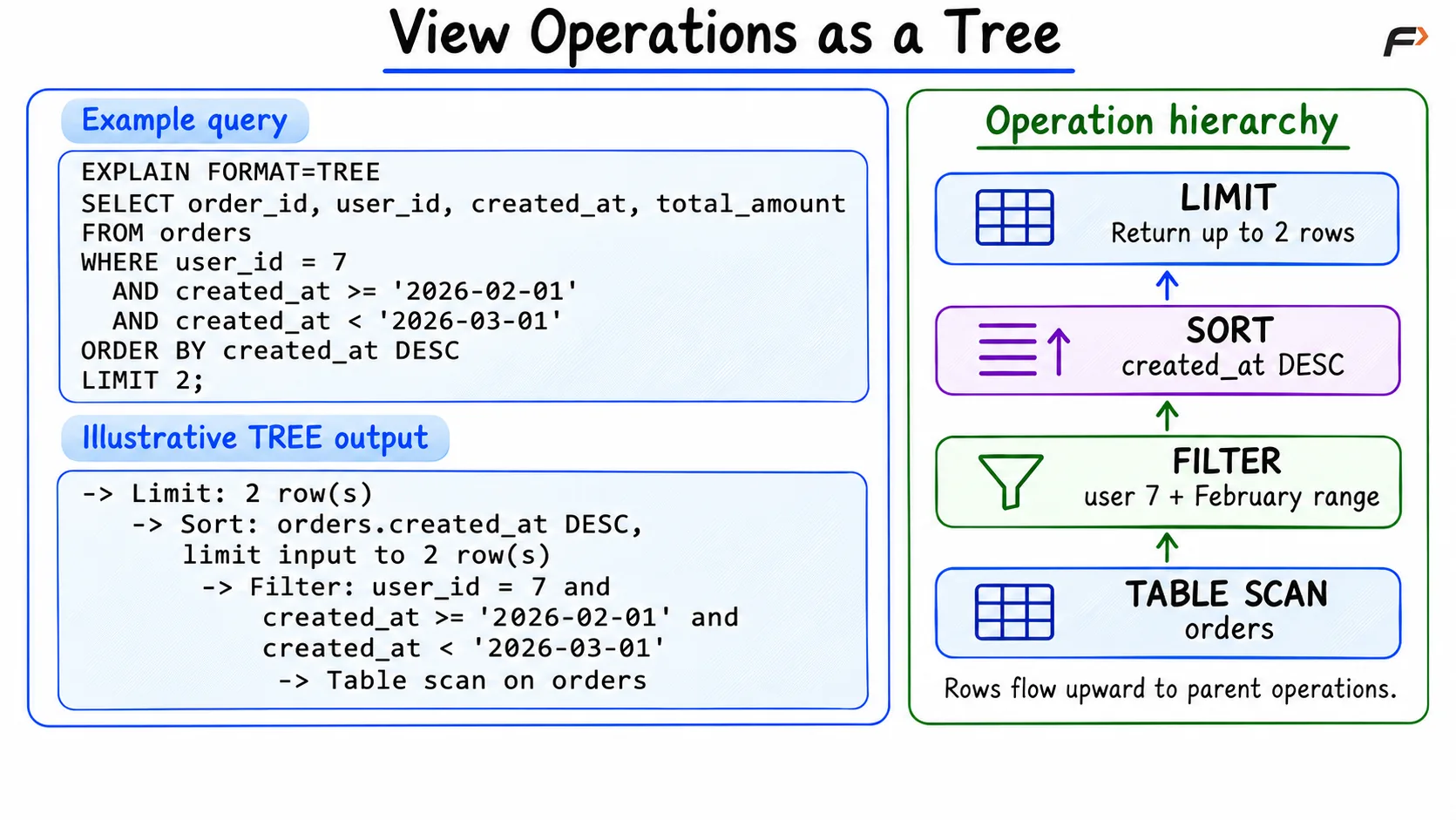
View the Operations as a Tree
Measure the Actual Work
An estimated plan cannot tell you the measured runtime. Run EXPLAIN ANALYZE to compare estimates with actual execution.
EXPLAIN ANALYZE FORMAT=TREESELECT order_id, user_id, created_at, total_amountFROM ordersWHERE user_id = 7 AND created_at >= '2026-02-01' AND created_at < '2026-03-01'ORDER BY created_at DESCLIMIT 2;Improve the Query and Compare Again
For this access pattern, a useful candidate is a composite index, an index containing more than one column.
CREATE INDEX idx_orders_user_createdON orders (user_id, created_at);The index orders entries first by user_id and then by created_at. It can locate user 7’s entries and narrow them to February. Within that user’s entries, scanning backward can provide the requested descending date order and may avoid a separate sort.
The diagram compares the operations that can change when this index is selected.
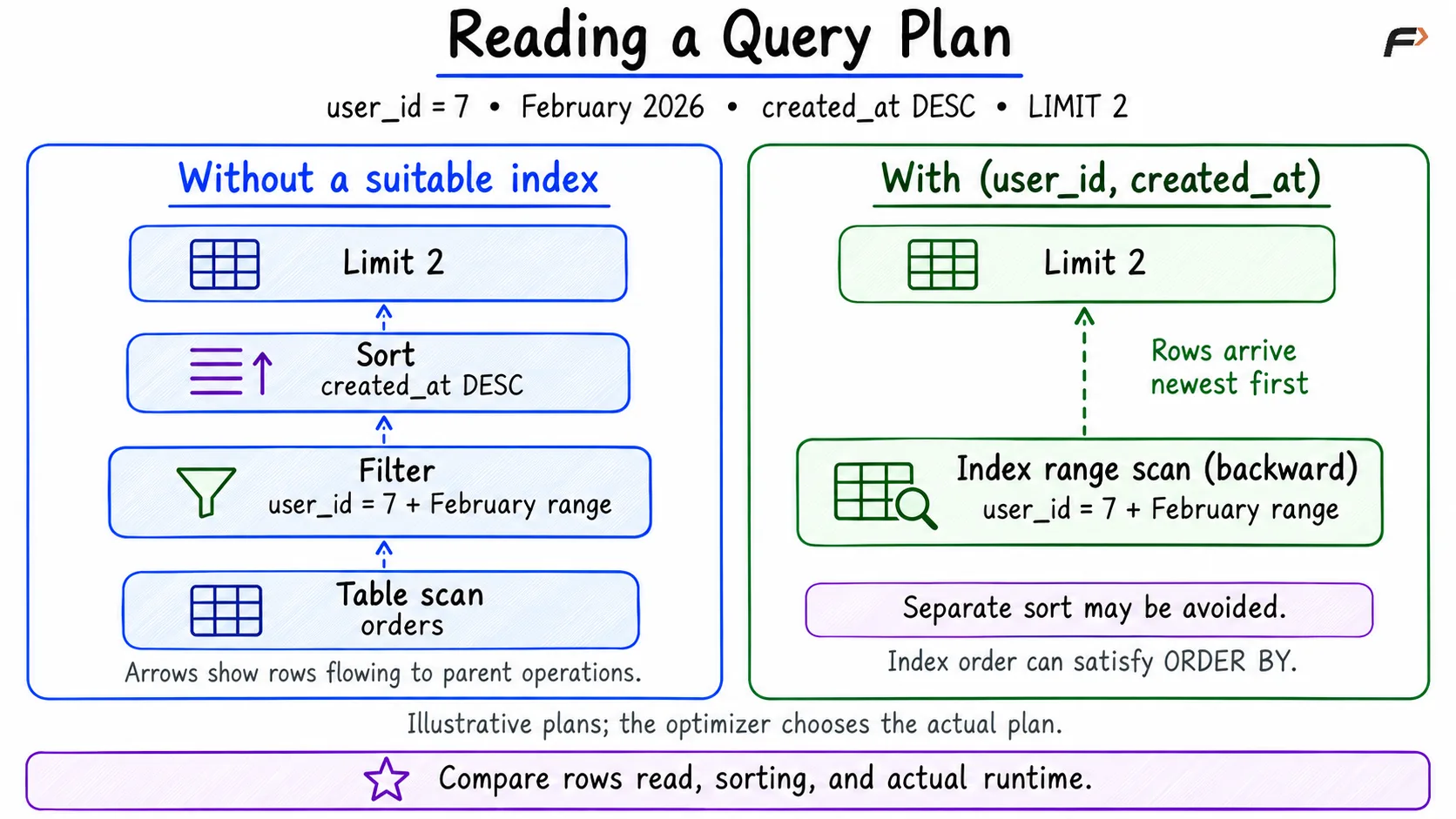
Reading a Query Plan
Creating an index does not guarantee that it will be used or that the query will be faster. The optimizer may still prefer a scan on five rows. Use representative data to assess performance, and remember that indexes also require storage and maintenance when data changes.
Make Date Filters Searchable
A condition is sargable when its form allows a suitable index to locate matching values efficiently. It makes index access possible; it does not force the optimizer to choose it.
Suppose we now want the number of orders user 7 placed on February 12.
SELECT COUNT(*) AS order_countFROM ordersWHERE user_id = 7 AND DATE(created_at) = '2026-02-12';With the ordinary index on (user_id, created_at), converting created_at to a date prevents that condition from directly specifying a range of stored timestamp values. The database may still use the user_id part of the index and evaluate the date conversion on the candidate rows.
Express the day using an inclusive start and an exclusive end instead.
SELECT COUNT(*) AS order_countFROM ordersWHERE user_id = 7 AND created_at >= '2026-02-12' AND created_at < '2026-02-13';Expected result for both versions
order_count |
|---|
1 |
Only order 102 matches. This range includes the whole day, including fractional seconds if the column stores them, and excludes midnight at the start of February 13.
The two boundaries describe a continuous interval in the timestamp index.
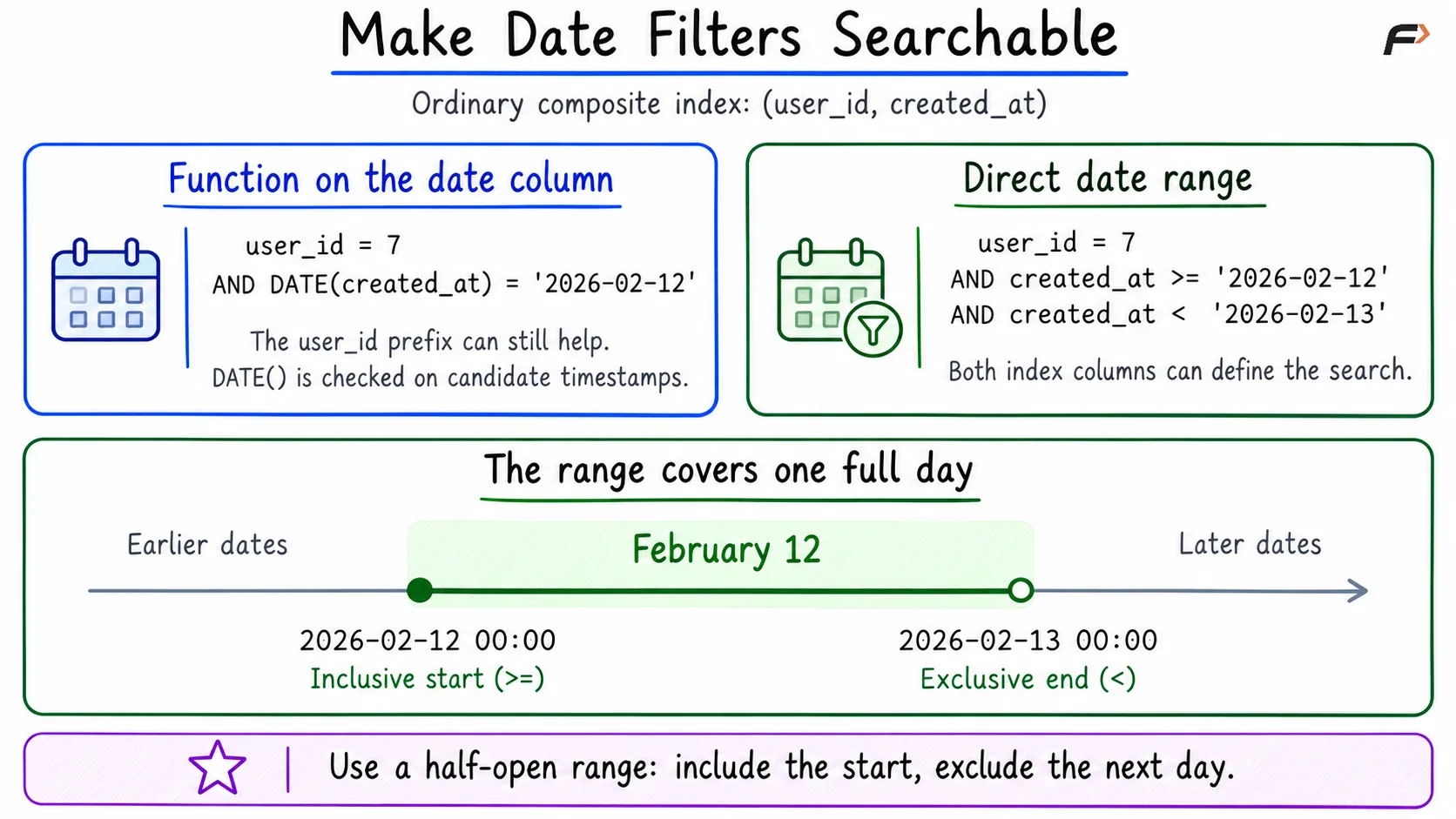
Make Date Filters Searchable
A matching expression index can support some function-based conditions, but the range rewrite works with the ordinary composite index used here.
A Practical Debugging Routine
Check the result first: Confirm the query returns the intended rows before changing its access pattern.
Find where work grows: Look for many rows examined, heavy filtering, additional sorting, or operations repeated many times.
Make one targeted change: Adjust an index or rewrite a condition, then inspect the plan again.
Compare with measurements: Check estimated versus actual rows and compare repeated runs under similar conditions. Cache state, server load, and measurement overhead can affect timings.
A large estimate error is a reason to investigate the data distribution and optimizer statistics. An index name alone is not proof of an improvement.
Summary
EXPLAIN shows the database’s chosen execution plan, while EXPLAIN ANALYZE runs the query and adds actual measurements. Use them to understand table access, filtering, sorting, and repeated work. A suitable composite index or a searchable date range can reduce unnecessary work, but confirm the result with the actual plan and representative data. Interpret scans, costs, and filesort in context instead of treating any single label as a verdict.
Be the first to add a comment.