Introduction
Working with a database involves defining how information is organized and managing the records stored within that structure. Creating a student table and updating a student’s marks are examples of these different tasks.
SQL groups these operations into categories called DDL and DML. Understanding their purposes makes it easier to choose commands and recognize how a change will affect the database.
What Is DDL?
DDL stands for Data Definition Language. It includes commands that define and manage database objects such as tables, schemas, and indexes.
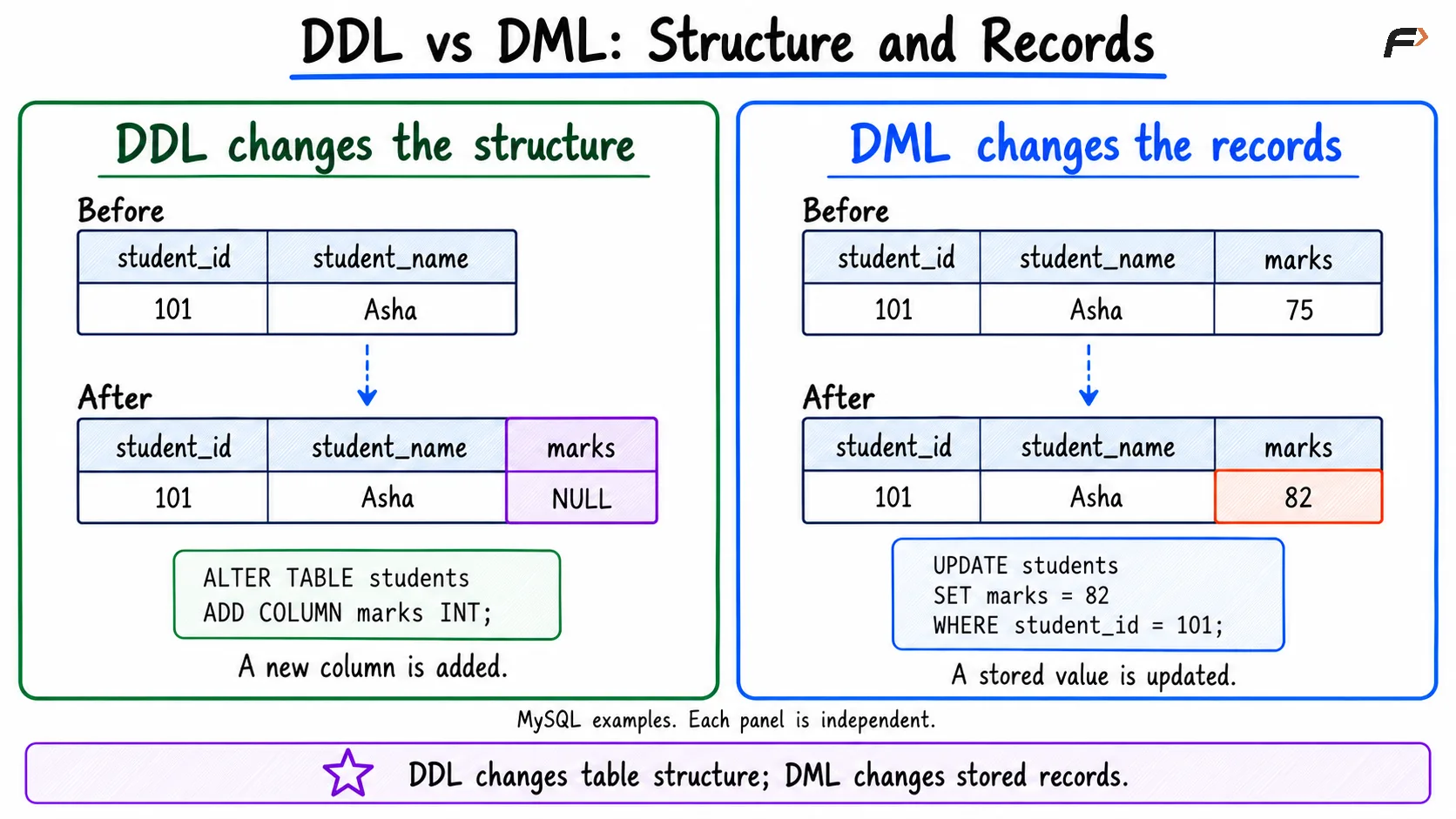
A table’s structure specifies its columns, data types, and constraints. DDL establishes or changes that definition.
Common DDL commands include:
CREATE: Creates an object, such as a table.
ALTER: Changes an existing object’s definition.
DROP: Removes an object.
TRUNCATE: Empties a table while retaining its definition; MySQL classifies it as DDL.
For example, adding an email column changes what information a student table can store. That is a structural operation, even if the table already contains records.
Although DDL mainly concerns definitions, it can also affect stored data. Dropping a table removes its records, while truncating it removes all its rows.
What Is DML?
DML stands for Data Manipulation Language. Its modification commands add, change, or remove records in existing tables.
The main commands are:
INSERT: Adds new rows.
UPDATE: Changes values in existing rows.
DELETE: Removes matching rows.
For example, changing a student’s marks from 75 to 82 modifies a stored value without changing the table’s columns or constraints.
SELECT is often classified separately as DQL (Data Query Language) because it retrieves data. Some classifications include it under DML (Data Manipulation Language) as well.
Key Differences Between DDL and DML
The main distinction is whether an operation manages database objects or modifies their records.
Feature | DDL | DML modification commands |
|---|---|---|
Full form | Data Definition Language | Data Manipulation Language |
Main purpose | Define and manage database objects | Modify stored records |
Typical target | Tables, columns, constraints, and other objects | Rows and column values |
Common commands |
|
|
Example | Add a | Change a student’s marks |
Row filtering | Does not generally use |
|
Transaction behavior | Depends on the command and database system | Depends on transactions, storage engine, and commit state |
Avoid treating rollback behavior as a universal difference between the categories. A command’s category alone does not determine whether its effects can be undone.
DDL and DML Examples
The following statements work in both MySQL and PostgreSQL. They assume that you are connected to an application database.
First, define the table using DDL:
CREATE TABLE students ( student_id INT PRIMARY KEY, student_name VARCHAR(100) NOT NULL) ;ALTER TABLE studentsADD COLUMN marks INT;CREATE TABLE establishes the table, and ALTER TABLE adds a column. The table now has a structure capable of storing student identifiers, names, and marks.
Next, add records using DML:
INSERT INTO students (student_id, student_name, marks)VALUES (101, 'Asha', 75), (102, 'Ravi', 68);Update one student’s marks:
UPDATE studentsSET marks = 82WHERE student_id = 101;Remove another student’s record:
DELETE FROM studentsWHERE student_id = 102;The table definition remains unchanged by these DML statements. After the operations, Asha’s record remains with marks of 82.
For UPDATE and DELETE, omitting WHERE makes every row eligible for modification or deletion. Check the intended condition before applying the change.
DDL vs DML
DELETE, TRUNCATE, and DROP
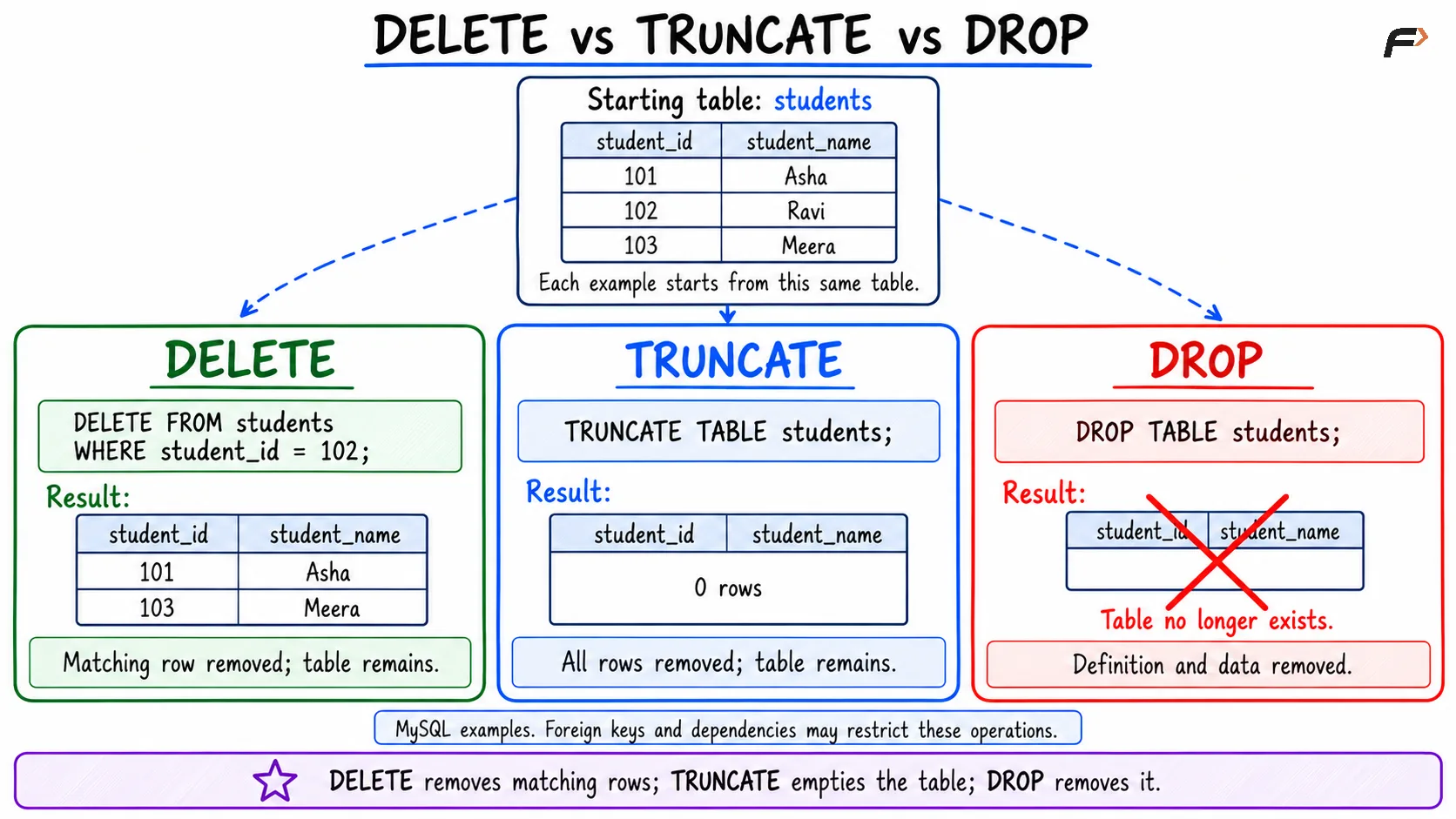
These commands can all remove data, but their scope differs.
Command | Category | What it removes | Retains table definition? |
|---|---|---|---|
| DML | Matching rows, or all rows without | Yes |
| DDL in MySQL | All rows | Yes |
| DDL | The table object and its data | No |
For example, use DELETE when only selected student records should be removed. Use TRUNCATE TABLE when the entire table should be emptied, and DROP TABLE when the table itself is no longer required.
Foreign keys and other dependencies can restrict these operations. Their locking, trigger, and transaction behavior also varies between database systems.
Delete vs Truncate vs Drop
Transactions and Rollback
A transaction groups database changes into a unit of work. COMMIT makes those changes permanent, while ROLLBACK discards changes that have not yet been committed. In MySQL, this rollback behavior requires a transactional table.
MySQL:
START TRANSACTION;UPDATE studentsSET marks = 90WHERE student_id = 101;ROLLBACK;PostgreSQL:
BEGIN;UPDATE studentsSET marks = 90WHERE student_id = 101;ROLLBACK;These are alternative examples. Run the version for your database system. Assuming the earlier operations have completed and been committed, Asha’s marks remain 82 because the later update is rolled back. Using COMMIT instead would retain the change.
MySQL normally enables autocommit, so a successful standalone DML statement is committed automatically. PostgreSQL’s psql client also uses autocommit by default. A later ROLLBACK cannot undo an already committed change.
Ordinary MySQL DDL statements such as ALTER TABLE, DROP TABLE, and TRUNCATE TABLE cause implicit commits and cannot be undone with an ordinary ROLLBACK. PostgreSQL permits these ordinary table operations to be rolled back when performed inside a transaction that has not been committed.
Summary
DDL manages database objects and their definitions, while DML modification commands manage records inside existing tables. Creating a table or adding a column uses DDL; inserting, updating, or deleting rows uses DML.
Choose commands according to their scope and check transaction behavior for the database system in use. Pay particular attention to filters, commit boundaries, and operations that remove entire tables or their contents.
Be the first to add a comment.