Introduction
A course platform needs to store users, courses, and enrollments. Keeping everything in one list would repeat information and make updates difficult. A relational database organizes that information into related tables.
Before writing complex queries, you need to know how to create those tables, choose suitable columns, and define rules for their records. A small course database is enough to put these basics into practice.
Databases, Tables, and SQL Commands
A database holds organized data and related objects. A table stores one kind of information: each row is a record, and each column describes an attribute of that record.
SQL is largely declarative. You describe the result or change you want, while the database system decides how to perform the work.
Commands are commonly grouped by purpose:
Category | Purpose | Examples |
|---|---|---|
DDL: Data Definition Language | Define database objects |
|
DML: Data Manipulation Language | Add, change, or remove records |
|
DQL: Data Query Language | Retrieve data |
|
DCL: Data Control Language | Manage permissions |
|
TCL: Transaction Control Language | Manage transactions |
|
SELECT is often classified separately as DQL because it retrieves data. Some classifications include it under DML as well.
Create and Select a Database
In both MySQL and PostgreSQL, create the practice database with:
CREATE DATABASE course_db;Listing databases and selecting a connection differ.
MySQL
SHOW DATABASES;USE course_db;PostgreSQL, using psql
\l\c course_dbThe PostgreSQL backslash commands belong to the psql client, not SQL itself. In a graphical tool, select or open a connection to course_db.
MySQL also supports CREATE DATABASE IF NOT EXISTS course_db;. PostgreSQL does not support that clause for CREATE DATABASE.
Choose Data Types and Create a Table
A column’s data type describes the values it can store. Choose it according to the information represented, rather than treating every value as text.
Data type | Typical use |
|---|---|
| Whole numbers, identifiers, and counts |
| Names, email addresses, and longer text |
| Exact decimal amounts |
| Calendar dates |
MySQL | Date and time |
| True or false flags |
MySQL treats BOOLEAN as an alias for TINYINT(1); PostgreSQL has a native Boolean type.
Create a users table with this definition, which works in both systems:
CREATE TABLE users ( user_id INT PRIMARY KEY, name VARCHAR(100) NOT NULL, email VARCHAR(150) NOT NULL UNIQUE, age INT CHECK (age >= 15), is_active BOOLEAN NOT NULL DEFAULT TRUE);The definition includes several rules:
PRIMARY KEY: Each user ID must be unique and cannot be
NULL.NOT NULL: A name and email must be supplied.
UNIQUE: Two records cannot share the same email.
CHECK: A supplied age must be at least 15.
DEFAULT: Omitting
is_activesuppliesTRUE.
Age still permits NULL. A CHECK condition alone does not make a column mandatory.
To generate IDs automatically, replace user_id INT PRIMARY KEY with the appropriate definition:
MySQL
user_id INT AUTO_INCREMENT PRIMARY KEYPostgreSQL
user_id INT GENERATED BY DEFAULT AS IDENTITY PRIMARY KEYThese are column definitions for use inside CREATE TABLE.
Inspect the Table and Add Records
After creating a table, inspect its structure before inserting data.
MySQL
SHOW TABLES;DESCRIBE users;SHOW CREATE TABLE users;DESCRIBE lists column details. SHOW CREATE TABLE displays the SQL definition needed to create the table, including its structure and constraints.
PostgreSQL, using psql
\dt\d usersNow add two users:
INSERT INTO users (user_id, name, email, age)VALUES (101, 'Asha', 'asha@example.com', 20), (102, 'Ravi', 'ravi@example.com', NULL);Both receive the default active status. To read selected columns and give email a temporary output name:
SELECT name, email AS mail_idFROM usersORDER BY user_id;name | mail_id |
|---|---|
Asha | |
Ravi |
The alias changes the result heading, not the stored column name.
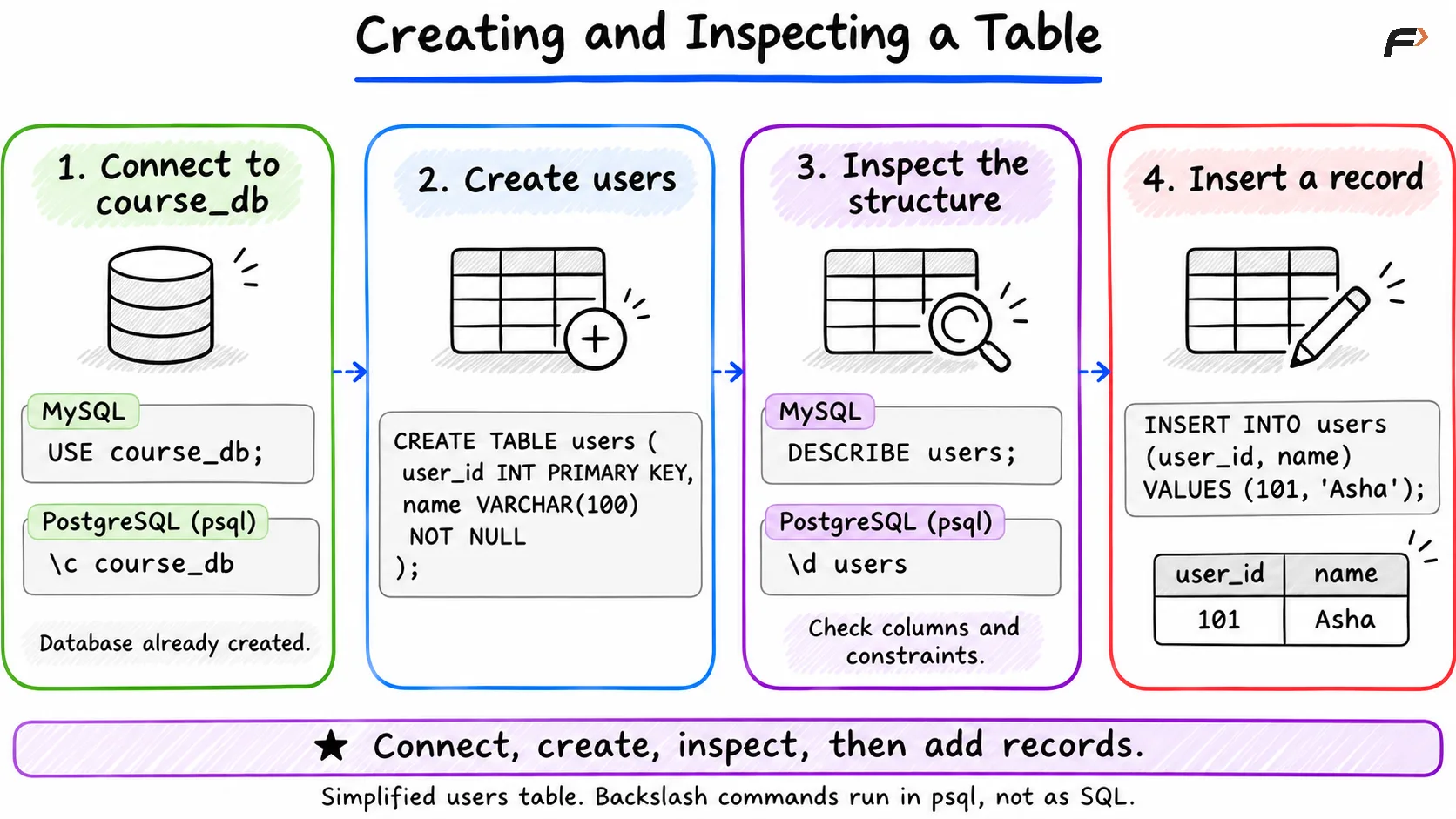
Creating and Inspecting a Table
Connect Tables with Keys
An enrollment belongs to a user. A foreign key records that relationship and checks that a referenced user exists.
CREATE TABLE enrollments ( user_id INT, course_id INT, PRIMARY KEY (user_id, course_id), FOREIGN KEY (user_id) REFERENCES users(user_id));Here, (user_id, course_id) is a composite primary key. A user may enroll in several courses, and a course may have several users, but the same pair cannot appear twice.
The foreign key checks user_id against users. This simplified example does not yet validate course_id; that would require a courses table and another foreign key.
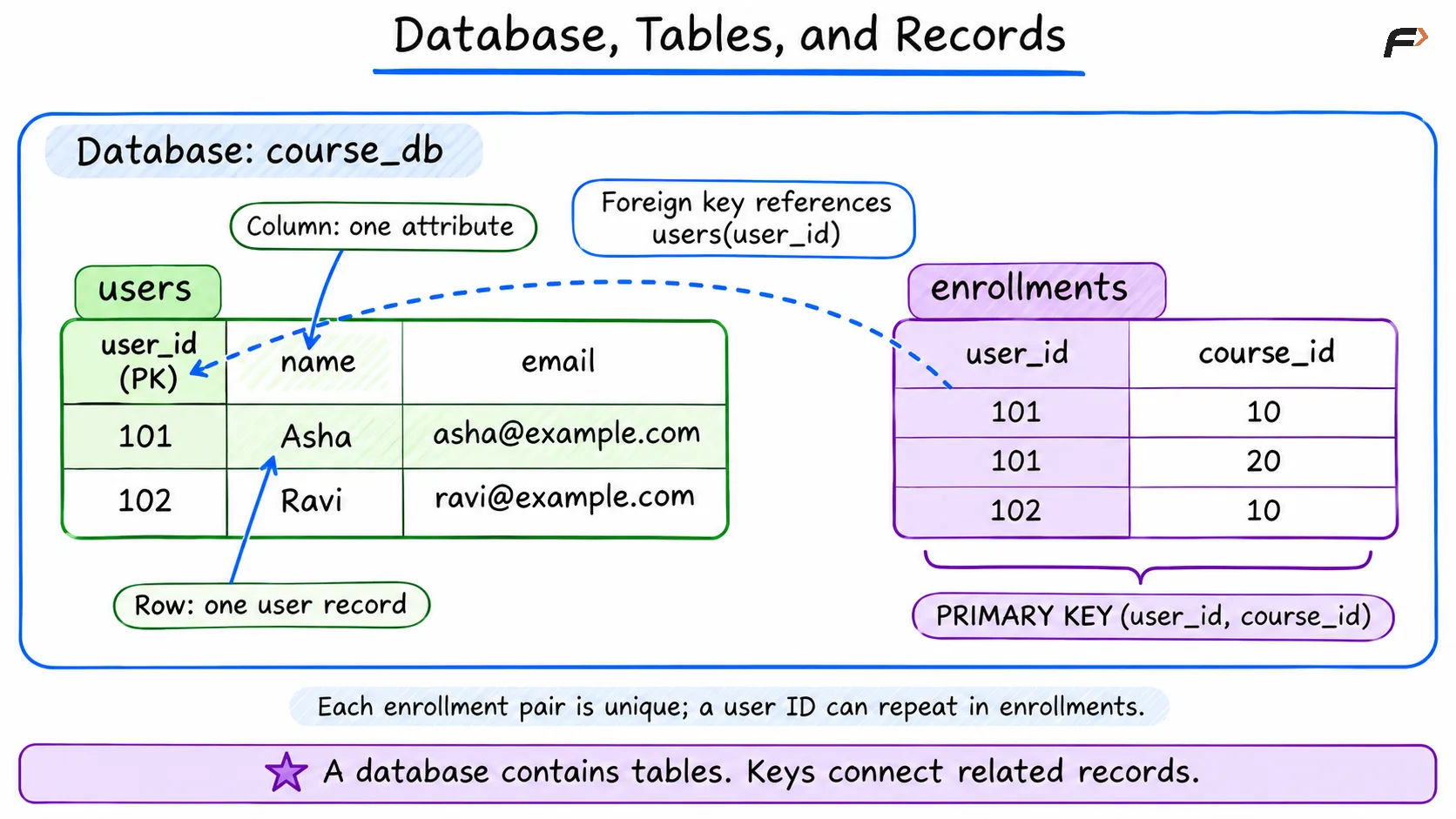
Database, Tables, and Records
NULL, Zero, and Empty Text
These values represent different things in MySQL and PostgreSQL:
Value | Meaning | Example |
|---|---|---|
| Missing, unknown, or not applicable | An age that was not supplied |
| A known numeric value | An account balance of zero |
| Text containing no characters | An empty nickname |
Ravi’s NULL age does not mean he is zero years old. To find that record, use WHERE age IS NULL. Ordinary comparisons such as age = NULL do not test for missing values.
An empty string also differs from ' ', which contains a space. Whether empty text is acceptable depends on the column’s rules and the application’s requirements.
How Queries Run and Where Indexes Help
A query goes through parsing and analysis, planning, and execution. The database checks its syntax and references, chooses an execution strategy, and then performs the work.
Consider a lookup by email:
SELECT nameFROM usersWHERE email = 'asha@example.com';An index provides an organized access path to matching records. In MySQL and PostgreSQL, the UNIQUE email constraint creates a supporting unique index, so this lookup has an index available.
The optimizer still chooses whether to use it. For a tiny table, scanning the records may be cheaper. Indexes can reduce search work, but they also occupy space and require maintenance when indexed data changes.
Change or Remove Database Objects
Use ALTER TABLE to change a definition and DML commands to change records. For example, these operations have different effects:
ALTER TABLE usersADD COLUMN nickname VARCHAR(50);UPDATE usersSET nickname = 'Ash'WHERE user_id = 101;The first adds a column; the second supplies a value.
DROP TABLE removes a table and its records. When practicing with the related tables above, remove the child table first:
DROP TABLE IF EXISTS enrollments;DROP TABLE IF EXISTS users;IF EXISTS avoids an error when an object is missing. It does not preserve its data. DROP DATABASE course_db; removes the entire practice database; in PostgreSQL, connect to another database before dropping it.
Summary
A relational database organizes information into tables, with data types and constraints defining what each record can contain. Primary and foreign keys identify records and connect related tables.
SQL commands create those structures, modify records, and retrieve results. Understanding their scope, along with missing values and basic index behavior, gives you a reliable starting point for writing queries.
Be the first to add a comment.