Introduction
A database may contain employee salaries, customer details, financial records, and other sensitive information. Security problems can expose this data, change it without permission, or prevent legitimate users from accessing it.
Database security combines controls that protect data, accounts, connections, and database services. Effective protection requires several measures working together because no single setting prevents every threat.
Example Table
Consider an Employee table containing employee identifiers, names, departments, and salaries.
Employee: initial data
EmployeeID | EmployeeName | Department | Salary |
|---|---|---|---|
101 | Asha | Support | 60000.00 |
102 | Ravi | Finance | 75000.00 |
103 | Meera | Support | 65000.00 |
EmployeeID is the primary key and uniquely identifies each employee.
A directory application needs to search employees by department. It should read identifiers, names, and departments, but it should not read salaries or modify employee records.
The Three Goals of Database Security
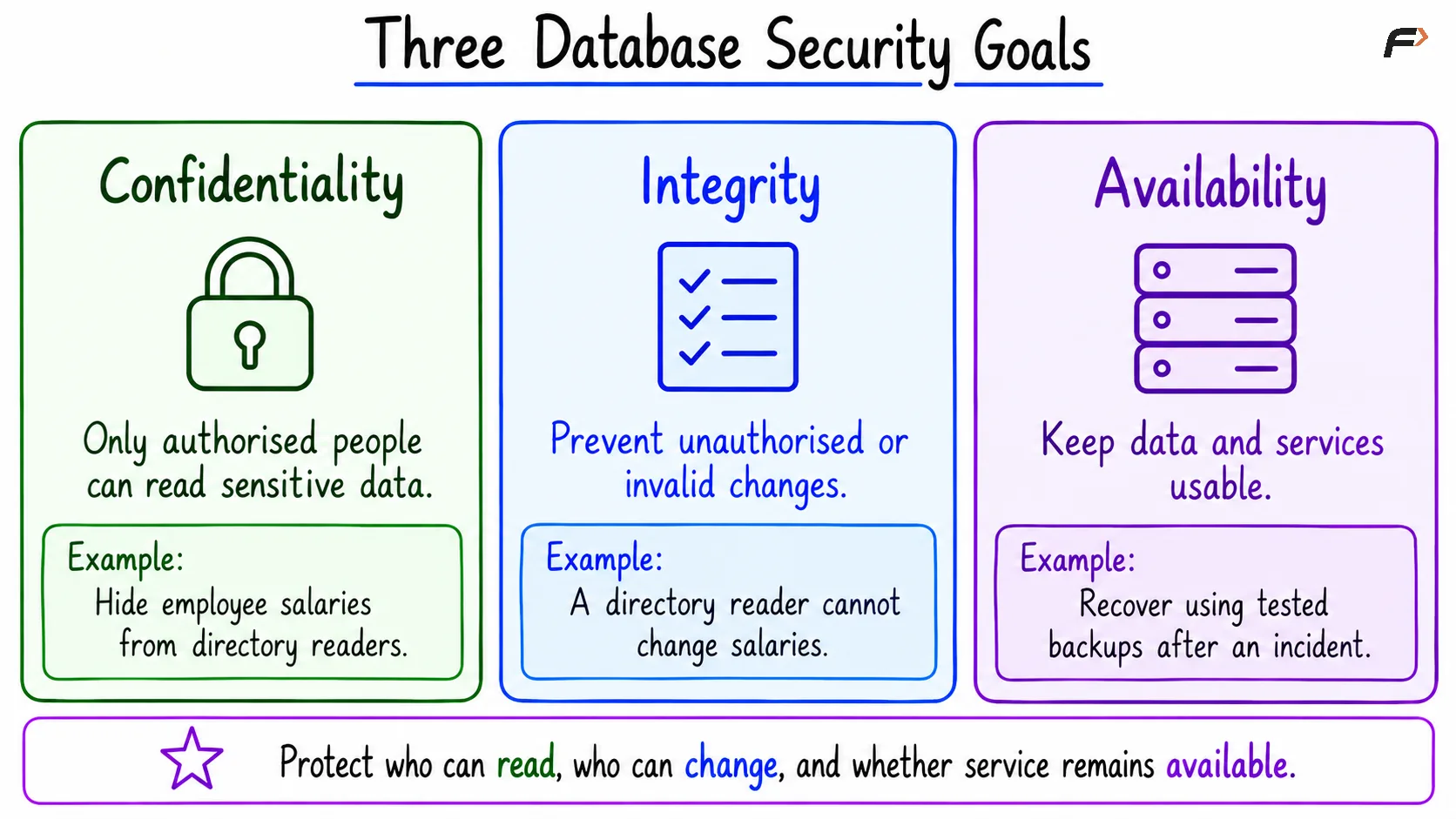
Database security commonly focuses on three goals.
Goal | Meaning | Example |
|---|---|---|
Confidentiality | Only authorised identities can read protected information. | A directory account cannot read salaries. |
Integrity | Data is protected from unauthorised or invalid changes. | A directory account cannot change an employee’s salary. |
Availability | Authorised users can access the service when needed. | Tested recovery procedures help restore service after an incident. |
These goals are often called the CIA triad, using the first letter of each goal.
Three database security goals
Common Database Security Threats
Threat | What can happen? | Main protections |
|---|---|---|
SQL injection | Untrusted input changes the meaning of an application’s SQL. | Bound parameters, safe query construction, and limited privileges. |
Stolen or weak credentials | Someone connects using another identity. | Strong authentication, protected secrets, and removal of unused accounts. |
Excessive privileges | A compromised or misused account can access more than its task requires. | Least privilege, roles, and regular access reviews. |
Insider misuse | An authorised person copies or changes data improperly. | Separation of duties, restricted access, and auditing. |
Misconfiguration or unpatched software | Exposed services or known flaws allow unwanted access. | Restricted network access, secure configuration, and timely updates. |
Data leakage | Sensitive information escapes through exports, logs, backups, or network traffic. | Encryption, access controls, and careful handling of copies. |
Denial of service | Excessive requests or expensive queries make the database unavailable. | Connection limits, timeouts, monitoring, and application rate limits. |
Malware, ransomware, or accidental deletion | Data becomes damaged, encrypted, or unavailable. | Host protection, limited privileges, and protected, tested backups. |
Some incidents involve several threats at once. For example, stolen credentials become more damaging when the account has administrative permissions.
SQL Injection and Parameterized Queries
SQL injection occurs when an application combines untrusted input with SQL instructions in a way that lets the input alter the query.
For example, a department search should treat the submitted department as a value. It should not treat any part of that value as SQL syntax.
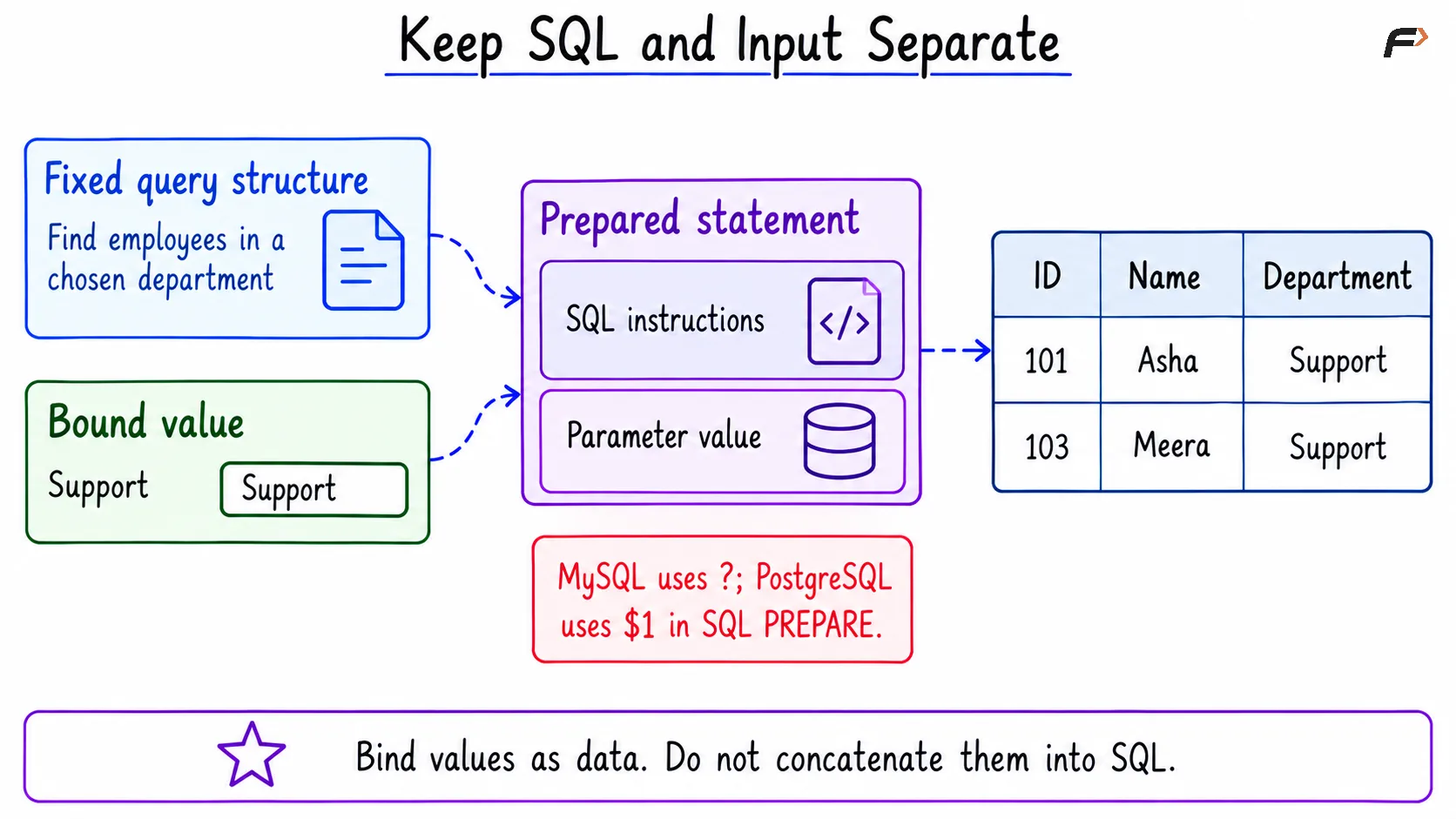
A parameterized query keeps the query structure separate from its input values:
Define the SQL structure.
Mark where a value belongs.
Bind the value through the database driver or prepared-statement interface.
Input validation is still useful for checking business rules, such as valid department names. However, validation alone is not a replacement for parameter binding.
Parameters normally represent values, not table names, column names, or keywords. If an application lets users choose a sort column, map that choice to a fixed list of permitted column names.
Stored procedures are not automatically injection-safe. A procedure that builds SQL by concatenating untrusted input can still be vulnerable.
Authentication and Least Privilege
Authentication verifies an identity. Authorization determines what that identity may do.
Important account protections include:
Separate application accounts from administrative accounts.
Grant only the required operations and objects.
Use roles to manage related permissions.
Remove unused accounts and review access when responsibilities change.
Keep credentials out of source code, public files, and logs.
Use multi-factor authentication for administrative access paths where supported.
Replace exposed credentials promptly.
A read-only application should not connect using a database owner or administrator account.
Permissions may come from direct grants, roles, ownership, or broad grants. Removing one grant does not remove access obtained through another route.
Protecting Sensitive Data
Encryption in Transit
Transport Layer Security (TLS) protects information travelling between the application and database.
Clients should verify the server’s certificate and identity. Encryption without proper identity verification may still allow connection to an impostor.
TLS protects the connection, but it does not determine which rows the connected account is allowed to read.
Encryption at Rest
Encryption at rest protects stored database files, disks, or backups against certain forms of unauthorised access.
Encryption keys must also be protected and made available to authorised recovery processes.
Database-file encryption does not stop an account that already has permission from reading decrypted query results.
Passwords, Masking, and Data Copies
Application user passwords should be stored using an appropriate salted password-hashing method, not plain text or reversible encryption.
Masking hides or replaces part of a displayed value. It is different from encryption and should not be treated as a complete access-control boundary.
Sensitive data also needs protection in exports, test databases, application logs, and backups. Keeping unnecessary copies increases the number of places that need protection.
Layered Protection in Practice
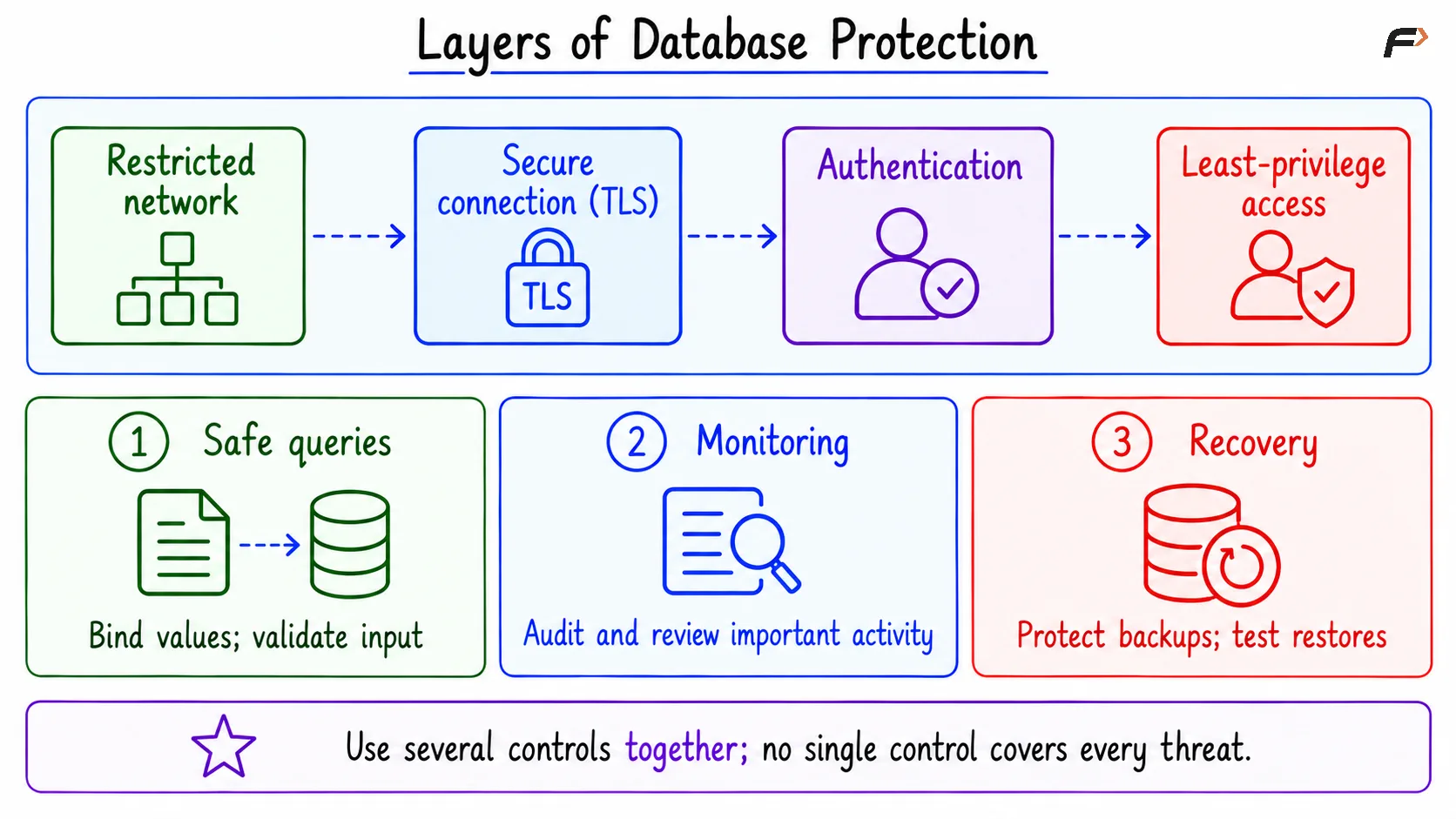
Layered protection, also called defense in depth, combines controls at several points:
Layer | Example protection |
|---|---|
Network | Permit database connections only from required systems. |
Connection | Require encrypted connections with certificate verification. |
Identity | Authenticate accounts and protect credentials. |
Permissions | Grant only the columns and operations required. |
Application | Bind query parameters and check business-level access. |
Database | Use constraints and transactions to protect valid changes. |
Monitoring | Record and review important activity. |
Recovery | Keep protected backups and test restoration. |
Constraints can reject invalid data, but they do not decide whether a user should be allowed to make an otherwise valid change.
Similarly, a parameterized query can safely search for Finance, but the application must still decide whether that user is allowed to view Finance employees.
Layers of database protection
A Compact SQL Example
Objective: Allow a directory account to search permitted employee columns using a bound department value, while preventing salary access.
The example assumes:
MySQL has a database named
company.PostgreSQL has a schema named
companyin the connected database.MySQL account
'directory_user'@'localhost'and PostgreSQL login roledirectory_useralready exist and can connect.These identities have no other grants, inherited privileges, ownership, or administrative powers.
A trusted administrator performs the table creation and permission setup.
1. Create the Sample Data
Consider the following queries to create and populate Employee.
CREATE TABLE company.Employee ( EmployeeID INT PRIMARY KEY, EmployeeName VARCHAR(50) NOT NULL, Department VARCHAR(30) NOT NULL, Salary DECIMAL(10, 2) NOT NULL);INSERT INTO company.Employee (EmployeeID, EmployeeName, Department, Salary)VALUES (101, 'Asha', 'Support', 60000.00), (102, 'Ravi', 'Finance', 75000.00), (103, 'Meera', 'Support', 65000.00);Expected outcome: The table contains the three rows shown in the initial dataset.
2. Grant Only the Required Read Access
Consider the following queries to allow reading the directory columns without granting salary access.
GRANT SELECT (EmployeeID, EmployeeName, Department)ON company.EmployeeTO 'directory_user'@'localhost';PostgreSQL’s USAGE ON SCHEMA permits access to objects in the schema when the necessary object privileges also exist. It does not grant access to every table.
Expected permissions
Action | Outcome |
|---|---|
Read EmployeeID, EmployeeName, and Department | Allowed |
Read Salary | Not granted |
Insert, update, or delete employees | Not granted |
These permissions restrict columns and operations. They do not restrict the account to Support rows.
3. Search with a Bound Parameter
Connect as the directory account.
Consider the following queries to search for Support employees without combining the department value with SQL instructions.
PREPARE find_employees FROM 'SELECT EmployeeID, EmployeeName, Department FROM company.Employee WHERE Department = ? ORDER BY EmployeeID';SET @department_value = 'Support';EXECUTE find_employees USING @department_value;DEALLOCATE PREPARE find_employees;In the MySQL query,? is the value placeholder. @department_value is a session variable supplying that value through EXECUTE ... USING.
In the PostgreSQL query, $1 represents the first parameter. VARCHAR declares its type.
Expected result
EmployeeID | EmployeeName | Department |
|---|---|---|
101 | Asha | Support |
103 | Meera | Support |
Keep SQL and input separate
In application code, values should be passed using the driver’s binding interface. Driver placeholder syntax may differ from the SQL-level examples above.
The protection is lost if untrusted input is concatenated into the SQL text before preparation. Preparing an already altered query does not make it safe.
4. Verify the Salary Restriction
Consider the following queries using the same directory connection.
SELECT EmployeeID, SalaryFROM company.Employee;Expected outcome: Both queries fail with a permission error. No salary result table is returned.
The account can search the permitted columns, but it cannot read salary merely because salary exists in the same table.
Monitoring and Auditing
Monitoring helps identify unusual activity, such as repeated login failures, unexpected data exports, privilege changes, or sudden increases in resource use.
Auditing records selected actions with information such as:
Who performed the action.
When it occurred.
Which object was accessed.
Whether the action succeeded or was denied.
Audit coverage must be configured and tested. A failed query is not guaranteed to appear in every type of log.
Audit records also need access controls and retention rules. Logging secrets or unnecessary sensitive values can create another data leak.
Backups, Availability, and Incident Response
Backups support recovery from deletion, corruption, and ransomware. Keep backup copies protected separately from the main database, including copies that ordinary application credentials cannot alter.
Test restores rather than assuming a completed backup job guarantees recoverability. Replication is useful for availability, but it can copy accidental deletions or harmful changes to another server.
To reduce service disruption, use suitable connection limits, query timeouts, capacity monitoring, and application rate limits.
If a security incident occurs, restrict the affected access, preserve relevant evidence, replace exposed credentials, fix the cause, and validate recovered data before returning to normal operation.
Summary
Database security protects confidentiality, integrity, and availability. Common threats include SQL injection, stolen credentials, excessive permissions, data leakage, unpatched software, and service disruption. Each threat requires suitable preventive and detective controls.
Parameterized queries keep input values separate from SQL instructions, while least privilege limits what an account can access. Encryption, secure configuration, monitoring, and tested backups provide additional protection across the database’s operation and recovery.
Be the first to add a comment.