Introduction
Different database users need different access. A reporting user may need employee names and departments but should not see salaries or change employee records. Database security must enforce these limits even when someone submits SQL directly.
Authorization controls permitted actions, views provide selected data, and auditing records relevant activity. Together, they help limit access and make important actions easier to review.
Authentication, Authorization, and Auditing
These terms describe different responsibilities.
Concept | Main question | Example |
|---|---|---|
Authentication | Who is connecting? | Verify the credentials of |
Authorization | What may this identity do? | Allow reading an employee directory but not salaries. |
Auditing | What activity was recorded? | Record an attempted read of the salary table and its outcome. |
Successful authentication does not automatically grant access to every table.
Auditing also does not replace authorization. Recording an action does not, by itself, prevent it.
Example Table and Access Requirement
Consider an Employee table that stores employee identifiers, names, departments, and salaries.
Employee: initial data
EmployeeID | EmployeeName | Department | Salary |
|---|---|---|---|
101 | Asha | Support | 60000.00 |
102 | Ravi | Finance | 75000.00 |
103 | Meera | Support | 65000.00 |
EmployeeID is the primary key and uniquely identifies each employee.
The reporting requirement is:
Show only employees in the Support department.
Show identifiers, names, and departments.
Hide the
Salarycolumn.Allow reading, but not inserting, updating, or deleting records.
A view named EmployeeDirectory will expose the permitted data.
Privileges: Permissions on Database Objects
A privilege permits a particular action on a database object.
Privilege | Typical purpose |
|---|---|
| Read data. |
| Add rows. |
| Change rows or permitted columns. |
| Remove rows. |
| Run a permitted routine. |
GRANT gives a privilege or role membership. REVOKE removes a grant.
Some privileges can be granted at column level. For example, a user could receive permission to update an employee’s department without permission to update salary.
WITH GRANT OPTION allows a recipient to pass an object privilege to others. It should be given only when that delegation is required.
Roles and Least Privilege
A role groups related permissions.
Instead of granting the same privileges separately to several reporting users:
Create a role such as
report_reader.Grant the required privileges to that role.
Assign the role to the relevant users.
This follows least privilege: give only the access needed for a task.
Permissions can come from several places, including direct grants, role memberships, broad database-level grants, and ownership. Removing one grant does not guarantee that every other route to the same access has disappeared.
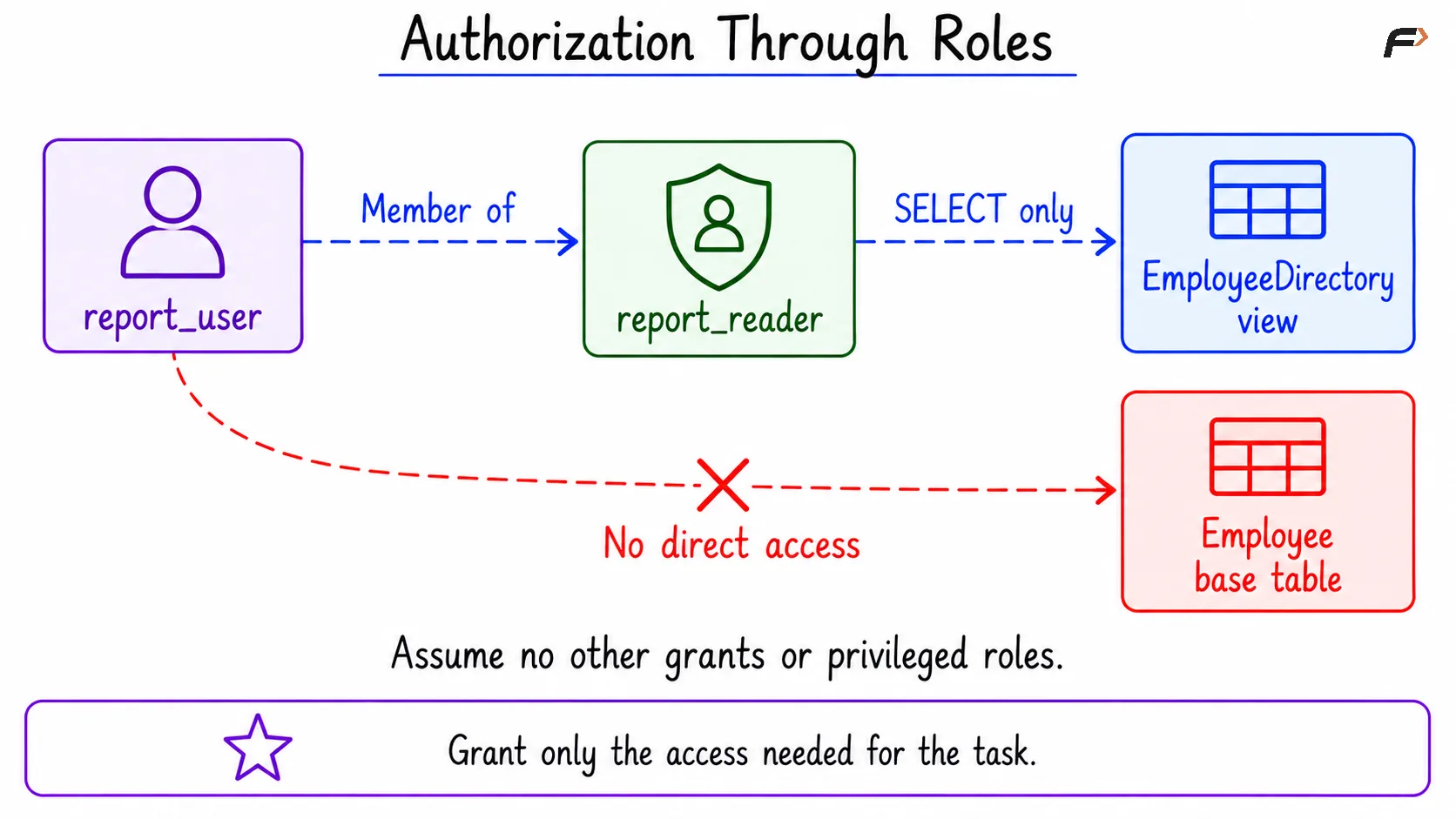
Authorization through roles
Using Views to Restrict Visible Data
A view is a named query that can be accessed like a table. An ordinary view stores its definition rather than an independent copy of its result rows.
A view can restrict:
Columns: Exclude sensitive fields such as salary.
Rows: Include only records that meet a condition.
For this example, EmployeeDirectory selects Support employees and excludes salary.
However, creating the view alone does not protect the base table. The reporting user must receive access to the view without another permission that exposes Employee directly.
Whose Privileges Does a View Use?
View security behaviour depends on the database and its settings.
MySQL:
SQL SECURITY DEFINERchecks underlying-object access using the view’s definer.SQL SECURITY INVOKERuses the caller’s privileges.PostgreSQL: Ordinary views normally use the view owner’s privileges for underlying relations. A
security_invokerview instead requires the caller’s underlying permissions.
In the example, the trusted view creator can read Employee, while the reporting user can read only the view.
PostgreSQL also provides security_barrier for views used to filter sensitive rows. It limits certain query rearrangements that could otherwise expose information through caller-supplied expressions. It does not replace correct grants.
Views Are Not Automatically Read-Only
Some simple views are updatable.
The example becomes read-only for the reporting user because that user receives only SELECT, not modification privileges.
For an updatable filtered view, WITH CHECK OPTION can prevent inserts or updates through that view from producing rows outside its filter. It does not grant write permission or prevent direct base-table access through other privileges.
A Compact SQL Example
Objective: Allow report_user to read Support employee details without exposing salary or granting direct table access.
The setup assumes:
MySQL already has a database named
company.PostgreSQL already has a schema named
companyin the connected database.MySQL account
'report_user'@'localhost'and PostgreSQL login rolereport_useralready exist and can connect.The reporting identity has no other object privileges, inherited access, ownership, or administrative powers.
A trusted administrator performs the setup and owns or controls the created objects.
Account creation and authentication configuration are separate from the object permissions demonstrated here.
1. Create the Base Table
Consider the following queries to create and populate the employee table.
CREATE TABLE company.Employee ( EmployeeID INT PRIMARY KEY, EmployeeName VARCHAR(50) NOT NULL, Department VARCHAR(30) NOT NULL, Salary DECIMAL(10, 2) NOT NULL);INSERT INTO company.Employee (EmployeeID, EmployeeName, Department, Salary)VALUES (101, 'Asha', 'Support', 60000.00), (102, 'Ravi', 'Finance', 75000.00), (103, 'Meera', 'Support', 65000.00);Expected outcome: The table contains the three rows shown in the initial dataset.
2. Create the Restricted View and Role
Consider the following queries to expose the permitted rows and columns through a reporting role.
MySQL:
CREATE SQL SECURITY DEFINER VIEW company.EmployeeDirectory ASSELECT EmployeeID, EmployeeName, DepartmentFROM company.EmployeeWHERE Department = 'Support';CREATE ROLE 'report_reader';GRANT SELECTON company.EmployeeDirectoryTO 'report_reader';GRANT 'report_reader'TO 'report_user'@'localhost';SET DEFAULT ROLE 'report_reader'TO 'report_user'@'localhost';The trusted creator becomes the view’s definer because no separate DEFINER account is specified.
SET DEFAULT ROLE makes the reporting role active by default in new connections for this account.
PostgreSQL:
CREATE VIEW company.EmployeeDirectoryWITH (security_barrier = true) ASSELECT EmployeeID, EmployeeName, DepartmentFROM company.EmployeeWHERE Department = 'Support';CREATE ROLE report_reader NOLOGIN;GRANT USAGE ON SCHEMA companyTO report_reader;GRANT SELECT ON company.EmployeeDirectoryTO report_reader;GRANT report_readerTO report_user;NOLOGIN makes report_reader a permission-group role rather than a login account.
USAGE ON SCHEMA allows access to objects within that schema when the required object privileges also exist. It does not grant permission to read every table.
Expected permissions
Object | Permission through |
|---|---|
|
|
| No direct access |
Employee modifications | Not granted |
3. Read the View as the Reporting User
Open a connection as the reporting identity.
Consider the following queries to activate the reporting role and read the permitted data.
SET ROLE 'report_reader';SELECT EmployeeID, EmployeeName, DepartmentFROM company.EmployeeDirectoryORDER BY EmployeeID;SET ROLE activates or switches to the assigned role for the session. The PostgreSQL role membership created above permits this switch.
Expected result
EmployeeID | EmployeeName | Department |
|---|---|---|
101 | Asha | Support |
103 | Meera | Support |
Ravi’s row is excluded by the department filter. Salary is absent because the view does not select that column.
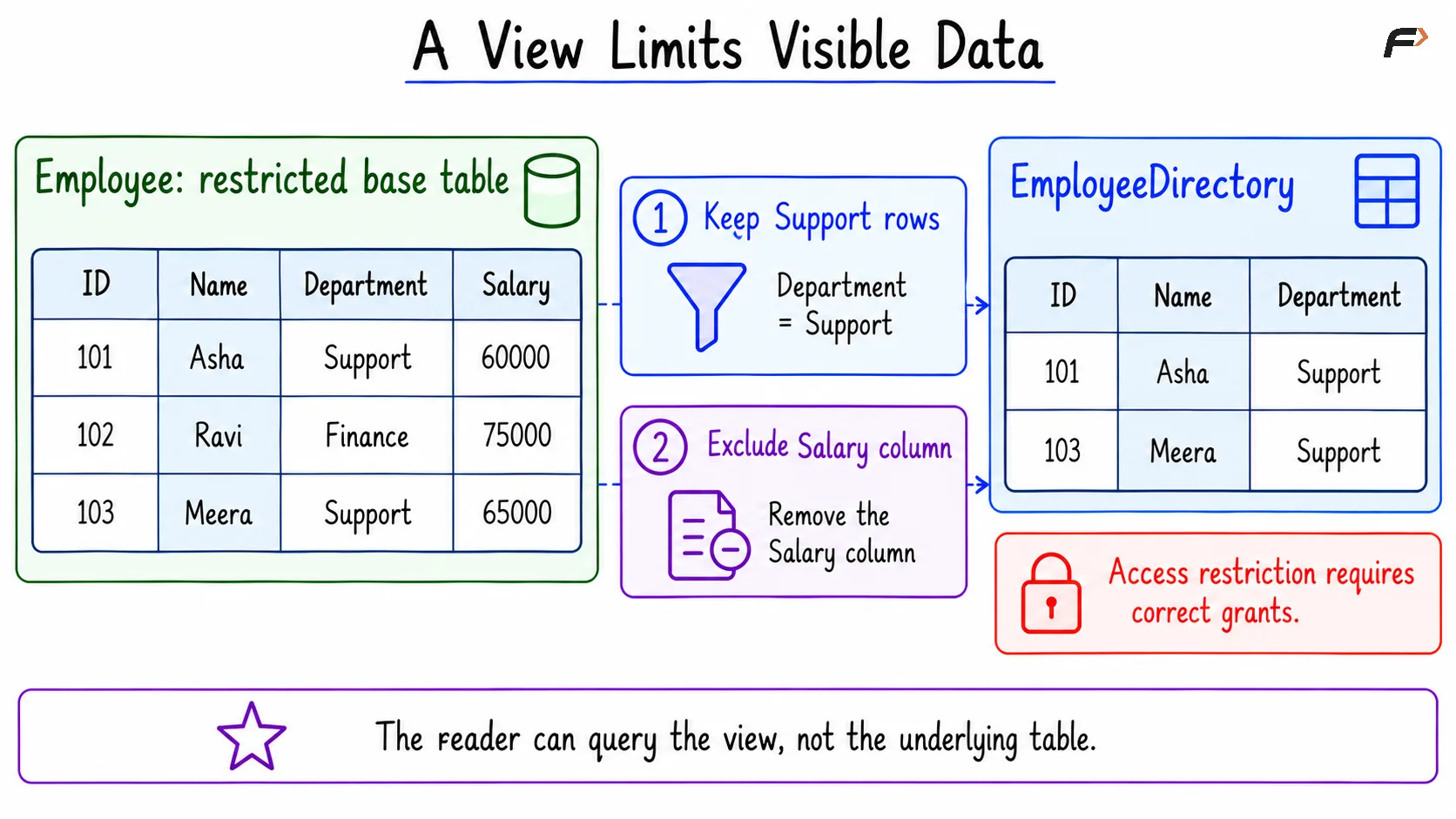
A view limits visible data
4. Verify That Direct Table Access Is Denied
Consider the following queries to test direct salary access using the same reporting connection.
SELECT EmployeeID, SalaryFROM company.Employee;Expected outcome: A permission error occurs, and no salary result table is returned.
The user can read the view because its underlying access is evaluated through the trusted definer or owner. That does not give the user direct permission on the base table.
5. Remove the Role’s View Permission
Return to the administrator connection.
Consider the following queries to remove the reporting role’s read permission.
REVOKE SELECTON company.EmployeeDirectoryFROM 'report_reader';Expected outcome: Subsequent view queries relying only on this role’s grant are denied.
This removes the privilege from the role, affecting all users who depended on that grant. Other independent grants must be reviewed separately.
What Is Database Auditing?
Database auditing records selected activity so that authorised reviewers can investigate access and changes.
Useful audit information includes:
The database identity and, where available, application identity.
The time and connection details.
The action and target object.
Whether the action succeeded or was denied.
Relevant statement or change details, according to the audit policy.
For the example, configured auditing might produce records like these:
Time | Database identity | Action | Object | Outcome |
|---|---|---|---|---|
10:00:00 | report_user | SELECT | EmployeeDirectory | Success |
10:01:00 | report_user | SELECT | Employee | Permission denied |
10:05:00 | security_admin | REVOKE SELECT | EmployeeDirectory | Success |
These are illustrative audit records, not output automatically produced by the earlier queries. The audit facility must be configured to capture these event types.
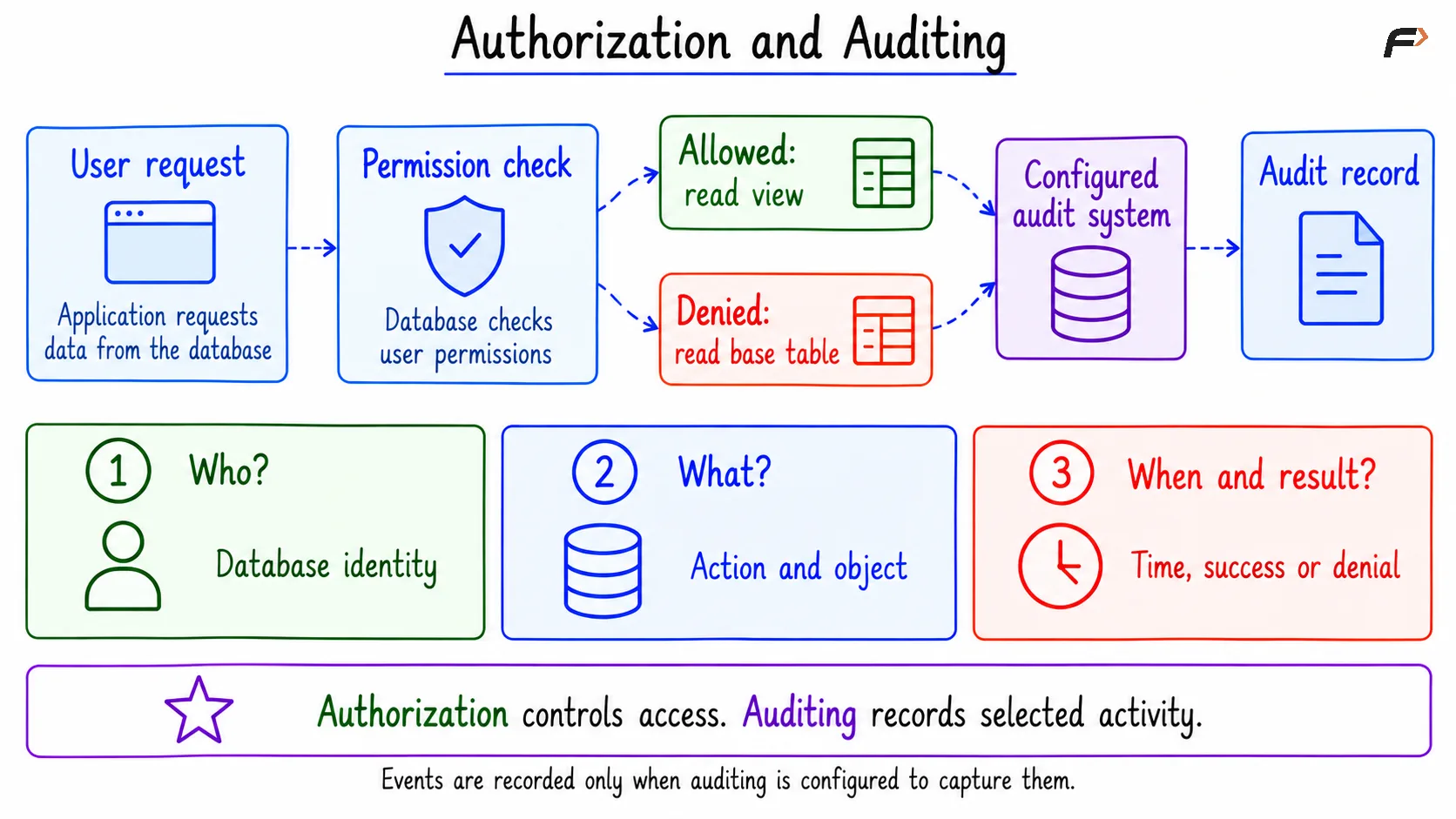
Authorization and auditing
Audit Logs, Change Triggers, and Recovery Logs
These mechanisms serve different purposes.
Mechanism | Main purpose | Important limit |
|---|---|---|
Security audit logging | Record selected access, administrative actions, and outcomes. | Coverage depends on configuration and available features. |
Row-change trigger | Record details such as old and new values for modifications. | Does not capture ordinary |
Recovery log | Support transaction recovery and durability. | Is not a substitute for a complete security audit trail. |
A trigger-based audit row usually participates in the same transaction as the change. If that transaction rolls back, its audit-table insert normally rolls back too.
General statement logging also needs careful interpretation. A statement appearing in a log does not necessarily prove that its transaction committed.
In MySQL, dedicated audit facilities depend on the installed edition or component. PostgreSQL logging can capture selected activity, while more structured auditing may require an audit extension. Neither system automatically provides every event in the illustrative audit table merely because GRANT was used.
Keeping Audit Records Useful
Audit records should be protected from unauthorised reading, modification, and deletion. Ordinary application accounts should not be able to erase the evidence of their own actions.
A useful audit policy also:
Selects important events instead of logging unnecessary sensitive detail.
Uses consistent timestamps and a defined retention period.
Reviews records and alerts on relevant patterns.
Tests whether both successful and denied actions are captured as intended.
If an application shares one database login across many people, the database may identify only that shared account. Identifying the actual person requires trusted application context or separate identities.
Views are access-control tools, not encryption or a guarantee that no information can ever be inferred from permitted results.
Summary
Authorization determines which actions an identity may perform. Roles simplify permission management, and least privilege limits unnecessary access. Views can expose selected rows and columns when their ownership settings and grants are designed correctly.
Auditing records selected activity for review, but it must be configured and protected. Restricted views, carefully managed privileges, and reliable audit records work together to control access and make important database actions traceable.
Be the first to add a comment.