Introduction
A database may stop working while an update is still in progress. A transaction can fail, a server can lose power, or a disk can become damaged. Without recovery support, these failures could leave incomplete changes or cause saved work to disappear.
Database recovery restores a usable, consistent database after a failure. Understanding what failed, where information was stored, and which transactions committed explains what recovery must achieve.
Example Table
Consider an Account table that stores each account’s identifier, holder name, and current balance.
Account: initial data
AccountID | HolderName | Balance |
|---|---|---|
1 | Asha | 1000.00 |
2 | Ravi | 500.00 |
AccountID is the primary key and uniquely identifies each account.
Suppose a transaction transfers 200 from Asha to Ravi. It must perform two updates:
Subtract 200 from Asha’s balance.
Add 200 to Ravi’s balance.
After a successful transfer, the balances should be:
AccountID | HolderName | Balance |
|---|---|---|
1 | Asha | 800.00 |
2 | Ravi | 700.00 |
The combined balance remains 1500.00. If only the subtraction survives, the database incorrectly shows a combined balance of 1300.00.
Both updates therefore belong to one transaction, a group of operations treated as one unit of work.
Types of Database Failures
Different failures require different recovery actions.
Failure type | What happens? | Example | Main recovery action |
|---|---|---|---|
Transaction failure | One transaction cannot complete successfully. | A transaction is selected for rollback after a deadlock. | Remove its incomplete changes. |
System crash | The database process or operating system stops. Working memory is lost. | Power failure or server crash. | Recover from surviving data files and recovery logs. |
Media failure | Stored database files become damaged or unavailable. | Disk failure or storage corruption. | Restore a valid backup and apply available recovery records. |
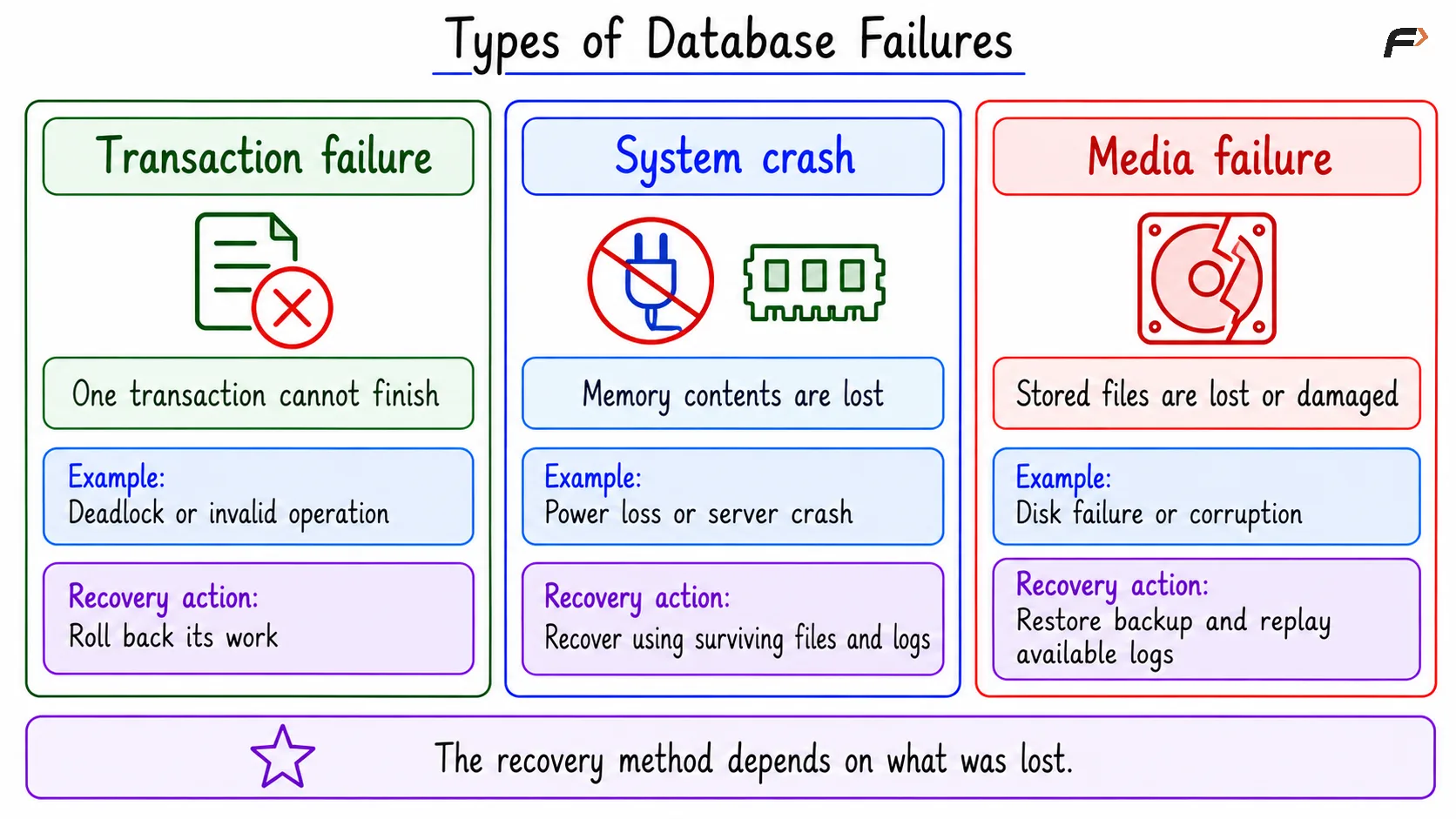
Types of database failures
A deadlock occurs when transactions wait for resources held by one another and cannot move forward.
For ordinary crash recovery, the required persistent files must remain available. If the failure also destroys those files, recovery must address storage loss as well.
What About Accidental Changes?
An incorrect update or deletion can commit successfully. The database then treats it as committed work, even if it was a human mistake.
Normal crash recovery does not automatically reverse such a change. Correcting it may require a new transaction or restoring data to an earlier point.
A network disconnection creates another difficulty: a client might lose contact just after the database commits. A missing success response does not always mean the transaction failed. The application should check the outcome before repeating an operation.
Storage Types in DBMS
Recovery depends on which information survives a failure.
Storage type | Meaning | Examples | Main limitation |
|---|---|---|---|
Volatile storage | Loses its contents when power is lost. | RAM, database memory buffers. | Cannot preserve data through a power failure. |
Non-volatile storage | Retains stored information without power. | SSDs, hard disks. | Can still fail or become corrupted. |
Stable storage | An ideal model in which stored information survives failures. | Approximated using redundant copies and careful storage techniques. | No physical storage provides an absolute guarantee against every failure. |
Non-volatile does not mean indestructible. A disk may survive a power interruption but fail physically later.
Memory Buffers and Data Pages
Databases commonly read and write data in fixed-size units called pages.
Frequently used pages are kept in a memory area called the buffer pool or buffer cache. Updating a row usually changes its in-memory page first.
A dirty page is a page that has changed in memory but has not yet been written back to its data file. Here, “dirty” means modified, not damaged.
This creates two recovery concerns:
A committed change may still be missing from a data file.
Depending on the database’s storage policy, a data file may contain changes from a transaction that has not committed.
Recovery information allows the database to handle these situations correctly.
Recovery Goals
1. Remove Incomplete Transaction Effects
Atomicity means that a transaction’s changes take effect together or do not take effect at all.
If the transfer stops after subtracting 200 from Asha but before completing and committing, recovery must prevent that partial transfer from becoming the final result.
2. Preserve Committed Work
Durability means that successfully committed work survives the failures covered by the system’s durability guarantees.
If the transfer committed durably before a server crash, recovery must preserve the balances of 800.00 and 700.00, even if some changed data pages had not yet reached their files.
This depends on correct durability settings, working storage, and the availability of the required recovery information.
3. Restore a Consistent Database
Recovery should leave the database in a state that reflects complete transactions.
For the transfer, the combined balance must remain 1500.00. However, recovery cannot repair incorrect business logic in a successfully committed transaction. Correct transaction code and constraints are still necessary.
Assuming no other transactions change these accounts:
Failure point | Required outcome after recovery | Asha | Ravi |
|---|---|---|---|
Before the transfer commits | Remove the incomplete transfer. | 1000.00 | 500.00 |
After the transfer commits durably | Preserve the completed transfer. | 800.00 | 700.00 |
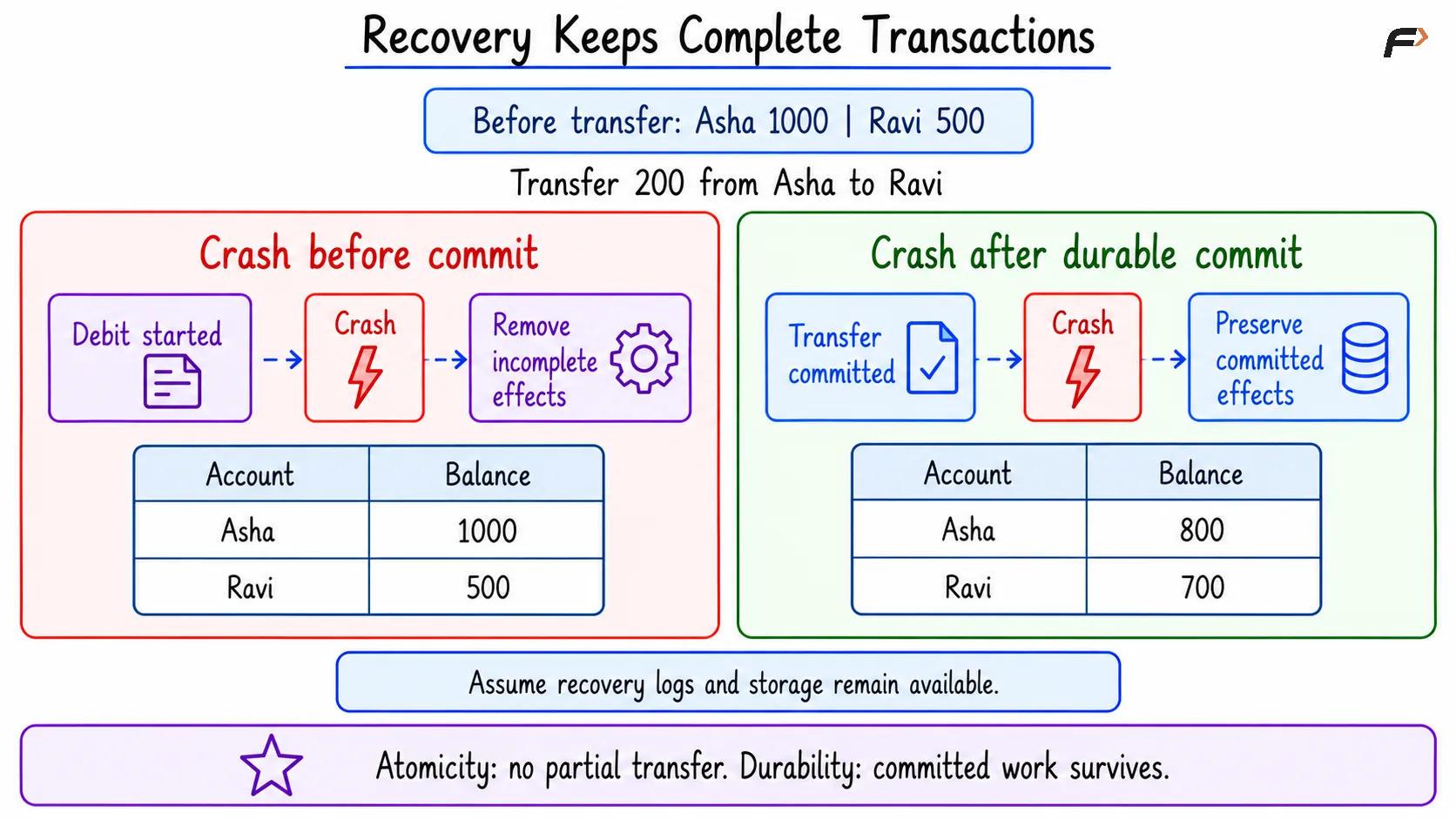
Recovery keeps complete transactions
4. Limit Data Loss and Downtime
For backup-based recovery, two useful planning terms are:
Recovery Point Objective (RPO): The maximum acceptable amount of lost recent data, measured in time.
Recovery Time Objective (RTO): The target time for restoring service.
For example, an RPO of five minutes allows at most five minutes of recent work to be lost. An RTO of thirty minutes targets restoring service within thirty minutes.
These are planning targets. Backups, log retention, and restore procedures must support them.
How Logs, Checkpoints, and Backups Help
Recovery Logs and Write-Ahead Logging
A recovery log records information needed to recover database changes.
With write-ahead logging (WAL), the required log records must reach persistent storage before the corresponding changed data page is written to its data file.
With durable commit settings, the required log records, including the commit information, become durable before the database confirms successful commit. Every changed data page does not need to be written at that moment.
This allows recovery to reconstruct changes that were committed but had not yet reached the data files.
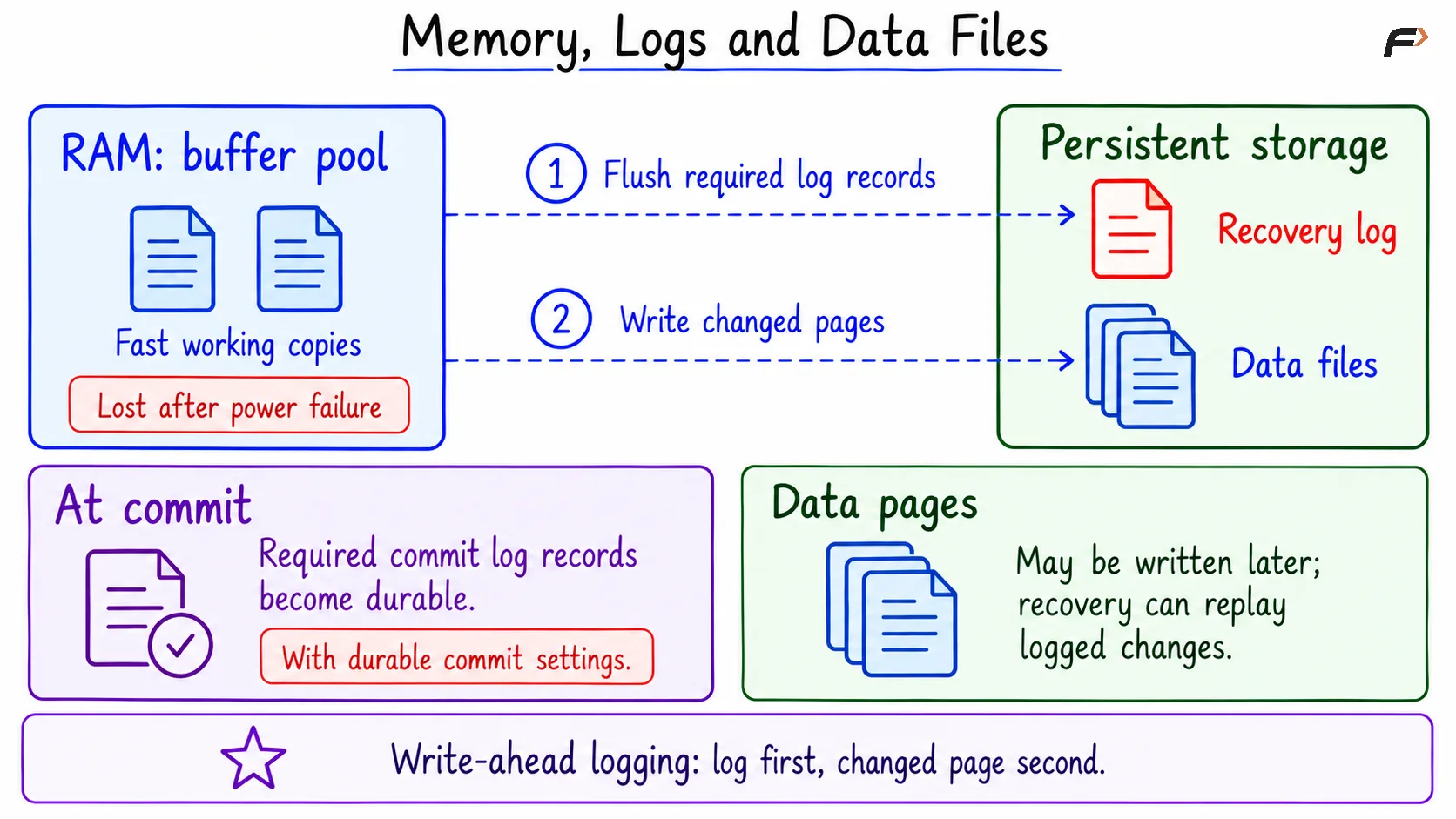
Memory , logs and data files
UNDO and REDO
Two important recovery ideas are:
Idea | Purpose | Transfer example |
|---|---|---|
UNDO | Remove the effects of incomplete or aborted work. | Remove Asha’s deduction if the transfer never committed. |
REDO | Reapply logged changes when required to reconstruct database pages. | Restore the committed transfer if its changes were missing from the data files. |
These describe recovery goals, not one identical internal process used by every database.
For example, InnoDB uses redo and undo information. PostgreSQL replays WAL and uses transaction status and row visibility rules to prevent aborted changes from appearing as committed data.
Some recovery algorithms also replay changes from incomplete transactions before handling their effects. REDO should therefore not be understood as always replaying only committed transactions.
Checkpoints
A checkpoint records recovery progress and coordinates writing changed pages.
It helps reduce the amount of recovery work needed after a crash. A checkpoint does not commit active transactions, and it is not a replacement for a backup.
Backups and Log Replay
A backup provides a recoverable copy of database data.
After storage loss, recovery may:
Restore a valid backup.
Replay the required saved logs.
Bring the database to a consistent recoverable point.
Point-in-time recovery restores the database to a selected point, such as just before an accidental committed deletion. It requires a suitable backup and the necessary log history.
Replication can improve availability, but it does not replace backups. An accidental deletion may also be copied to a replica.
A Compact SQL Example
The following example demonstrates the visible effects of rollback and commit. It does not simulate a server crash or disk failure.
Assume the two accounts exist, Asha has sufficient funds, and no other transaction changes these rows during the example.
1. Create the Initial Data
Objective: Create the account table with the starting balances.
Consider the following queries to create and populate Account.
CREATE TABLE Account ( AccountID INT PRIMARY KEY, HolderName VARCHAR(50) NOT NULL, Balance DECIMAL(10, 2) NOT NULL);START TRANSACTION;INSERT INTO Account (AccountID, HolderName, Balance)VALUES (1, 'Asha', 1000.00), (2, 'Ravi', 500.00);COMMIT;SELECT AccountID, HolderName, BalanceFROM AccountORDER BY AccountID;DECIMAL(10, 2) and NUMERIC(10, 2) store exact numeric values with two decimal places.
Expected result
AccountID | HolderName | Balance |
|---|---|---|
1 | Asha | 1000.00 |
2 | Ravi | 500.00 |
2. Roll Back an Incomplete Transfer
Objective: Cancel the transaction after the deduction, before the credit is performed.
Consider the following queries to undo the incomplete transfer.
START TRANSACTION;UPDATE AccountSET Balance = Balance - 200.00WHERE AccountID = 1;ROLLBACK;SELECT AccountID, HolderName, BalanceFROM AccountORDER BY AccountID;ROLLBACK cancels this transaction’s changes. Asha’s deduction does not remain in the table.
Expected result
AccountID | HolderName | Balance |
|---|---|---|
1 | Asha | 1000.00 |
2 | Ravi | 500.00 |
The same atomicity goal applies after a crash: an incomplete transfer must not remain as a completed change.
3. Commit the Complete Transfer
Objective: Save both sides of the transfer together.
Consider the following queries to transfer 200 from Asha to Ravi and commit the transaction.
START TRANSACTION;UPDATE AccountSET Balance = Balance - 200.00WHERE AccountID = 1;UPDATE AccountSET Balance = Balance + 200.00WHERE AccountID = 2;COMMIT;SELECT AccountID, HolderName, BalanceFROM AccountORDER BY AccountID;Expected result
AccountID | HolderName | Balance |
|---|---|---|
1 | Asha | 800.00 |
2 | Ravi | 700.00 |
COMMIT completes the transaction. A later ROLLBACK cannot cancel this already committed transfer.
If a server crash occurs after durable commit and the required storage survives, recovery must preserve this result.
Summary
Database recovery handles transaction failures, system crashes, and storage failures. Its main goals are to remove incomplete transaction effects, preserve committed work, and restore a consistent database. The recovery method depends on which data and recovery information remain available.
Memory buffers provide fast access, while persistent storage holds data files and recovery information. Logs support recovery, checkpoints reduce recovery work, and backups protect against losses that surviving database files alone cannot repair.
Be the first to add a comment.