Introduction
A student management application may need to activate a student and update their city as one operation. At the same time, other users may be searching for students or viewing reports. The application needs a way to communicate with the database, share its connections, and save related changes together.
A connection carries SQL requests to the database server. A connection pool keeps connections available for reuse. A transaction groups related changes, and COMMIT saves the changes in that transaction.
What Is a Database Connection?
A database connection is a live communication channel between an application and a database server. It gives the application a database session, which holds information such as session settings and the current transaction.
What Is a Connection Pool?
A connection pool manages database connections so an application can borrow and reuse them. This reduces the repeated work of opening and authenticating a new connection for every request.
When a request needs to run SQL, it asks the pool for a connection. The pool gives an available connection to the request. The request uses it for database work and gives it back when the work is done. That connection remains borrowed until the request returns it.
For example, three requests might borrow three available connections:
Request | Borrowed connection |
|---|---|
Request A | Connection 73 |
Request B | Connection 74 |
Request C | Connection 75 |
With one available connection, these requests must take turns using it. With several connections, their database work can run concurrently, subject to server resources and any locks the queries need.
After a request finishes, it returns its connection to the pool for reuse. Returning a pooled connection usually leaves the physical connection open. When all connections are busy, another request may wait or receive an error, depending on the pool’s configuration.
How Does the Pool Choose a Connection?
The pool follows rules for choosing which available connection to lend. If several requests are waiting, it also needs rules for deciding which request receives a connection next. These decisions are where scheduling fits into connection pooling.
The rules depend on the pool implementation and configuration. Connections are not necessarily handed out in a fixed order.
Why Might Connection IDs Keep Changing?
A connection ID identifies a database connection or session, rather than an individual query. If the tool borrows a connection separately for each query, successive queries may use different connections.
For example, the first query might borrow connection 73 and return it after finishing. The second might borrow connection 74. A third query might reuse connection 73. The reported IDs would then be 73, 74, and 73.
A newly opened physical connection can also have a different ID. Changing IDs alone do not reveal how the pool chooses connections or schedules waiting requests.
Transactions, COMMIT and Autocommit
A transaction groups related database operations into one unit. Its changes can be committed together or discarded together with ROLLBACK. This all-or-nothing property is called atomicity.
COMMIT ends the current connection’s transaction and makes its changes permanent. ROLLBACK discards that transaction’s uncommitted changes. A later ROLLBACK cannot undo an already successful COMMIT.
How Autocommit Changes the Behavior
MySQL enables autocommit by default for new server sessions, although an application or database driver can change this setting. With autocommit enabled and no explicit transaction active, each successful statement is committed as its own transaction.
How two updates are executed | What gets saved? |
|---|---|
Separately, with autocommit enabled | Each successful update is committed independently. If the second fails, the first can remain saved. |
Together, inside an explicit transaction | COMMIT saves the transaction’s changes together. ROLLBACK discards its uncommitted changes if the operation is abandoned. |
Autocommit therefore still uses transactions. It changes whether each statement is committed individually or several statements are grouped explicitly.
In PostgreSQL, a standalone statement is also wrapped in an implicit transaction when no transaction block is active. Client libraries may start transactions automatically, so check the behavior of the interface you use.
Example: Save Two Student Updates Together
Suppose a staff member approves two edits to a student record: activate the student and change their city to Delhi. The application should save both edits together.
Assume the students table already exists, student_id is its primary key, and the MySQL version uses the transactional InnoDB storage engine.
Before the transaction
student_id | status | city |
|---|---|---|
1 | BANNED | Pune |
Run one of the following versions on a single connection. These examples show the successful path, where both updates complete before COMMIT.
START TRANSACTION;UPDATE studentsSET status = 'ACTIVE'WHERE student_id = 1;UPDATE studentsSET city = 'Delhi'WHERE student_id = 1;COMMIT;SELECT student_id, status, cityFROM studentsWHERE student_id = 1;Expected result after COMMIT
student_id | status | city |
|---|---|---|
1 | ACTIVE | Delhi |
Both updates target student 1, and COMMIT saves the two changes together. If the application abandons the operation before committing, ROLLBACK discards its changes and the record remains BANNED, Pune.
Handle failures explicitly: If either required update fails, the application should roll back the transaction instead of continuing to COMMIT. In MySQL, some errors undo only the failed statement, so an error does not always cancel the entire transaction automatically.
Keep the Transaction on One Connection
When using a pool, borrow a connection once and hold it for the entire transaction:
Borrow an available connection.
Start the transaction on that connection.
Run all related statements through the same connection.
Commit after success, or roll back if the operation fails or is abandoned.
Return the connection to the pool.
The diagram follows Request A through Connection 73 while other requests use their own connections.
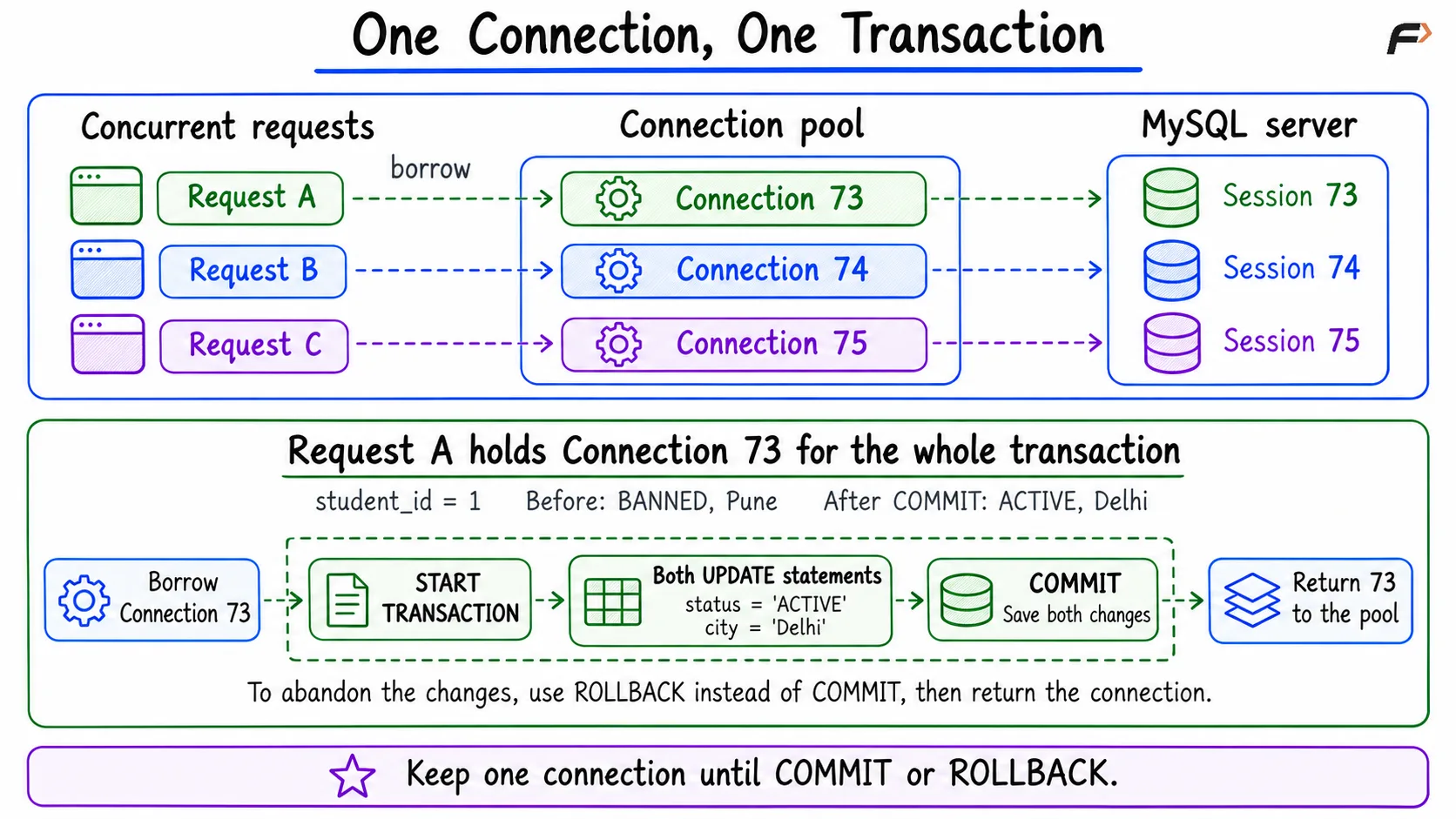
One Connection, One Transaction
If START TRANSACTION runs on Connection 73 but an UPDATE runs on Connection 74, that update is outside Connection 73’s transaction. Similarly, COMMIT on Connection 74 cannot commit changes pending on Connection 73.
Finish the transaction before returning the connection. Pool cleanup behavior varies, so the application should explicitly commit or roll back. If the physical connection ends before an InnoDB transaction is committed, its uncommitted changes are rolled back. Returning a connection to a pool is different from physically disconnecting it.
Summary
A connection provides a database session and owns its transaction state. A connection pool reuses connections and allows multiple requests to perform database work concurrently. With autocommit enabled, standalone statements are committed separately. An explicit transaction groups related changes so they can be committed or rolled back together. When using a pool, keep the same connection until the transaction finishes, then return it for reuse.
Be the first to add a comment.