Introduction
COUNT is an SQL aggregate function that returns how many rows or values satisfy its counting rule. It supports tasks such as counting registered students, recorded results, or different scores in an examination.
The expression inside COUNT determines what is counted. COUNT(*), COUNT(column), and COUNT(DISTINCT column) can produce different answers from the same table because they handle missing and repeated values differently.
An Example Relation
Consider a table named StudentMarks that stores students’ marks in the same examination. Each row represents one student’s result.
StudentMarks : initial data
StudentID | Name | Department | Marks |
|---|---|---|---|
101 | Asha | Computer Science | 80.00 |
102 | Ravi | Electronics | 60.00 |
103 | Meera | Computer Science | 90.00 |
104 | Arjun | Electronics | 70.00 |
105 | Neha | Computer Science | NULL |
106 | Kabir | Computer Science | 80.00 |
StudentID is the primary key and uniquely identifies each student. Neha’s NULL means that her marks have not been recorded; it does not mean that she scored zero.
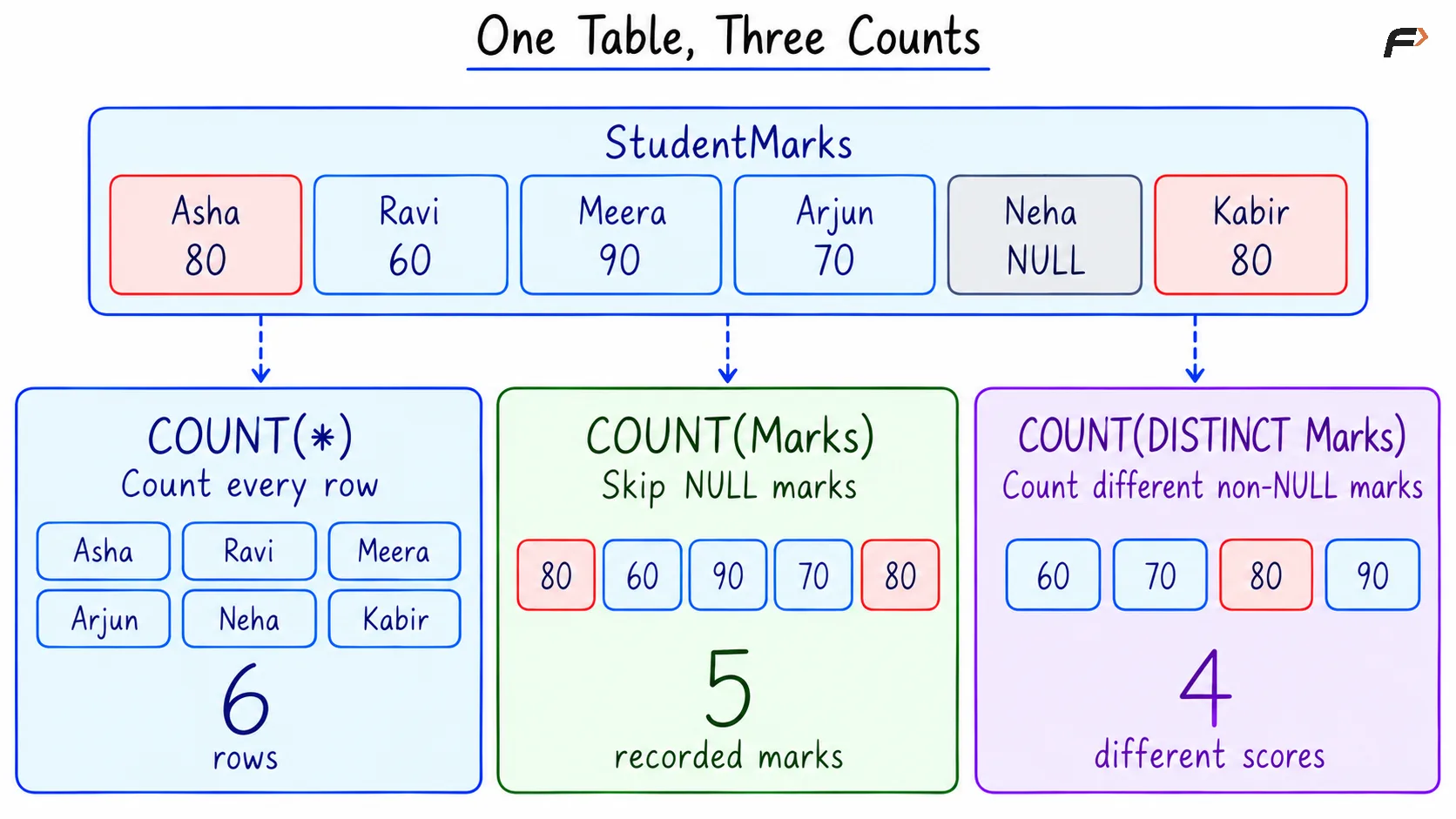
The table contains six student records, five recorded marks, and a repeated score of 80. These details help distinguish the three common forms of COUNT.
Counting Rows with COUNT(*)
COUNT(*) counts every input row, including rows that contain NULL values. Here, * is special syntax for counting rows; it does not mean counting columns or individual cells.
Consider the following queries to count all students in StudentMarks.
SELECT COUNT(*) AS total_studentsFROM StudentMarks;Expected result
total_students |
|---|
6 |
Neha’s row is included even though her marks are missing. Asha and Kabir also contribute one row each despite having the same score. AS total_students gives the result column a readable name.
COUNT(1) also counts every input row because the constant 1 is never NULL. The 1 does not refer to the first column; COUNT(*) expresses the intention to count rows more directly.
Counting Recorded Values with COUNT(column)
COUNT(column) counts rows where the specified column is not NULL. Repeated values are counted separately because each occurrence belongs to an input row.
Consider the following queries to count how many students have recorded marks.
SELECT COUNT(Marks) AS recorded_countFROM StudentMarks;Expected result
recorded_count |
|---|
5 |
Neha’s missing mark is excluded. The two scores of 80 are both included, so the result counts recorded marks rather than different scores.
A recorded zero would also be included because zero is not NULL. This form of COUNT works with text and date columns too: it checks whether a value is present rather than adding values together.
Counting Different Values with COUNT(DISTINCT column)
COUNT(DISTINCT column) counts different non-NULL values. The DISTINCT keyword makes repeated occurrences of the same value contribute only once.
Consider the following queries to count the different recorded scores.
SELECT COUNT(DISTINCT Marks) AS distinct_scoresFROM StudentMarks;Expected result
distinct_scores |
|---|
4 |
The different recorded scores are 60, 70, 80, and 90. The repeated 80 contributes once, and NULL contributes nothing.
This result counts different scores, not students. DISTINCT changes the input values considered by the calculation; it does not delete records from the table.
ONE TABLE , THREE COUNTS
Counting Rows That Match a Condition
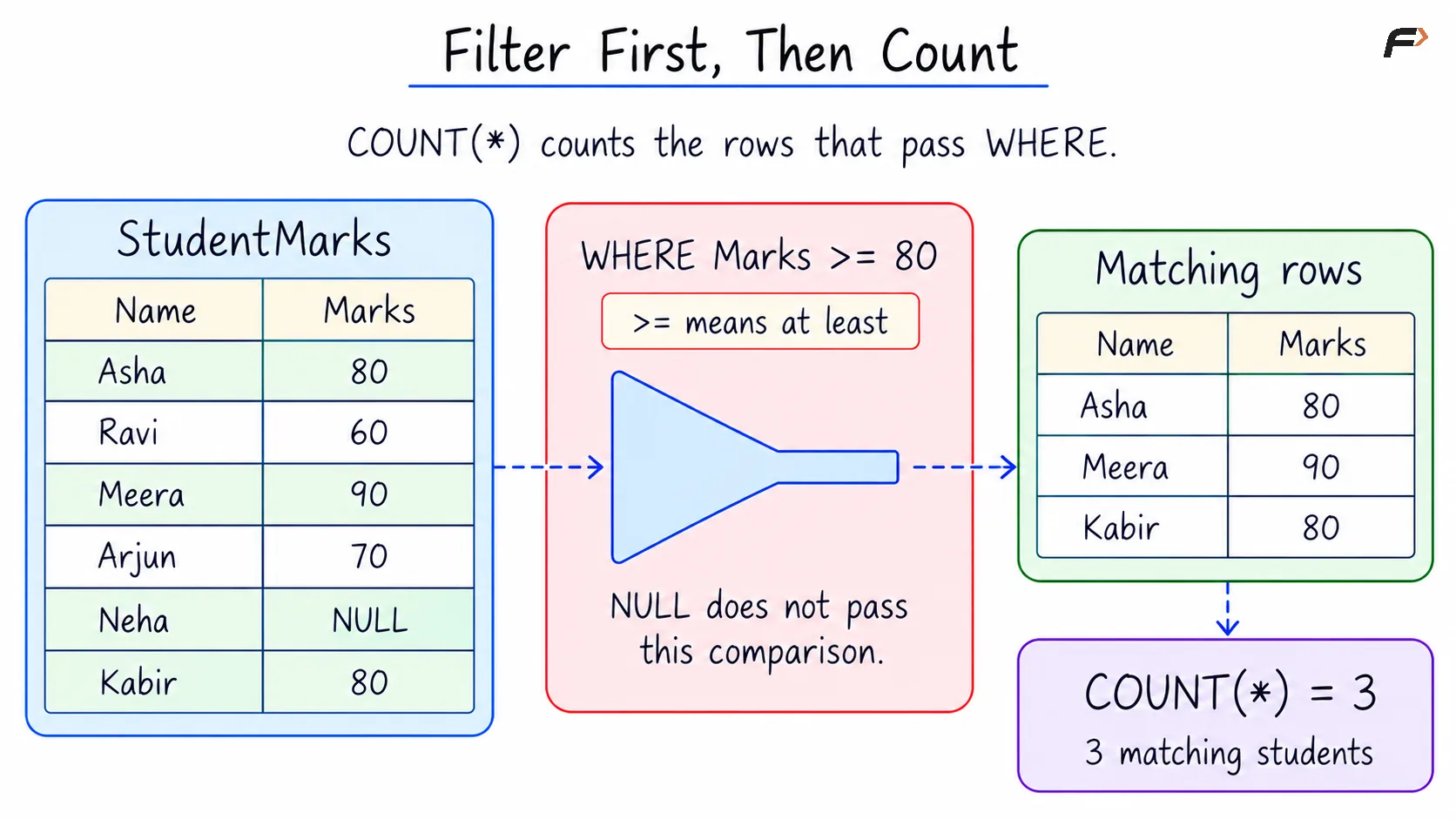
A WHERE clause filters rows before COUNT processes them. This makes it possible to count only records that satisfy a particular condition.
Consider the following queries to count students whose recorded marks are at least 80.
SELECT COUNT(*) AS students_at_least_80FROM StudentMarksWHERE Marks >= 80;Expected result
students_at_least_80 |
|---|
3 |
The operator >= means “greater than or equal to.” Asha, Meera, and Kabir satisfy the condition, so COUNT(*) counts these three matching rows.
Neha’s NULL mark does not satisfy this comparison. Although COUNT(*) includes rows containing NULL, it can only count rows that remain after the filter.
FILTER FIRST , THEN COUNT
COUNT When No Rows Match
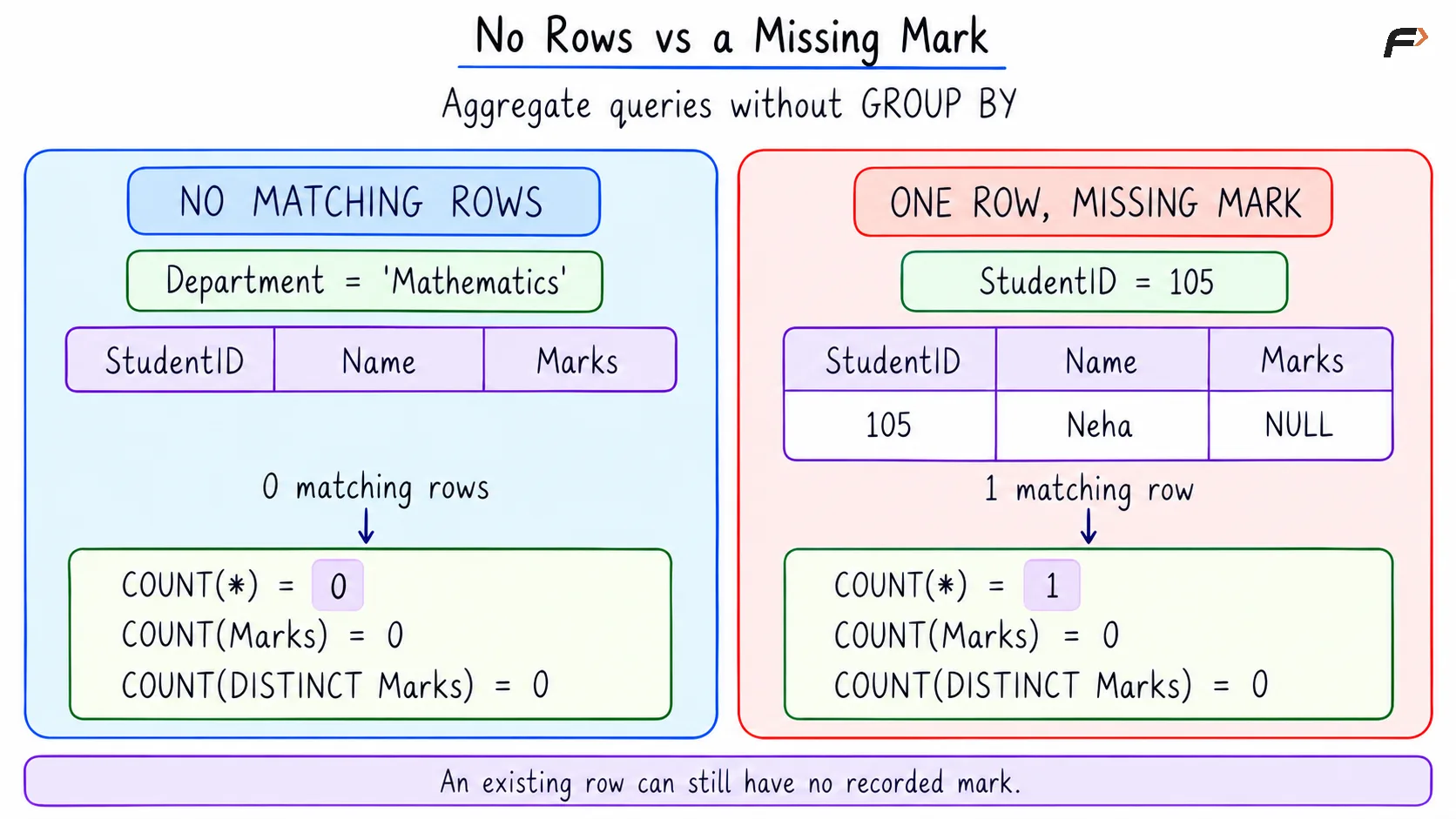
When an aggregate query without GROUP BY has no matching rows, the three forms of COUNT return 0. They do not return NULL.
Consider the following queries to count records and recorded scores for Mathematics, which has no rows in the example table.
SELECT COUNT(*) AS total_students, COUNT(Marks) AS recorded_count, COUNT(DISTINCT Marks) AS distinct_scoresFROM StudentMarksWHERE Department = 'Mathematics';Expected result
total_students | recorded_count | distinct_scores |
|---|---|---|
0 | 0 | 0 |
These queries return one summary row containing zeros because no records match the department condition.
A row with a missing value is a different situation. If only Neha’s row were selected, COUNT(*) would return 1, while COUNT(Marks) and COUNT(DISTINCT Marks) would both return 0.
NO ROWS VS A MISSING MARK
A Compact Example
Objective: For each department, count the total students, students with recorded marks, different recorded scores, and students whose marks are missing.
The example data is repeated below for reference.
StudentMarks
StudentID | Name | Department | Marks |
|---|---|---|---|
101 | Asha | Computer Science | 80.00 |
102 | Ravi | Electronics | 60.00 |
103 | Meera | Computer Science | 90.00 |
104 | Arjun | Electronics | 70.00 |
105 | Neha | Computer Science | NULL |
106 | Kabir | Computer Science | 80.00 |
GROUP BY Department collects rows belonging to the same department. Each COUNT calculation then operates separately within each group.
Consider the following queries to produce the department-wise counting report.
SELECT Department AS department, COUNT(*) AS total_students, COUNT(Marks) AS recorded_count, COUNT(DISTINCT Marks) AS distinct_scores, COUNT(*) - COUNT(Marks) AS missing_countFROM StudentMarksGROUP BY DepartmentORDER BY Department;Expected result
department | total_students | recorded_count | distinct_scores | missing_count |
|---|---|---|---|---|
Computer Science | 4 | 3 | 2 | 1 |
Electronics | 2 | 2 | 2 | 0 |
The counts follow directly from the records in each group:
Computer Science: Four students have three recorded marks: 80, 90, and 80. There are two different scores, and Neha’s mark is missing.
Electronics: Two students have recorded marks of 60 and 70. Both scores are different, and neither mark is missing.
In COUNT(*) - COUNT(Marks), subtraction removes the number of recorded marks from the total number of rows. The difference therefore counts rows where Marks is NULL.
ORDER BY Department displays the departments alphabetically. Mathematics does not appear because GROUP BY forms groups from existing input rows; it does not create a group for an absent department.
Summary
COUNT(*) counts rows, COUNT(column) counts non-NULL values, and COUNT(DISTINCT column) counts different non-NULL values. Choosing the correct form depends on whether the required answer concerns records, available values, or different values.
WHERE limits the rows included in a count, while GROUP BY produces separate counts for groups. A count over no matching rows returns zero in a query without grouping, while a row containing NULL still contributes to COUNT(*).
Be the first to add a comment.