Introduction
Choosing a data type defines what kind of information a column stores, but it does not express every requirement. An integer column, for example, can still accept a negative age unless another rule prevents it.
SQL constraints add these rules to table definitions. They help keep records valid by requiring values, preventing duplicates, checking conditions, and maintaining references between related tables.
What Are Constraints in SQL?
A constraint is a rule enforced by the database on a column or table. When an insert or update violates an enforced constraint, the database rejects the operation.
For example, a student table might require every student to have an identifier and name, prevent duplicate email addresses, and reject ages below an allowed minimum.
Rule | Purpose | Example |
|---|---|---|
| Prevents missing values | A student name is required |
| Prevents duplicate key values | Email addresses must be distinct |
| Uniquely identifies each row and disallows NULL | Student identifier |
| Enforces a valid reference | Department must exist |
| Tests a condition | Age must be at least 16 |
| Supplies an omitted value | Status starts as |
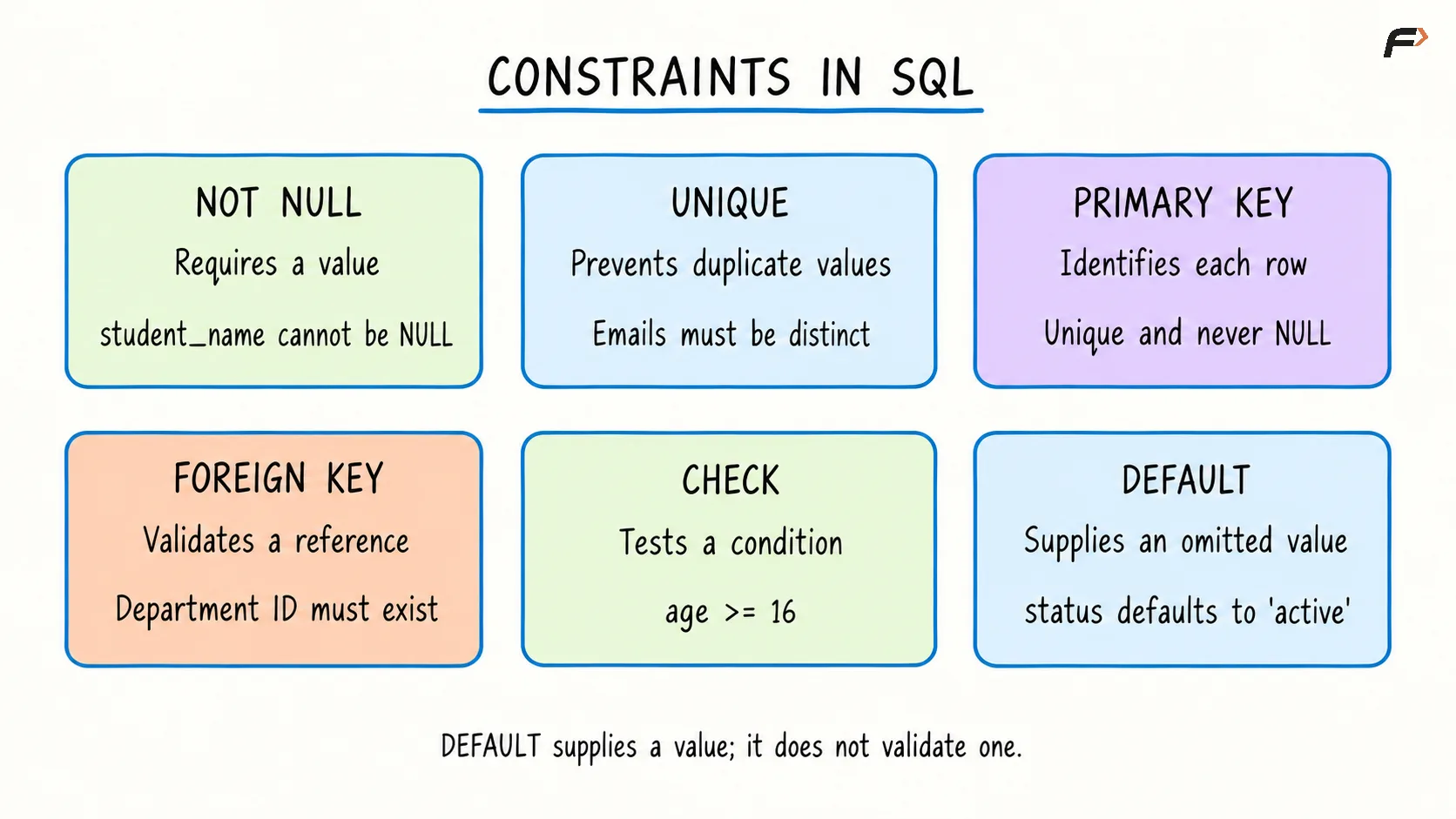
constraints in sql
NOT NULL and UNIQUE
NOT NULL requires a column to contain a value. For example, declaring student_name VARCHAR(100) NOT NULL prevents a record from storing NULL as its name.
It does not reject an empty string such as ''. An empty string is a supplied value, so preventing blank names requires an additional rule.
UNIQUE prevents repeated values in a column or combination of columns. It is useful for identifiers other than the primary key, such as an institutional email address.
In MySQL, a nullable UNIQUE column permits multiple NULL values. Combine UNIQUE with NOT NULL when the value must be both present and distinct.
PRIMARY KEY and FOREIGN KEY
A primary key gives each row a unique, non-null identity. A table has one primary key constraint, although that key may contain multiple columns.
A foreign key validates a reference to a key in another or the same table. For example, a student’s department_id can reference the primary key of a departments table.
These constraints enforce different forms of integrity:
Entity integrity: A primary key ensures each row has a unique, non-null identity.
Referential integrity: A foreign key prevents non-null references to nonexistent parent keys.
Foreign key values may repeat because several students can belong to the same department. A foreign key can also permit NULL unless its columns have additional rules preventing it.
CHECK and DEFAULT
CHECK requires a condition to hold for accepted data. For example, CHECK (age >= 16) rejects a supplied age of 14.
A check condition that evaluates to unknown because of NULL does not fail. Therefore, use both NOT NULL and CHECK when an age must be present and satisfy the minimum.
DEFAULT provides a value when the column is omitted from an insert or the DEFAULT keyword is used. For example, a status column can begin with 'active'.
A default does not restrict other supplied values. It also does not generally replace an explicitly supplied NULL; nullability is controlled separately.
Creating a Table with Constraints
The following example combines the main rules. Create the referenced department table first:
CREATE TABLE departments ( department_id INT PRIMARY KEY, department_name VARCHAR(50) NOT NULL) ;Then define the student table:
CREATE TABLE students ( student_id INT PRIMARY KEY, student_name VARCHAR(100) NOT NULL, email VARCHAR(150) NOT NULL UNIQUE, age INT NOT NULL, department_id INT, status VARCHAR(20) NOT NULL DEFAULT 'active', CONSTRAINT chk_student_age CHECK (age >= 16), CONSTRAINT fk_student_department FOREIGN KEY (department_id) REFERENCES departments(department_id));Insert a department, followed by a student who references it:
INSERT INTO departments (department_id, department_name)VALUES (10, 'Computer Science');INSERT INTO students (student_id, student_name, email, age, department_id)VALUES (101, 'Asha', 'asha@example.com', 19, 10);This student record satisfies the constraints. Because status was omitted, it receives the default value 'active'.
The database would reject these separate attempts:
Attempt | Reason for rejection |
|---|---|
Insert another student with ID | Duplicate primary key |
Insert | Violates |
Reuse | Violates |
Insert age | Violates the age check |
Reference department | Violates the foreign key |
Column-level declarations, such as email ... UNIQUE, are convenient for simple rules. Table-level declarations are useful for named constraints and rules involving multiple columns.
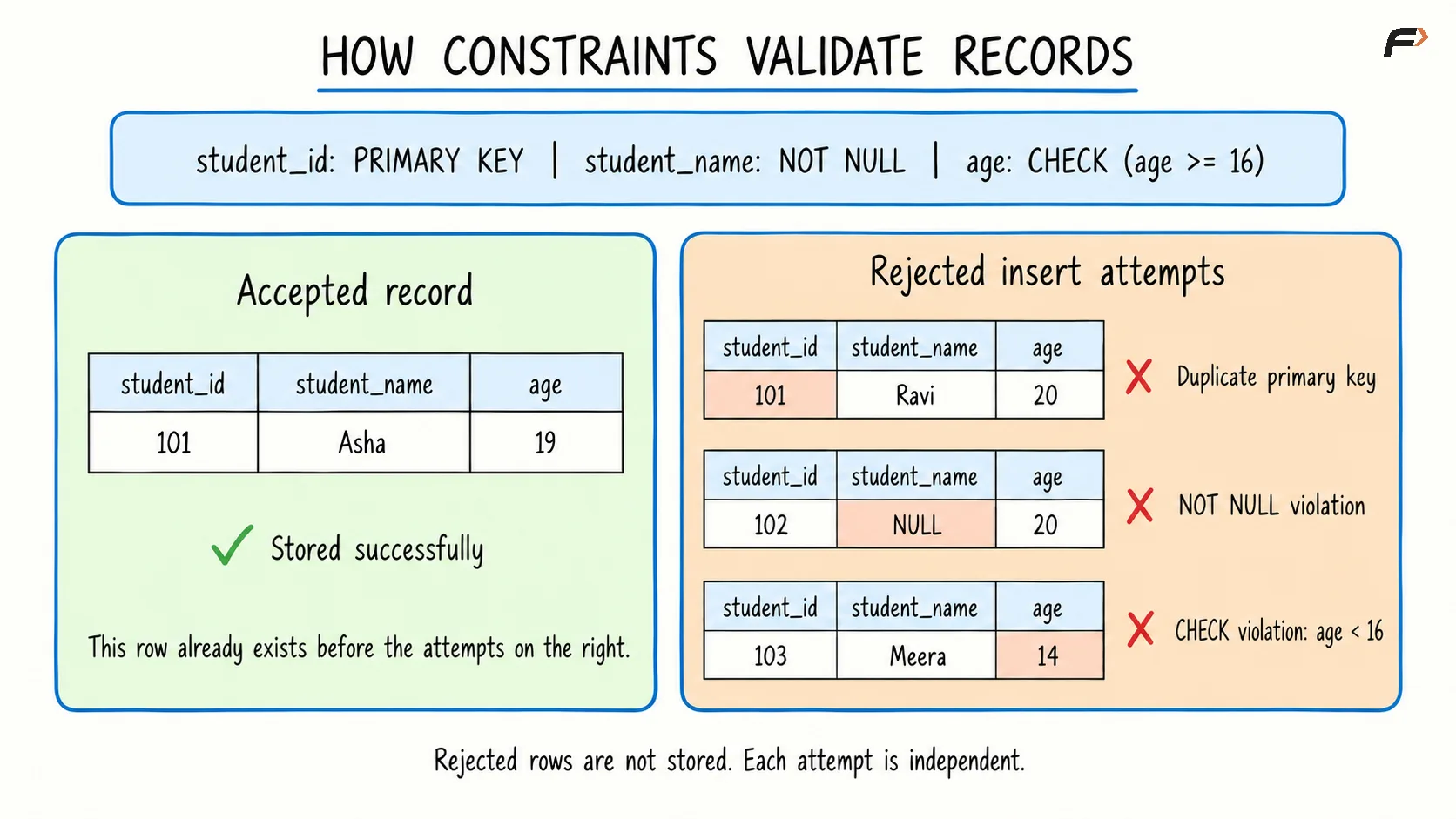
How constraint validate records
Managing Constraints on Existing Tables
Constraints can also be added using ALTER TABLE. Suppose course fees must be nonnegative:
ALTER TABLE studentsADD COLUMN course_fee DECIMAL(8, 2);ALTER TABLE studentsADD CONSTRAINT chk_course_feeCHECK (course_fee >= 0);Because the fee column permits NULL, an unknown fee remains allowed. Existing records must satisfy a newly added enforced constraint, so check and correct incompatible data first.
To remove this named check in MySQL:
ALTER TABLE studentsDROP CHECK chk_course_fee;Removing the constraint leaves the column and its values in place. Syntax for removing constraints varies by type and database system.
Summary
SQL constraints enforce rules that data types alone cannot express. They require values, prevent duplicates, identify rows, validate references, and check acceptable values, while defaults supply omitted values.
Choose rules according to the table’s requirements and combine them where necessary. Clear constraint names and valid existing data make those rules easier to manage as a database changes.
Be the first to add a comment.