Introduction
Transactions can behave correctly when tested alone yet encounter waits or conflicts when several clients run them together. Failures add another challenge: the application must understand which changes completed and which require recovery.
This lab uses a small stock table and two database sessions to explore those situations. We will observe competing updates, undo an uncommitted change, and separate ordinary rollback from crash recovery.
Prepare the Practice Environment
Use a disposable database with transactional tables. Open two connections, called Session A and Session B, to the same database.
The examples use START TRANSACTION, supported by systems such as MySQL and PostgreSQL. Other databases may require different transaction-start syntax.
Create and populate the table once, then ensure the setup is committed:
CREATE TABLE stock_lab ( product_id INTEGER PRIMARY KEY, quantity INTEGER NOT NULL, CHECK (quantity >= 0));INSERT INTO stock_lab (product_id, quantity)VALUES (1, 10);The starting quantity is 10.
Locking, isolation defaults, timeout behavior, and affected-row reporting vary. Record the database and isolation level when documenting observations.
Experiment 1: Competing Updates
In Session A, run:
START TRANSACTION;UPDATE stock_labSET quantity = quantity - 1WHERE product_id = 1;Leave the transaction open.
In Session B, run:
START TRANSACTION;UPDATE stock_labSET quantity = quantity - 1WHERE product_id = 1;In common row-locking transactional systems, Session B waits because Session A holds a conflicting write lock.
Now commit Session A:
COMMIT;If Session B’s update then succeeds, commit it:
COMMIT;Check the result:
SELECT quantityFROM stock_labWHERE product_id = 1;If both transactions commit successfully, the quantity should be 8.
Some isolation levels or implementations may instead report a serialization conflict. In that case, roll back the failed transaction and retry the whole transaction as appropriate.
The lesson: Concurrent operations can wait or fail even when their individual SQL statements are valid.
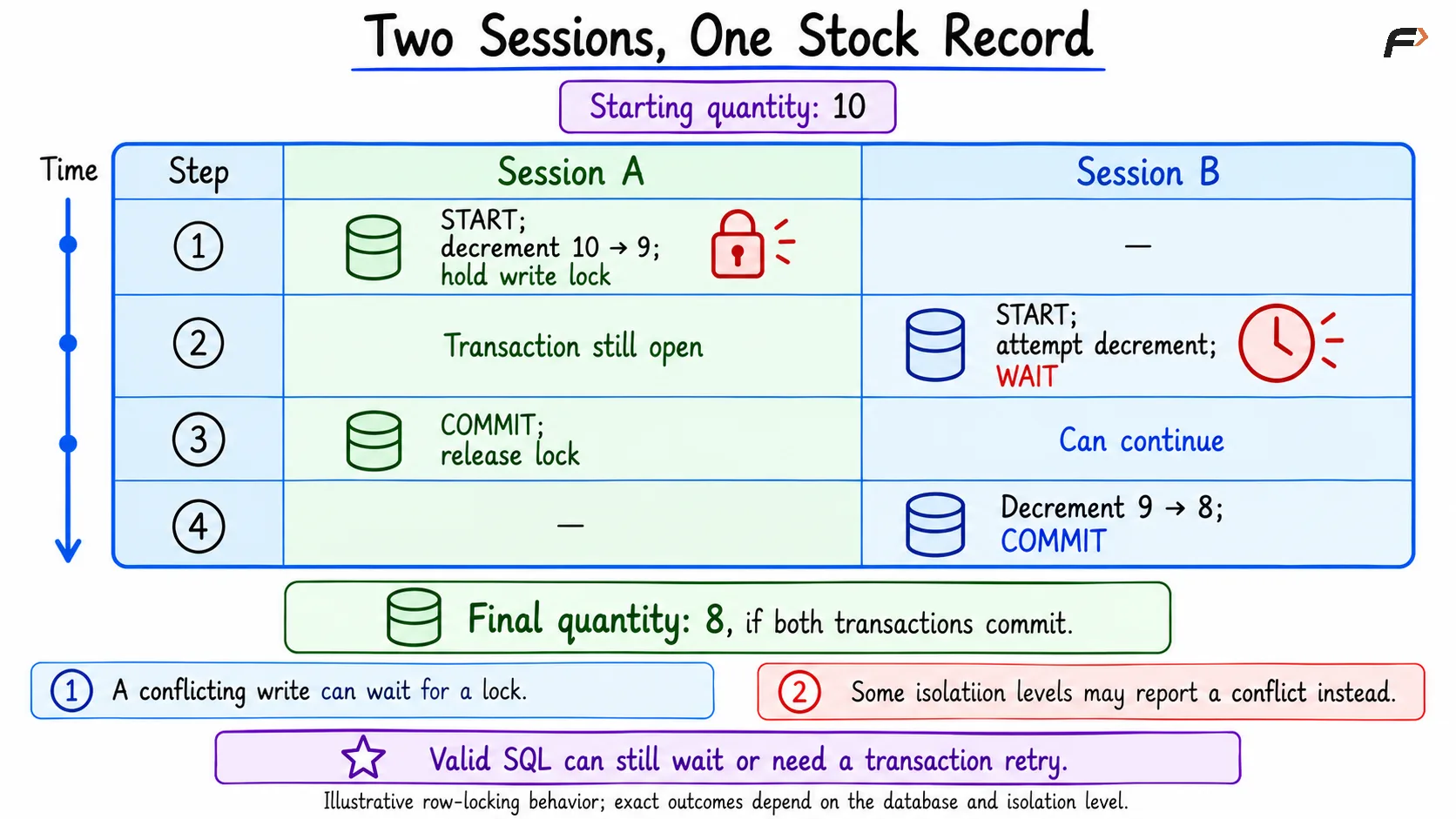
Two-session update timeline
Experiment 2: Avoid a Stale Read–Modify–Write
Reset the quantity to 10 with no other transactions open:
UPDATE stock_labSET quantity = 10WHERE product_id = 1;Commit the reset if needed.
Imagine two clients both read 10 and independently calculate a new quantity of 9. If both later submit an absolute assignment to 9, a naive workflow can lose one intended decrement.
Instead, express the change inside the database:
START TRANSACTION;UPDATE stock_labSET quantity = quantity - 1WHERE product_id = 1 AND quantity >= 1;COMMIT;The condition prevents the statement from decrementing a zero quantity.
Check the affected-row count using the client or database’s supported mechanism:
Outcome | Meaning |
|---|---|
One row changed | The decrement succeeded |
Zero rows changed | The product was absent or lacked sufficient quantity |
Transaction error | Handle the error and retry when appropriate |
The statement combines the condition and change into one operation. It does not guarantee that every concurrent attempt succeeds without waiting or retrying.
Experiment 3: Roll Back an Uncommitted Change
Start with quantity 10.
In one session:
START TRANSACTION;UPDATE stock_labSET quantity = 3WHERE product_id = 1;SELECT quantityFROM stock_labWHERE product_id = 1;Within that transaction, the query should show 3.
Now run:
ROLLBACK;SELECT quantityFROM stock_labWHERE product_id = 1;With no intervening committed changes, the quantity returns to 10.
Rollback cancels the transaction’s uncommitted work. It does not undo a transaction that has already committed.
Experiment 4: Disconnect Before Commit
In a fresh transaction:
START TRANSACTION;UPDATE stock_labSET quantity = 2WHERE product_id = 1;Close that connection without committing.
After the server detects that the session has ended, an ordinary uncommitted transaction is typically rolled back. Check the quantity from another connection.
A broken network connection may take time to detect. Closing a client window is therefore different from proving that the server has already completed cleanup.
This experiment tests session cleanup, not a database-server crash.
Rollback vs Crash Recovery
These mechanisms address different events:
Mechanism | Situation | Purpose |
|---|---|---|
Explicit rollback | Application cancels an active transaction | Undo uncommitted changes |
Session cleanup | Connection ends with unfinished work | Resolve the abandoned transaction |
Crash recovery | Database restarts after a failure | Recover a valid state using durable recovery information |
In a typical logging-based database, committed changes can be recovered even when their modified data pages were not all written before the crash.
Durability depends on the database’s guarantees and configuration.
A controlled crash test requires an isolated server and a defined recovery procedure. The SQL experiments above do not, by themselves, demonstrate crash recovery.
Handle an Uncertain Commit Outcome
Suppose a client sends COMMIT, then loses its connection before receiving the response.
The transaction may have committed successfully, or it may not have. A timeout alone cannot settle the outcome.
For business operations, use a durable operation identifier or idempotency key that lets the application check completion and avoid duplicate effects.
Do not blindly repeat a stock deduction or payment merely because the client did not receive confirmation.
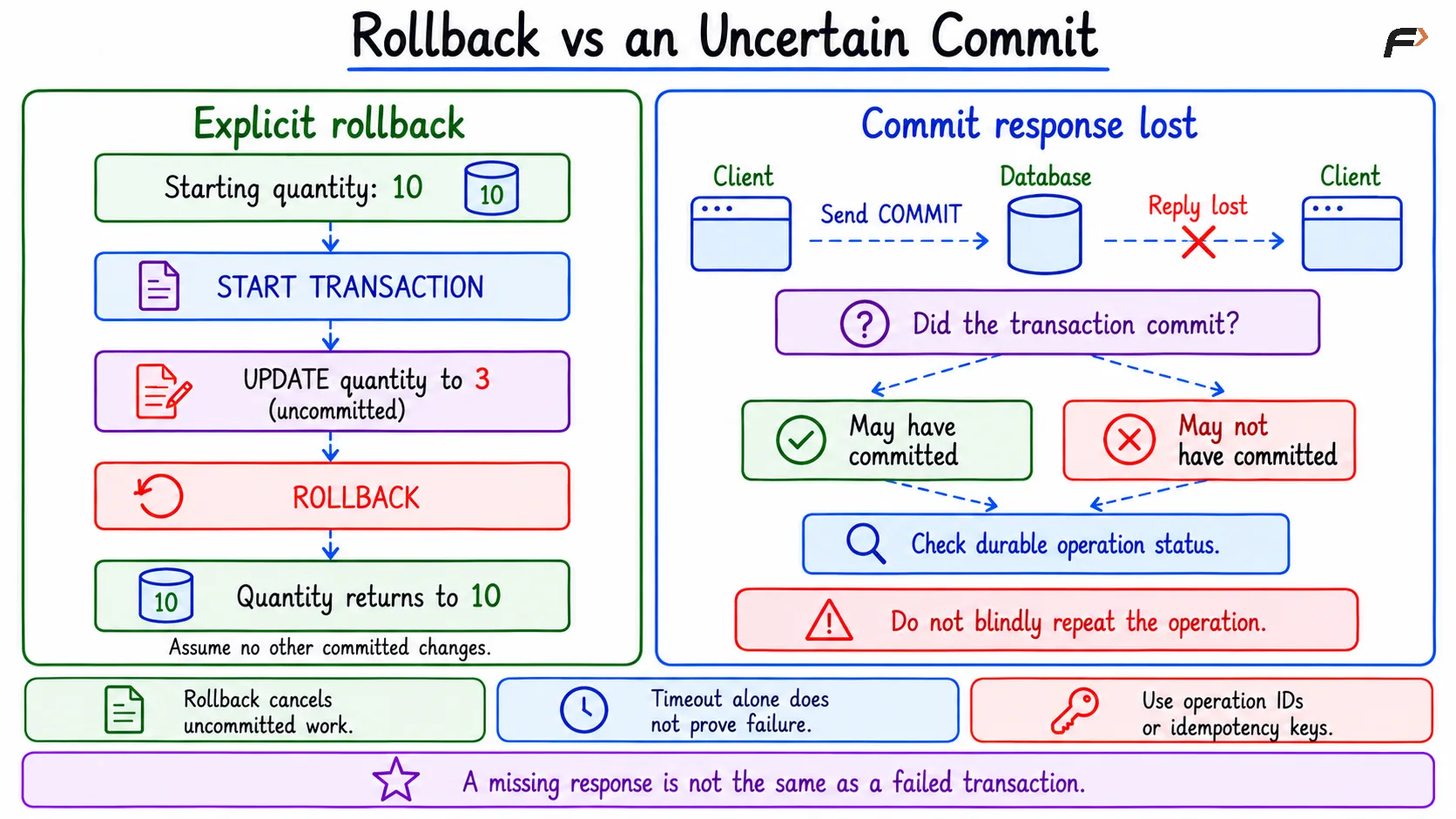
Rollback vs uncertain commit
Summary
Concurrency testing reveals lock waits, conflicts, and unsafe read–modify–write patterns. Conditional updates, explicit transactions, and appropriate retry handling help preserve the intended behavior.
Rollback handles unfinished work, while crash recovery reconstructs state after a server failure. Applications must also handle uncertain outcomes, because losing a response does not necessarily mean a transaction failed.
Be the first to add a comment.