Introduction
Many database queries need a range rather than a single matching value. A student portal might retrieve marks within a band, while an order system might find purchases made during a particular period.
SQL provides BETWEEN and NOT BETWEEN for these requirements. They express range conditions compactly, but their inclusive boundaries and handling of missing values need careful attention.
What Do BETWEEN and NOT BETWEEN Do?
BETWEEN tests whether a value lies within a range, including both endpoints. NOT BETWEEN negates that test.
WHERE column_name NOT BETWEEN lower_value AND upper_valueFor compatible numeric values and known boundaries:
Condition | Equivalent comparison |
|---|---|
|
|
|
|
The AND inside BETWEEN separates the two boundaries. It is part of the range syntax.
Filtering Numbers with BETWEEN
Consider this students table:
student_id | student_name | marks |
|---|---|---|
101 | Asha | 70 |
102 | Ravi | 65 |
103 | Meera | 90 |
104 | Kabir | 95 |
105 | Nila | 82 |
106 | Omar | NULL |
Retrieve students whose marks fall between 70 and 90:
SELECT student_name, marksFROM studentsWHERE marks BETWEEN 70 AND 90;The result contains:
student_name | marks |
|---|---|
Asha | 70 |
Meera | 90 |
Nila | 82 |
Asha and Meera qualify because both boundaries are included. Omar does not qualify because his mark is unknown.
The displayed row order is illustrative. Add ORDER BY when a specific order is required.
Excluding a Range with NOT BETWEEN
Use NOT BETWEEN to retrieve known values outside the range:
SELECT student_name, marksFROM studentsWHERE marks NOT BETWEEN 70 AND 90;The result contains:
student_name | marks |
|---|---|
Ravi | 65 |
Kabir | 95 |
The boundary values 70 and 90 are excluded from this result because they belong inside the range.
To select values strictly inside the boundaries instead, use explicit comparisons:
WHERE marks > 70 AND marks < 90For the sample data, only Nila qualifies. BETWEEN itself does not provide an option to make its endpoints exclusive.
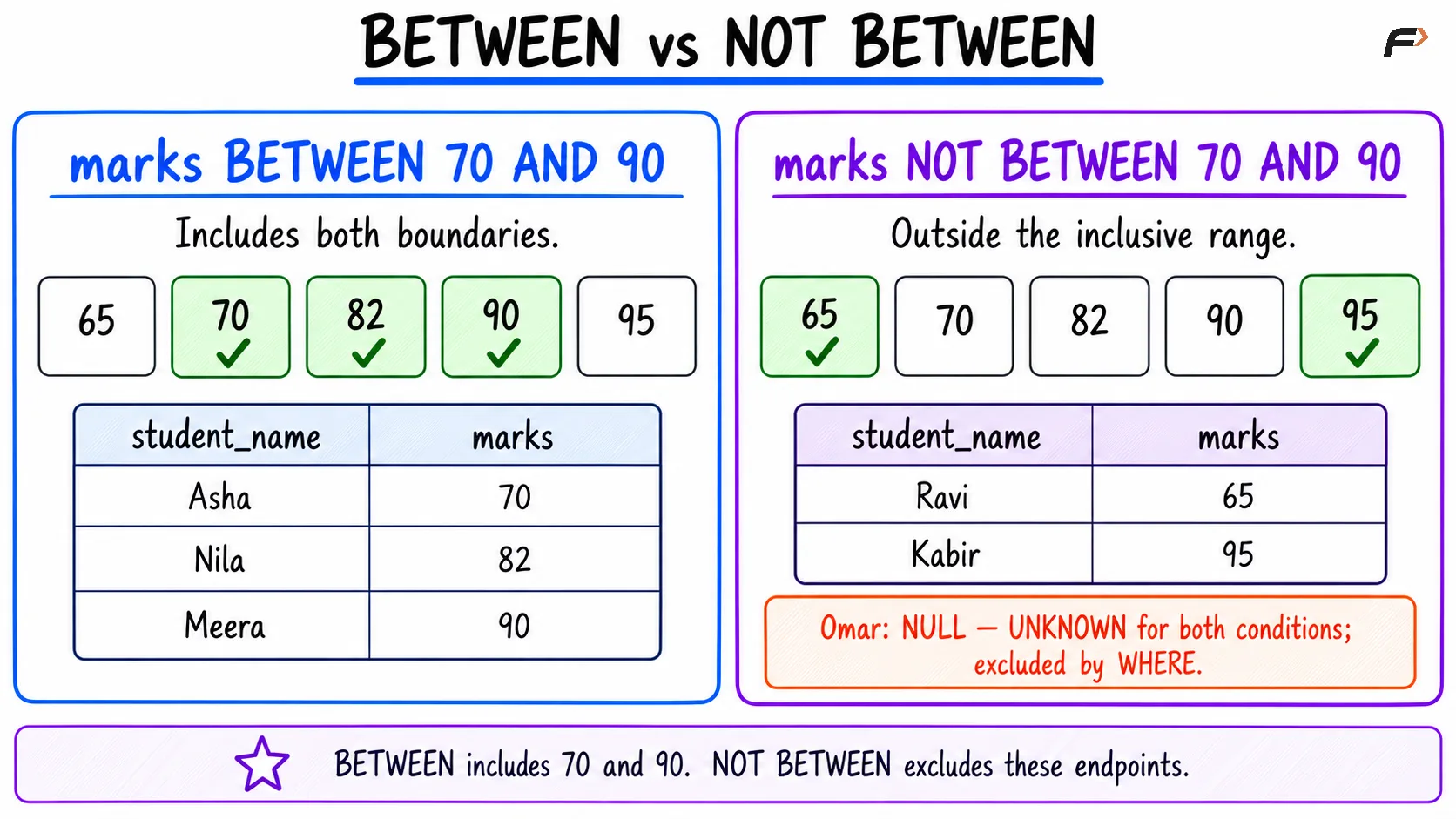
BETWEEN and NOT BETWEEN
Boundary Order and Combined Conditions
Write the lower boundary first and the upper boundary second.
WHERE marks BETWEEN 90 AND 70This does not automatically reverse the bounds. With ordinary numeric comparisons, no known value can be both at least 90 and at most 70.
You can combine a range with another condition:
SELECT student_id, student_name, marksFROM studentsWHERE marks BETWEEN 70 AND 90 AND student_id >= 103;Meera and Nila qualify. The first AND separates the range boundaries; the second connects the completed range test to another requirement.
When combining several alternatives with OR, use parentheses to make the intended grouping clear.
Using BETWEEN with Dates
For a column defined as DATE, an inclusive date range can be written as:
SELECT order_id, order_dateFROM ordersWHERE order_date BETWEEN CAST('2026-10-01' AS DATE) AND CAST('2026-10-31' AS DATE);This includes orders dated October 1 through October 31.
A column containing a time component requires more care. An upper bound representing October 31 at midnight does not include later times on that day.
For a MySQL DATETIME column named created_at, use a half-open interval to include the complete month:
SELECT order_id, created_atFROM ordersWHERE created_at >= '2026-10-01 00:00:00' AND created_at < '2026-11-01 00:00:00';This includes the start of October and excludes the start of November, covering all times within October without guessing the final fractional second.
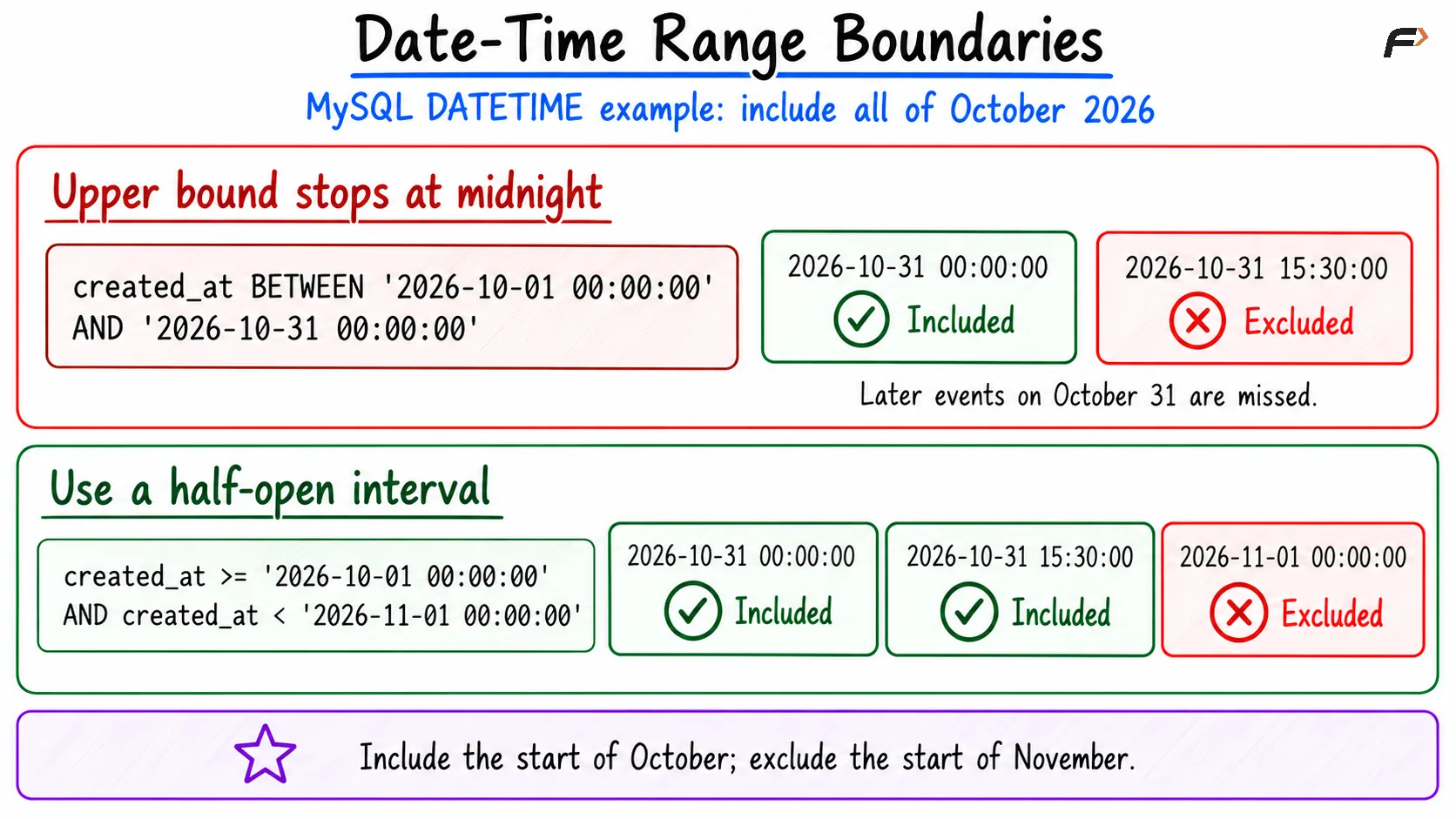
Date time range boundaries
NULL Values and Text Ranges
When the tested value is NULL, both BETWEEN and NOT BETWEEN produce unknown. A WHERE clause excludes that result.
Therefore, Omar appears in neither of the earlier queries. To include missing marks alongside values outside the range:
SELECT student_name, marksFROM studentsWHERE marks NOT BETWEEN 70 AND 90 OR marks IS NULL;This returns Ravi, Kabir, and Omar. Keep the boundaries non-null unless the requirement explicitly accounts for SQL’s three-valued logic.
Text ranges are also possible, but ordering depends on the column’s collation. For example, name BETWEEN 'A' AND 'M' does not mean “every name beginning with A through M.” A longer name beginning with M may compare after the complete string 'M'.
Use text patterns or more carefully defined conditions when filtering by prefixes.
Common Mistakes
Check these points when writing range filters:
Forgetting inclusive endpoints:
BETWEEN 70 AND 90includes both 70 and 90.Reversing the boundaries: Ordinary
BETWEENdoes not reorder them.Expecting NOT BETWEEN to include NULL: Add
IS NULLexplicitly when missing values should qualify.Using date-only bounds for timestamps: Account for the time component.
Mixing incompatible types: Avoid relying on implicit text-to-number conversions.
Using BETWEEN for separate choices: Use
IN (70, 80, 90)when only those individual values are wanted.
A range includes intermediate values. A membership list includes only the specified choices.
Summary
BETWEEN selects values within an inclusive range, while NOT BETWEEN selects known values outside it. Write the lower boundary first and use explicit comparisons when exclusive endpoints are needed.
Account for missing values, compatible types, and time components. Clear boundaries make range filters easier to read and help prevent records from being accidentally omitted.
Be the first to add a comment.