Introduction
An aggregate function performs a calculation across a set of input values and returns a single summary value. In SQL, MIN, MAX, SUM, and AVG help find the smallest value, largest value, total, and average without calculating them manually.
These functions can summarize an entire table, selected rows, or individual groups. Understanding how they handle missing and repeated values is essential because those details affect the meaning of the result.
An Example Relation
Consider a table named StudentMarks that stores students’ marks in the same examination. Each row represents one student’s result.
StudentMarks : initial data
StudentID | Name | Department | Marks |
|---|---|---|---|
101 | Asha | Computer Science | 80.00 |
102 | Ravi | Electronics | 60.00 |
103 | Meera | Computer Science | 90.00 |
104 | Arjun | Electronics | 70.00 |
105 | Neha | Computer Science | NULL |
106 | Kabir | Computer Science | 80.00 |
StudentID uniquely identifies each student. Assume that Marks uses the numeric type DECIMAL(5,2), which supports marks with two decimal places.
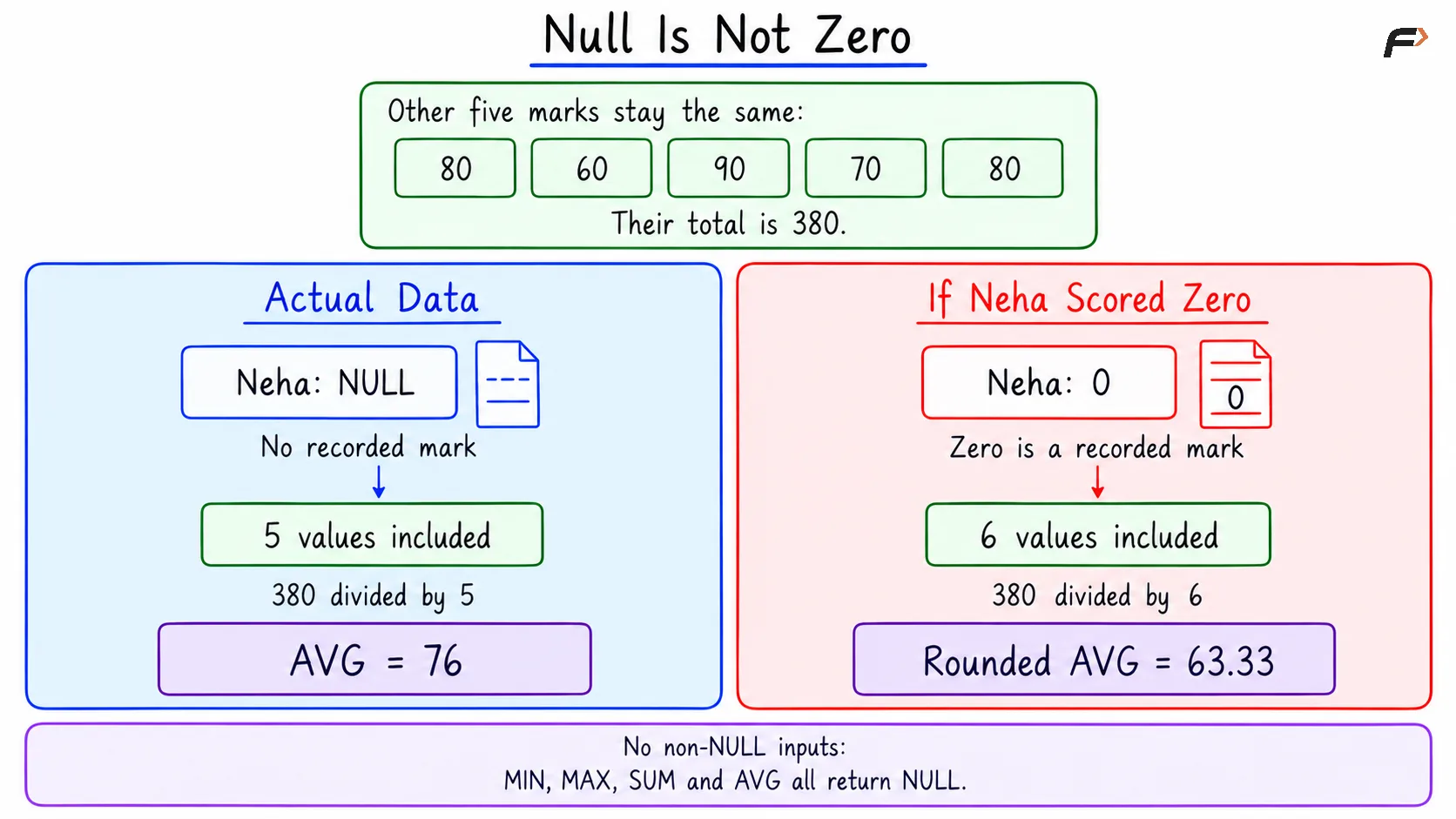
Neha’s NULL means that her marks have not been recorded; it does not mean that she scored zero. Asha and Kabir both scored 80, so the table also contains a repeated mark.
Finding the Smallest and Largest Values with MIN and MAX
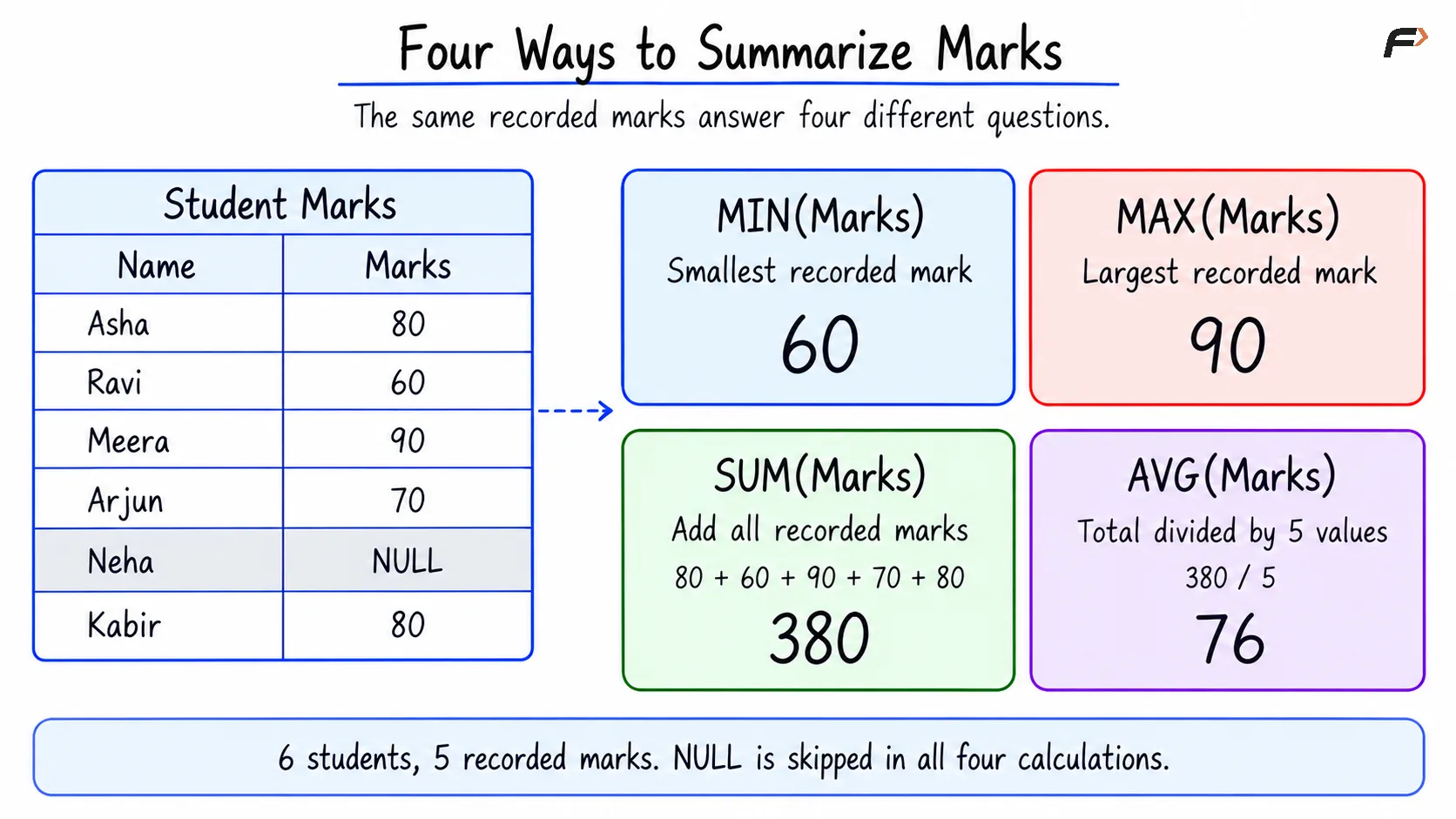
MIN returns the smallest non-NULL input value, while MAX returns the largest. For the Marks column, these functions identify the lowest and highest recorded scores.
Consider the following queries to find the lowest and highest recorded marks.
SELECT MIN(Marks) AS lowest_marks, MAX(Marks) AS highest_marksFROM StudentMarks;Expected result
lowest_marks | highest_marks |
|---|---|
60.00 | 90.00 |
The AS keyword gives each calculated column a readable name. Because the queries summarize the entire table without GROUP BY, each returns one summary row.
MAX(Marks) returns the highest mark, not the name or complete record of the student who received it. Similarly, MIN(Marks) returns only the lowest mark.
These functions also work with supported date and text types. For example, they can identify the earliest and latest dates; text values follow the database’s text comparison rules.
Calculating a Total with SUM
SUM adds the non-NULL numeric input values. It is useful for calculating totals such as combined marks, quantities, or expenses.
Consider the following queries to calculate the total recorded marks.
SELECT SUM(Marks) AS total_marksFROM StudentMarks;Expected result
total_marks |
|---|
380.00 |
The total is 80 + 60 + 90 + 70 + 80 = 380. Both occurrences of 80 contribute to the calculation because they represent marks recorded for two different students.
Calculating an Average with AVG
AVG calculates the arithmetic mean of the non-NULL numeric input values. It divides their total by the number of values included in the calculation.
Consider the following queries to calculate the average recorded marks, rounded to two decimal places.
SELECT ROUND(AVG(Marks), 2) AS average_marksFROM StudentMarks;Expected result
average_marks |
|---|
76.00 |
There are six student records but only five recorded marks. Therefore, the average is 380 / 5 = 76, where / represents division. Neha’s missing mark contributes neither a value to the total nor an entry to the denominator.
ROUND(..., 2) rounds the calculated average to two decimal places. It does not change the marks stored in the table.
FOUR WAYS TO SUMMARIZE MARKS
Handling NULL and Empty Results
All four functions ignore NULL input values. A recorded zero is different: it participates in the calculation, including the number of values used by AVG.
If no non-NULL input values are available, MIN, MAX, SUM, and AVG return NULL. This happens when all selected marks are missing or when no rows match the filter.
Consider the following queries to summarize marks for the Mathematics department, which has no rows in the example table.
SELECT MIN(Marks) AS lowest_marks, MAX(Marks) AS highest_marks, SUM(Marks) AS total_marks, AVG(Marks) AS average_marksFROM StudentMarksWHERE Department = 'Mathematics';Expected result
lowest_marks | highest_marks | total_marks | average_marks |
|---|---|---|---|
NULL | NULL | NULL | NULL |
WHERE selects matching rows before the aggregate calculations. Here, no rows match, so these queries return one summary row containing NULL for every calculation.
In particular, SUM returns NULL for this empty input. A total of zero would represent a different result: numeric values were available and their sum was zero.
NULL IS NOT ZERO
Handling Repeated Values with DISTINCT
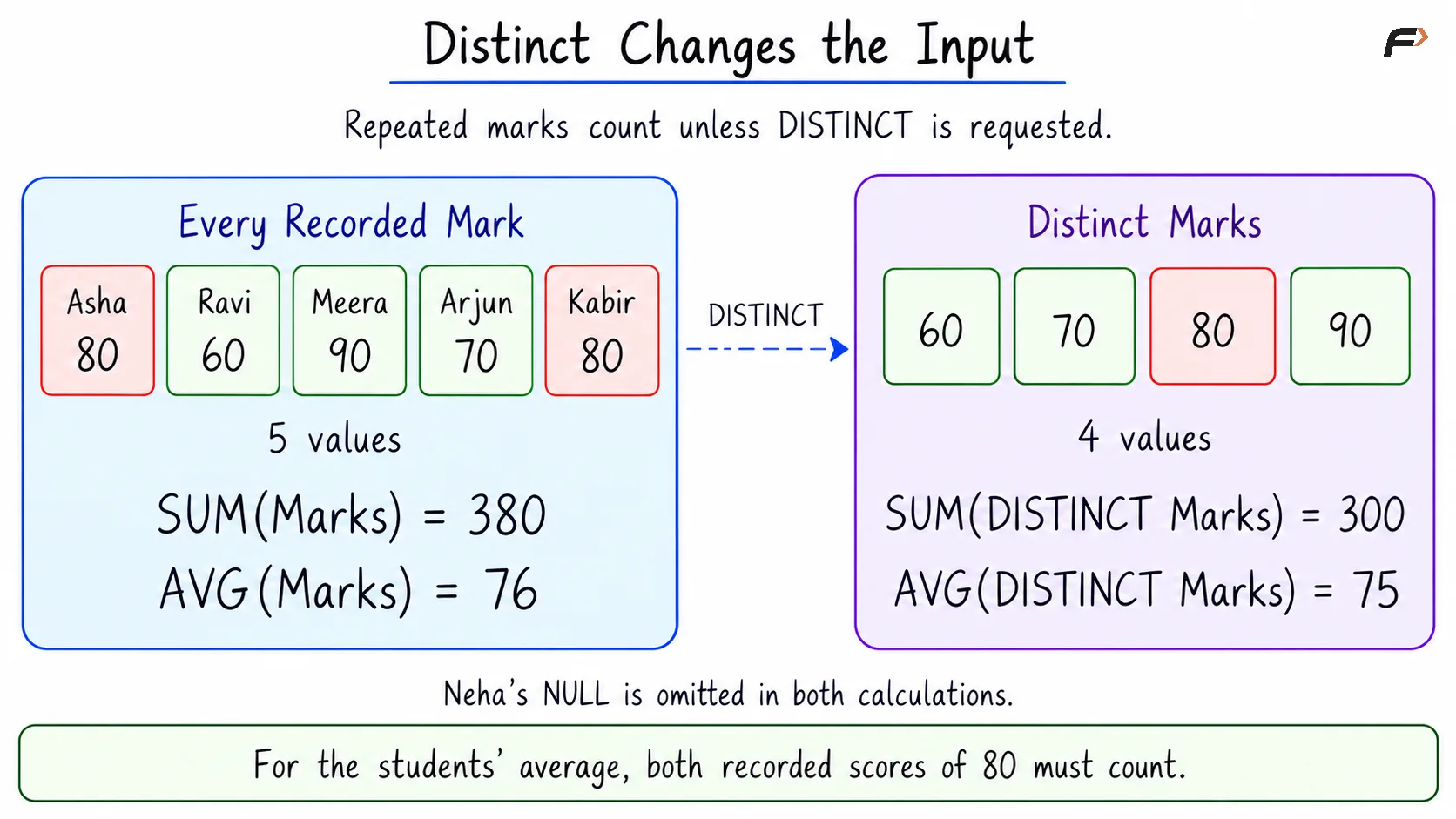
By default, SUM and AVG include every non-NULL input occurrence. Placing DISTINCT inside an aggregate function makes it use each different input value only once.
In StudentMarks, the recorded marks are 80, 60, 90, 70, and 80. The distinct marks are 60, 70, 80, and 90.
Consider the following queries to compare calculations over all recorded marks with calculations over distinct marks.
SELECT SUM(Marks) AS total_marks, SUM(DISTINCT Marks) AS distinct_total, ROUND(AVG(Marks), 2) AS average_marks, ROUND(AVG(DISTINCT Marks), 2) AS distinct_averageFROM StudentMarks;Expected result
total_marks | distinct_total | average_marks | distinct_average |
|---|---|---|---|
380.00 | 300.00 | 76.00 | 75.00 |
The distinct total is 60 + 70 + 80 + 90 = 300, and the distinct average is 300 / 4 = 75.
These calculations answer different questions. The ordinary average represents the students’ recorded marks, while the distinct average represents the different score values. Removing a repeated score is inappropriate when each student’s result should contribute separately.
DISTINCT inside the function does not delete table records. It also does not change the result of MIN or MAX, because repeating a value cannot change the smallest or largest value.
DISTINCT CHANGES THE OUTPUT
A Compact Example
Objective: Find the lowest, highest, total, and average recorded marks for each department, and display the departments alphabetically.
The relevant data is repeated below for reference.
StudentMarks
StudentID | Name | Department | Marks |
|---|---|---|---|
101 | Asha | Computer Science | 80.00 |
102 | Ravi | Electronics | 60.00 |
103 | Meera | Computer Science | 90.00 |
104 | Arjun | Electronics | 70.00 |
105 | Neha | Computer Science | NULL |
106 | Kabir | Computer Science | 80.00 |
GROUP BY Department places rows with the same department into a group. Each aggregate function then calculates a separate result for each group.
Consider the following queries to produce the department-wise marks summary.
SELECT Department AS department, MIN(Marks) AS lowest_marks, MAX(Marks) AS highest_marks, SUM(Marks) AS total_marks, ROUND(AVG(Marks), 2) AS average_marksFROM StudentMarksGROUP BY DepartmentORDER BY Department;Expected result
department | lowest_marks | highest_marks | total_marks | average_marks |
|---|---|---|---|---|
Computer Science | 80.00 | 90.00 | 250.00 | 83.33 |
Electronics | 60.00 | 70.00 | 130.00 | 65.00 |
The calculations use the recorded marks within each department:
Computer Science: The values are 80, 90, and 80. Their total is 250, and their average is approximately 83.33. Neha’s missing mark is excluded.
Electronics: The values are 60 and 70. Their total is 130, and their average is 65.
GROUP BY produces one summary row per department. ORDER BY Department arranges those rows alphabetically; it does not change the aggregate values.
Summary
MIN and MAX identify the smallest and largest input values, while SUM and AVG calculate a numeric total and arithmetic mean. These functions can summarize an entire selection of rows or calculate separate results for groups.
All four functions ignore NULL inputs and return NULL when no non-NULL values are available. Repeated values normally participate in the calculation, while DISTINCT changes the calculation to use different values only. Choosing the correct inputs is essential for producing a meaningful summary.
Be the first to add a comment.