Introduction
A database system is the complete environment used to store, manage, access, protect, and maintain data. It includes more than stored tables or database software. A working database system combines the database, database management system, applications, computing infrastructure, users, and operating procedures.
An online store, for example, may have a database containing customers and orders. The complete database system also includes the software that processes those orders, the servers running the software, the employees maintaining it, and the procedures used for backups and access control.
Database, DBMS, and Database System
The terms database, DBMS, and database system describe related but different concepts.
Term | Meaning | Example |
|---|---|---|
Database | An organized collection of stored data and metadata | Customer, product, and order records |
DBMS | Software that creates, manages, queries, and protects databases | MySQL or PostgreSQL |
Database system | The complete environment containing data, software, applications, infrastructure, people, and procedures | An online store’s order-management environment |
A database contains the data. A DBMS provides the software layer used to manage that data. A database system combines both with everything required to use and operate them.
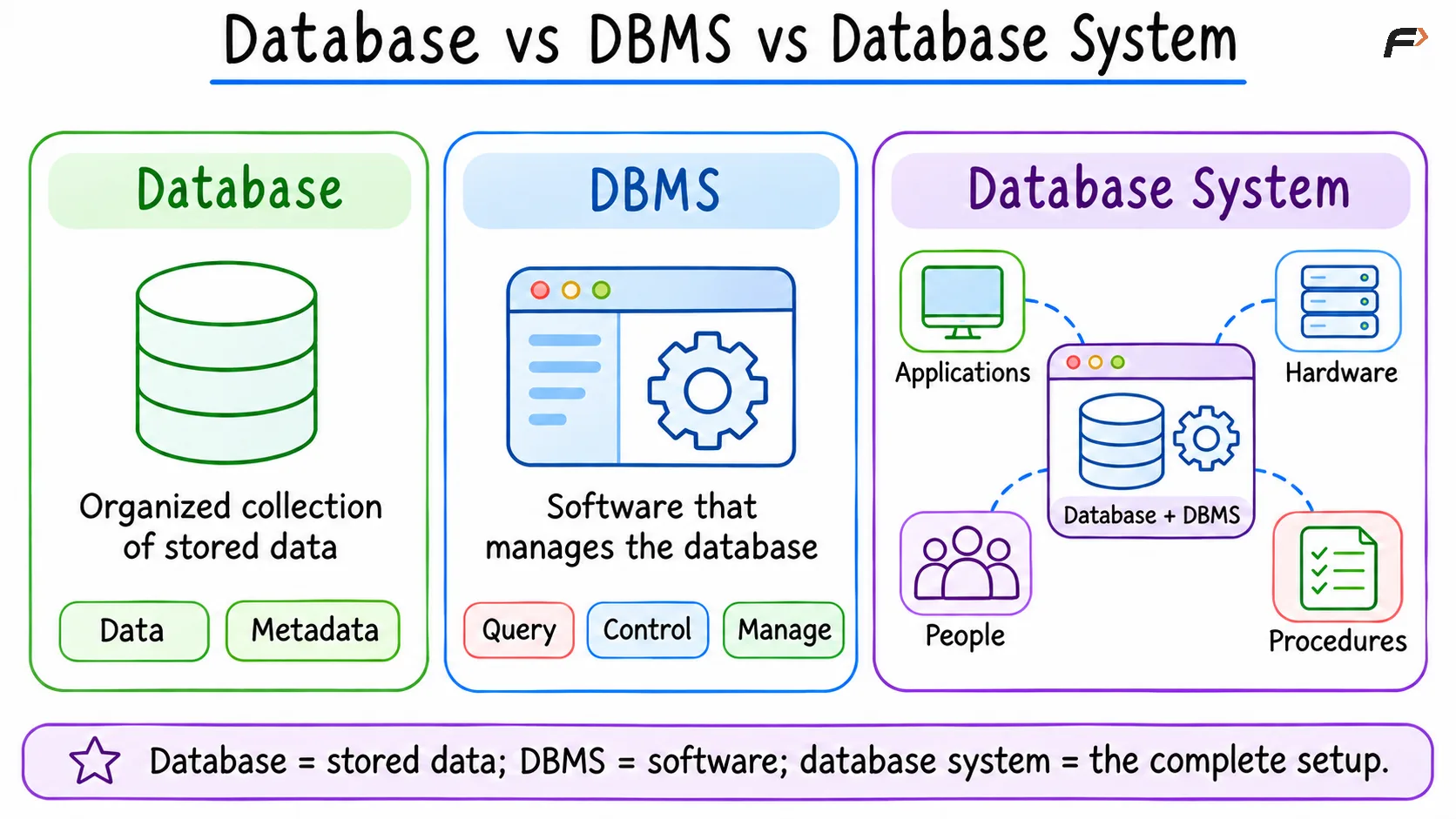
Database vs DBMS vs Database System
Main Parts of a Database System
Data and Metadata
Data represents stored facts, such as customer names, product prices, employee salaries, order statuses, and payment records. Metadata describes the structure and meaning of that data, including table names, column names, data types, constraints, indexes, and permissions.
Both data and metadata are essential. Raw values have limited meaning when their structure and rules are unknown.
Database Management System
The DBMS is the software responsible for managing databases. Its core responsibilities include creating database structures, storing and retrieving data, processing queries, coordinating concurrent operations, checking defined constraints, managing permissions, recording recovery information, and providing administration tools.
MySQL, PostgreSQL, Oracle Database, Microsoft SQL Server, SQLite, and IBM Db2 are examples of database management systems.
Applications and Interfaces
Most end users do not communicate directly with a DBMS. Instead, applications provide interfaces such as web pages, mobile applications, desktop software, administrative dashboards, reporting tools, application programming interfaces (APIs), and command-line clients that convert user actions into requests the DBMS can process.
Hardware and Infrastructure
The database system relies on physical and virtual computing resources, including processors, memory, SSDs or hard disks, servers, network equipment, backup storage, and cloud infrastructure.
A small embedded system may run on one device. A larger system may use many servers and managed services. Detailed deployment arrangements belong to a later database-architecture lesson.
People
People design, build, use, and maintain the system. Depending on the organization's size, these responsibilities may be handled by end users, application developers, database designers, database administrators, system administrators, security teams, and data analysts.
A small project may assign several responsibilities to one person. A large organization may distribute them across specialized teams.
Procedures
Procedures define how the database system should be operated. Common operational procedures include creating user accounts, approving access, deploying schema changes, monitoring system health, creating backups, testing recovery, responding to incidents, and retaining or deleting records.
A technically capable DBMS can still be operated poorly when procedures are missing or unreliable.
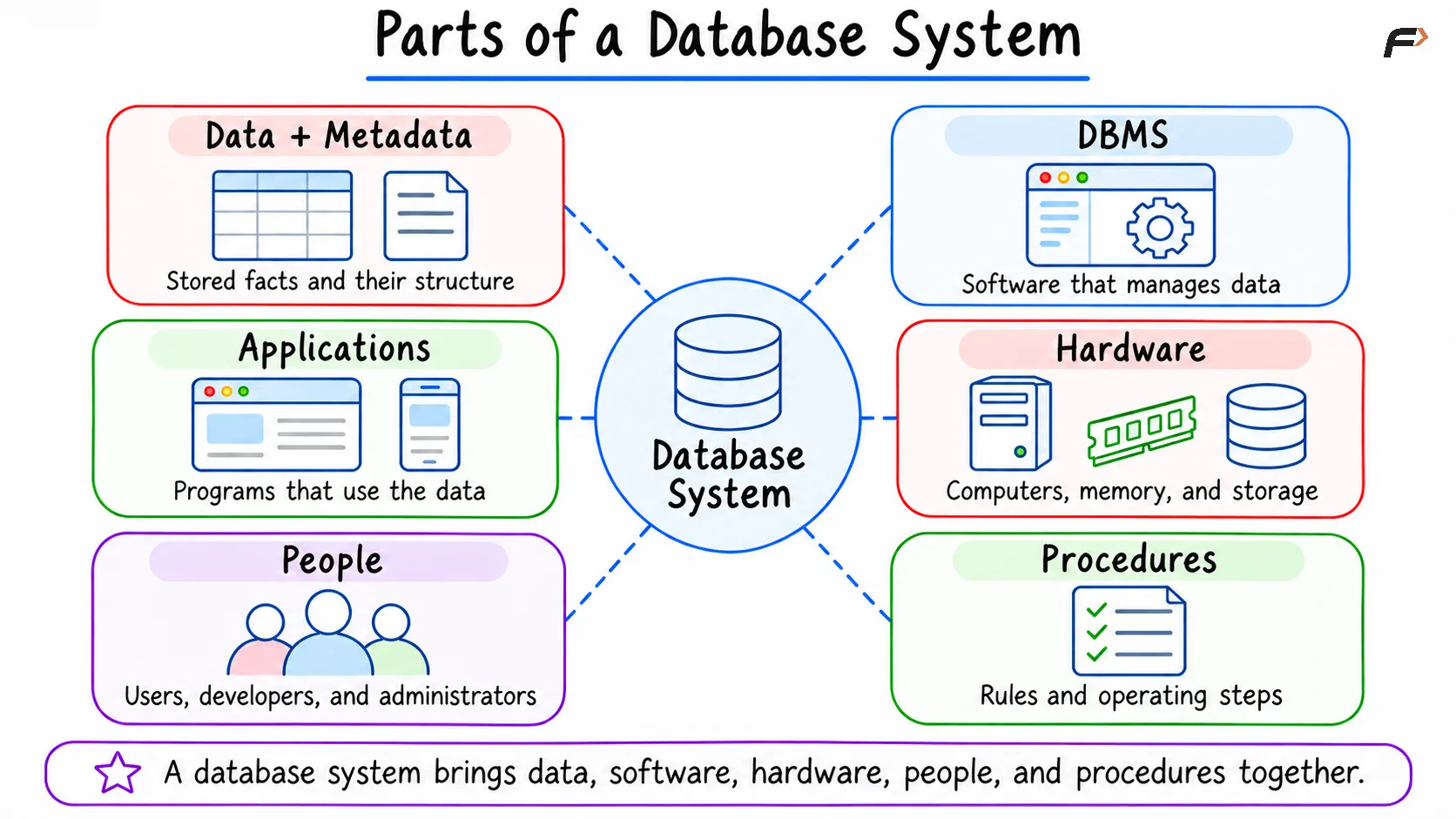
Parts of a Database System
How a Database System Works
Consider an online store displaying the orders for a customer.
The customer interacts with a web or mobile application. The application sends a request to the DBMS. The DBMS accesses the database, processes the request, and returns the result to the application.
A simplified flow is:
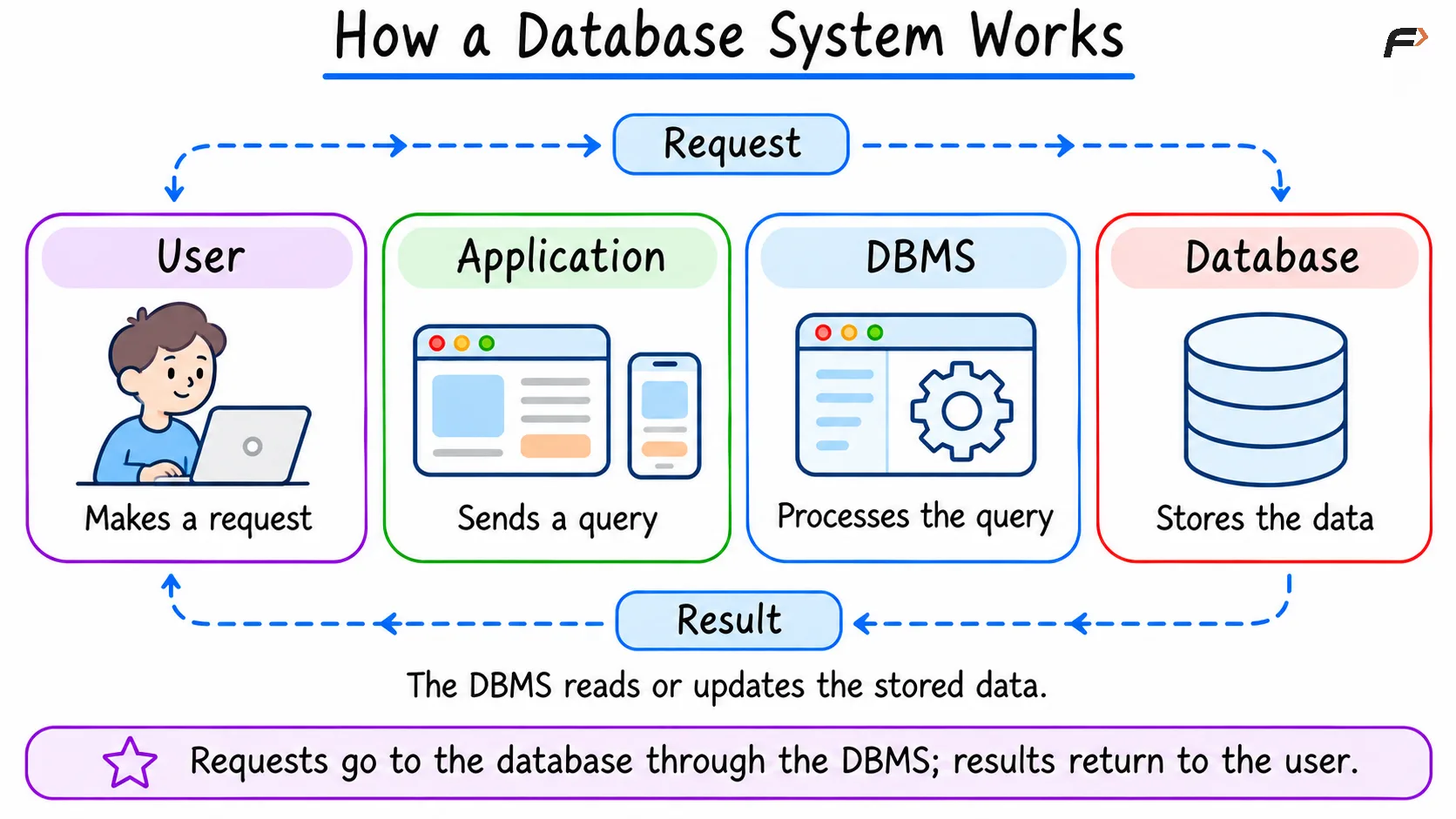
How a Database System Works
The exact path may also include networks, application servers, connection pools, caches, or other services. Those additions do not change the basic relationship between the application, DBMS, and database.
Example SQL Request
The application might retrieve orders for customer 42.
SELECT order_id, status, total_amountFROM ordersWHERE customer_id = 42;The syntax is identical because the statement uses standard SQL features.
Request Processing
A simplified request passes through these stages:
The application sends the SQL statement.
The DBMS authenticates the connection and checks access.
The DBMS validates the statement.
The query planner selects an execution strategy.
The execution engine reads the required data.
The DBMS creates a result set.
The result returns to the application.
The application formats the result for the user.
The DBMS acts as the controlled interface between applications and stored data. IBM describes a DBMS as software that enables administrators, applications, and users to interact with database data and metadata.
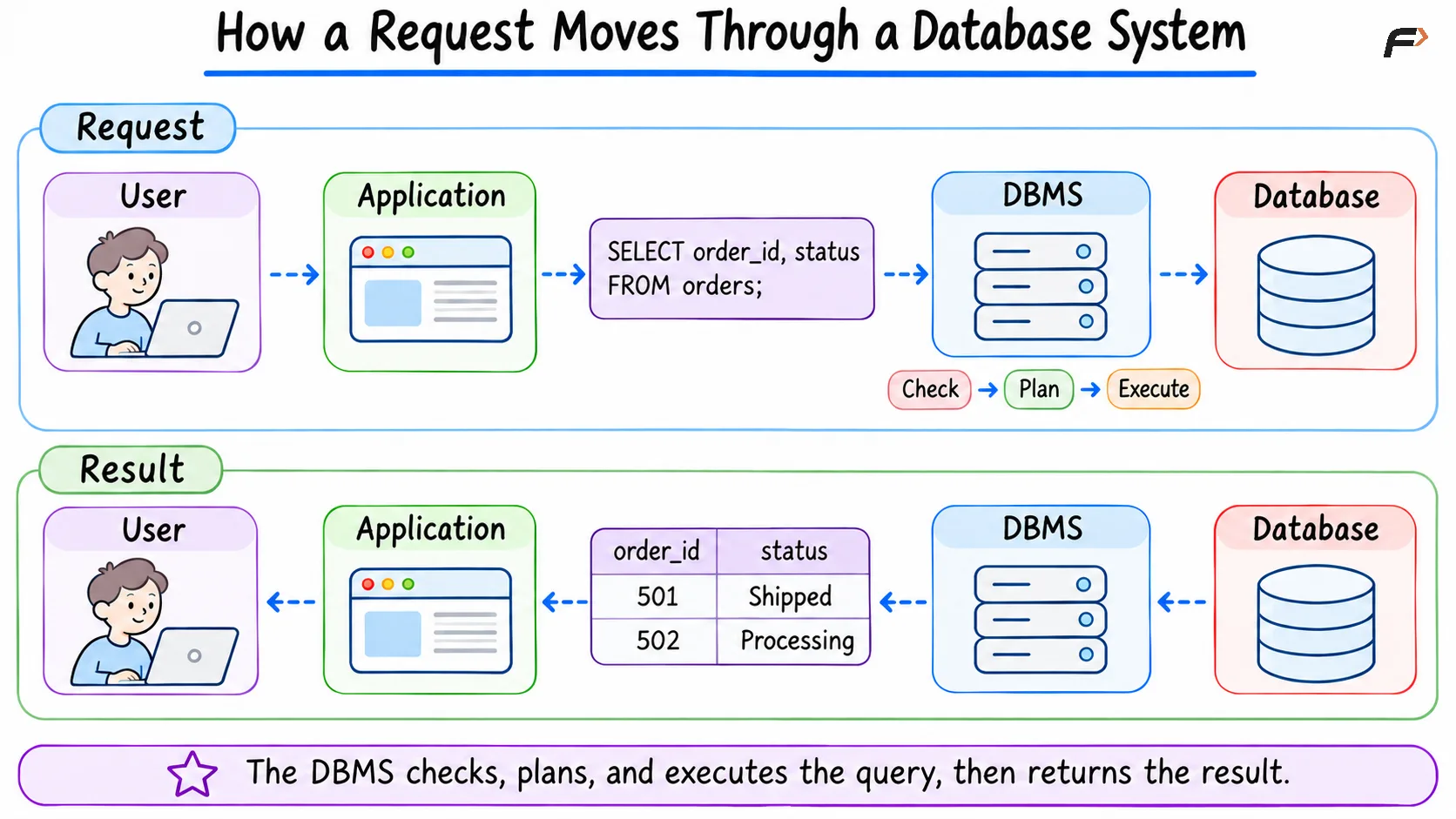
How a Request Moves Through a Database System
Services Provided by a Database System
Structured Data Management
The system organizes data according to a defined model.
In a relational database, data is commonly represented through tables, rows, columns, keys, and relationships. Other database families use different structures, which are covered separately.
Query and Update Processing
The DBMS provides methods for retrieving and changing data. In relational systems, SQL supports core operations such as reading data, adding records, updating values, removing records, defining structures, managing permissions, and controlling transactions.
Concurrent Access
Multiple applications and users may access the same data at the same time.
The DBMS coordinates these operations using transactions and concurrency-control mechanisms. The objective is to allow useful parallel work while controlling conflicting changes and intermediate states.
Exact behavior depends on the DBMS, storage engine, transaction settings, and operation.
Integrity Enforcement
A database system can enforce declared rules, including required values, unique identifiers, valid references, allowed data types, and accepted value ranges.
The system enforces only the rules that have been defined correctly. It cannot infer every business requirement automatically.
Security and Access Control
A DBMS can restrict operations according to users, roles, and privileges.
Access control may determine:
Which databases can be accessed
Which tables can be read
Which rows or columns are visible
Which records can be changed
Which administrative actions are permitted
Application security and database security work together. Database permissions do not replace secure application development.
Recovery Support
Many DBMS products maintain logs, checkpoints, backups, or related mechanisms that support recovery.
Recovery capabilities differ among systems and configurations. A transaction log does not replace tested backups, and replication does not automatically protect against every mistake.
Administration and Monitoring
Database systems require ongoing observation and maintenance. Common administrative activities include monitoring storage usage, tracking slow queries, reviewing failures, updating statistics, applying software updates, managing accounts, testing backups, and planning capacity.
People and Procedures Keep the System Operational
Database technology alone does not define a successful database system. The people operating the system need clear responsibilities, and important tasks need repeatable procedures.
Operational need | People involved | Supporting procedure |
|---|---|---|
Database design | Designers and developers | Schema review |
Application access | Developers and administrators | Connection and credential management |
User permissions | Administrators and security teams | Access approval and review |
Data protection | Administrators and operations teams | Backup and recovery testing |
Performance | Developers and administrators | Query monitoring and tuning |
Software changes | Development and operations teams | Tested deployment and rollback |
Incident handling | Operations, security, and business teams | Detection, escalation, and recovery |
The same DBMS can support a reliable system or an unreliable one depending on configuration, maintenance, procedures, and operational discipline.
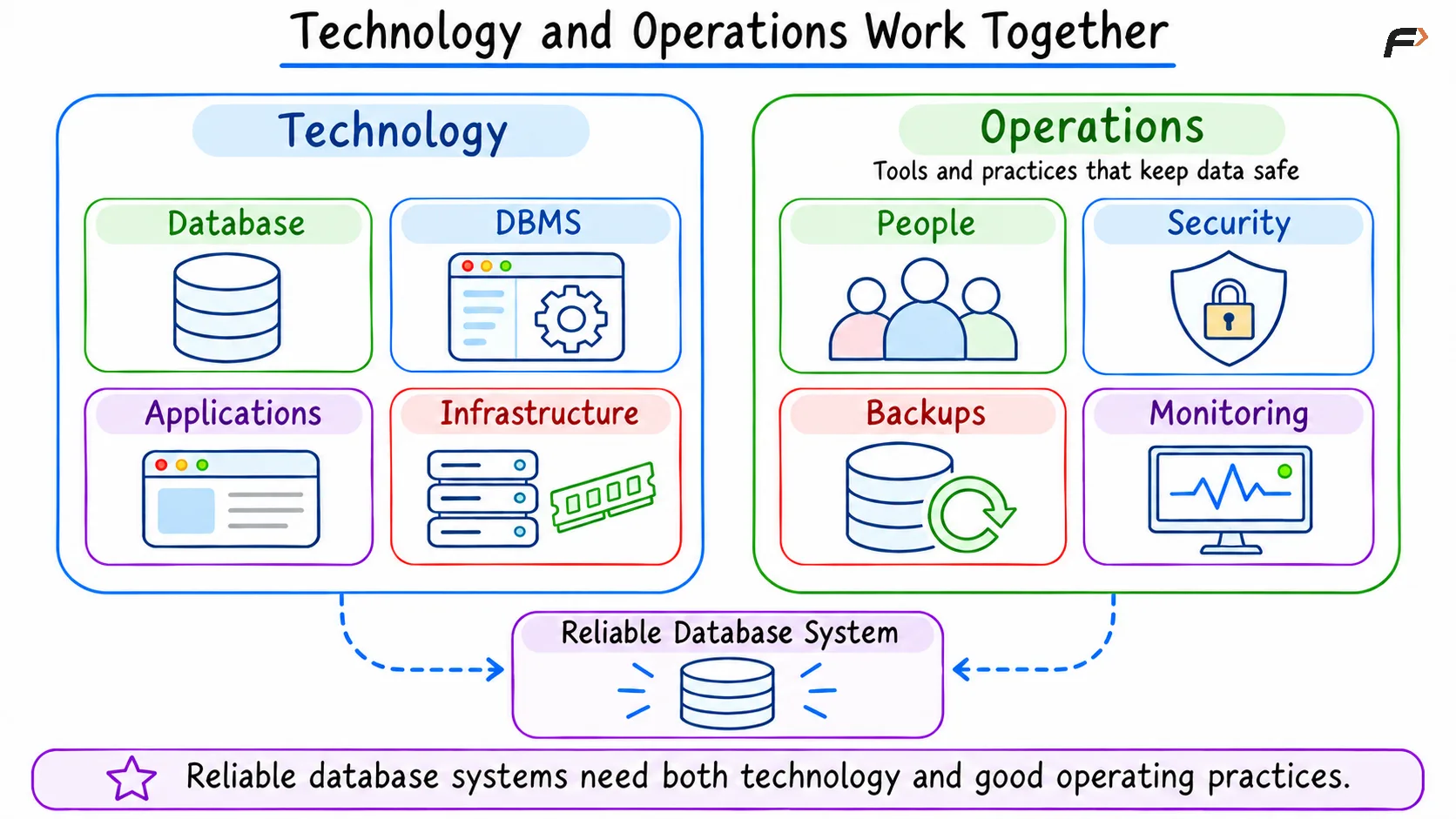
Technology and Operations Work Together
Database System Examples
Database systems support many kinds of applications.
Domain | Stored data | Typical operations |
|---|---|---|
Online retail | Customers, products, orders, payments | Search products and process orders |
Banking | Accounts, balances, transactions | Record transfers and calculate balances |
Healthcare | Patients, appointments, treatments | Schedule visits and retrieve records |
Education | Students, courses, results | Manage enrollment and grades |
Transportation | Routes, vehicles, bookings | Reserve seats and update schedules |
Inventory | Products, suppliers, stock movements | Track quantities and deliveries |
Each example includes more than a database. It also requires software, infrastructure, users, security, and operational procedures.
Database System Benefits and Trade-Offs
Benefit | Practical value | Trade-off |
|---|---|---|
Shared data management | Multiple applications can use controlled data | Coordination and governance are required |
Structured access | Queries provide repeatable data operations | Users need appropriate language or tools |
Central rule enforcement | Declared constraints can apply across applications | Incorrect rules can reject valid data or permit bad data |
Concurrent use | Multiple sessions can work with shared data | Conflicts and performance contention must be managed |
Access control | Operations can be limited by account or role | Permission design and review add administrative work |
Recovery mechanisms | Some failures can be recovered systematically | Recovery requires correct configuration and testing |
Data abstraction | Applications avoid many physical-storage details | Schema and interface changes can still affect applications |
Monitoring and administration | Health and performance can be observed | Skilled operation consumes time and resources |
A database system introduces overhead because it provides services beyond raw storage. CPU, memory, administration, maintenance, and operational expertise may all be required.
A simple application with small, temporary, or isolated data may not require a large database system. The appropriate solution depends on data volume, sharing, reliability, security, and operational requirements.
Database Products and Complete Systems
A DBMS product is only one part of a deployed database system.
DBMS product | Example complete database system |
|---|---|
MySQL | MySQL, an online-store application, order data, servers, administrators, and backup procedures |
PostgreSQL | PostgreSQL, a hospital application, patient data, access policies, monitoring, and recovery procedures |
SQLite | SQLite, a mobile application, local data, device storage, and application update procedures |
Microsoft SQL Server | SQL Server, business applications, company data, Windows infrastructure, users, and operational policies |
Installing PostgreSQL or MySQL provides DBMS software. It does not automatically create the surrounding applications, data model, security policy, backup process, or operating team.
Common Confusions About Database Systems
A database system is not only the stored data
The database contains data and metadata. The complete system also includes the DBMS, applications, infrastructure, people, and procedures.
A DBMS and a database are not the same
A database is the managed data collection. A DBMS is the software used to create, access, and control it.
MySQL and PostgreSQL are DBMS products
They can become parts of database systems when combined with databases, applications, hardware, users, and operating procedures.
A database server is not always a separate physical machine
The term may describe software providing database services. The DBMS can run on a dedicated server, a virtual machine, a cloud service, a container, or the same device as an application.
A database system does not automatically guarantee accurate data
Accuracy depends on correct inputs, constraints, application logic, permissions, procedures, and maintenance.
Summary
A database system is the complete environment used to store, manage, access, and protect data. It combines the database, DBMS, applications, infrastructure, people, and operating procedures. Together, these components support data processing, concurrent access, integrity, security, and recovery. Understanding their roles helps explain how database systems operate and why reliable data management requires more than database software alone.
Be the first to add a comment.