Introduction
An algorithm, flowchart or pseudocode explains how to solve a problem. A programming language lets us express that solution in a form that can actually run.
The important order is:
Problem => Algorithm => Pseudocode or Flowchart => Program
A programming language does not replace logic. It gives logic a precise form. If the algorithm is wrong, writing it in C++, Java or Python will not automatically make it correct.
What a Programming Language Provides
A programming language is a formal system for writing instructions and data in a way that can be processed by a computer through tools such as a compiler, interpreter or runtime.
Computers ultimately work with low-level representations such as binary. Programming languages let us work with meaningful names, expressions and statements instead of writing long sequences of zeros and ones.
A language provides:
Feature | Purpose |
|---|---|
Vocabulary | keywords and built-in names |
Syntax | rules for writing valid statements |
Semantics | meaning of written statements |
Data representation | numbers, text, booleans and collections |
Control flow | sequence, conditions, loops and function calls |
Abstraction tools | reusable named pieces of behaviour |
For example:
IF age >= 18
    DISPLAY "Eligible"
END IF
The syntax asks whether this is written correctly according to the language’s rules. The semantics describe what it means: compare age with 18, then display a message if the condition is true.
Correctness asks a different question: does this logic satisfy the requirement?
If the requirement says people aged 18 or above are eligible, then age >= 18 is correct. If we accidentally write age > 18, the code may still be syntactically valid, but it wrongly excludes age 18.
Syntax, Semantics and Correctness
These three ideas are easy to mix up, but they are different.
Idea | Question It Answers |
|---|---|
Syntax | Is the statement written in a valid form? |
Semantics | What does the statement mean? |
Correctness | Does that meaning solve the required problem? |
A program can have correct syntax but wrong logic.
For example:
IF marks > 40
    DISPLAY "Pass"
END IF
If the rule is “marks at least 40 pass”, then this condition is wrong because it excludes exactly 40. The program may run, but the meaning does not match the requirement.
This is why learning syntax is necessary, but not sufficient. A programmer must also understand the problem.
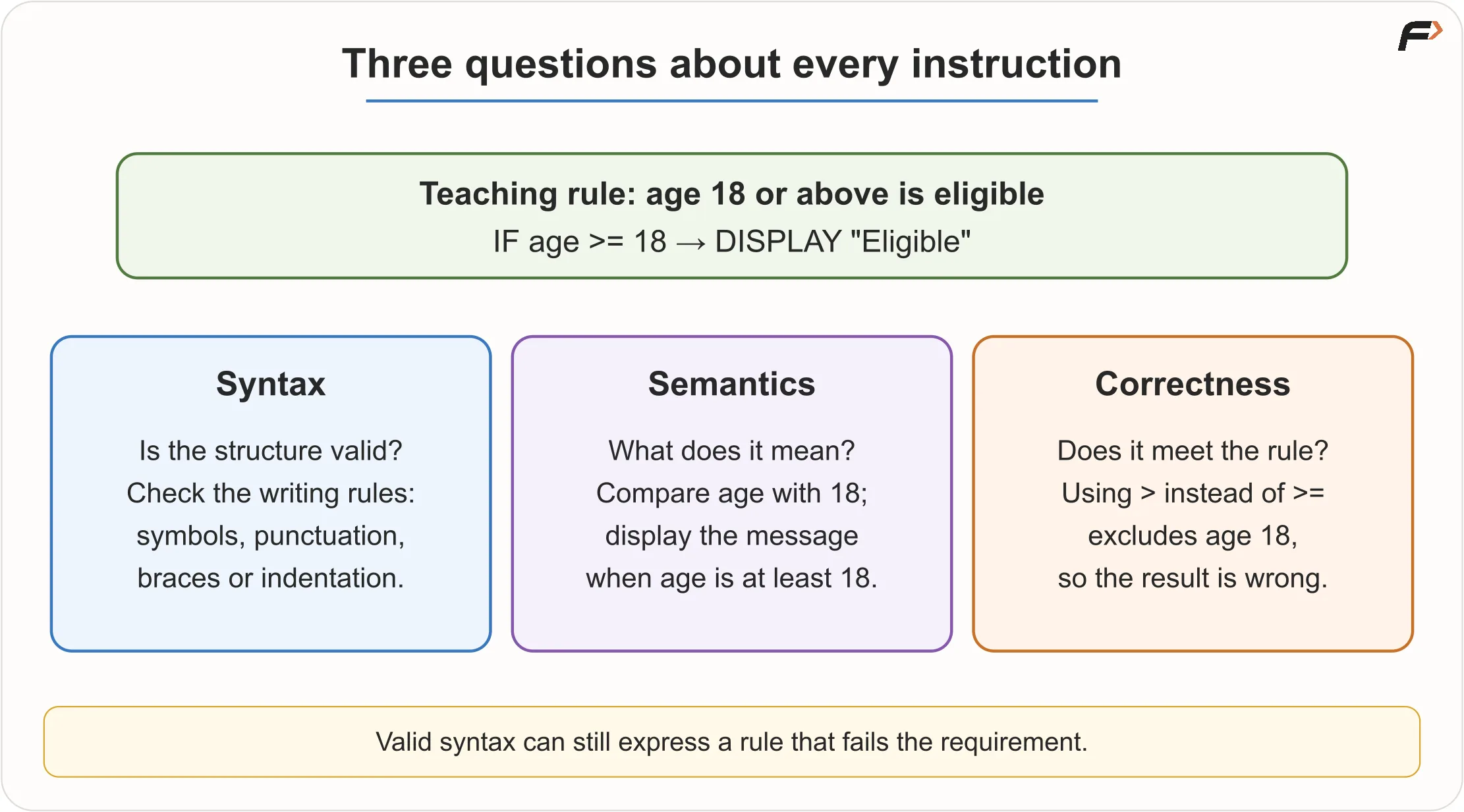
Syntax, Semantics and Correctness
Abstraction in Programming Languages
Abstraction means using a higher-level idea without handling every low-level detail yourself.
When you write:
total = price + taxyou do not manually control CPU registers, memory addresses or machine instructions. The programming language and its tools handle many lower-level details.
A simple ladder looks like this:
Problem idea => Algorithm => Source code => Language tools => Machine instructions => Hardware execution
At each level, some details are hidden so that we can focus on the right level of work.
Abstraction is helpful, but it does not remove the need for precision. The program still needs correct instructions. A vague idea must eventually become exact logic.
What Happens When You Press Run?
When you press Run, several things happen behind the scenes. The exact process depends on the language and environment, but the general idea is similar.
For a simple program that adds two numbers:
The source code is saved in a file or workspace.
A compiler, interpreter or runtime reads the program.
The tool checks the program and prepares it for execution.
The operating system starts or uses a running process.
The program receives input.
The CPU performs the required operations.
The result is displayed.
The button looks simple, but it hides a chain of tools and system actions.
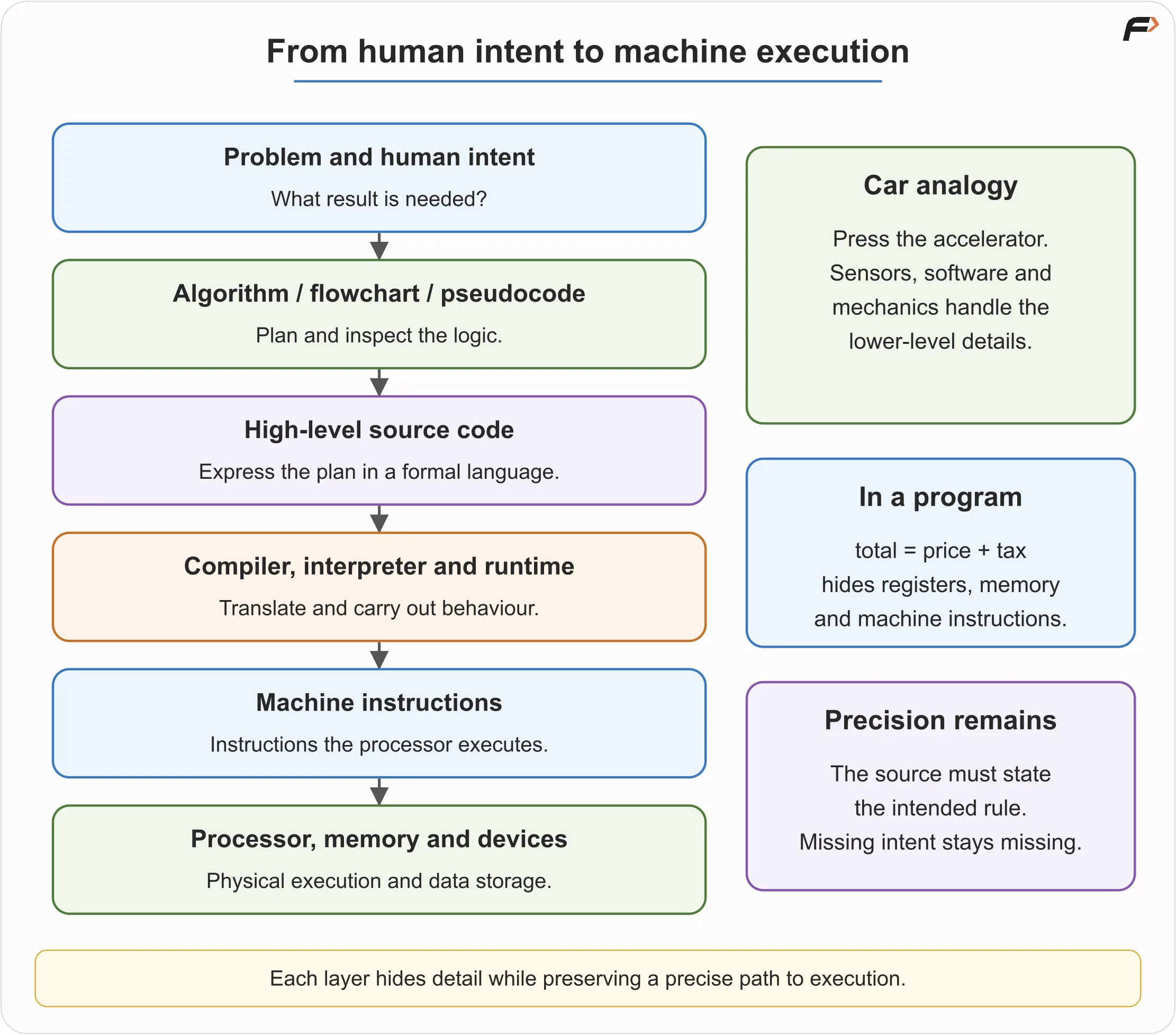
Abstraction
Development Tools
Different tools play different roles.
Tool | Role |
|---|---|
Code editor | Helps write and organise source code |
IDE | Combines editing, running, debugging and project tools |
Compiler | Translates source code into another executable or intermediate form |
Interpreter | Executes instructions directly or through an intermediate form |
Runtime | Provides services needed while the program runs |
Terminal | Text interface used to run commands and programs |
Installing a code editor is not always enough. For example, writing C++ in an editor still requires a C++ compiler. Similarly, Java needs Java tools, and Python needs a Python interpreter.
This is a common beginner confusion: the place where you type code and the tool that runs code are not always the same thing.
Compiled and Interpreted Languages
People often say C++ is compiled, Python is interpreted, and Java runs on the JVM. These labels are useful as a starting point, but real execution can have more steps.
Here is a simple view:
Language | Common Execution Idea |
|---|---|
C++ | Source code is compiled and linked into an executable |
Python | Source code is processed by a Python implementation and executed through a runtime |
Java | Source code is compiled into bytecode that runs on the JVM |
A CPU does not directly understand a C++ for loop, a Python if, or a Java class. Language tools connect these human-readable statements to lower-level execution.
Do not treat “compiled” and “interpreted” as fixed quality labels. Performance depends on implementation, optimisation, workload and environment.
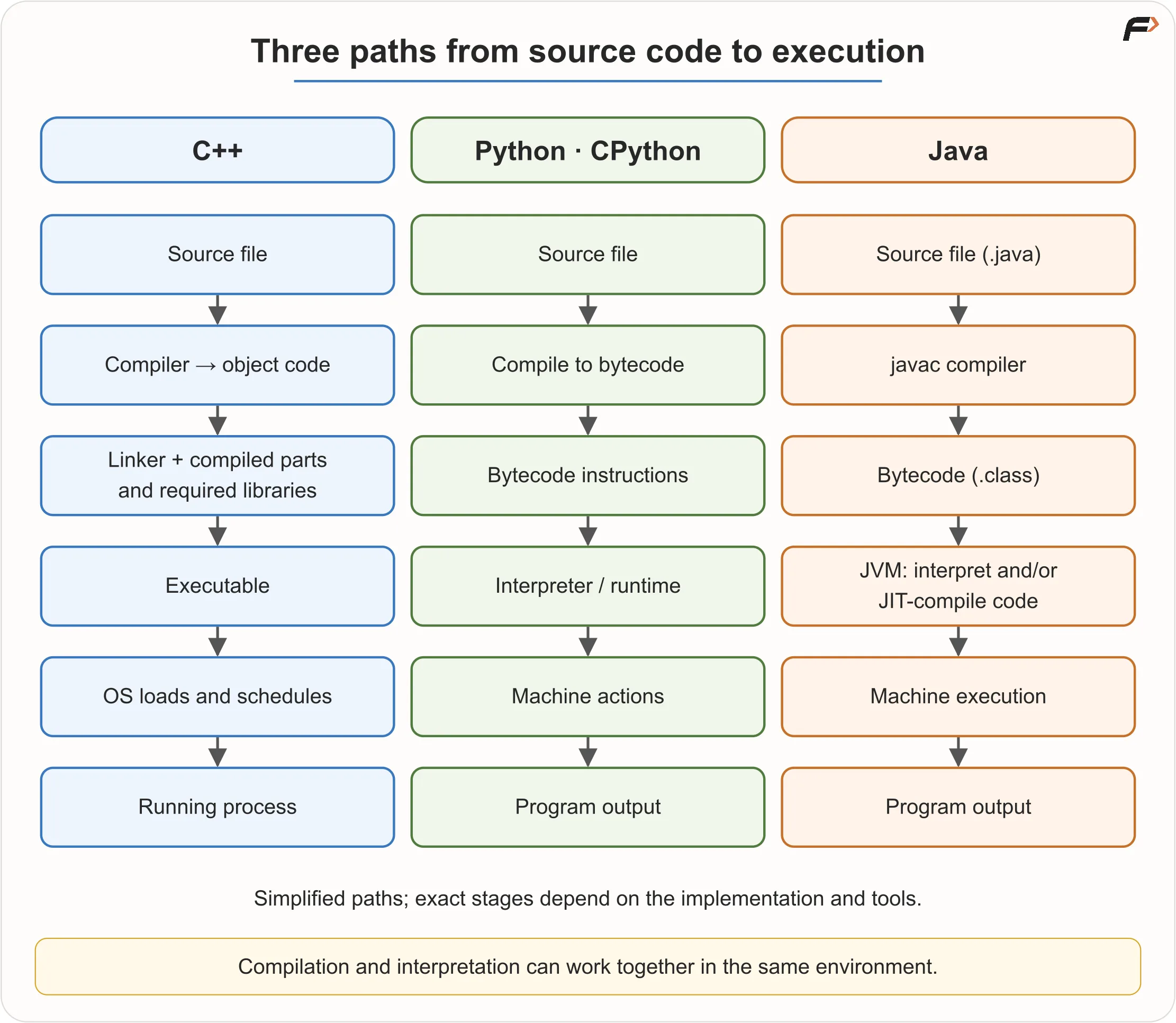
Execution Paths
Why So Many Languages Exist
Different kinds of software have different needs. Some need high performance. Some need quick development. Some need strong safety rules. Some need easy web integration. Some need direct hardware access.
Languages differ in:
performance
memory control
readability
safety
ecosystem
portability
tooling
platform support
developer productivity
suitability for a domain
A workshop has different tools because different jobs need different strengths. Programming languages are similar, though they overlap much more. Many languages can solve the same problem, but some make a particular kind of work easier.
Language Ecosystem
A language is not only its syntax. Its ecosystem also matters.
A language ecosystem includes:
standard libraries
third-party packages
frameworks
build tools
debuggers
documentation
community support
existing company codebases
A library provides reusable code. A framework gives a structured foundation for building applications.
For example, two languages may both be capable of backend development. A team may still choose one because it already has existing code, trained developers, useful libraries and production tools in that ecosystem.
Technical possibility and practical fit are not always the same thing.
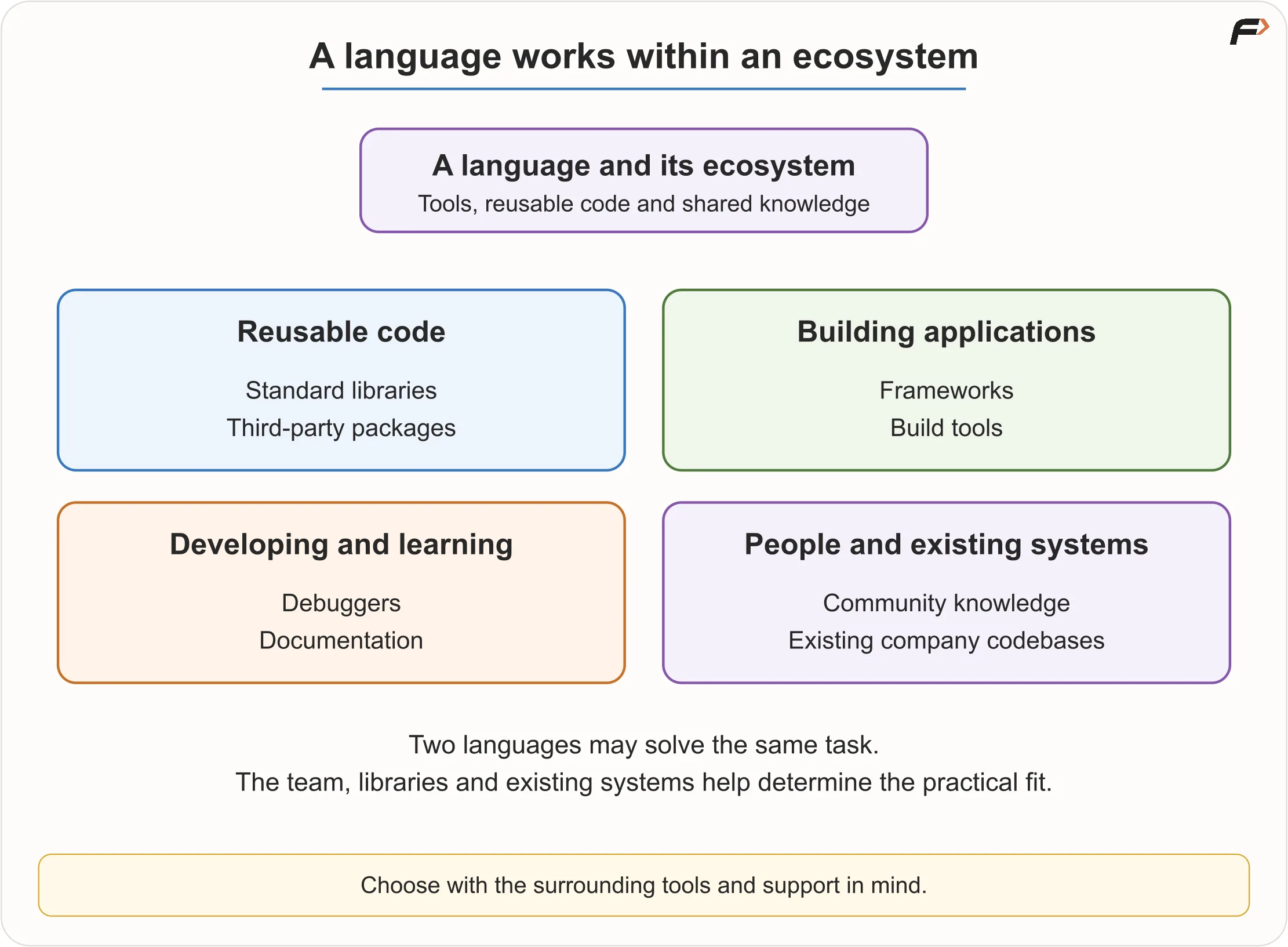
Language Ecosystem
A Practical Language Map
These are common uses, not strict boundaries.
Language | Useful Mental Model | Common Uses |
|---|---|---|
C | Small, procedural language with direct system access | operating systems, embedded systems, firmware |
C++ | Performance, control and high-level abstractions | DSA, competitive programming, games, browsers, native applications |
Java | Structured, statically typed language on a managed runtime | backend systems, enterprise software, Android codebases |
Python | Readable, high-level language with a large ecosystem | learning, automation, data, AI, scripting, backend work |
JavaScript | Main language of browser interactivity, also used on servers | frontend, web apps, full-stack development |
Go | Simple compiled language with good concurrency support | cloud services, backend systems, command-line tools |
C# | Managed language associated with .NET | backend, Windows apps, enterprise software, Unity games |
Kotlin | Modern JVM language with strong Android support | Android apps, backend development |
Swift | Apple-platform language | iOS, macOS and Apple ecosystem apps |
Rust | Systems language focused on performance and memory safety | systems software, performance-sensitive components |
A language can often do more than its most famous use case. Python is not only for AI. C++ is not only for DSA. JavaScript is not only for small browser effects. But knowing common strengths helps beginners choose a practical path.
C++, Java and Python for Beginners
Many beginners ask whether they should start with C++, Java or Python. All three can be good starting points, depending on your goal.
Start With | When It Fits | Keep In Mind |
|---|---|---|
C++ | DSA, competitive programming, performance interest, college uses C/C++ | Learn the useful subset first; the full language is large |
Java | structured learning, backend goals, placement preparation, college support | Keep the algorithm visible beneath setup code |
Python | beginner-friendly syntax, automation, data, AI, quick experimentation | Understand what built-in operations are doing |
There is no universal best language. A better question is:
Best for what goal, in what environment, with what support?
How to Choose Your First Language
Ask these questions:
What is my immediate goal: DSA, college exams, web, apps, data or systems?
What language does my college, mentor or coding platform support?
Which language has the best teaching support around me?
Do I already know the basics of one suitable language?
Which ecosystem will I need after learning the fundamentals?
With no external restriction:
Choose C++ if DSA and competitive programming are central.
Choose Java if structured programming, OOP, backend or placement preparation fits your path.
Choose Python if you want an easier syntax start, or if automation, data or AI interests you.
If you already know one suitable language, it is usually better to build on it instead of restarting again and again.
Consistent practice matters more than chasing the “perfect” first language.
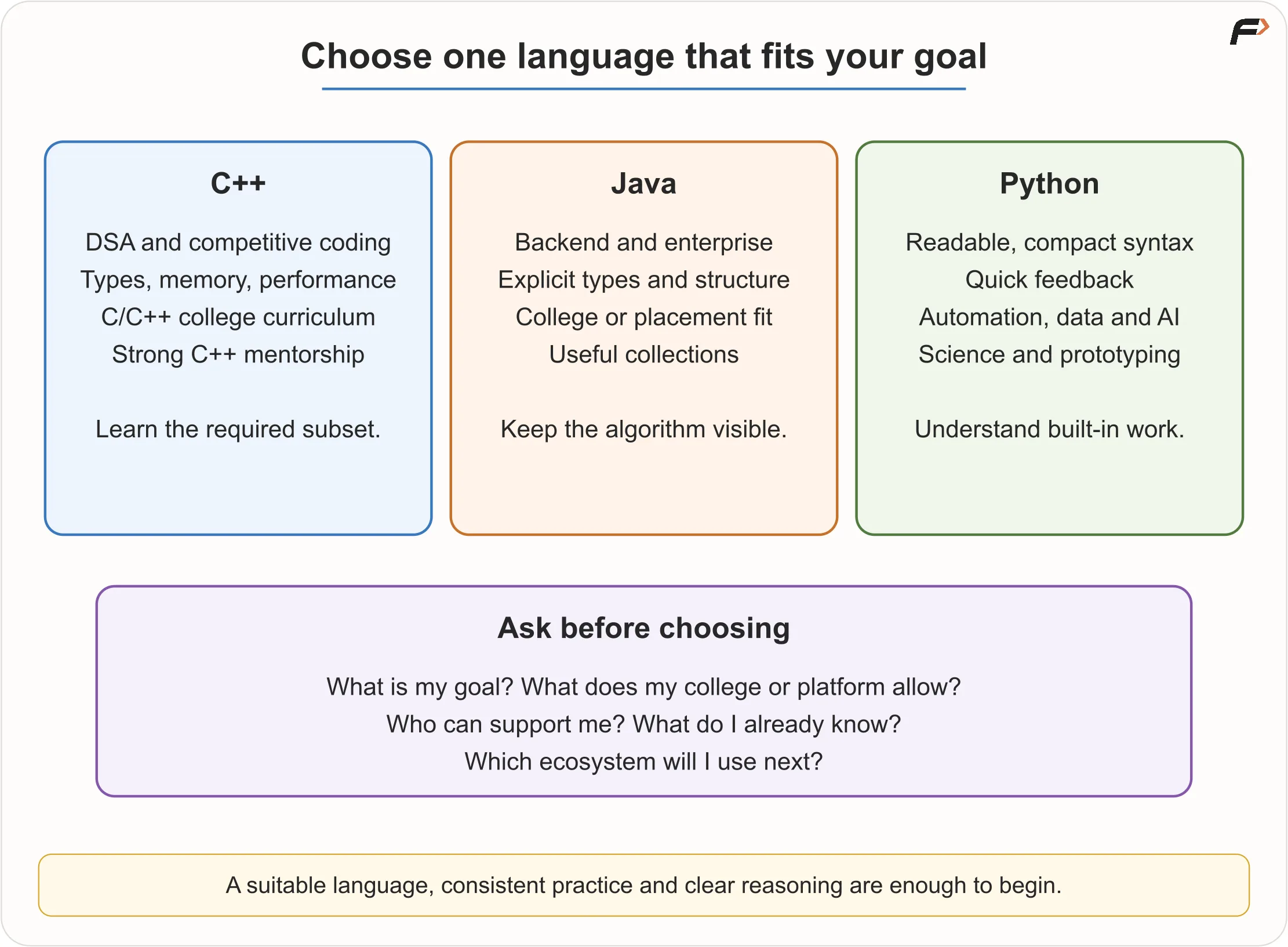
Choose Your First Language
One Algorithm in Three Languages
Problem:
Read an integer and display whether it is even or odd.
The language-independent logic is:
READ number

IF number MOD 2 equals 0
    DISPLAY "Even"
ELSE
    DISPLAY "Odd"
END IF
The core idea is the same everywhere:
Receive a number.
Find the remainder after division by 2.
If the remainder is 0, the number is even.
Otherwise, it is odd.
C++ Preview
int number;
std::cin >> number;

if (number % 2 == 0) {
    std::cout << "Even";
} else {
    std::cout << "Odd";
}
Java Preview
int number = scanner.nextInt();

if (number % 2 == 0) {
    System.out.println("Even");
} else {
    System.out.println("Odd");
}
Python Preview
number = int(input())

if number % 2 == 0:
    print("Even")
else:
    print("Odd")
The syntax changes. The algorithm does not.
C++ uses braces and semicolons. Java has more surrounding structure. Python uses indentation. But all three versions check number % 2 == 0.
Zero is even. Negative integers can also be even or odd. Checking whether the remainder equals zero works for identifying even numbers.
How Much Language Is Enough for DSA?
You do not need to master an entire language before starting DSA. You need enough language knowledge to express and test logic.
Before beginning DSA seriously, learn:
Basic program structure.
Input and output.
Variables and data types.
Operators and expressions.
Conditions.
Loops.
Functions.
Arrays or lists.
Strings.
Basic debugging.
Common standard containers or collections.
In C++, this may include arrays, strings, vectors, pairs, maps, sets and basic STL usage.
In Java, this may include arrays, strings, ArrayList, HashMap, HashSet, queues and stacks.
In Python, this may include lists, strings, dictionaries, sets, tuples and common built-in functions.
Advanced GUI development, file handling, frameworks and deep object-oriented design are not required before starting basic DSA.
What DSA Adds
Programming lets us express instructions. Data Structures and Algorithms help us choose better ways to organise data and solve problems as input size grows.
For example, checking 10 names one by one is easy. Searching through millions of names raises bigger questions:
How is the data stored?
Can it be searched faster?
How much memory is used?
Does the approach still work when input grows?
That is where DSA becomes important.
A useful learning progression is:
Programming basics => Logic and debugging => DSA => Projects
Projects then combine language knowledge, DSA, interfaces, data, files, networks and real-world requirements.
Language Myths to Avoid
Myth | Reality |
|---|---|
C++ automatically makes you better at DSA | DSA skill comes from reasoning and practice |
Python is not a real programming language | Python is widely used in real software, automation, data and AI |
Short Python code is always fast | Short code can still hide large computation |
Java is too verbose for interviews | Java is valid where accepted; familiarity matters |
Java and JavaScript are versions of one language | They are different languages |
Compiled always means fast | Performance depends on many factors |
I must learn C++, Java and Python before DSA | One language is enough to begin |
Switching languages will fix weak logic | Easier syntax may help, but logic still matters |
First language decides your whole career | Programming concepts transfer |
Advanced OOP must come before arrays | Learn in dependency order |
A language is a tool. Problem-solving is the core skill.
Choosing a Path
A beginner should write three short answers:
Question | Your Answer |
|---|---|
My immediate goal is | DSA / college / web / apps / data / systems |
My platform or mentor supports | C++ / Java / Python / another language |
I will start with | chosen language and reason |
Then commit to that language for the foundations.
For example:
“I will start with C++ because my goal is competitive programming and my course uses it.”
“I will start with Java because my college and placement preparation use Java.”
“I will start with Python because I want an easier start and I am interested in automation and data.”
The goal is not to choose forever. The goal is to stop restarting and start practising.
Practice: Even or Odd
Before writing code, test the logic manually.
Input | Remainder on Division by 2 | Expected Output |
|---|---|---|
8 | 0 | Even |
7 | 1 | Odd |
0 | 0 | Even |
-3 | not 0 | Odd |
Then implement the same logic in your chosen language.
This small exercise teaches an important lesson: the logic is language-independent, but the implementation syntax depends on the language.
Key Terms
Term | Meaning |
|---|---|
Programming language | Formal system for expressing data and instructions |
Source code | Human-readable program text |
Syntax | Rules for valid written structure |
Semantics | Meaning of a statement |
Compiler | Tool that translates source code into another form |
Interpreter | Tool that executes instructions directly or through an intermediate form |
Runtime | Environment and services needed during execution |
Bytecode | Intermediate instruction form used by some implementations |
Linker | Tool that combines compiled parts and dependencies |
Process | A running instance of a program |
IDE | Tool environment combining editor, runner, debugger and project support |
Library | Reusable code available to programs |
Framework | Structured foundation for building applications |
Ecosystem | Libraries, tools, frameworks, documentation and community around a language |
Abstraction | Higher-level interface that hides lower-level details |
Summary
Programming languages turn planned logic into executable instructions. They provide syntax, meaning, data representation, control flow, abstraction tools and access to an ecosystem.
The language matters, but it is not the first step. First understand the problem, design the algorithm, dry-run the logic and then write the program.
C++, Java and Python are all valid starting points. Choose based on your goal, curriculum, platform and available support. Learn one language well enough to express logic clearly, then begin DSA and projects. The strongest path is not switching constantly; it is practising consistently.
Be the first to add a comment.