Introduction
Programming may sound technical at first, but the basic idea is simple: a computer performs work by following instructions. If the instructions are clear and arranged in the correct order, the computer can produce the expected result. If the instructions are incomplete, incorrect, or placed in the wrong sequence, the result can change.
This is why programming is not only about writing code. It is about thinking carefully, breaking a task into steps, and expressing those steps in a way a computer can follow.
Programming Means Ordered Instructions
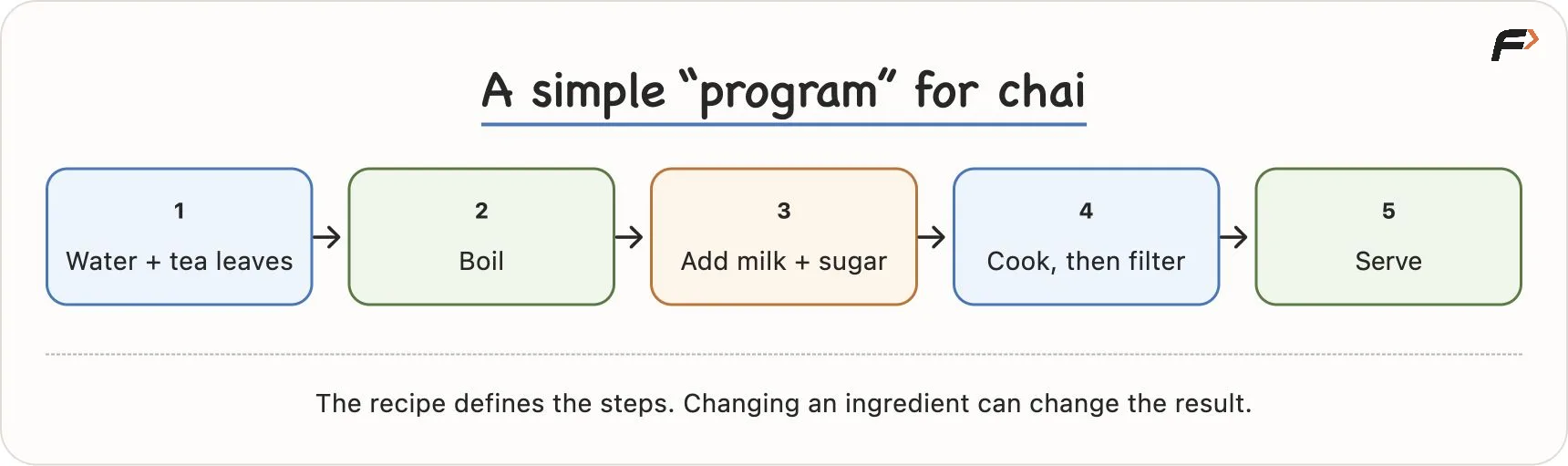
Imagine preparing a simple cup of tea. You may boil water, add tea leaves, add milk, add sugar, let it cook for some time, and then filter it into a cup. The order matters. If you filter the tea before adding milk, the result will not be the same.
A program works in a similar way. It gives a computer a sequence of instructions such as:
take some input
process that input
make a decision if needed
produce an output
The computer does not automatically guess missing details. A person may understand what you mean if you say, "make tea," but a computer needs exact instructions written according to the rules of a programming language.
So, a simple definition is:
Programming is the process of creating clear, ordered instructions that tell a computer what to do.
What Is a Computer?
A computer is a machine that executes instructions. It can perform calculations, compare values, store information, display output, and communicate with other systems. Its strength is speed and consistency.
But a computer does not have common sense in the human way. If a program tells it to delete a selected file, and the system allows that action, it can delete the file even if the user selected the wrong one. Protection features such as confirmation boxes, permissions, backups, and undo options exist because programmers designed them.
This gives us an important beginner idea:
A computer is powerful, but the intended behaviour must be described precisely.
Computers can make decisions, but only according to rules given through software. They do not naturally understand what the user "probably meant."
Hardware and Software
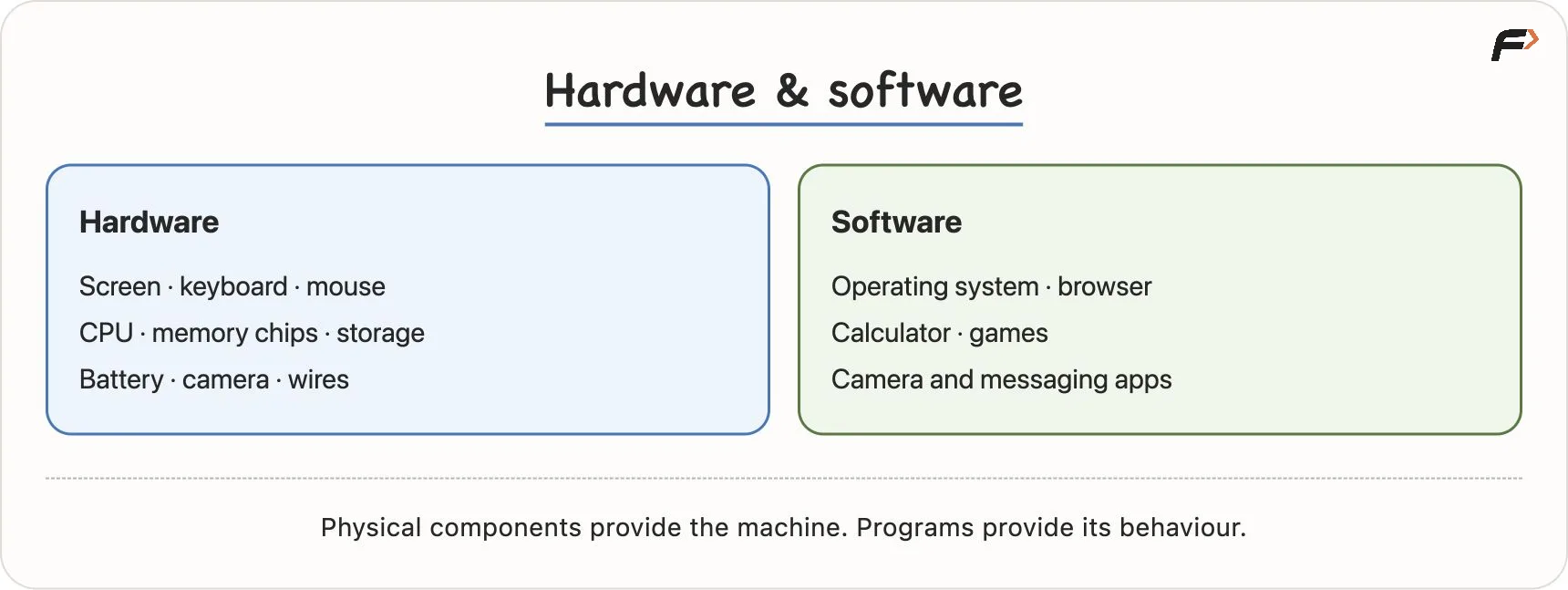
To understand how computers work, it helps to separate two basic terms: hardware and software.
Term | Meaning | Examples |
|---|---|---|
Hardware | Physical parts of a computer system | screen, keyboard, mouse, CPU, RAM, storage drive, camera, battery |
Software | Programs and data that run on hardware | browser, calculator, games, WhatsApp, Windows, Android, iOS |
Hardware is the part you can physically touch. Software is not a separate object you can hold in your hand, but it is stored physically as data inside storage devices.
For example, in a phone:
The screen, battery, camera, and processor are hardware.
Android or iOS, the camera app, and the messaging app are software.
Software needs hardware to run. Hardware becomes useful for different tasks because software tells it what to do.
Hardware and Software
CPU, RAM, Storage, and Operating System
When you open an app, several parts of the computer work together. Four important terms are CPU, RAM, storage, and operating system.
Storage
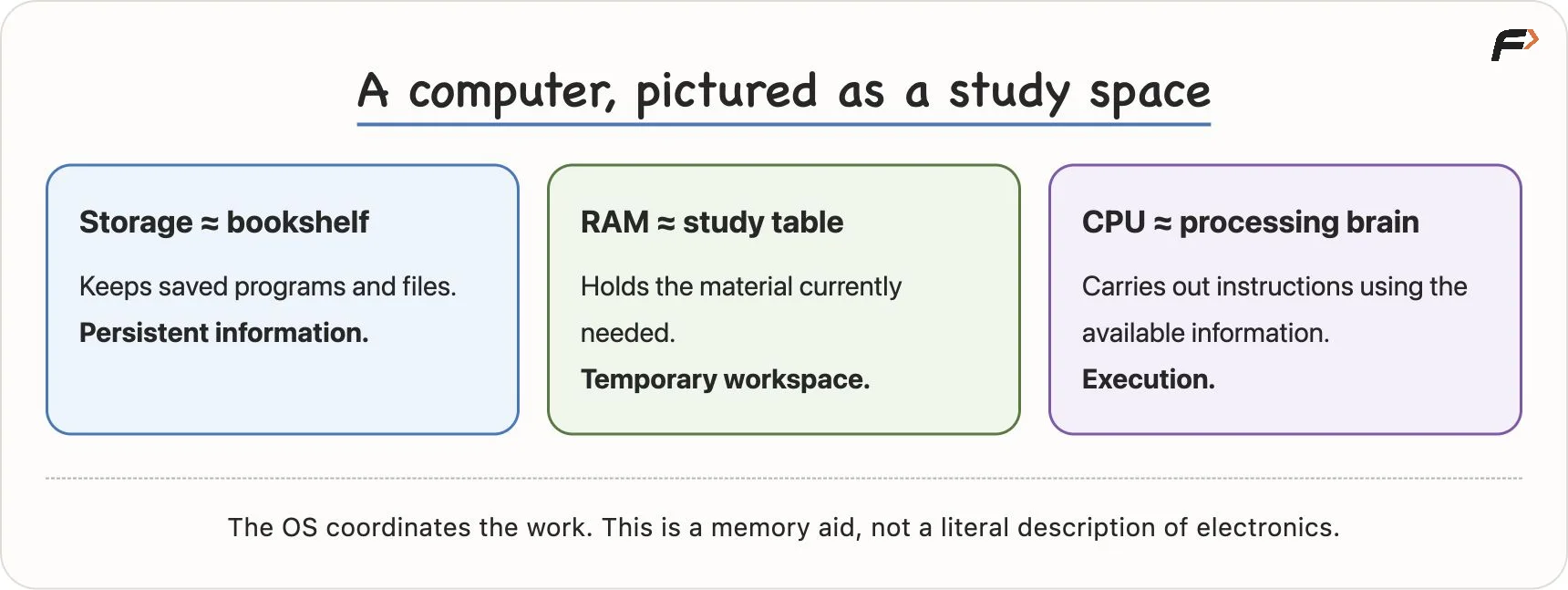
Storage keeps saved data and installed programs. Photos, videos, documents, apps, and system files are stored here. Common storage devices include SSDs, HDDs, and pen drives.
Storage is persistent. This means saved data remains there even after the power is turned off. However, persistent does not mean permanent forever. Files can still be deleted, corrupted, or lost if the device fails.
RAM
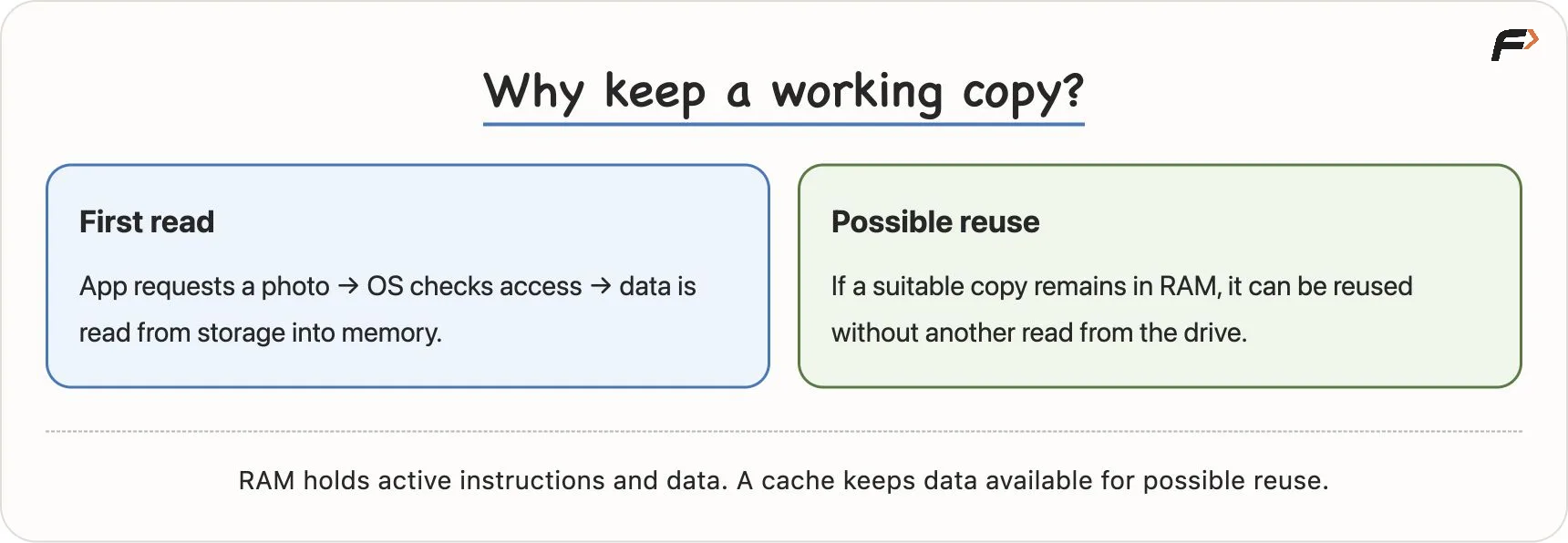
RAM is fast temporary memory used by running programs. When an app is opened, the required instructions and data are brought into RAM so they can be accessed quickly.
RAM is faster than normal storage, but it is temporary. If power is removed, ordinary RAM loses its contents. This is why unsaved work can disappear if a device suddenly shuts down.
RAM and Caching
CPU
The CPU, or Central Processing Unit, executes instructions. It performs calculations, comparisons, and other processing work needed by programs.
People often call the CPU the brain of the computer. This is a useful shortcut, but it should not be taken too literally. The CPU processes instructions; it does not understand meaning like a human brain.
Operating System
The operating system, or OS, manages the computer's resources. Windows, Linux, macOS, Android, and iOS are examples of operating systems.
The OS helps with tasks such as:
opening and closing applications
managing memory
controlling access to files
handling input from keyboard, mouse, or touchscreen
coordinating hardware devices
giving apps controlled access to system resources
For example, when an app wants to access your photos, it usually does not directly take control of every file on the device. It asks through operating-system services, and the OS applies permission rules.
CPU RAM Storage
How an App Opens
Let us take one simple example: opening a messaging app on a phone.
You tap the app icon.
The touchscreen detects the tap.
The operating system identifies which app you selected.
Required app code and data are loaded from storage into RAM.
The CPU executes the app's instructions.
The app displays chats and responds to your actions.
Opening an app does not mean every possible part of the app is loaded at once. The system may load only what is needed at that moment. Other parts can be loaded later when you open another screen or use another feature.
This is one reason apps can feel fast even though they contain many features.
Programs, Programmers, Bugs, and Debugging
A program is a set of instructions written to make a computer perform a task. Programming is the activity of creating those instructions.
A programmer, developer, coder, or software engineer writes programs. These words are often used in similar ways, though in jobs they may have slightly different responsibilities.
Chai Program
What Is a Bug?
A bug is a mistake or defect that causes a program to behave incorrectly or unexpectedly.
Suppose a calculator app adds two numbers incorrectly because the program uses the wrong operation internally. The app may still open, accept input, and show an answer, but the answer is wrong. That wrong behaviour comes from a defect in the program.
Bugs can happen because of:
wrong instructions
missing conditions
incorrect order of steps
misunderstanding the problem
unexpected input
mistakes while changing existing code
Not every problem is caused by a program bug. A slow internet connection, damaged device, or unavailable server can also create issues. Good programmers investigate before assuming the cause.
What Is Debugging?
Debugging is the process of finding the cause of a bug, fixing it, and checking that the fix works.
A simple debugging process looks like this:
Observe what is going wrong.
Try to reproduce the problem.
Inspect the related steps or code.
Find the actual cause.
Fix the cause.
Test again.
Debugging is a normal part of programming. Writing code and fixing code both develop the ability to think clearly.
Why Programming Languages Exist
At the lowest level, computers work with binary values, represented using 0 and 1. Machine instructions and data are ultimately represented in this low-level form.
But writing large programs directly using binary would be extremely difficult for humans. Programming languages give us a readable and structured way to express instructions.
Examples of programming languages include:
Python
Java
C
C++
JavaScript
Swift
A programming language has rules for writing instructions. These rules are called syntax. But syntax alone is not enough. A programmer must also understand the logic of the task.
For example, knowing how to write an if statement is useful, but you must also know what condition should be checked and what should happen in each case.
Abstraction in Programming
Abstraction means using something through a simpler interface without handling every internal detail yourself.
Think about driving a car. When you press the accelerator, you do not personally control every mechanical and electronic process inside the vehicle. You use a simple control, and the system handles many details internally.
Programming uses abstraction in a similar way. A language, library, or function may provide a simple command for a useful action. You can use that action without rewriting all the lower-level steps every time.
For example, a programming language may provide a function to sort a list. You can use it by giving the list as input, even if you do not yet know every internal step used by the sorting algorithm.
Abstraction saves time, but it does not remove the need to understand what you are asking the computer to do.
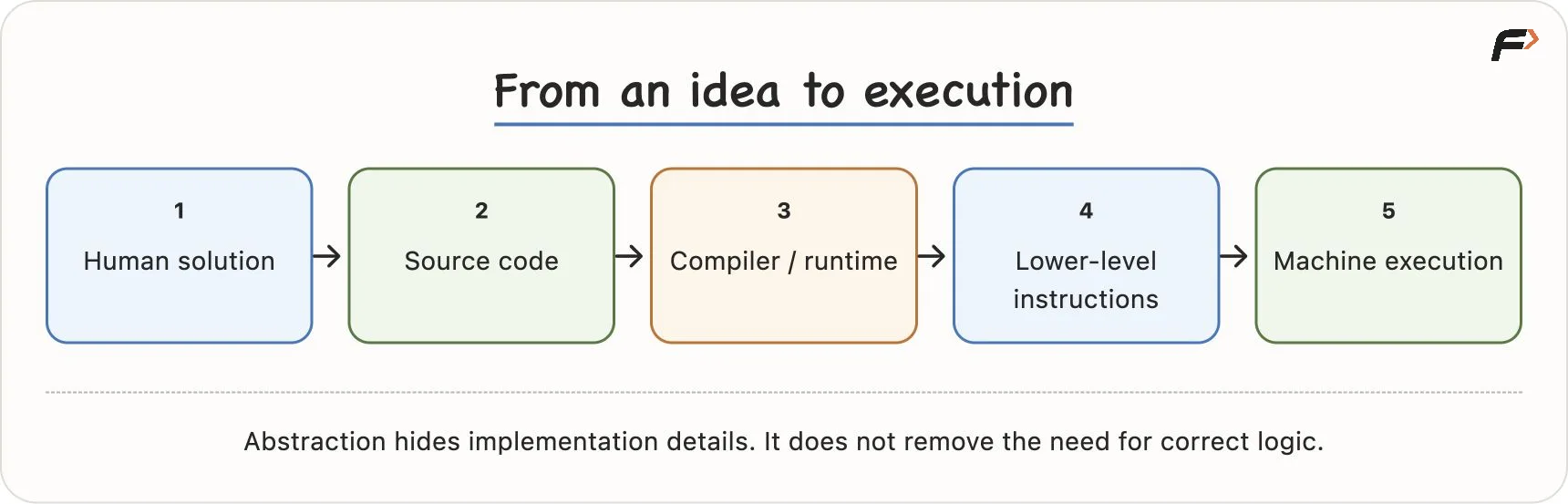
Code to Execution
Why There Are Many Programming Languages
Different programming languages are designed with different strengths, styles, and ecosystems. An ecosystem includes libraries, tools, frameworks, and community support around a language.
Language | Common Uses |
|---|---|
Python | automation, data work, AI, beginner-friendly programming |
Java | backend systems, enterprise applications, Android development |
C | systems programming and low-level work |
C++ | performance-sensitive software, DSA, games, systems work |
JavaScript | websites, web apps, server-side development |
Swift | apps for Apple platforms |
These are common uses, not strict limits. Many tasks can be done in more than one language.
The important point for beginners is that programming concepts transfer. Variables, conditions, loops, functions, data structures, and problem-solving ideas appear in many languages, even if the syntax changes.
Everyday Technology Is Built From Instructions
Many daily actions look simple on the screen, but they involve several instructions and decisions behind the scenes.
Consider sending a message:
You type the message.
The app stores the draft or current input.
You press Send.
The app makes a network request.
A server receives and routes the message.
The friend's device receives the message.
The app displays it and may show a notification.
To the user, this may look like one small action. Inside the system, many programs and devices coordinate to complete the task.
The same pattern appears in many places:
An ATM verifies a card, checks a PIN, checks account balance, dispenses money, and records the transaction.
A food-ordering app manages cart items, payment status, restaurant confirmation, and delivery tracking.
A traffic-light system follows timing rules and may respond to sensors.
The common pattern is:
Input => decision => action => output
Programming is the skill of defining these flows clearly enough for a computer system to execute them.
From Using Programs to Creating Programs
Before learning programming, you mostly use programs created by others: messaging apps, video platforms, browsers, games, calculators, and payment apps.
Learning programming slowly changes your role:
Use programs => understand programs => write instructions => build programs
At first, you usually begin with small tasks. You may write a program to add numbers, check whether a number is even, print a pattern, or store a few values. These tasks may look simple, but they teach the foundation of giving exact instructions.
As you grow, you learn:
A programming language: to express instructions in code.
Data structures and algorithms: to organise data and solve problems efficiently.
Projects: to combine ideas into useful applications.
Syntax helps you write code, but programming also needs problem understanding, logical thinking, and testing.
Key Terms
Term | Meaning |
|---|---|
Programming | Creating clear, ordered instructions for a computer |
Computer | A machine that executes instructions |
Hardware | Physical parts of a computer system |
Software | Programs and data that run on hardware |
CPU | The processor that executes instructions |
RAM | Fast, temporary memory used by running programs |
Storage | Persistent space for saved apps and data |
Operating system | Software that manages hardware and applications |
Program | A set of instructions for a computer |
Programmer | A person who writes programs |
Bug | A defect that causes wrong or unexpected behaviour |
Debugging | Finding, fixing, and testing the cause of a defect |
Binary | A representation using 0 and 1 |
Programming language | A formal language used to write program instructions |
Abstraction | A simpler interface that hides lower-level details |
Summary
Programming is about giving a computer clear, ordered instructions. A computer can work very fast, but it depends on software to tell it what to do.
Hardware provides the physical machine, while software provides behaviour. Storage keeps saved data, RAM holds active working data, the CPU executes instructions, and the operating system coordinates resources.
As a beginner, the goal is not to know every internal detail immediately. The goal is to build a clear mental model: programs are instructions, computers follow those instructions, bugs are defects in behaviour, and programming languages help humans express logic in a structured way.
Be the first to add a comment.