Introduction
A programming language can express a solution, but it cannot fix unclear thinking. If the logic is wrong, the code will also behave wrongly, even if the syntax is correct.
This is why flowcharts and pseudocode are useful before coding. They help us slow down, understand the requirement, decide the steps, test the cases, and then write the program with more confidence.
A useful problem-solving cycle is:
Understand => Model => Draw => Dry-run => Challenge => Write pseudocode
Before Drawing a Flowchart
Before choosing shapes, first understand the problem. A flowchart should represent executable logic, not random thoughts.
Ask these questions:
What is the problem asking?
What inputs are given?
What output is required?
What calculations are needed?
Which conditions create different paths?
Which actions repeat?
Which boundaries or invalid cases matter?
Once these are clear, the flowchart becomes much easier to draw.
Student Result With Subject-Wise Rule
Consider this requirement:
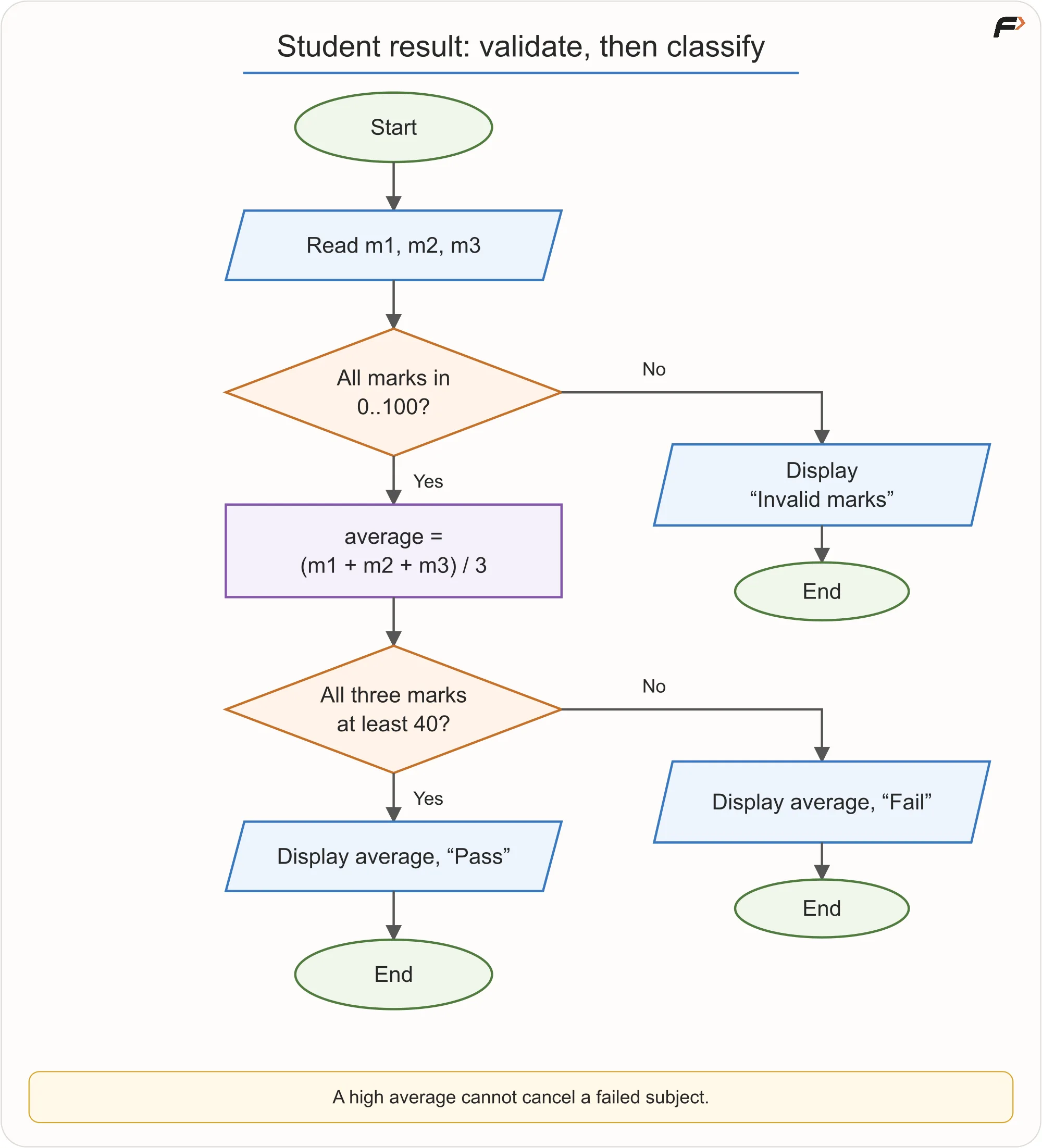
Read marks in three subjects. Marks must be from 0 to 100. Display Invalid marks if any input is outside that range. Otherwise, display the average and report Pass only when every subject has at least 40 marks.
This problem has two separate concerns:
Validation: Are the marks allowed?
Result logic: If the marks are valid, does the student pass?
Validation should come first. For example, marks 90, 105, 80 should not produce an average because 105 is not a valid mark.
The logic is:
Read
m1,m2, andm3.If any mark is below 0 or above 100, display
Invalid marksand stop.Calculate the average.
If all three marks are at least 40, display average and
Pass.Otherwise, display average and
Fail.
Student Result With Subject-Wise Rule
Pseudocode:
READ m1, m2, m3

IF m1 < 0 OR m1 > 100 OR
   m2 < 0 OR m2 > 100 OR
   m3 < 0 OR m3 > 100
    DISPLAY "Invalid marks"
    STOP
END IF

SET average = (m1 + m2 + m3) / 3

IF m1 >= 40 AND m2 >= 40 AND m3 >= 40
    DISPLAY average, "Pass"
ELSE
    DISPLAY average, "Fail"
END IF
Dry runs:
Marks | Average | Result | Reason |
|---|---|---|---|
| 80 | Pass | all marks are valid and at least 40 |
| 70 | Fail | one subject is below 40 |
| not calculated | Invalid marks | 105 is outside the valid range |
Key idea: First check whether the data is valid. Then decide what the valid data means.
Largest of Three Numbers
Requirement:
Read three numbers and display the largest value.
One clean approach is the current-champion method.
Start by assuming the first number is the largest. Then compare the remaining numbers one by one.
Pseudocode:
READ a, b, c
SET largest = a

IF b > largest
    SET largest = b
END IF

IF c > largest
    SET largest = c
END IF

DISPLAY largest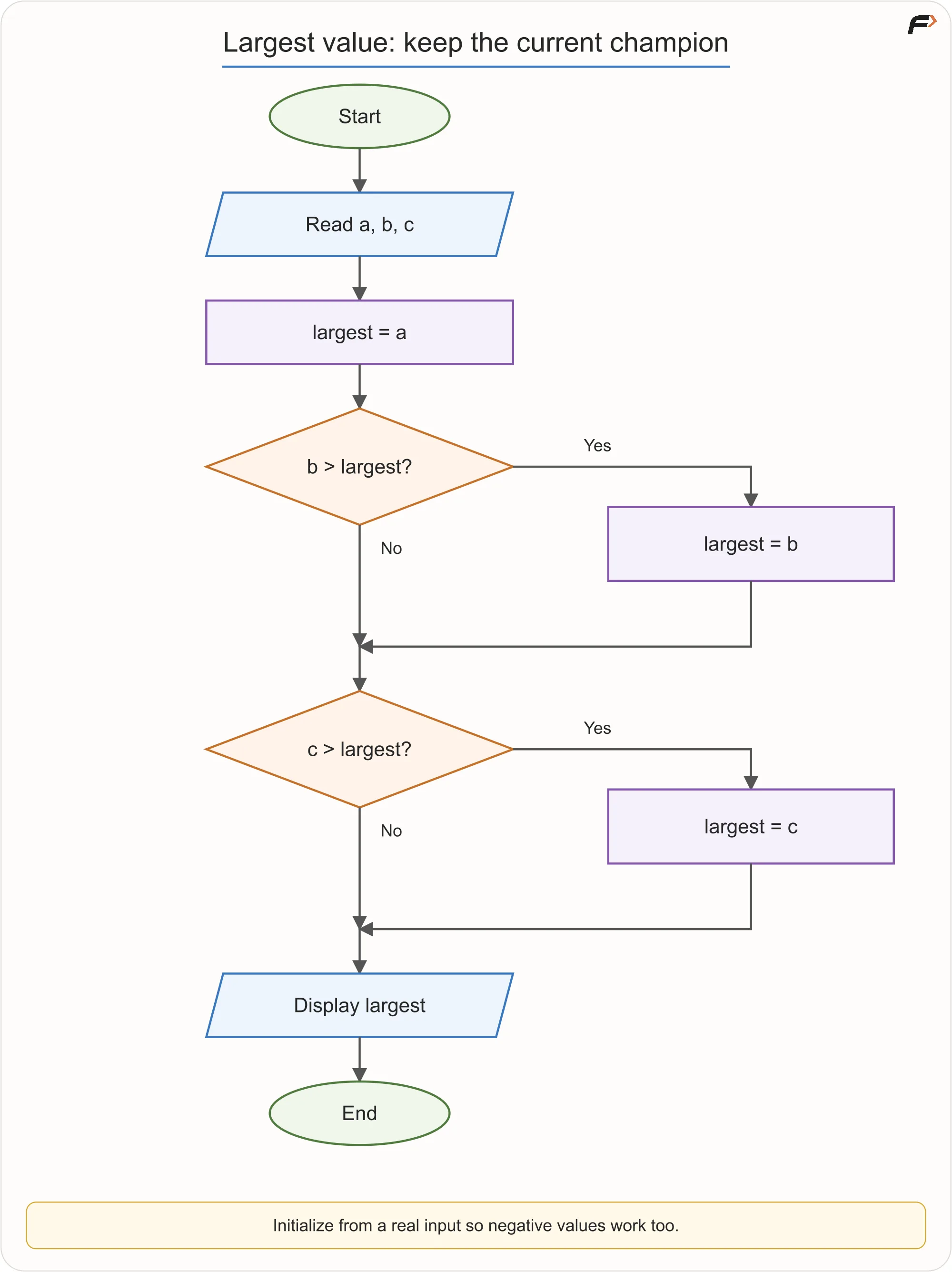
Largest of Three Numbers
Dry runs:
Input | Largest |
|---|---|
| 8 |
| 7 |
| 5 |
| -3 |
This method is useful because it scales. For 100 numbers, we can keep comparing each new value with the largest value seen so far.
Key idea: After every comparison, largest stores the greatest value seen so far.
Grade Classification
Requirement:
Read a mark from 0 to 100 and assign a grade.
Marks Range | Grade |
|---|---|
90 to 100 | A |
75 to 89 | B |
60 to 74 | C |
40 to 59 | D |
0 to 39 | F |
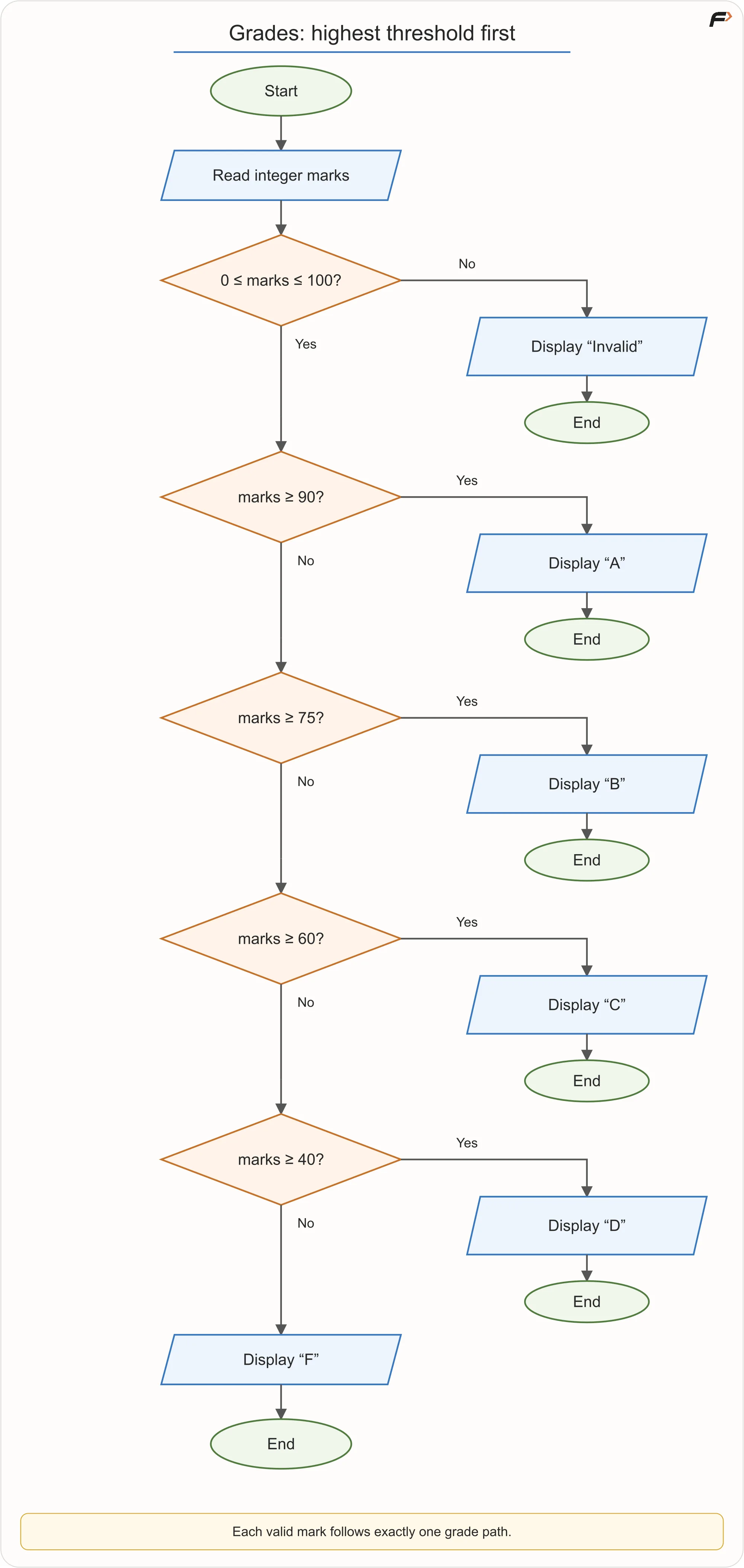
First validate the mark. Then check grade thresholds from highest to lowest.
Pseudocode:
READ marks

IF marks < 0 OR marks > 100
    DISPLAY "Invalid"
ELSE IF marks >= 90
    DISPLAY "A"
ELSE IF marks >= 75
    DISPLAY "B"
ELSE IF marks >= 60
    DISPLAY "C"
ELSE IF marks >= 40
    DISPLAY "D"
ELSE
    DISPLAY "F"
END IF
The order matters. If we check marks >= 40 first, then a mark like 95 will also satisfy that condition and may wrongly receive D.
Grade Classification
Boundary checks:
Mark | Result |
|---|---|
-1 | Invalid |
0 | F |
39 | F |
40 | D |
59 | D |
60 | C |
74 | C |
75 | B |
89 | B |
90 | A |
100 | A |
101 | Invalid |
Key idea: In chained decisions, the first true branch is selected. So the order of conditions is part of the algorithm.
Sum From 1 to N
Requirement:
Read a positive integer
Nand calculate1 + 2 + ... + Nusing a loop.
We need:
Part | Value |
|---|---|
Starting sum |
|
Starting counter |
|
Continue condition |
|
Repeated work | add |
Update | increase |
Pseudocode:
READ N

IF N <= 0
    DISPLAY "Invalid"
    STOP
END IF

SET sum = 0
SET i = 1

WHILE i <= N
    SET sum = sum + i
    SET i = i + 1
END WHILE

DISPLAY sum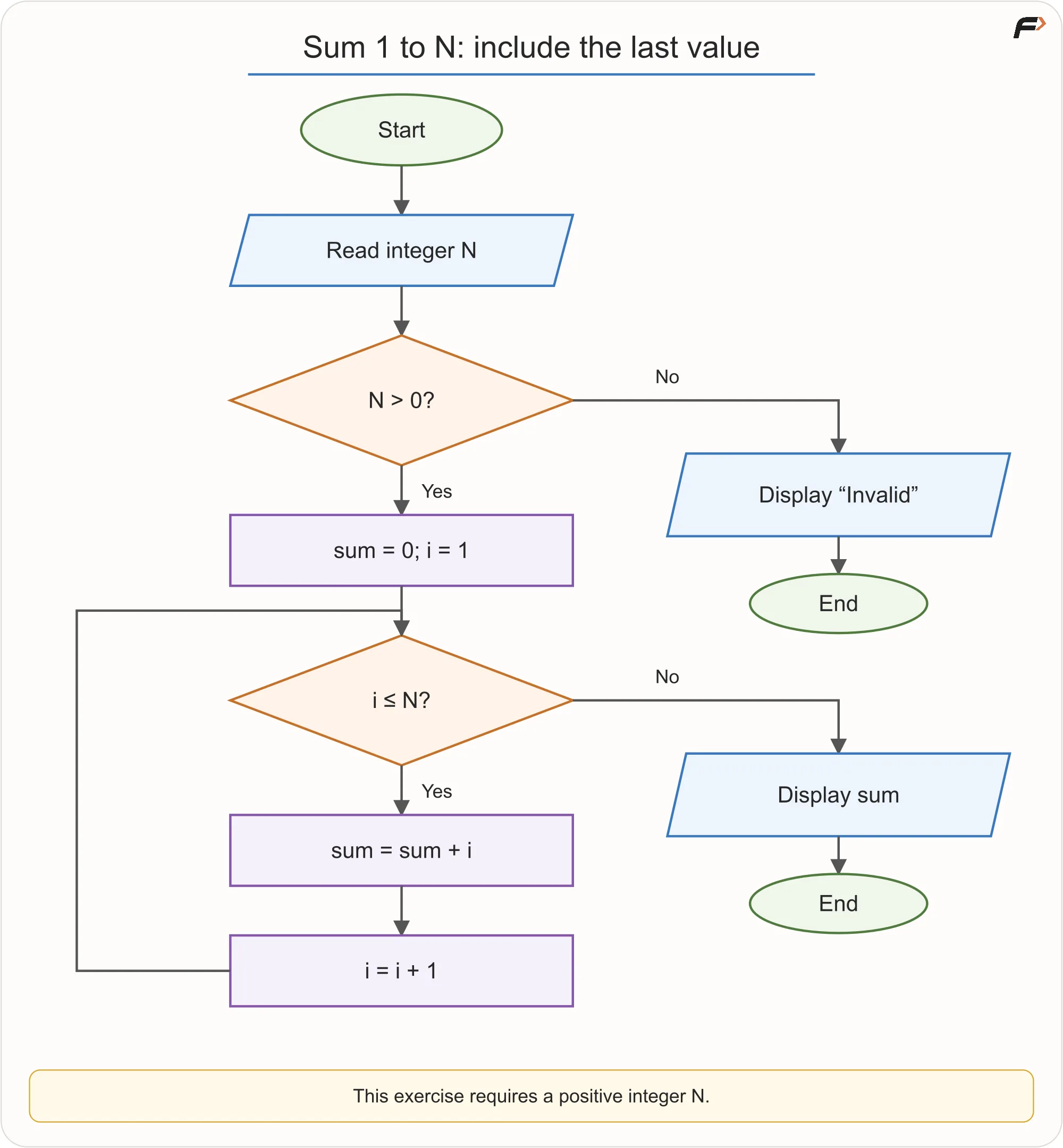
Sum From 1 to N
Dry run for N = 5:
Before Iteration | Operation | New Sum | New |
|---|---|---|---|
| add 1 | 1 | 2 |
| add 2 | 3 | 3 |
| add 3 | 6 | 4 |
| add 4 | 10 | 5 |
| add 5 | 15 | 6 |
When i = 6, the condition i <= 5 becomes false, so the loop stops. The output is 15.
Common mistakes:
Using
i < N, which missesN.Forgetting
i = i + 1, which can create an infinite loop.Displaying
suminside the loop when only the final sum is required.
Sum of Digits
Requirement:
Read a non-negative integer and display the sum of its digits.
For a number like 472, we can process digits from right to left:
472 MOD 10 = 2472 DIV 10 = 4747 MOD 10 = 747 DIV 10 = 44 MOD 10 = 44 DIV 10 = 0
MOD 10 gives the last digit.DIV 10 removes the last digit using integer division.
Pseudocode:
READ N

IF N < 0
    DISPLAY "Invalid"
    STOP
END IF

SET sum = 0

WHILE N > 0
    SET digit = N MOD 10
    SET sum = sum + digit
    SET N = N DIV 10
END WHILE

DISPLAY sum
Dry run for 472:
| Digit | Sum After |
|
|---|---|---|---|
472 | 2 | 2 | 47 |
47 | 7 | 9 | 4 |
4 | 4 | 13 | 0 |
The output is 13.
For input 0, the loop does not run and sum remains 0, which is correct for digit sum.
Key idea: A number can be processed digit by digit by repeatedly extracting and removing its last digit.
Restaurant Bill
Requirement:
Read the price of two food items and a delivery fee. Display the total payable amount.
There is no decision in this problem if all values are assumed valid.
Inputs:
item1item2deliveryFee
Calculation:
total = item1 + item2 + deliveryFee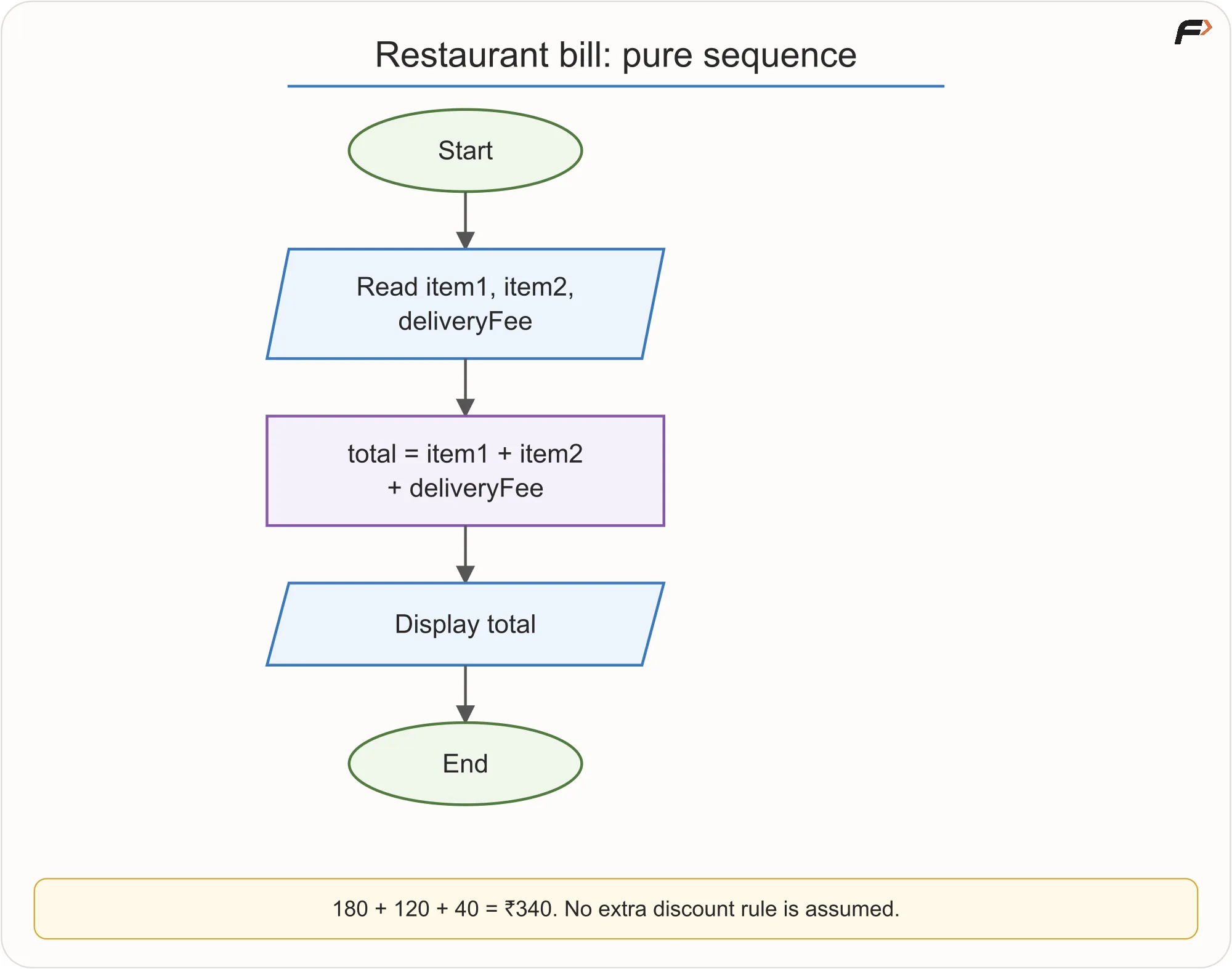
Restaurant Bill
Pseudocode:
READ item1, item2, deliveryFee
SET total = item1 + item2 + deliveryFee
DISPLAY total
Dry run:
Item 1 | Item 2 | Delivery Fee | Total |
|---|---|---|---|
180 | 120 | 40 | 340 |
Do not add discount or free-delivery rules unless the requirement says so. Real apps may have many extra rules, but the algorithm should solve the stated problem first.
Electricity Bill Using Slabs
Requirement:
Calculate the electricity bill using this simplified slab system:
First 100 units: Rs. 2 per unit
Next 100 units: Rs. 3 per unit
Units above 200: Rs. 5 per unit
This is slab billing. It does not mean all units are charged at the highest rate reached.
For 250 units:
Portion | Calculation | Amount |
|---|---|---|
First 100 units |
| 200 |
Next 100 units |
| 300 |
Remaining 50 units |
| 250 |
Total | 750 |
Pseudocode:
READ units

IF units < 0
    DISPLAY "Invalid"
    STOP
END IF

IF units <= 100
    SET bill = units * 2
ELSE IF units <= 200
    SET bill = 100 * 2 + (units - 100) * 3
ELSE
    SET bill = 100 * 2 + 100 * 3 + (units - 200) * 5
END IF

DISPLAY bill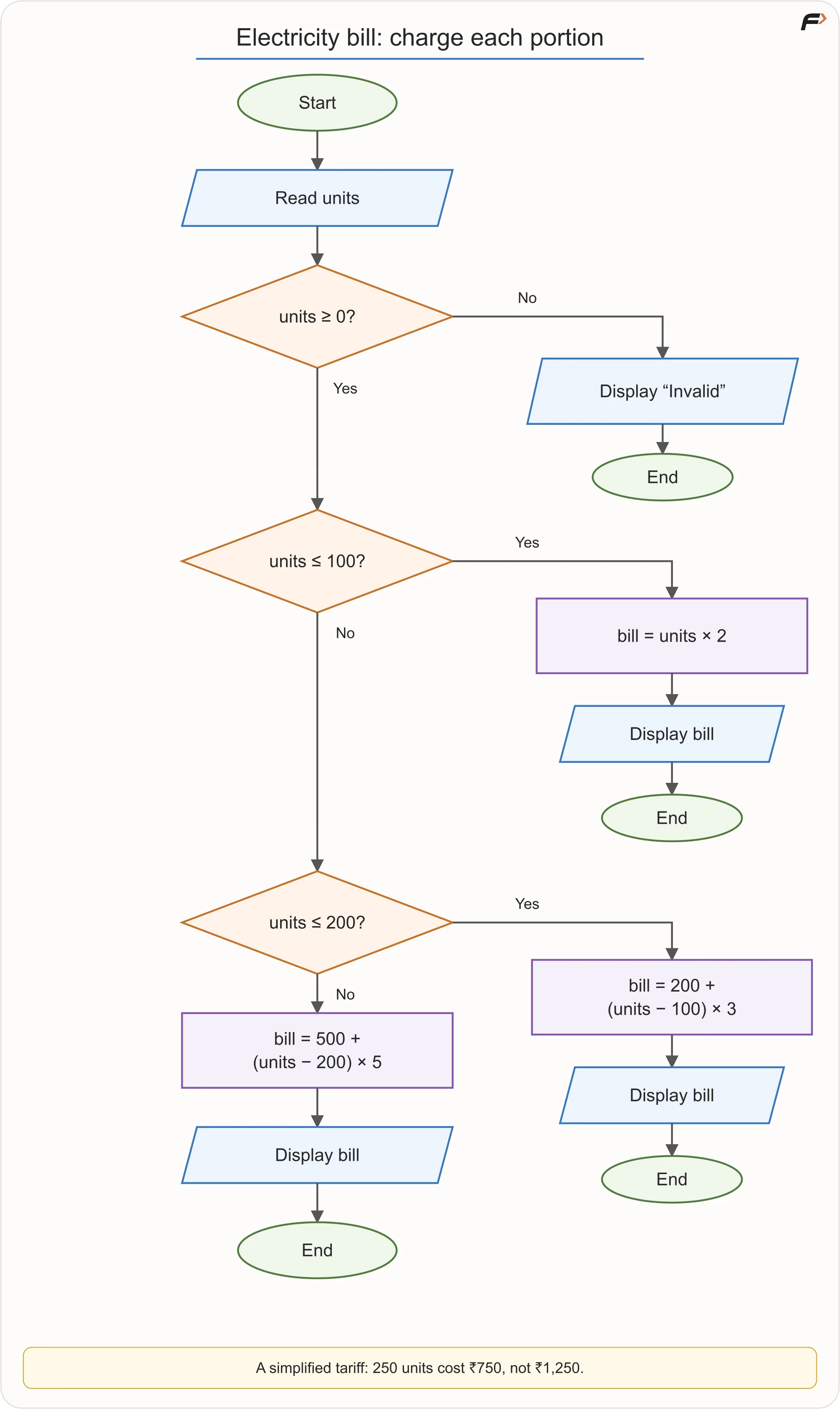
Electricity Bill Using Slabs
Boundary checks:
Units | Bill |
|---|---|
0 | 0 |
100 | 200 |
101 | 203 |
200 | 500 |
201 | 505 |
250 | 750 |
Key idea: In slab pricing, each portion is charged under its own rule.
Explaining a Flowchart
After drawing a flowchart, do not stop at the shapes. Check whether you can explain why each shape exists.
Ask:
Why is this input needed?
What calculation happens here?
Why is this condition placed before that action?
What happens if the condition is false?
Does every path end properly?
Does the loop move toward stopping?
Is output shown at the correct time?
If you cannot explain a shape, the flowchart may be memorised rather than understood.
Common Lab Mistakes
Mistake | Better Habit |
|---|---|
Drawing before understanding | Extract the contract first |
Using examples instead of variables | Use general names like |
Ignoring invalid input silently | Validate it or clearly state it is guaranteed valid |
Overlapping grade branches | Order conditions carefully |
Missing loop update | Ensure the loop progresses |
Printing final output inside the loop | Place output according to the requirement |
Hiding too much in one vague box | Break important logic into precise steps |
Showing only success cases | Include failure paths when required |
Key Terms
Term | Meaning |
|---|---|
Validation | Checking whether input follows allowed rules |
Boundary | A value where behaviour may change |
Accumulator | A variable that stores a growing result, such as a sum |
Counter | A variable used to count steps, items, or occurrences |
Identity value | A starting value that does not affect an operation, such as 0 for addition |
Slab | A portion of a range processed under one rule |
Trace | A dry run showing state changes step by step |
Termination | The condition that makes repetition stop |
Summary
Flowchart problem-solving is about designing correct logic before writing code. Each problem should be understood through its input, output, rules, validation, boundaries, and repeated actions.
Problems like student results, largest values, grade classification, sum calculation, digit processing, restaurant billing, free delivery, and slab billing all use the same basic thinking tools: sequence, selection, iteration, counters, accumulators, and dry runs.
A good flowchart or pseudocode solution should not only work for one example. It should handle the full stated requirement, including boundary values and invalid cases where required.
Be the first to add a comment.