Introduction
An algorithm tells us how to solve a problem. Before converting that algorithm into code, it is useful to check whether the steps are clear, whether the decisions cover all cases, and whether any repeated step has a proper stopping condition.
Flowcharts and pseudocode are two beginner-friendly ways to do this. A flowchart makes the logic visible as a diagram. Pseudocode writes the same logic in simple structured language, without worrying about the exact syntax of C++, Java, Python, or any other programming language.
A useful planning path is:
Problem => Algorithm => Flowchart => Pseudocode => Program
This does not mean every small problem needs all these stages. But when the logic has decisions, repeated steps, or multiple possible paths, flowcharts and pseudocode can make mistakes easier to find before writing code.
Why Flowcharts Are Useful
A flowchart is a diagram that represents the steps, decisions, and repeated actions in a process. It shows how control moves from one step to another.
For example, think about this instruction:
“Keep asking for the PIN until it is correct, then allow withdrawal.”
This sounds simple, but it leaves many questions:
Is there a limit on wrong attempts?
What happens after too many wrong attempts?
Should withdrawal be allowed before checking balance?
What if the entered amount is invalid?
What if the ATM does not have enough cash?
A flowchart helps expose these missing details. When we draw the possible paths, it becomes easier to see whether every situation has a clear result.
A good flowchart usually shows:
where the process starts and ends
what input is received
what output is displayed
what calculations or updates happen
which conditions decide the path
which steps repeat
what stops the repetition
The purpose of a flowchart is not decoration. Its purpose is to make the logic visible enough to inspect.
Common Flowchart Symbols
Flowcharts use standard shapes so that each type of step is easy to recognise.
Symbol Type | Used For | Example |
|---|---|---|
Start/End | beginning or ending of the process | Start, End |
Input/Output | reading input or showing output | Read age, Display result |
Process | calculation or update |
|
Decision | True/False question |
|
Arrow | direction of control flow | next step |
Connector | joining separated parts of a large chart | A, B |
Use each symbol with care. A calculation such as total = price + tax is a process. Showing that total to the user is output. A question such as marks >= 40? is a decision and should lead to different paths.
A decision should have labelled branches such as Yes/No or True/False. Without labels, the reader has to guess which arrow means what.
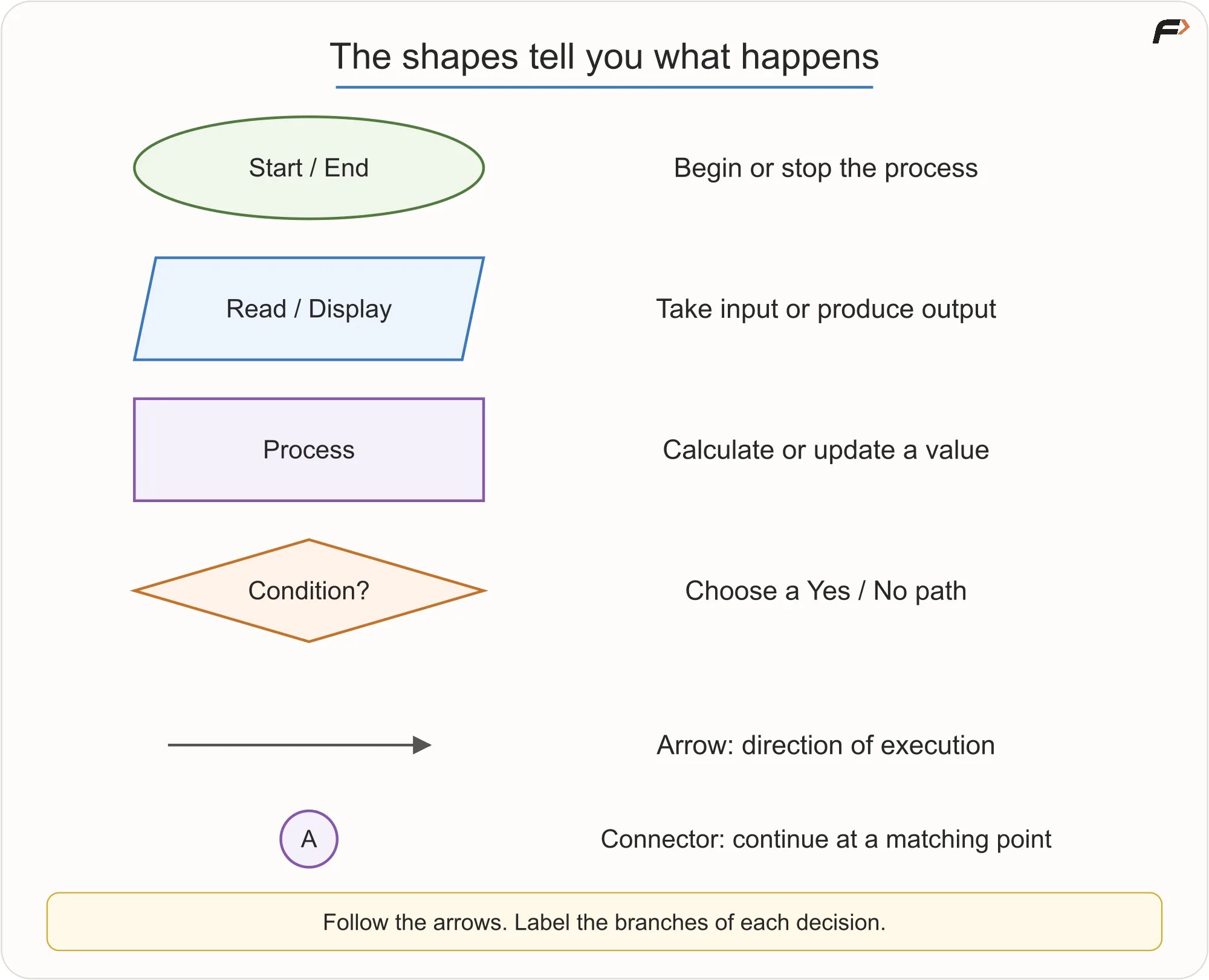
Flowchart Symbols
What Control Flow Means
Control flow means the order in which instructions are considered and executed.
Imagine a marker placed at the Start of a flowchart. The marker moves along arrows from one symbol to the next. At a process box, it performs an action. At a decision box, it checks the condition and follows only the matching branch. At End, the process stops.
This also means not every box runs for every input. Different inputs may follow different paths.
For example, in an age-checking flowchart, age 20 may follow the Eligible path, while age 16 follows the Not Eligible path. Both paths are part of the chart, but only one is followed in a single run.
Sequence: Steps in Order
A sequence means steps are performed one after another.
Consider the task:
Read the length and width of a rectangle, calculate its area, and display the area.
The logic is:
Start.
Read
length.Read
width.Calculate
area = length * width.Display
area.End.
The order matters. We cannot calculate the area before reading the length and width. We should also calculate the area before displaying it.
If length = 20 and width = 30, then:
area = 20 * 30 = 600
There is no decision and no repetition here. This is a simple sequence.
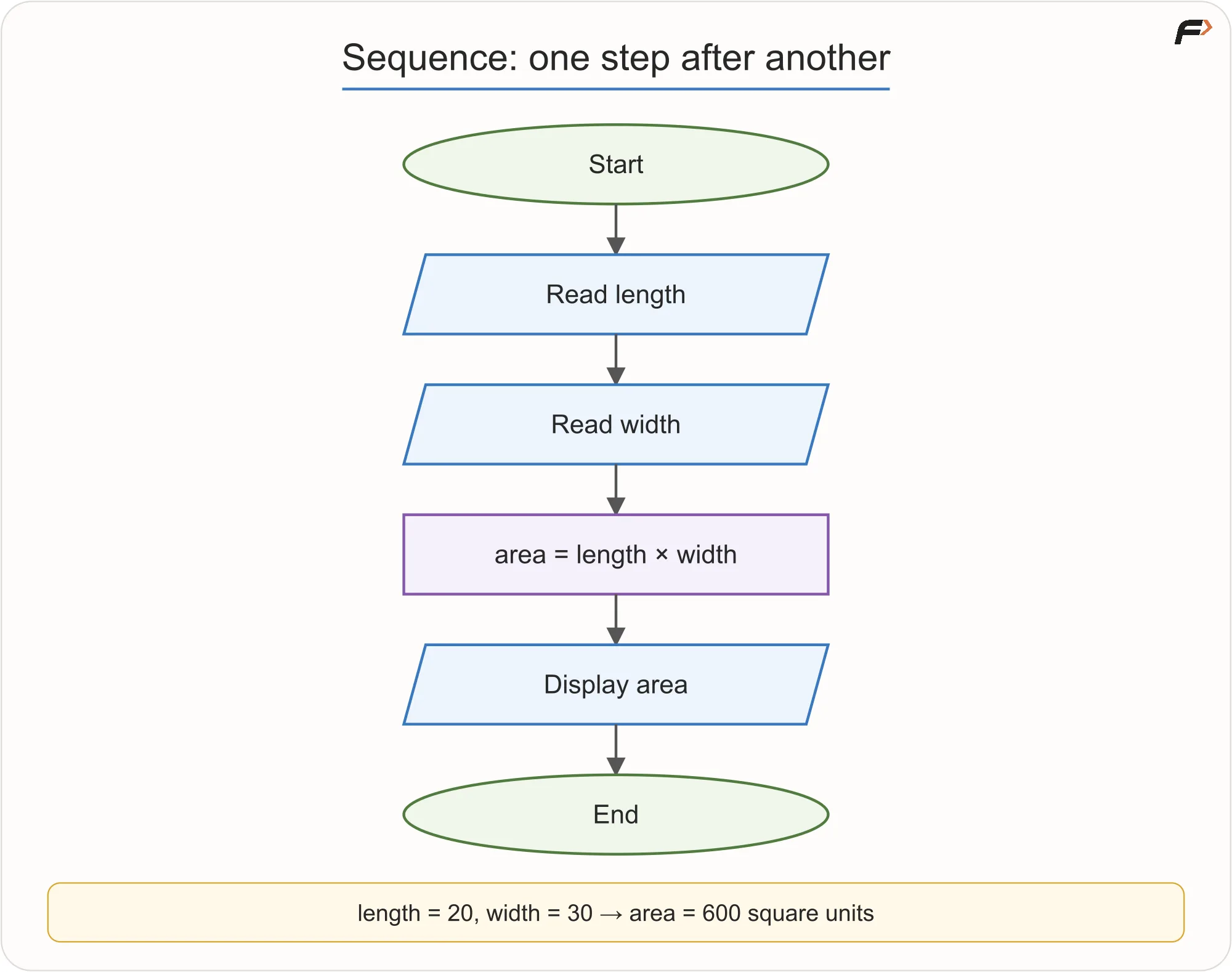
Sequence: Steps in Order
Selection: Choosing a Path
Selection means choosing what to do based on a condition.
Consider this rule:
If age is at least 18, display Eligible. Otherwise, display Not Eligible.
The condition is:
age >= 18
If the condition is true, the output is Eligible. If it is false, the output is Not Eligible.
Age | Condition | Output |
|---|---|---|
20 | True | Eligible |
17 | False | Not Eligible |
18 | True | Eligible |
The boundary value 18 matters. Since the rule says “at least 18”, age 18 is eligible. If we accidentally write age > 18, then age 18 will be incorrectly rejected.
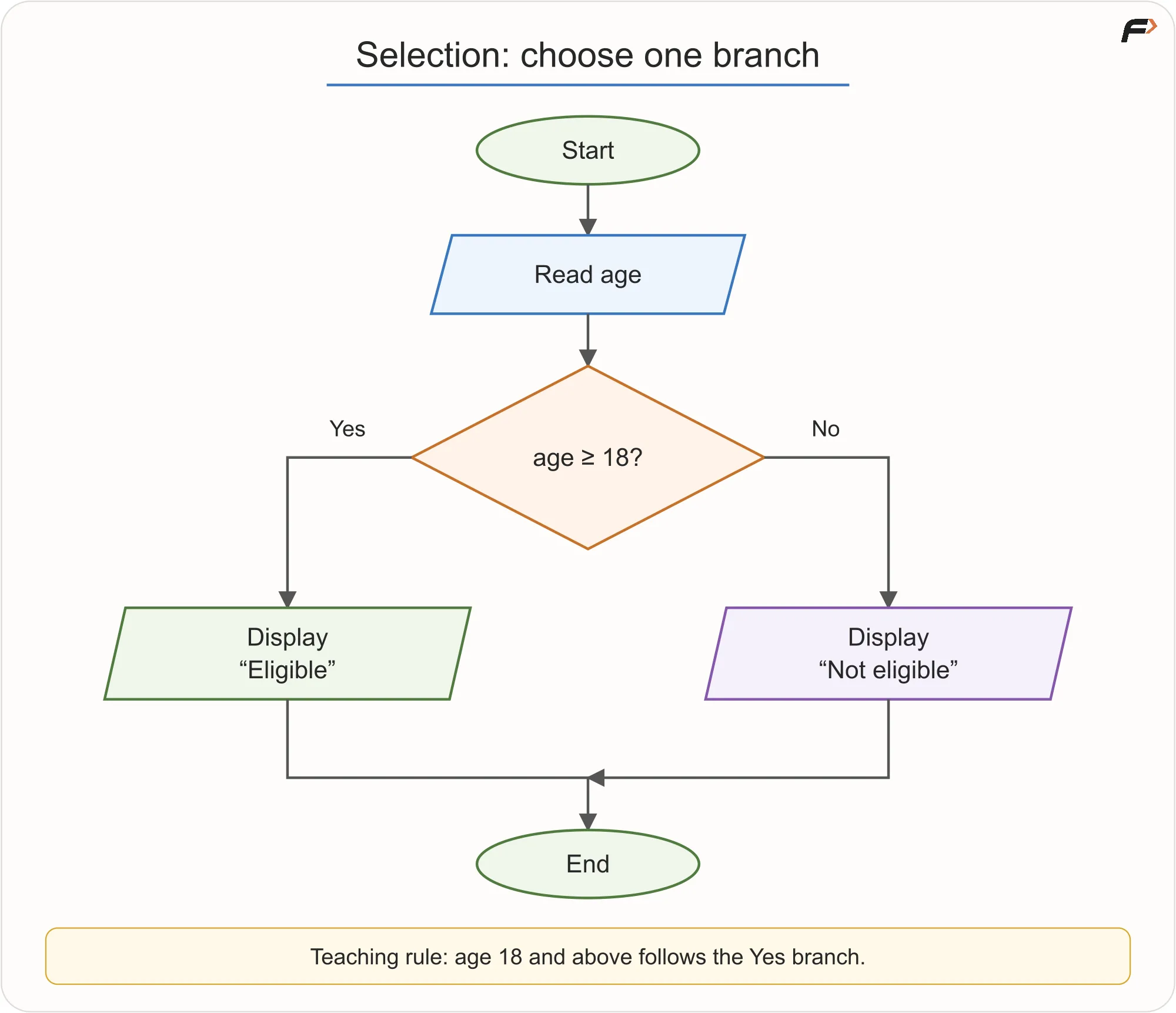
Selection: Choosing a Path
More Than Two Outcomes
Some problems need more than two results.
For example:
Classify a number as positive, negative, or zero.
A clean logic is:
Read
number.If
number > 0, display Positive.Otherwise, if
number < 0, display Negative.Otherwise, display Zero.
The second condition is checked only if the first condition is false. For normal numeric input, if the number is not greater than zero and not less than zero, it must be zero.
Number | Output |
|---|---|
5 | Positive |
-3 | Negative |
0 | Zero |
This is selection with multiple possible outcomes.
Iteration: Repeating Steps
Iteration means repeating a step or group of steps while a condition allows it.
Consider the task:
Print numbers from 1 to N.
If N = 3, we could write:
Print 1
Print 2
Print 3
But that only works for one fixed value. If N = 100, writing 100 separate print steps is not a good solution.
Instead, we use a loop.
The logic is:
Read
N.Set
i = 1.Check whether
i <= N.If yes, display
i.Increase
iby 1.Go back and check again.
If no, end.
For N = 3, the dry run looks like this:
Current | Is | Action |
|---|---|---|
1 | Yes | Print 1, then make |
2 | Yes | Print 2, then make |
3 | Yes | Print 3, then make |
4 | No | Stop |
The output is: 1 2 3
The final check with i = 4 is important. It tells the loop to stop.
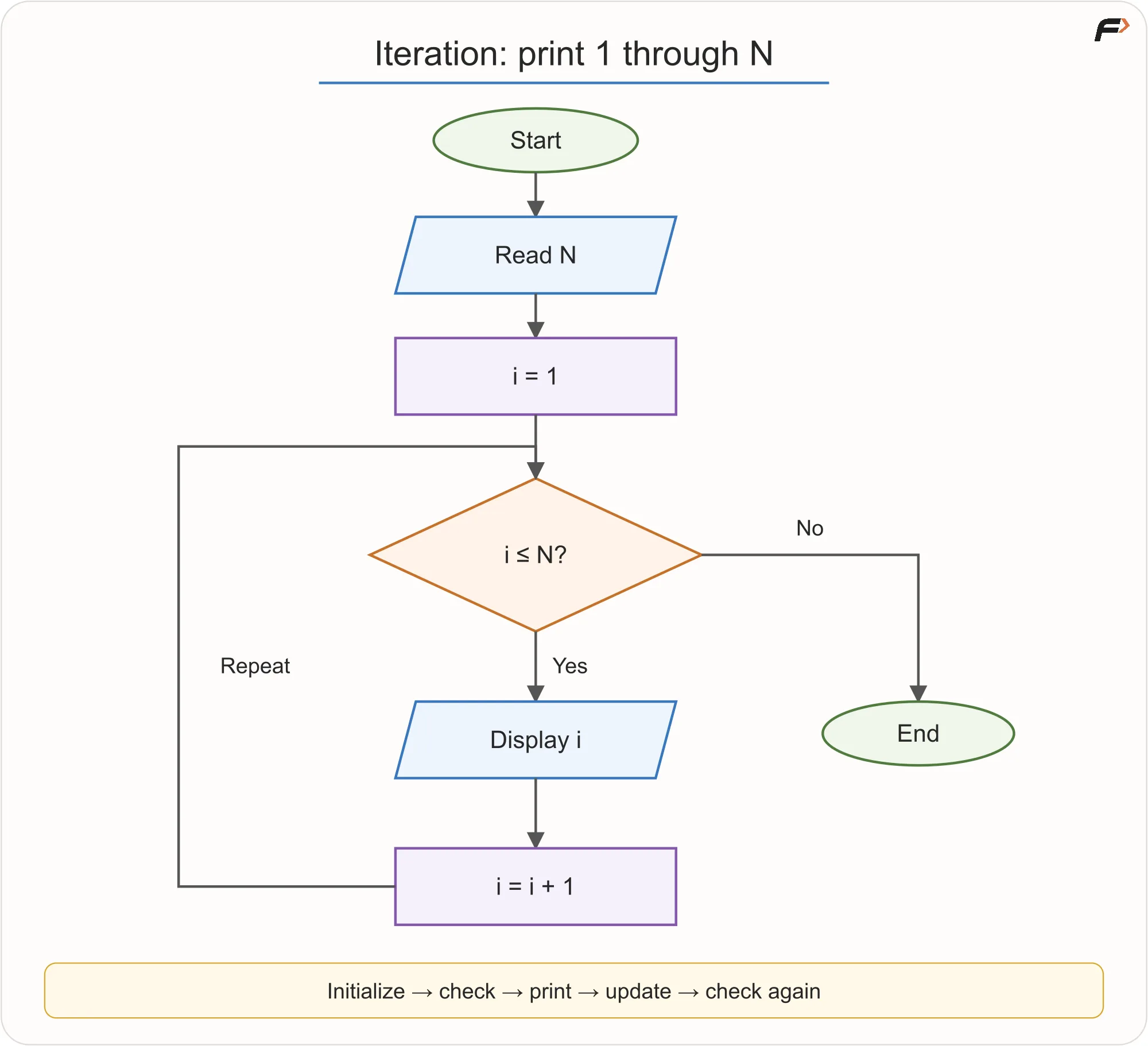
Print numbers from 1 to N.
Important Parts of a Loop
A loop usually needs four things:
Part | Meaning | Example |
|---|---|---|
Initialization | starting value before repetition |
|
Condition | decides whether to continue |
|
Body | repeated work | display |
Update | moves toward stopping |
|
If we forget the update, the loop may never stop. For example, if i always remains 1, then i <= N may always be true for a positive N.
If we use the wrong condition, the result can also change. For printing 1 to N, using i < N will skip N. So for N = 3, it prints only 1 2.
A loop can also run zero times. If N = 0, the first check 1 <= 0 is false, so nothing is printed.
Selection Inside Iteration
Sequence, selection, and iteration can be combined.
Consider this task:
For N students, read each student’s marks. Display Pass if marks are at least 40, otherwise display Fail.
Here, the loop processes students one by one. Inside the loop, a decision checks whether the current student passed.
The logic is:
Read
N.Set
i = 1.While
i <= N, repeat:Read
marks.If
marks >= 40, display Pass.Otherwise, display Fail.
Increase
iby 1.
End.
For marks 42, 39, and 40, the outputs are:
Marks | Condition | Output |
|---|---|---|
42 | True | Pass |
39 | False | Fail |
40 | True | Pass |
The value 40 passes because the rule says “at least 40”.
Two placements are important:
The marks must be read inside the loop because each student has a different marks value.
The counter must increase after both Pass and Fail paths, because every student should move the process forward.
Each student should receive only one result.
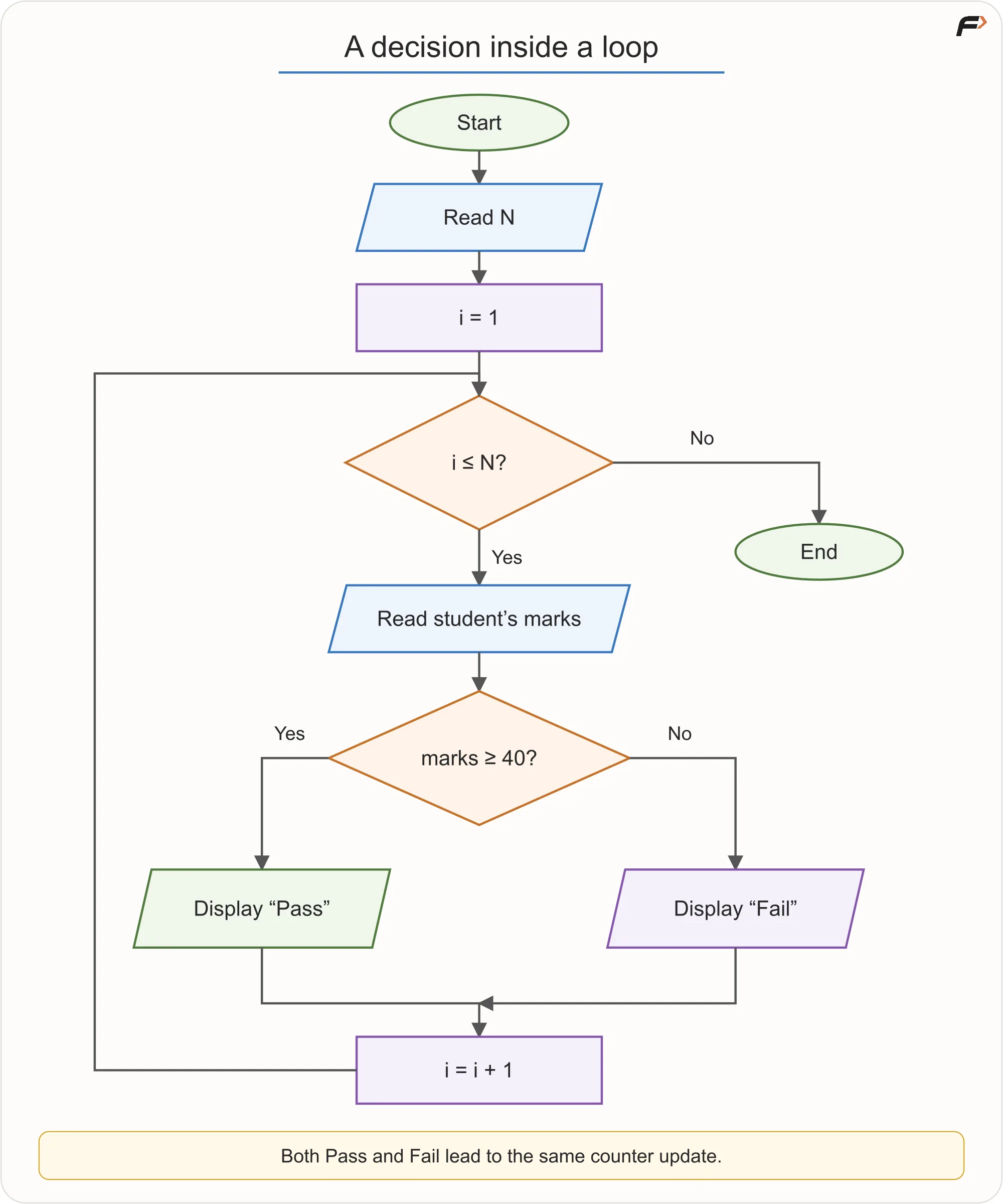
Selection Inside Iteration
ATM Withdrawal Example
An ATM process is a good example of sequence, selection, and repetition working together.
A simplified ATM model may have these rules:
Read the card.
Ask for the PIN.
Allow at most three wrong PIN attempts.
Ask for withdrawal amount only after a correct PIN.
Check that the amount is positive.
Check that the account has enough balance.
Check that the ATM has enough cash.
Dispense cash only after the required checks pass.
Update the balance after successful cash dispensing.
The authentication part can be described like this:
Read card.
Set
attempts = 0.Read PIN.
If PIN is correct, continue to withdrawal.
Otherwise, increase
attempts.If
attempts < 3, ask for PIN again.Otherwise, block the session and end.
The important detail is that attempts = 0 should happen once before retries begin. If we reset attempts to zero after every wrong PIN, the limit will never work.
The withdrawal part can be described like this:
Read amount.
If amount is not positive, show invalid amount and ask again.
If balance is less than amount, show insufficient balance and end.
If ATM cash is less than amount, show unavailable cash and end.
Authorize withdrawal.
Dispense cash.
Update balance.
Record transaction.
End.
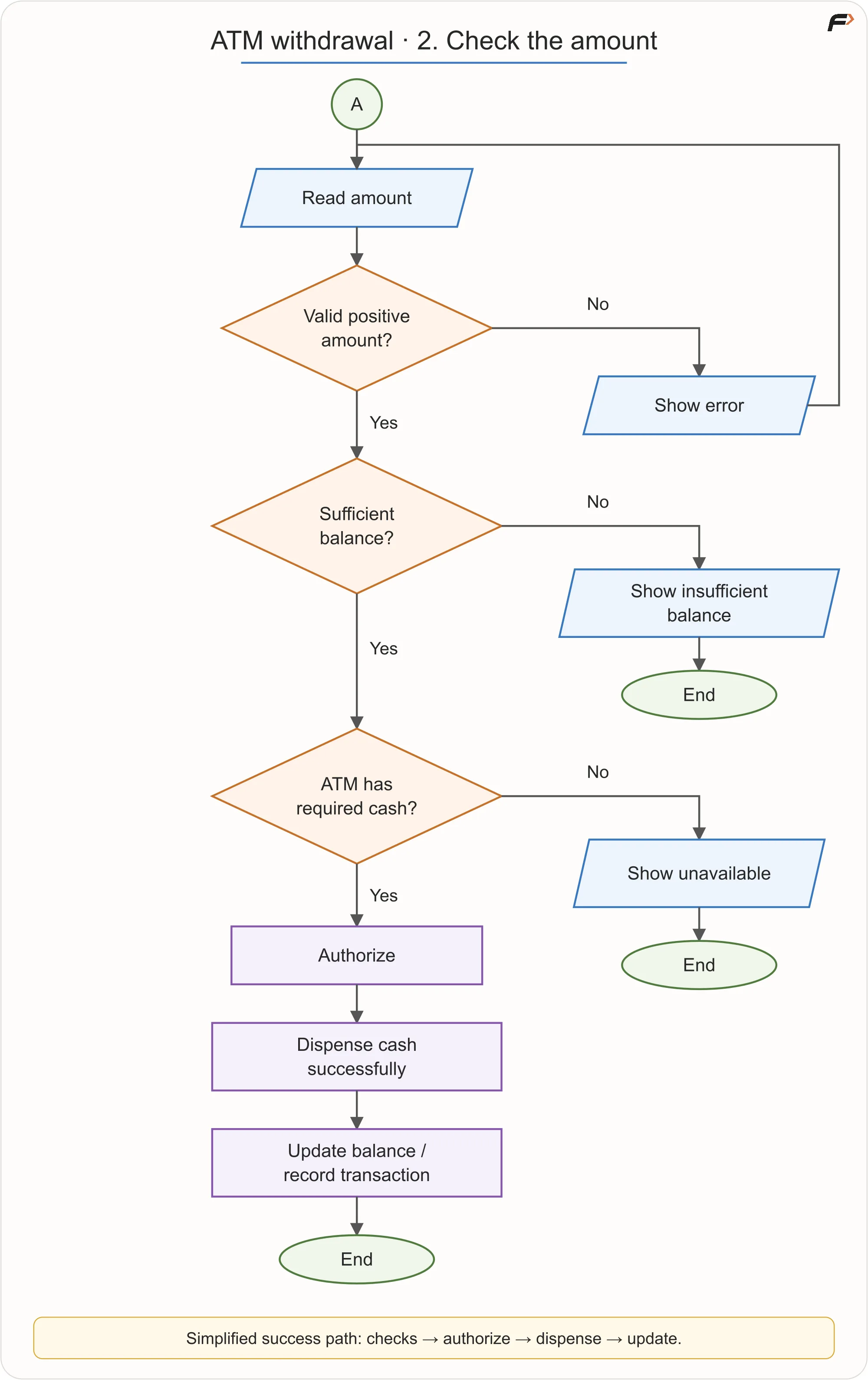
ATM Withdrawal
The order matters. We should not update the balance before checking the amount, balance, and cash availability. We should also not treat every withdrawal request as successful.
This example is still simplified. Real ATM systems include banking networks, encryption, hardware checks, rollback handling, cancellation, timeouts, and fraud checks. For learning flowcharts, the goal is to understand control flow, not to model every real banking detail.
What Is Pseudocode?
Pseudocode is a structured way to write an algorithm in plain, readable instructions. It is not tied to one programming language.
For example, the age eligibility logic can be written as:
READ age
IF age >= 18 THEN
DISPLAY "Eligible"
ELSE
DISPLAY "Not eligible"
END IF
This is not exact C++, Java, or Python syntax. It is a clear description of the logic.
There is no single universal pseudocode standard. Some people write PRINT, others write DISPLAY. Some write INPUT, others write READ. The important thing is that the steps are clear, consistent, and easy to follow.
Common Pseudocode Words
Word | Purpose |
|---|---|
READ / INPUT | receive input |
DISPLAY / PRINT / OUTPUT | show output |
SET | assign or update a value |
IF | start a condition |
ELSE IF | check another condition |
ELSE | handle the remaining case |
END IF | finish a conditional block |
WHILE | repeat while a condition is true |
FOR | repeat over a known range or collection |
RETURN | give back a result from a routine |
STOP | end the process |
Pseudocode helps us think about the algorithm before language syntax becomes a distraction.
Assignment in Pseudocode
An assignment stores a value under a name.
For example:
SET count = count + 1
This does not mean that a number is mathematically equal to itself plus one. It means:
Read the current value of
count.Add
1.Store the new value back into
count.
If count was 4, it becomes 5.
Assignments are commonly used for counters, totals, and updates inside loops.
Convert Flowchart Logic Into Pseudocode
Consider this task:
Find the sum of numbers from 1 to N.
We need a running total. We also need a counter that moves from 1 to N.
The pseudocode is:
READ N
SET sum = 0
SET i = 1
WHILE i <= N
SET sum = sum + i
SET i = i + 1
END WHILE
DISPLAY sum
For N = 3, the dry run is:
Step |
|
|
|---|---|---|
Start | 1 | 0 |
Add 1 | 2 | 1 |
Add 2 | 3 | 3 |
Add 3 | 4 | 6 |
Stop | 4 | 6 |
The final output is 6.
For N = 0, the condition i <= N is false at the start, so the loop body does not run. The output remains 0.
The placement of DISPLAY sum matters. It is outside the loop because the task asks for the final sum, not every intermediate sum.
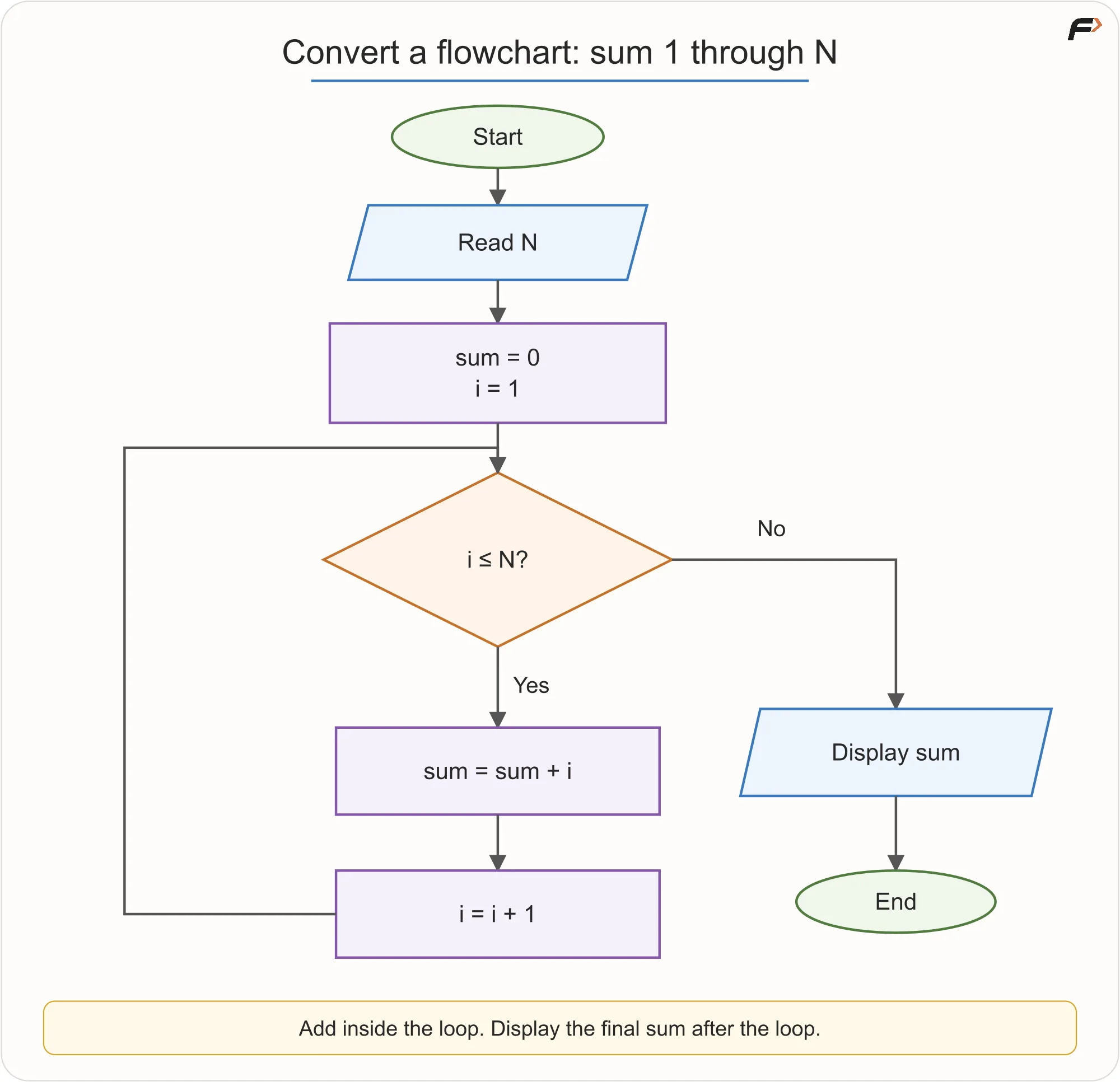
Convert Flowchart Logic Into Pseudocode
Flowchart, Pseudocode, and Program
The same algorithm can be represented in different ways.
Representation | Best Use | Limitation |
|---|---|---|
Flowchart | Seeing paths, branches, and loops visually | Large logic can become crowded |
Pseudocode | Writing clear language-independent steps | Usually cannot be executed directly |
Program | Running the solution on a computer | Syntax can distract from unfinished logic |
None of these is always better than the others. Use the form that helps at the current stage.
If the logic is still unclear, a flowchart may help. If the logic is clear but not ready for a programming language, pseudocode may help. Once the algorithm is correct, code turns it into an executable program.
Common Flowchart and Pseudocode Mistakes
Mistake | Better Habit |
|---|---|
Writing a condition in a process box | Use a decision diamond for True/False choices |
Leaving branches unlabelled | Label paths as Yes/No or True/False |
Letting an arrow go nowhere | Every reachable path should continue or end |
Forgetting the loop update | Make sure the loop progresses toward stopping |
Putting output in the wrong place | Decide whether to display once or during each repetition |
Writing pseudocode like exact C++ | Keep it language-independent and readable |
Hiding too much in one vague step | Break large actions into smaller steps when needed |
Showing only the success path | Include failure paths when the requirement includes them |
A flowchart or pseudocode version should not simply show what happens when everything goes well. If wrong input, failed payment, insufficient balance, or too many attempts are part of the requirement, they should have clear paths too.
Check the Logic Before Coding
Before moving from flowchart or pseudocode to code, ask these questions:
Are all required inputs read before they are used?
Does every decision have a clear condition?
Are decision branches labelled clearly?
Are boundary values handled correctly?
Does every loop have initialization, condition, body, and update?
Can the loop stop for valid inputs?
Can the loop correctly run zero times when needed?
Does every path either continue properly or end?
Do the flowchart and pseudocode describe the same logic?
This check saves time because it catches thinking mistakes before they become coding mistakes.
Key Terms
Term | Meaning |
|---|---|
Flowchart | A visual representation of steps and paths in a process |
Control flow | The order in which instructions are considered and executed |
Sequence | Steps performed one after another |
Selection | Choosing a path based on a condition |
Iteration | Repeating steps while a condition allows it |
Initialization | Setting the starting value before repetition |
Condition | A True/False question controlling a path |
Update | A change that moves a loop toward stopping |
Pseudocode | A structured, language-independent description of an algorithm |
Assignment | Calculating and storing a value under a name |
Dry run | Manually tracing steps for a sample input |
Summary
Flowcharts and pseudocode help beginners plan logic before writing code. A flowchart shows the path of execution visually, while pseudocode states the same logic in clear structured words.
Sequence handles steps in order. Selection chooses between paths. Iteration repeats steps until a stopping condition is reached. These three ideas can combine to describe many useful algorithms.
A clear algorithm should remain the same whether it is drawn as a flowchart, written as pseudocode, or implemented as a program. The representation changes, but the logic should stay consistent.
Be the first to add a comment.