Introduction
Wireless networking allows devices to communicate without physical cables. Instead of sending data through Ethernet wires or fiber cables, wireless devices use radio waves to exchange information through the air.
Wi-Fi is the most common example of wireless networking in homes, offices, campuses, cafes, airports, and public places. Before going deeper into Wi-Fi standards, roaming, interference, and security, it is important to understand a few basic wireless terms.
Basic Wi-Fi Components
A wireless network has devices that connect to the network and devices that provide the wireless connection.
Station or client: Any device that connects to Wi-Fi, such as a laptop, smartphone, tablet, printer, smart TV, or IoT device.
Access Point: A device that allows wireless clients to join a network using radio waves.
Wi-Fi router: In home networks, this is usually a single box that works as an access point, router, switch, DHCP server, NAT device, and firewall.
Enterprise access point: In offices or campuses, access points are usually separate devices connected to switches, routers, firewalls, and controllers.
In simple terms, the client connects wirelessly to the access point, and the access point connects that client to the rest of the network.
Home Wi-Fi vs Enterprise Wi-Fi
Home Wi-Fi and enterprise Wi-Fi use similar wireless ideas, but their design is different because the scale is different.
Aspect | Home Wi-Fi | Enterprise Wi-Fi |
|---|---|---|
Common Device | Wi-Fi router | Dedicated access points |
Scale | Small number of users | Many users and devices |
Management | Usually managed locally | Often centrally managed |
Components | Many roles in one device | APs, switches, routers, firewalls, DHCP, DNS |
Use Case | Homes and small offices | Offices, campuses, hospitals, hotels |
A home router combines many networking functions because the network is small. Larger networks separate these roles for better performance, reliability, and management.
SSID and BSSID
SSID and BSSID are two common terms used in Wi-Fi networks.
SSID stands for Service Set Identifier. It is the Wi-Fi network name visible to users. For example, Home Wi-Fi, College Wi-Fi, or Office Wi-Fi can be SSIDs.
BSSID stands for Basic Service Set Identifier. It uniquely identifies a specific access point and is usually based on the access point’s MAC address.
Term | Meaning | Example Use |
|---|---|---|
SSID | Wi-Fi network name | User selects this name while connecting |
BSSID | Unique access point identifier | Used for roaming, debugging, and identifying the exact AP |
Multiple access points can advertise the same SSID. For example, an office may have one visible Wi-Fi name across several floors, but each access point behind that network has a different BSSID.
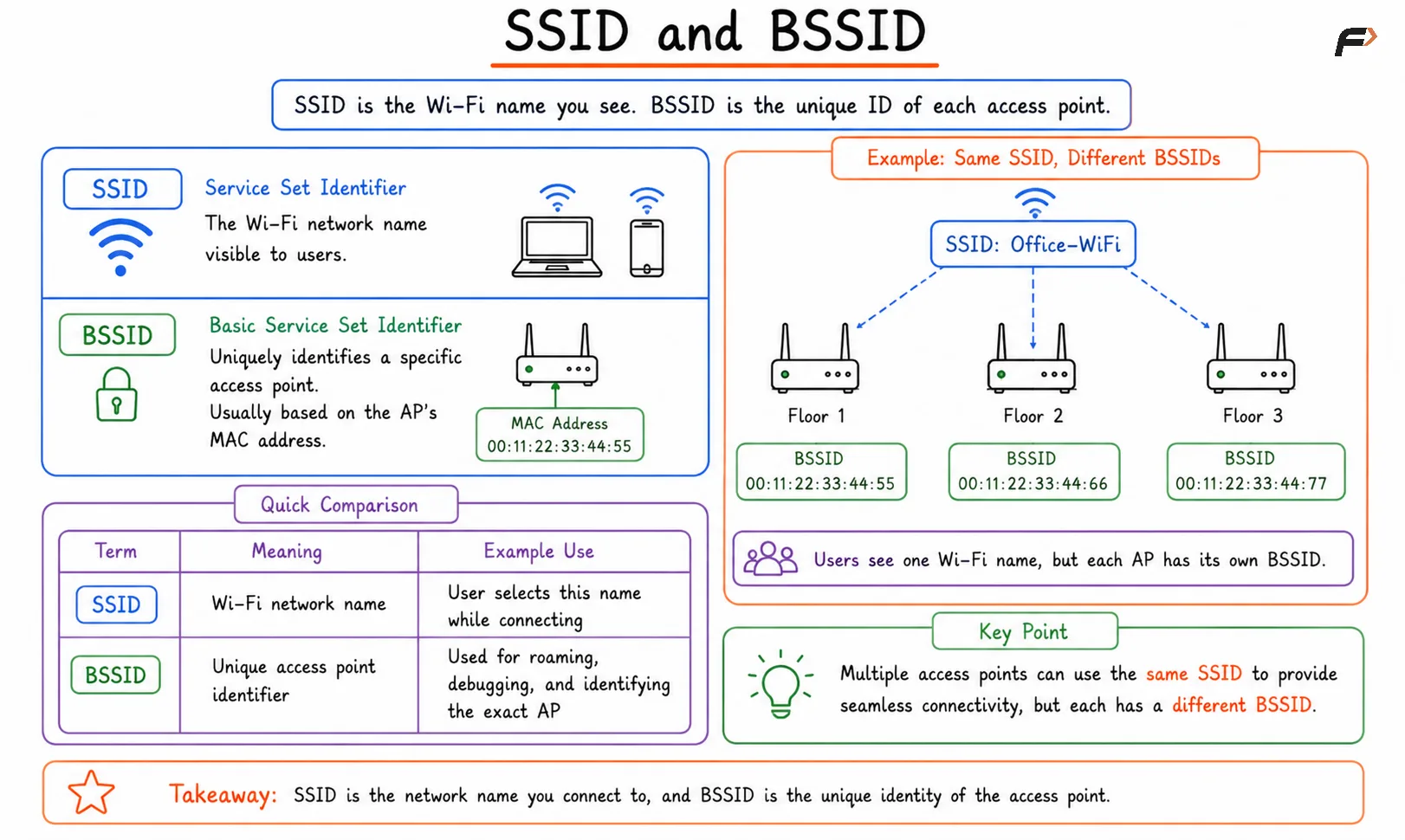
SSID and BSSID
Wi-Fi Frequency Bands
Wi-Fi commonly operates in three frequency bands: 2.4 GHz, 5 GHz, and 6 GHz. Each band has different behavior because radio frequency affects speed, range, and interference.
Band | Coverage | Speed | Interference |
|---|---|---|---|
2.4 GHz | Better range | Lower speed | Higher interference |
5 GHz | Medium range | Higher speed | Lower than 2.4 GHz |
6 GHz | Shorter range | Very high speed | Lower congestion |
The 2.4 GHz band travels farther and passes through walls better, but it is often crowded. The 5 GHz band provides better speed and more channels, but range is lower. The 6 GHz band provides more spectrum and high performance, but it needs newer device support.
Bands, Channels, and Channel Width
A frequency band is a large range of wireless spectrum. A channel is a smaller portion inside that band used for communication.
For example, 2.4 GHz is a band, while channels like 1, 6, and 11 are specific sections inside that band. Access points use channels so nearby wireless networks can share spectrum more efficiently.
Channel width decides how much spectrum a Wi-Fi channel uses. Common widths include 20 MHz, 40 MHz, 80 MHz, and 160 MHz.
Narrow channels: More stable in crowded environments and cause less interference.
Wider channels: Can provide higher throughput but need cleaner spectrum.
2.4 GHz planning: Channels 1, 6, and 11 are commonly used because they do not overlap in many regions.
Crowded networks: Narrower channels often perform better than very wide channels.
A wider channel is not always better. In a noisy or crowded environment, wider channels may create more interference and reduce real performance.
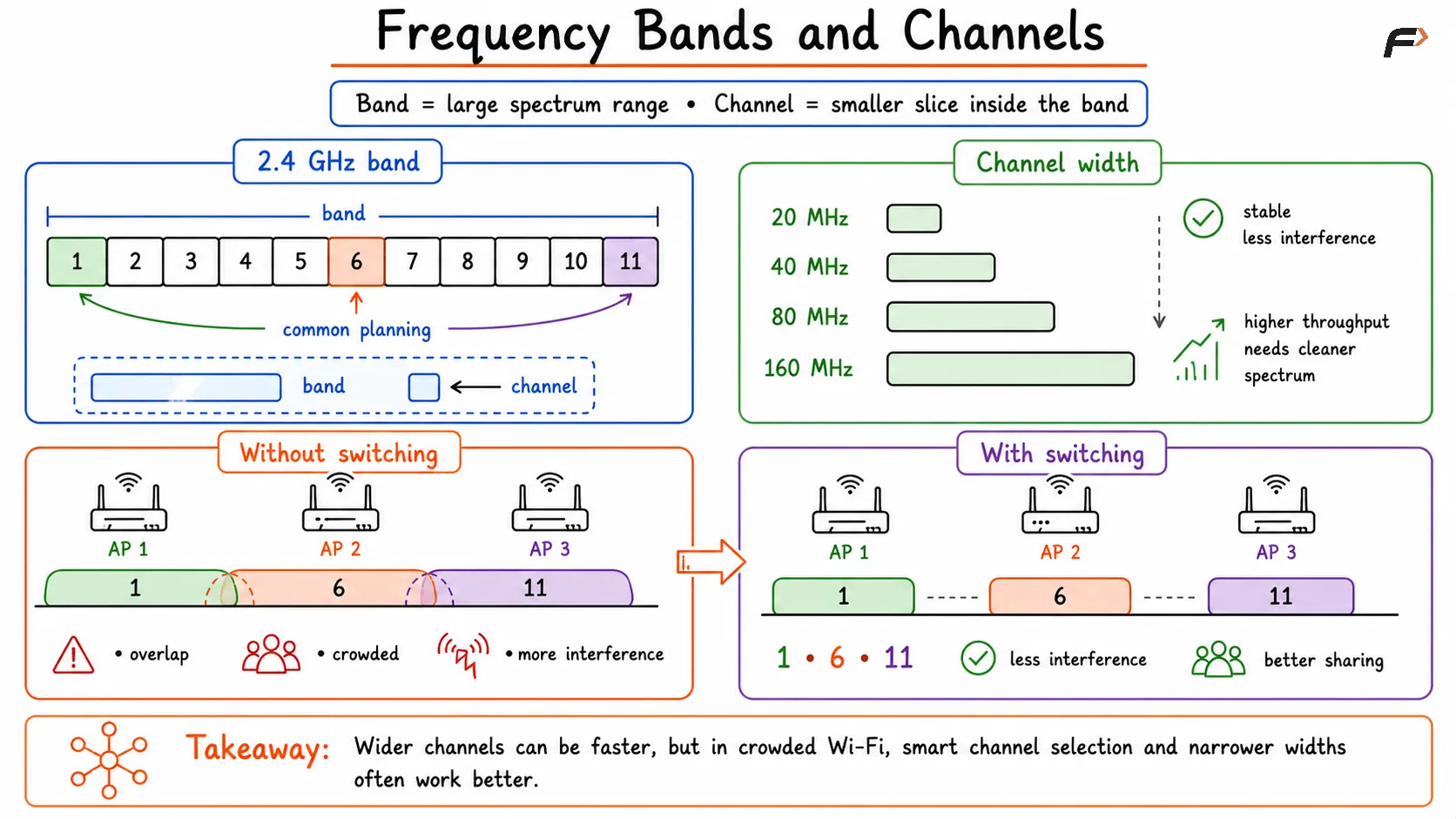
Frequency Bands and Channels
Signal, Noise, and SNR
Wireless performance does not depend only on signal strength. It also depends on how much noise or interference exists around the signal.
RSSI, or Received Signal Strength Indicator, tells how strong the received Wi-Fi signal is. A stronger signal is usually better, but signal strength alone does not guarantee good speed.
SNR, or Signal-to-Noise Ratio, compares the useful Wi-Fi signal with unwanted noise. A high SNR means the signal is clearly stronger than the noise, which usually improves wireless performance.
Strong signal with low noise: Good wireless quality.
Strong signal with high noise: Performance may still be poor.
Weak signal with noise: Slow speeds, retransmissions, and unstable connectivity.
High SNR: Better chance of higher data rates and stable communication.
This is why a device may show good Wi-Fi bars but still experience slow internet if the surrounding wireless environment is noisy.
MCS, MIMO, and Airtime
Wireless networks use several mechanisms to improve speed and efficiency.
MCS stands for Modulation and Coding Scheme. It decides how efficiently data is transmitted over a wireless link. Higher MCS values usually mean higher speeds, but they require better signal quality.
MIMO stands for Multiple Input Multiple Output. It uses multiple antennas to send and receive multiple data streams at the same time. For example, a 2x2 MIMO device can support two spatial streams.
Airtime means the amount of time a device uses the wireless channel. Since Wi-Fi is a shared medium, devices must take turns using the channel.
MCS: Higher values improve speed when signal quality is good.
MIMO: Multiple antennas allow more data to be transmitted efficiently.
Airtime: Shared channel time must be used carefully.
Slow devices: A slow device may consume more airtime and reduce performance for others.
A wireless network is not only about maximum speed. It is also about how efficiently many devices share the same radio channel.
Summary
Wireless networking allows devices to communicate using radio waves instead of physical cables. Wi-Fi clients connect to access points, and access points connect those devices to the larger network.
Important wireless basics include SSID, BSSID, 2.4 GHz, 5 GHz, 6 GHz, channels, channel width, RSSI, SNR, MCS, MIMO, and airtime. These concepts explain why wireless networks are flexible but also affected by interference, signal strength, noise, shared channels, and device density.
Be the first to add a comment.