Introduction
Wi-Fi routers often advertise speeds such as 300 Mbps, 1200 Mbps, 2400 Mbps, or even higher. These numbers look simple, but they do not represent the speed every phone, laptop, or smart TV will actually receive in daily use.
The advertised speed usually refers to the maximum theoretical wireless link rate under ideal conditions. Real throughput is lower because Wi-Fi has overhead, interference, shared airtime, device limits, and bottlenecks outside the wireless link.
Advertised Speed vs Real Throughput
The speed printed on a router box is usually a PHY-layer data rate. It describes what the wireless link may support under clean conditions, not what an application will consistently receive.
For example, a device may show a link speed of 866 Mbps, but an actual file download or speed test may be much lower. This is normal because Wi-Fi communication includes acknowledgements, encryption overhead, retransmissions, management frames, and shared channel usage.
Speed Type | Meaning |
|---|---|
Advertised speed | Maximum theoretical wireless capability |
Link speed | Negotiated speed between device and access point |
Real throughput | Actual usable speed available to applications |
Internet speed | Speed provided by the ISP plan |
Application speed | Final speed experienced by the app or website |
The final experience is limited by the weakest part of the complete path, not only by the Wi-Fi router.
Signal Strength, Distance, and SNR
Wi-Fi uses radio waves, and radio signals weaken as distance increases. Walls, floors, ceilings, metal objects, glass, and concrete can reduce signal quality even when the router itself is powerful.
Signal strength matters, but it is not the full story. Wi-Fi performance depends more on Signal-to-Noise Ratio, or SNR. SNR compares the useful Wi-Fi signal with unwanted noise and interference around it.
Strong signal with low noise: Better speed and stability.
Strong signal with high noise: Good bars may still produce poor speed.
Weak signal with noise: Lower speed, higher latency, and more retransmissions.
Lower SNR: The device switches to safer but slower transmission rates.
This is why a phone may show decent Wi-Fi bars but still feel slow in a noisy wireless environment.
Rate Adaptation and MCS
Wi-Fi devices automatically adjust their transmission rate based on link quality. This process is called rate adaptation.
When signal quality is good, the device can use a higher Modulation and Coding Scheme, or MCS. Higher MCS values carry more data per transmission and provide better speed.
When signal quality drops, the device moves to lower MCS values. Lower MCS values are more reliable, but they reduce throughput.
Wi-Fi prefers a stable slower connection over a fast unreliable one. This protects communication, but it also reduces real-world speed.
Interference and Channel Congestion
Wi-Fi operates in shared radio spectrum. Neighboring Wi-Fi networks, Bluetooth devices, microwave ovens, wireless cameras, baby monitors, and crowded apartment or office environments can all affect performance.
Interference causes frames to become corrupted or lost. When that happens, Wi-Fi must retransmit the same data, which wastes airtime.
Common effects of interference include:
More retransmissions: Lost or corrupted frames must be sent again.
Higher latency: Devices wait longer before successful delivery.
Lower throughput: More airtime is spent fixing errors instead of sending new data.
Unstable speed: Performance changes as nearby devices and networks become active.
Channel selection and channel width also matter. Wider channels can provide higher speed in clean environments, but in crowded areas they may collect more interference and perform worse.
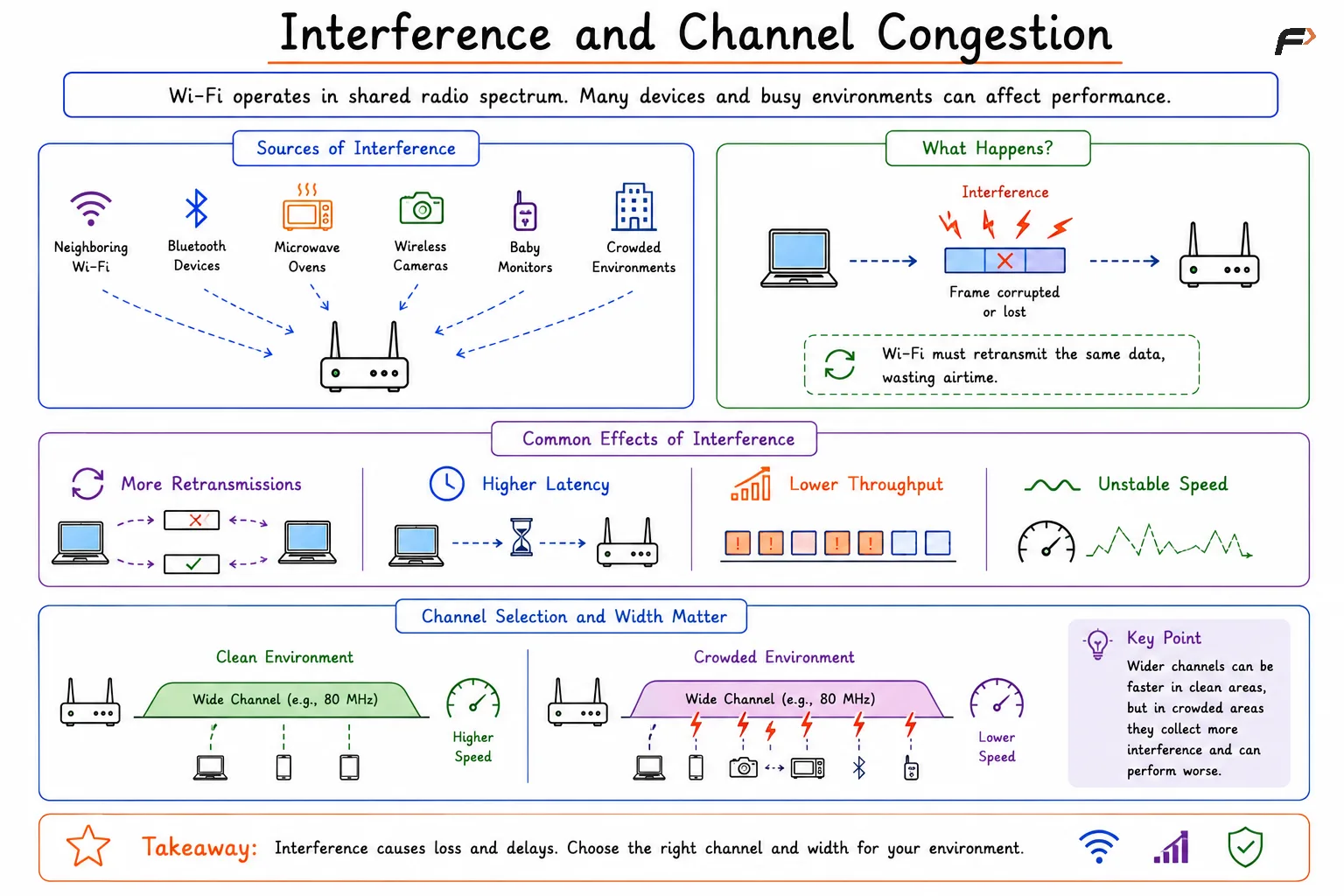
Interference and Channel Congestion
Wi-Fi Is a Shared Medium
Wi-Fi is different from switched Ethernet. In Ethernet, each wired device may have a dedicated link to a switch. In Wi-Fi, devices share the same wireless channel.
That means airtime is the most important resource. When one device is transmitting, other devices on the same channel often have to wait.
This creates an important rule: Wi-Fi is airtime-based, not just bandwidth-based.
If many devices are active at the same time, the available airtime is divided among them. More clients, more traffic, and more management frames all reduce the usable time available for each device.
Slow Clients Can Affect Everyone
A slow or distant client does not only suffer individually. It can also reduce performance for other devices on the same wireless channel.
Suppose one laptop is close to the access point and another phone is far away. The distant phone may use a lower data rate because its signal quality is poor. Since it transmits slowly, it occupies the channel for a longer time.
Other devices must wait while that slow transmission completes.
Client Condition | Airtime Impact | Network Effect |
|---|---|---|
Strong signal, high MCS | Uses less airtime | Better overall efficiency |
Weak signal, low MCS | Uses more airtime | Other devices wait longer |
Many active clients | Airtime is divided | Lower speed per device |
High retransmissions | Airtime is wasted | Higher latency and lower throughput |
This is one reason one weak device can make an entire Wi-Fi network feel slower.
Device, Router, and Internet Bottlenecks
Slow Wi-Fi is not always caused by the wireless signal. Other parts of the path can also limit speed.
Common bottlenecks include:
Client device limits: Older phones or laptops may not support newer Wi-Fi standards, wider channels, or multiple spatial streams.
Access point capacity: A router may have a fast wireless radio but a slower wired uplink or weaker processor.
ISP plan: A
1200 MbpsWi-Fi link cannot deliver1200 Mbpsinternet if the broadband plan is only100 Mbps.Server limitations: A website, game server, or cloud service may be slow even when Wi-Fi is good.
Application behavior: Some apps limit download speed, upload speed, or background activity.
Power saving: Phones and laptops may reduce radio activity to save battery, which can affect throughput and latency.
The real speed is determined by the slowest component in the end-to-end path.
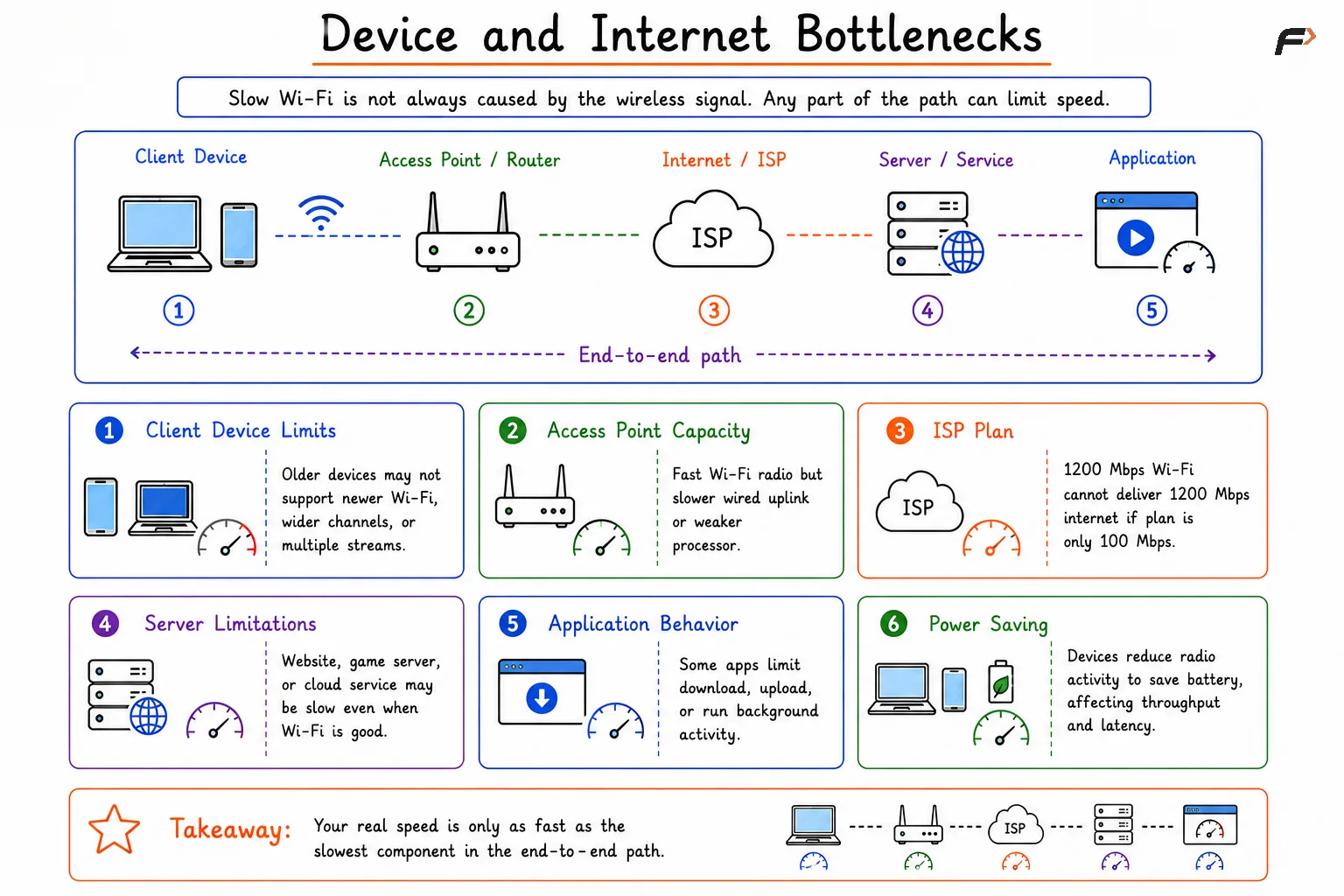
Device and Internet Bottlenecks
Why 2.4 GHz, 5 GHz, and 6 GHz Feel Different
Different Wi-Fi bands behave differently. Each band has its own trade-off between range, speed, and interference.
Band | Strength | Limitation |
|---|---|---|
2.4 GHz | Better range and wall penetration | More interference and lower speed |
5 GHz | Higher speed and more channels | Shorter range than 2.4 GHz |
6 GHz | Cleaner spectrum and high speed | Shortest range and needs newer devices |
The best band depends on the environment. A nearby device may perform better on 5 GHz or 6 GHz, while a faraway device behind walls may fall back to 2.4 GHz for coverage.
Summary
Wi-Fi speed drops in real life because the advertised router speed is only an ideal wireless capability, not guaranteed application throughput. Actual performance depends on signal quality, SNR, MCS rate adaptation, interference, channel congestion, retransmissions, airtime sharing, and client device capability.
The full network path also matters. Router limits, ISP bandwidth, server speed, application behavior, and power-saving modes can all reduce the final speed. Good Wi-Fi performance depends on clean airtime, strong signal quality, low interference, capable devices, and a path where no single component becomes the bottleneck.
Be the first to add a comment.