Introduction
Opening a website over Wi-Fi looks simple. A user enters a URL, presses Enter, and the page appears on the screen. Behind that small action, many network protocols work together in a fixed sequence.
The device must already be connected to Wi-Fi, resolve the website name, find the local gateway, create a transport connection, secure the session, send an HTTP request, receive the response, and finally render the webpage.
Device Connects to Wi-Fi
Before any website can open, the phone or laptop must join the Wi-Fi network. This happens at the wireless link level between the client device and the access point.
The device typically performs:
Scanning: Finds nearby Wi-Fi networks using beacon frames and probe responses.
Authentication: Starts communication with the selected access point.
Association: Becomes a member of the wireless network.
Security handshake: Establishes encryption keys for protected Wi-Fi traffic.
DHCP configuration: Receives IP address, subnet mask, gateway, and DNS server details.
After these steps, the device is connected to the local Wi-Fi network and has the basic information needed for IP communication.
User Enters the Website URL
Suppose the user enters: https://takeuforward.org
The browser understands the URL, but the network cannot send packets directly to a domain name. Devices communicate using IP addresses, so the browser must first find the IP address of the website.
At this stage, the browser knows the domain name, but not yet the destination server address.
DNS, or Domain Name System, converts the website name into an IP address. The device sends a DNS query to its configured DNS server.
For example: takeuforward.org => DNS lookup => Destination IP address
Once DNS returns the IP address, the browser knows where the website server is located. If the DNS answer is already cached, this step may complete faster because the device does not need a fresh lookup.
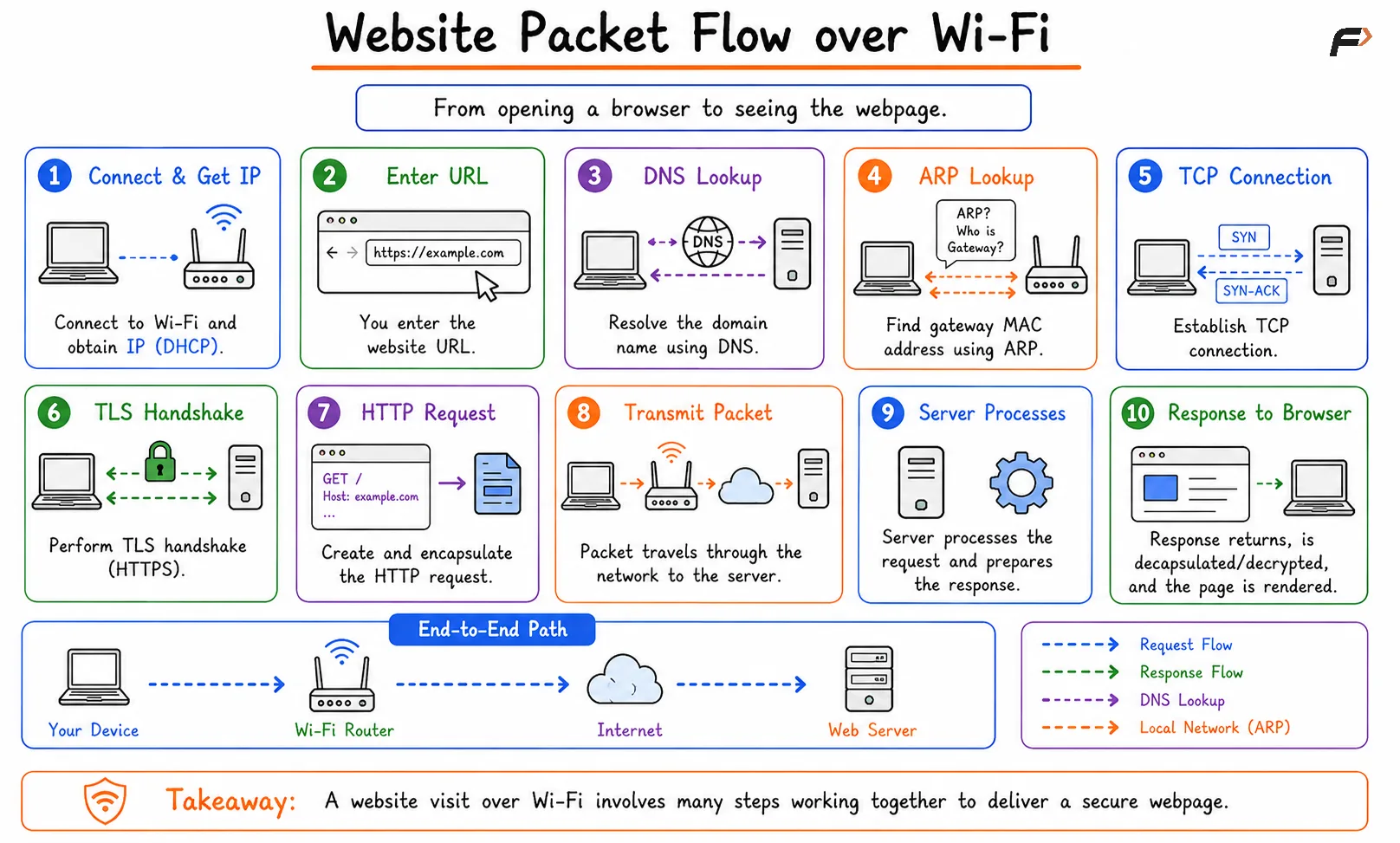
Website Packet Flow over Wi-Fi
Device Finds the Gateway MAC Address
The destination website is usually outside the local Wi-Fi network. So the device does not send the packet directly to the website server at Layer 2. It sends the packet to the default gateway, usually the home router or office router.
The device already knows the gateway IP address from DHCP, but local network delivery needs a MAC address. ARP is used to find it.
ARP works like this:
Gateway IP known => ARP request broadcast => Router replies with MAC address
After ARP completes, the device knows the MAC address of the default gateway and can send frames toward it.
TCP and TLS Setup
For most HTTPS websites using HTTP/1.1 or HTTP/2, the browser first establishes a TCP connection with the server. TCP provides reliable and ordered delivery.
After TCP is established, HTTPS communication uses TLS. The TLS handshake verifies the server certificate, agrees on cryptographic parameters, and creates session keys for encrypted communication.
Step | Purpose |
|---|---|
TCP handshake | Creates a reliable transport connection |
TLS handshake | Secures the connection using encryption and authentication |
HTTP request | Asks the server for the webpage or resource |
If HTTP/3 is used, QUIC over UDP handles connection setup and security differently. The common learning flow still remains: resolve name, connect securely, request content, receive response.
HTTP Request Gets Encapsulated
After TCP and TLS are ready, the browser sends the HTTP request. For example, the request may ask for the homepage, an image, a CSS file, a JavaScript file, or an API response.
As the request moves down the protocol stack, each layer wraps it with its own information.
A simplified encapsulation flow looks like:
HTTP request => TLS encrypted data => TCP segment => IP packet => Wi-Fi frame
The Wi-Fi frame is sent wirelessly from the device to the access point. From there, the router forwards the packet toward the internet.
Packet Travels Through the Network
Once the packet reaches the router, it leaves the local Wi-Fi segment and moves through wider network infrastructure.
A typical path may look like:
Device => Access Point => Router => ISP => Internet routers => Website server
In a home network, NAT may also happen at the router. NAT translates the device’s private IP address into the public IP address used on the internet.
Routers along the path mainly inspect the destination IP address and forward the packet toward the next hop. They do not need to understand the website content inside the encrypted HTTPS traffic.
Server Processes the Request
When the packet reaches the website server, the server processes it through the network stack.
The server performs decapsulation:
Wi-Fi or Ethernet frame removed => IP packet processed => TCP data reassembled => TLS decrypts data => HTTP request reaches web server
The web server then prepares a response. The response may contain HTML, CSS, JavaScript, images, videos, JSON data, or other resources needed by the webpage.
Response Returns to the Client
The server sends the response back toward the client. The response is also broken into packets and travels across the internet through routers.
When the response reaches the user’s router, it is forwarded back to the correct device on the local Wi-Fi network. If NAT was used earlier, the router uses its NAT table to map the returning traffic back to the original private device.
The client then processes the response:
Wi-Fi frame received => IP packet processed => TCP stream reassembled => TLS decrypts data => HTTP response delivered to browser
Finally, the browser uses the response to render the webpage. It may also send additional requests for CSS, JavaScript, images, fonts, ads, analytics, or API data.
Protocols Involved in Website Loading
Protocol or Concept | Role in Website Packet Flow |
|---|---|
Wi-Fi | Carries frames between device and access point |
DHCP | Provides IP address, gateway, and DNS settings |
ARP | Finds the MAC address of the default gateway |
DNS | Converts domain name into IP address |
IP | Provides logical addressing and routing |
NAT | Translates private IP traffic to public IP traffic |
TCP | Provides reliable transport for many web connections |
TLS | Encrypts and authenticates HTTPS communication |
HTTP/HTTPS | Carries website requests and responses |
Each protocol solves one part of the journey. Together, they allow a simple browser action to become a complete end-to-end network communication.
Summary
Opening a website over Wi-Fi involves much more than sending one request. The device first joins the Wi-Fi network, receives IP configuration, resolves the domain name using DNS, finds the gateway MAC address using ARP, and sends traffic through the router.
For HTTPS websites, TCP creates a reliable connection and TLS secures it before the browser sends the HTTP request. The packet travels through the access point, router, ISP, internet routers, and server. The response returns through the network, gets decapsulated, decrypted, and delivered to the browser, which finally renders the webpage.
Be the first to add a comment.