Introduction
Switching and routing are two of the most important concepts in computer networking. Both help data move from one place to another, but they do not solve the same problem. One handles communication inside a local network, while the other handles communication between different networks.
This difference is what makes both technologies essential. A switched network keeps local communication efficient, and routing allows devices in separate networks or VLANs to reach each other in a controlled way.
What Switching Means
Switching is the process of forwarding data within the same network. A switch receives an Ethernet frame and decides where to send it by checking the destination MAC address.
If two devices are in the same VLAN or the same local Layer 2 network, switching is enough to move traffic between them. The traffic stays local and does not need a router.
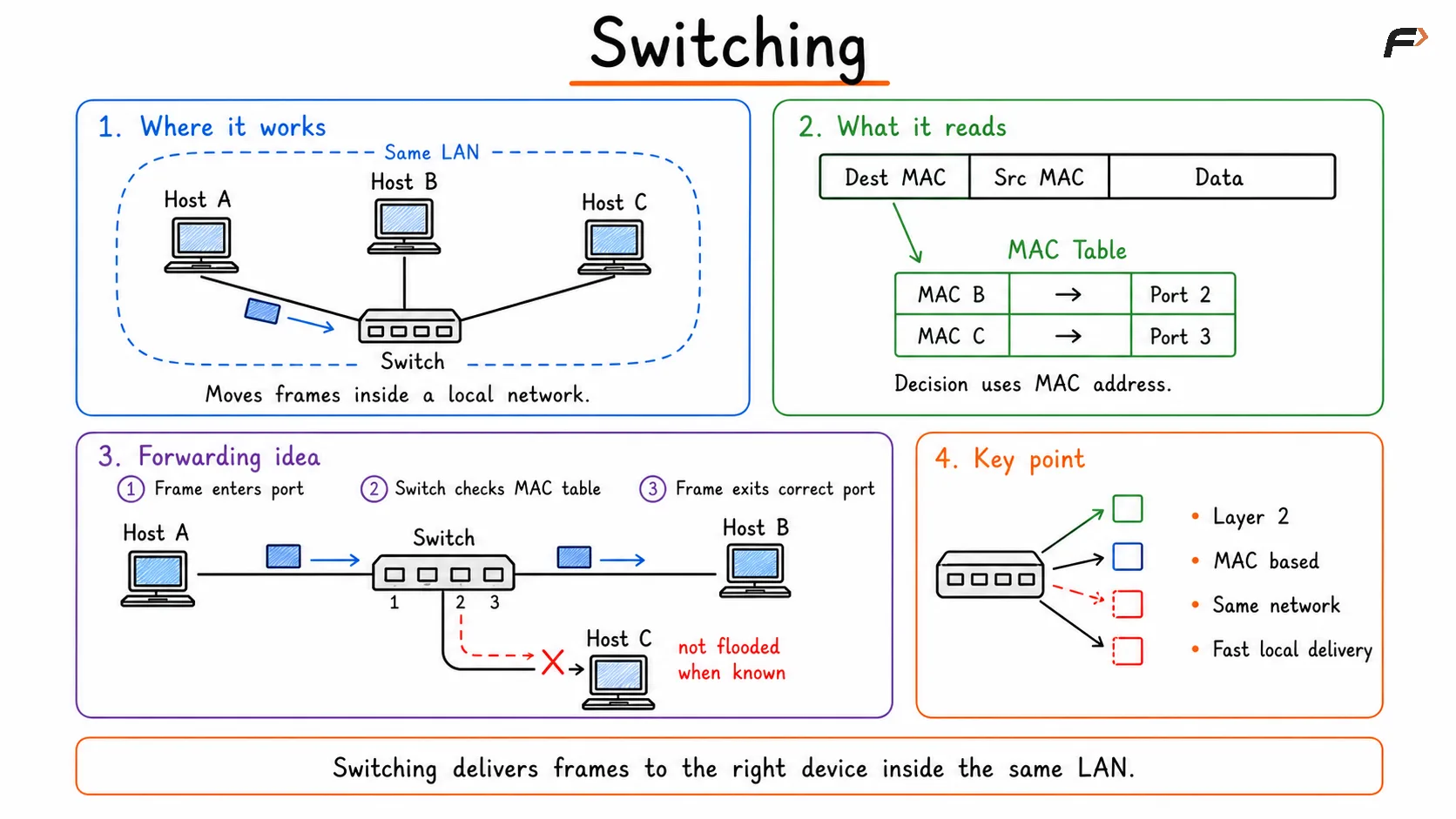
Overview of network switching, showing how data is transferred between devices through different switching techniques to ensure efficient communication and reliable delivery across a network.
What Routing Means
Routing is the process of moving data between different networks. A router checks the destination IP address and decides which path the packet should take to reach another network.
If the source and destination belong to different VLANs, different subnets, or different networks, switching alone is not enough. In that case, a router or Layer 3 device is required.
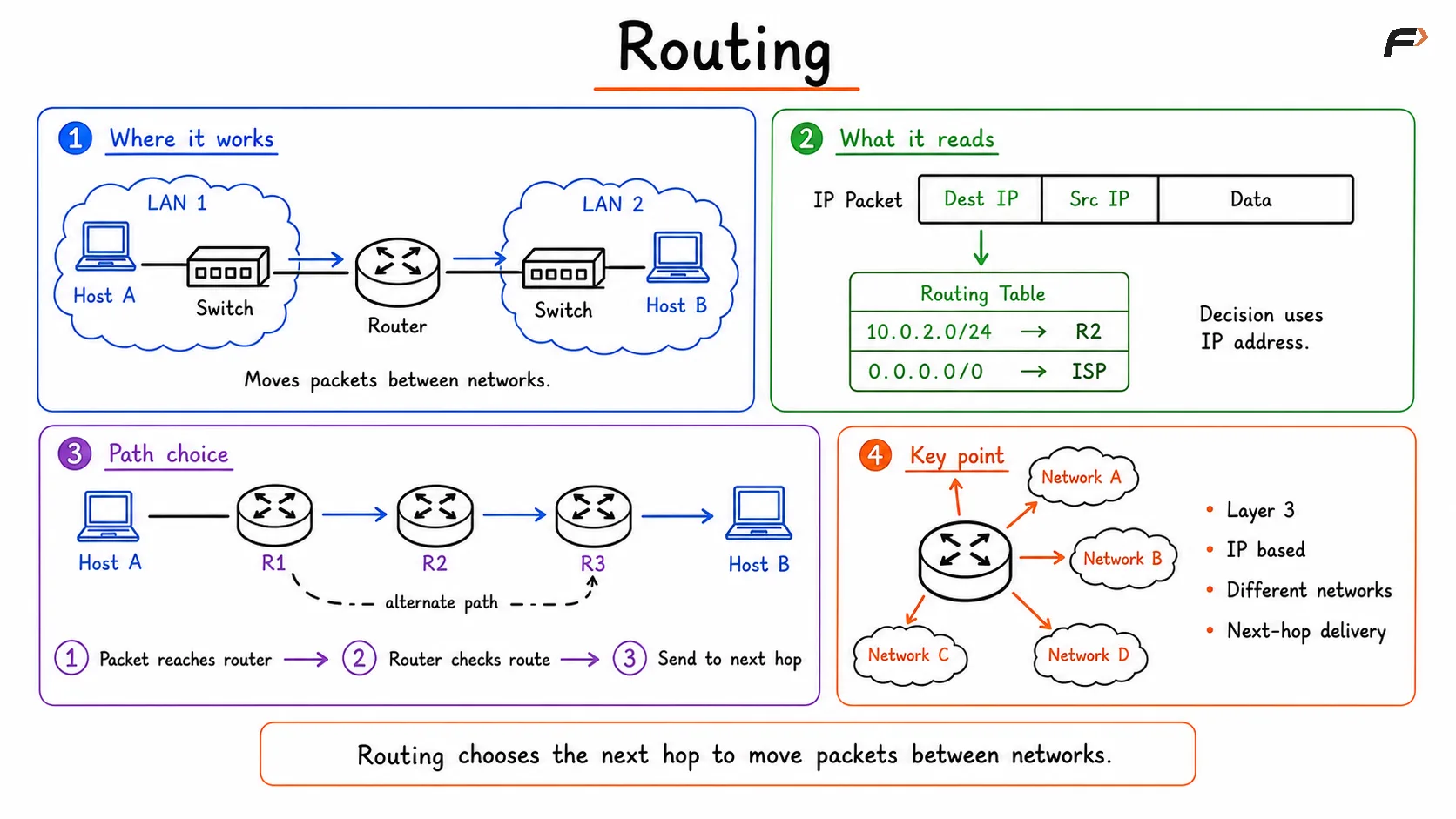
Diagram explaining routing, showing how routers use destination IP addresses and routing tables to select the next hop and forward packets between different networks through the best available path.
Main Difference Between Switching and Routing
The simplest way to remember the difference is this:
Switching: Moves data within the same network.
Routing: Moves data between different networks.
That basic idea helps with most networking questions, but the technical differences become clearer when the two are compared side by side.
Aspect | Switching | Routing |
|---|---|---|
Purpose | Moves data within the same network | Moves data between different networks |
OSI Layer | Layer 2, Data Link Layer | Layer 3, Network Layer |
Address Used | MAC address | IP address |
Data Unit | Frame | Packet |
Forwarding Information | MAC address table | Routing table |
Scope | Same VLAN or same local network | Different VLANs or different networks |
Device | Switch | Router or Layer 3 switch |
Example of Switching and Routing
Suppose a laptop and a printer are connected to the same VLAN. If the laptop sends data to the printer, the switch checks the destination MAC address and forwards the frame to the correct port.
In this case:
Same network: Both devices are in the same VLAN.
Layer 2 delivery: The switch handles the communication.
No router needed: Traffic stays inside the local network.
This is a typical switching scenario.
Now suppose a laptop belongs to VLAN 10 and a server belongs to VLAN 20. Since these are different networks, the traffic cannot be delivered by Layer 2 switching alone.
The communication flow becomes:
Source device sends traffic: The laptop sends data toward its gateway.
Switch forwards locally: The switch passes the frame toward the router or Layer 3 switch.
Routing decision happens: The router checks the destination IP network.
Traffic enters the destination network: The packet is forwarded into VLAN 20.
Destination receives the data: The server gets the packet.
This is a routing scenario because the communication crosses a network boundary.
Why the Difference Matters
Understanding switching and routing helps explain how modern LANs and enterprise networks are built. Local communication should stay fast and efficient, while communication between different departments, VLANs, or subnets should follow routing boundaries and network policies.
This difference matters for:
Network design: Helps decide where Layer 2 ends and Layer 3 begins.
VLAN communication: Devices in different VLANs require routing.
Troubleshooting: Helps identify whether the problem is local switching or inter-network routing.
Security and segmentation: Routing boundaries are often used to apply control between networks.
Summary
Switching and routing both move data, but they work at different layers and serve different purposes. Switching is used for communication inside the same local network and relies on MAC addresses, Ethernet frames, and a MAC address table. Routing is used for communication between different networks and relies on IP addresses, packets, and a routing table.
In short, switching handles local delivery and routing handles inter-network delivery. That distinction is the foundation for understanding how devices communicate inside modern computer networks.
Be the first to add a comment.