Introduction
At the Network Layer, packets do not jump directly from the sender to the final destination. They move step by step through multiple routers, and each router has to make a practical decision about what should happen next.
This is where routing and forwarding come in. These two ideas are closely related, but they are not the same. One is responsible for building path information, and the other is responsible for using that information to move packets.
Need of Routing and Forwarding
When a packet travels across the internet, it usually passes through several networks before reaching the destination. A router cannot forward the packet properly unless it already has some knowledge of reachable networks and possible next hops.
That creates two separate responsibilities:
Path knowledge: The router needs a map of where different networks are.
Packet movement: The router needs to send each packet toward the correct next hop.
Routing handles the first responsibility. Forwarding handles the second.
A simple journey may look like this:
Source device => Home router => ISP router => Regional router => Backbone router => Destination network => Destination device
At every router, the packet is moved forward one step, but that step is possible only because route information already exists.
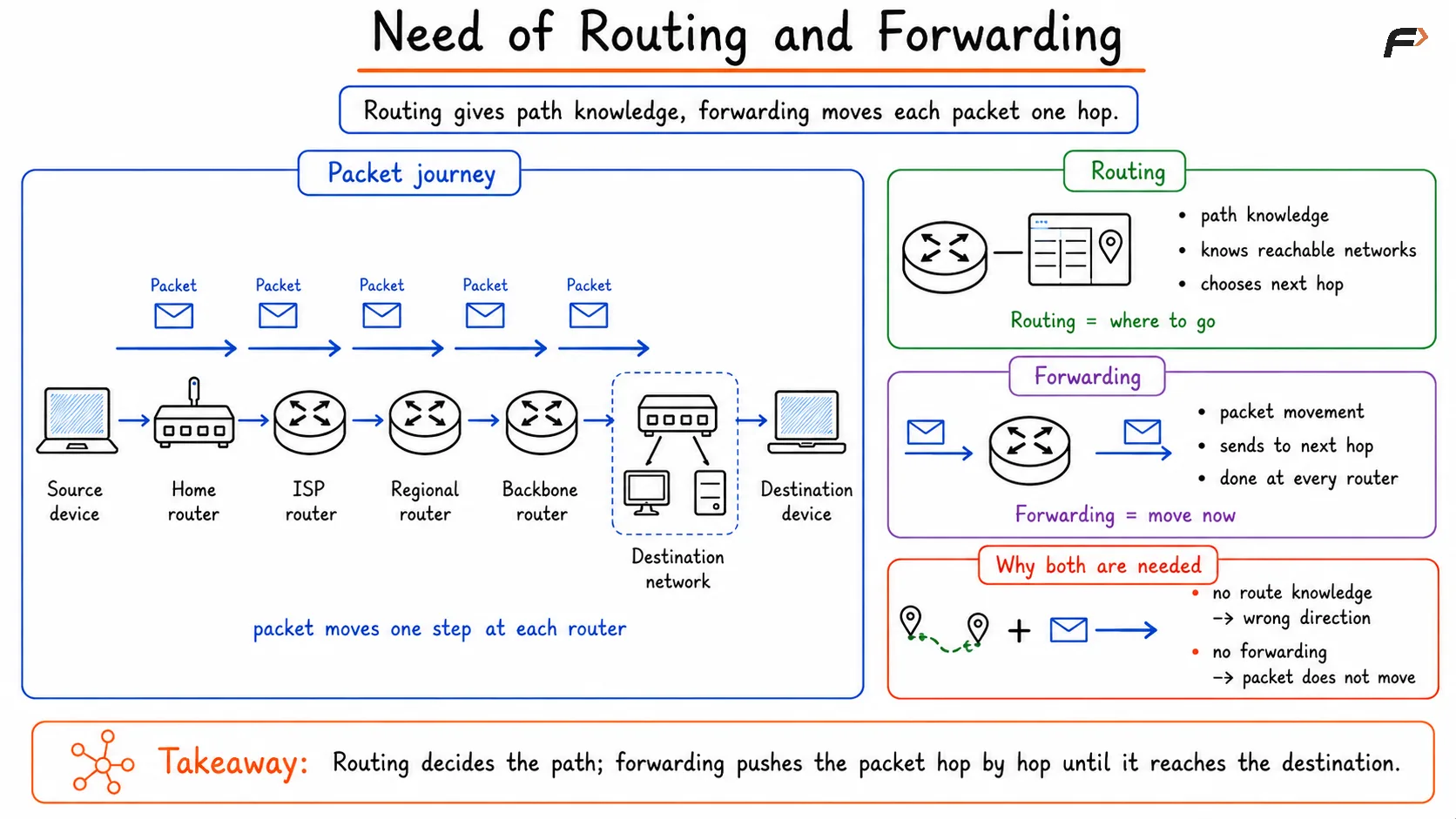
Need of Routing and Forwarding
What Routing Means
Routing is the process of learning, selecting, and maintaining paths through the network. Its job is to determine which networks are reachable, what paths exist, and which path should be preferred.
In simple terms, routing builds the map.
Routing is responsible for:
Learning reachable networks
Selecting the best path
Building and updating routing tables
Adapting when topology changes
Routing itself does not move a packet. It creates the information that will later be used for packet movement.
How Routers Learn Routes
A router can learn routing information in different ways. The source of that information affects how flexible and dynamic the network becomes.
Common route sources include:
Directly connected networks: The router automatically knows networks attached to its own interfaces.
Static routes: A network administrator manually defines where certain traffic should go.
Routing protocols: Routers exchange route information dynamically using protocols such as RIP, OSPF, or BGP.
A small home router may use only directly connected routes and one default route to the ISP. A large enterprise or service provider router may rely heavily on dynamic routing protocols.
What a Routing Table Does
A routing table is the structure that stores the route information a router uses for decision-making. It usually does not store every individual IP address. Instead, it stores network prefixes and the next hop or outgoing path associated with them.
A routing table typically contains:
Destination network prefix
Next hop
Outgoing interface
Route source or preference
This table is one of the most important outputs of the routing process.
What Forwarding Means
Forwarding is the actual process of moving a packet from an incoming interface to the correct outgoing interface. Unlike routing, forwarding happens for every packet and must be fast.
In simple terms, forwarding uses the map.
Forwarding is responsible for:
Reading the destination IP address
Checking the best matching route
Choosing the outgoing interface
Sending the packet toward the next hop
This makes forwarding a data-plane activity, while routing is usually treated as a control-plane activity.
What Happens During Forwarding
When a router receives a packet, it goes through a sequence of actions before forwarding it.
A simplified forwarding flow looks like this:
Frame arrives => Layer 2 header removed => Destination IP checked => Routing table lookup => Best route selected => Next hop chosen => Packet forwarded
This sequence happens repeatedly at every router until the packet reaches the destination network.
The router is not rethinking the entire global path at this moment. It is using already available route information to make one immediate forwarding decision.
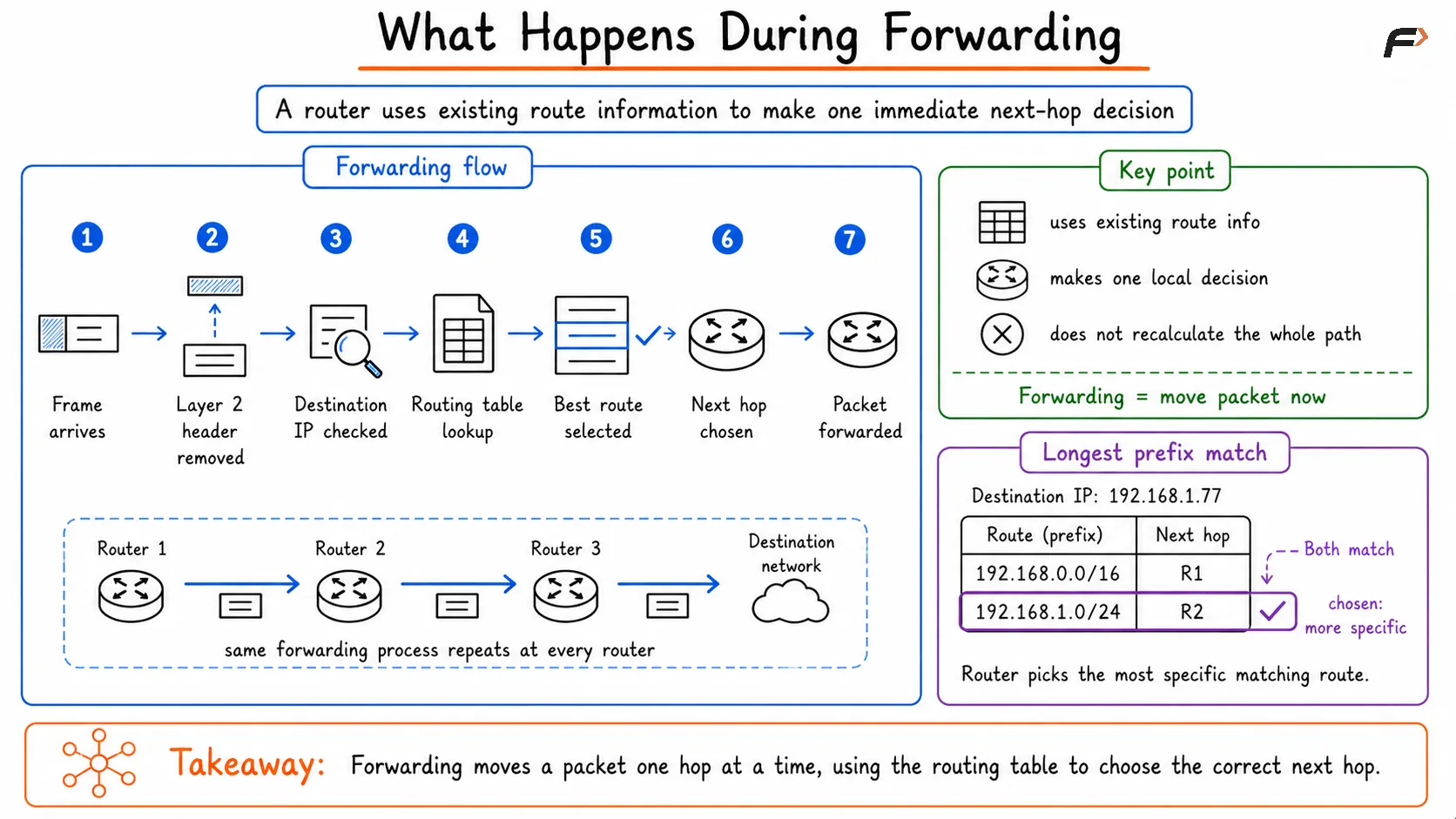
Forwarding in Routers
Longest Prefix Match
One of the most important forwarding rules is longest prefix match. A router may find more than one route that matches the destination IP address. When that happens, it chooses the most specific matching route.
For example, if the routing table contains:
192.168.0.0/16192.168.1.0/24
and the packet is going to 192.168.1.77, both routes match. But /24 is more specific than /16, so the router selects 192.168.1.0/24.
This rule is essential because it allows general routes and more specific routes to coexist in the same routing table.
Routing vs Forwarding
The difference becomes much clearer when the two are compared directly.
Aspect | Routing | Forwarding |
|---|---|---|
Main purpose | Determines paths through the network | Moves packets along those paths |
Plane | Control plane | Data plane |
Main focus | Decision-making | Packet movement |
Speed requirement | Important, but not per-packet critical | Extremely performance-critical |
Uses | Route learning, route selection, routing tables | Destination lookup, next hop, outgoing interface |
Trigger | Topology changes, route updates, configuration | Every packet arrival |
This is the central idea: routing decides where traffic should go, while forwarding carries out that decision packet by packet.
Summary
Routing and forwarding are two related but different functions at the Network Layer. Routing is responsible for learning networks, selecting paths, and building routing tables. Forwarding is the fast packet-by-packet process of using that information to send traffic toward the correct next hop.
A simple way to remember the difference is this: routing builds the map, and forwarding follows the map. That distinction is fundamental to understanding how routers move packets efficiently across local networks, enterprise networks, and the wider internet.
Be the first to add a comment.