Introduction
Routing works properly only when every router has a correct idea of where a destination network is located. When that information becomes outdated, delayed, or inconsistent, routers can make bad forwarding decisions. In that situation, packets may stop moving toward the destination and start circulating inside the network.
This condition is called a routing loop. It is one of the most important problems discussed in routing protocols, especially in distance vector routing, where routers depend on information learned from neighbors.
What Is a Routing Loop?
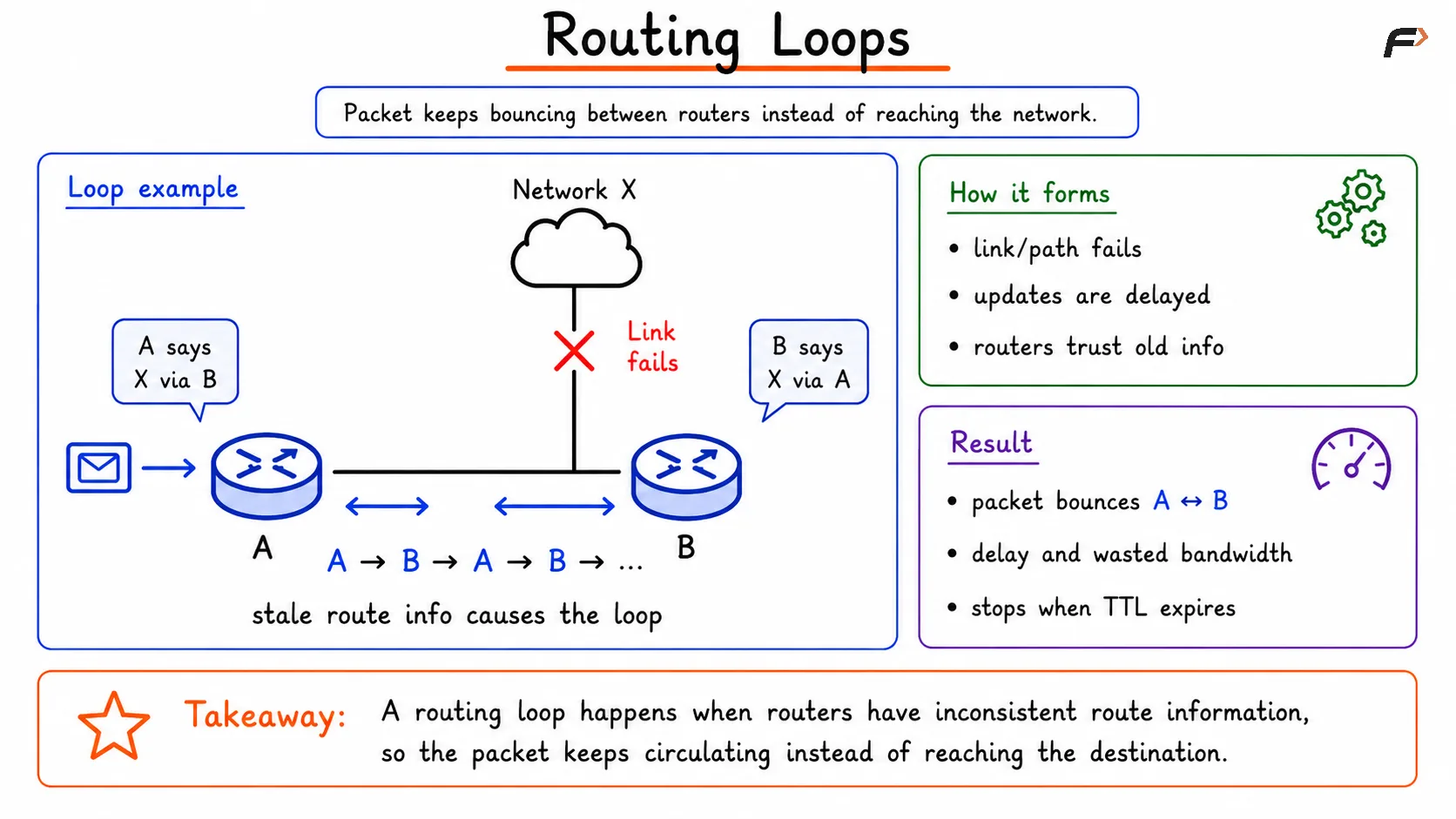
A routing loop happens when a packet keeps moving between routers again and again instead of reaching the destination network. The packet is forwarded, but every forwarding decision sends it back into the same path.
In simple terms, the routers involved believe that some other router has the correct route, so the packet keeps bouncing in circles.
A short example looks like this:
Router A thinks Network X is reachable through Router B.
Router B thinks Network X is reachable through Router A.
The packet moves A => B => A => B until some control mechanism stops it.
How Routing Loops Form
Routing loops usually appear when routers do not have a fully updated view of the network. This is common after a link failure, route withdrawal, or delayed routing update.
Suppose Router B loses its path to a destination, but Router A has not yet learned about that failure. If Router A still advertises the old route, Router B may believe the destination is reachable through Router A. Now both routers start depending on each other for the same route, and the loop begins.
This is why routing loops are strongly connected with two common ideas:
Inconsistent routing information: Different routers have different views of the same network at the same time.
Count to infinity problem: Routers keep increasing route metrics step by step because each one believes the other still has a valid path.
Routing Loops
Why Routing Loops Are Dangerous
A routing loop is not just a small routing mistake. It can affect the performance and stability of the whole network.
Bandwidth wastage: The same packet keeps consuming link capacity without delivering useful data.
Increased delay: Packets spend extra time moving in circles, which increases latency.
Router CPU load: Each repeated forwarding decision uses processing power on every router in the loop.
Network congestion: Large numbers of looping packets can fill interfaces and queues.
Packet loss: Useful traffic may be dropped because the network becomes overloaded.
Routing instability: Recovery becomes slower when stale routes continue spreading between routers.
In larger networks, even a temporary routing loop can create noticeable performance problems.
Common Loop Prevention Techniques
Routing protocols use several mechanisms to reduce the chance of loops and to control the damage if a loop still forms. These techniques are especially important in protocols such as RIP and other distance vector environments.
Technique | Main Purpose |
|---|---|
TTL | Limits how long a packet can keep circulating |
Split Horizon | Stops a router from advertising a learned route back on the same interface |
Poison Reverse | Explicitly tells the neighbor that the learned route is unreachable through this router |
Route Poisoning | Marks a failed route as unreachable and advertises that failure quickly |
Hold-Down Timer | Prevents the router from trusting unstable or suspicious route updates too soon |
Routing Loop Prevention Techniques
TTL and Loop Control
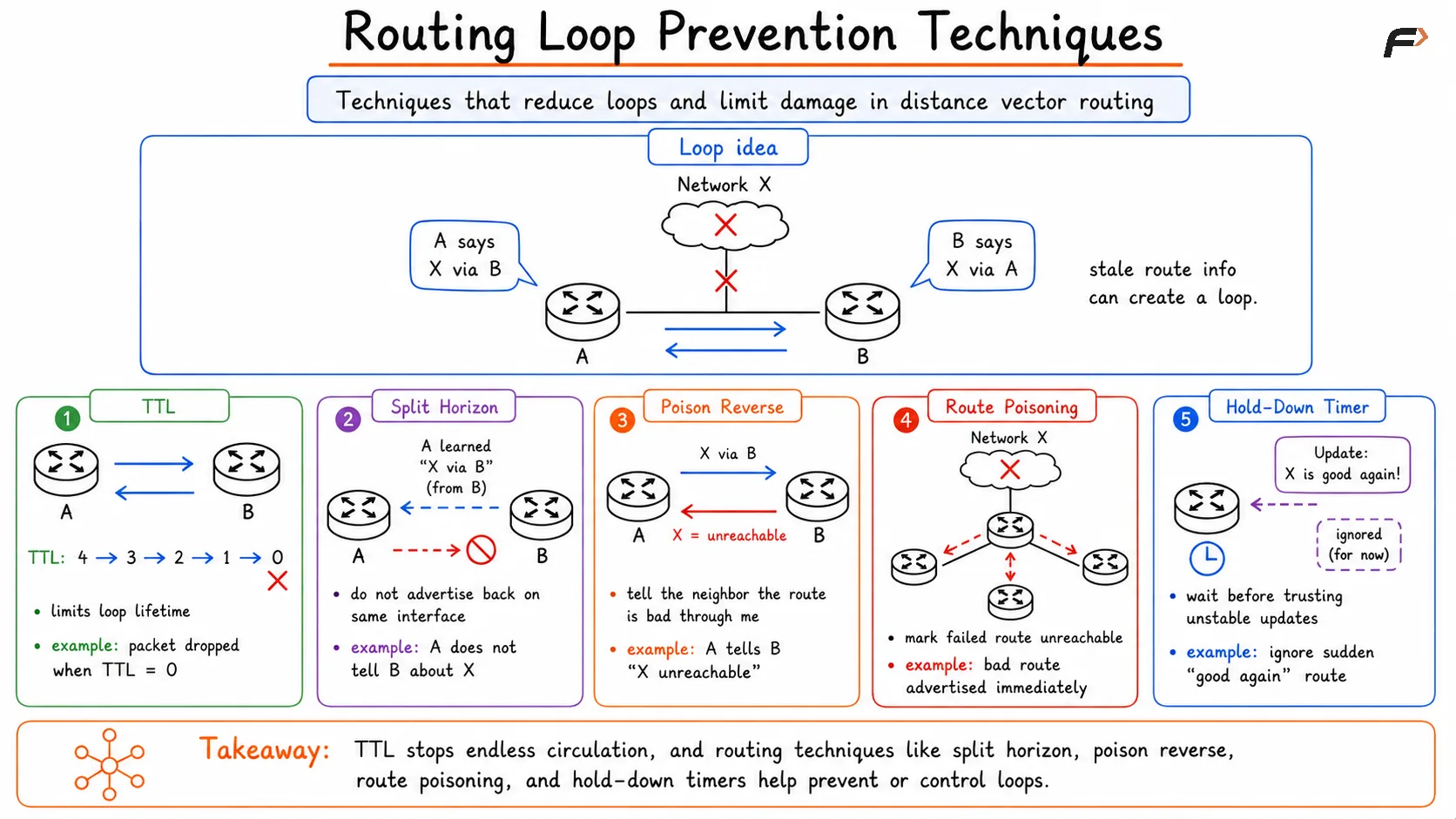
TTL, or Time To Live, is a field in the IP header that decreases by 1 every time a router forwards a packet. When the TTL value reaches 0, the packet is discarded.
That means a looping packet cannot remain in the network forever. Even if a routing loop forms, the packet eventually expires.
This point is important: TTL does not actually prevent a routing loop from forming. It only limits the damage by making sure the loop is temporary for that packet.
For example:
Initial TTL: 64
After 1 router: 63
After 2 routers: 62
After repeated looping: value keeps falling until the packet is dropped
Split Horizon
Split horizon is one of the simplest loop prevention rules in distance vector routing. The rule says that if a router learns a route from a particular interface, it should not advertise that same route back through that interface.
This prevents a router from telling its neighbor to use a path that originally came from that same neighbor.
A simple example makes it clear:
Router A learns about Network X from Router B.
Router A should not advertise Network X back to Router B as if A has its own independent path.
This reduces the chance of a two-router loop.
Split horizon improves convergence and avoids many small routing loops caused by route feedback.
Poison Reverse and Route Poisoning
These two terms sound similar, but they are used in slightly different ways.
Technique | Meaning |
|---|---|
Poison Reverse | A router advertises the route back to the same neighbor with an infinite metric, clearly saying that route should not be used through me |
Route Poisoning | A router advertises a failed route to neighbors with an infinite metric so the network quickly learns that the route is no longer valid |
Poison reverse is stronger than simple split horizon because it does not stay silent. It sends an explicit negative update. This helps remove confusion during route changes.
Route poisoning is used when a route has failed and the router wants that information to spread quickly across the network. Instead of waiting for routers to slowly discover the failure, the route is marked unreachable immediately.
Both techniques are closely tied to loop prevention, faster convergence, and control of stale routing information.
Hold-Down Timers
Hold-down timers improve stability after a route failure. When a router learns that a route is no longer valid, it does not immediately trust new updates claiming that the route is available again.
Instead, it waits for a defined period. During that time, suspicious or unstable updates are ignored.
The idea is simple:
A route fails.
The router marks it invalid.
A hold-down timer starts.
Unreliable replacement updates are ignored for a while.
After the network settles, the router accepts fresh routing information.
This helps reduce false recovery updates, temporary loops, and route flapping problems.
Summary
Routing loops occur when packets circulate between routers instead of moving toward the destination. They are usually caused by stale routing information, delayed updates, or inconsistent routing tables, especially in distance vector routing protocols.
To reduce this problem, networks use loop control and loop prevention techniques such as TTL, split horizon, poison reverse, route poisoning, and hold-down timers. Together, these mechanisms help improve convergence, reduce bandwidth waste, prevent count to infinity behavior, and keep routing more stable and reliable.
Be the first to add a comment.