Introduction
Quality of Service, or QoS, is used to manage network traffic when different applications share the same limited bandwidth. Not all traffic has the same urgency. A video call, online game, file download, and email transfer may all use the network together, but they do not suffer equally from delay.
QoS helps the network decide which traffic should be handled first. It does not create extra bandwidth. It simply manages the available bandwidth more intelligently so that delay-sensitive traffic gets better treatment during congestion.
What Is QoS?
QoS is a set of rules and mechanisms used to classify, prioritize, and schedule network traffic. These rules may be applied on routers, switches, operating systems, firewalls, or other network devices.
The main idea behind QoS is simple: important traffic should not wait behind less urgent traffic when the network is busy.
A common priority order can look like this:
High priority: Voice calls, video conferencing, online gaming.
Normal priority: Web browsing and general application traffic.
Low priority: File downloads, backups, email sync, bulk transfers.
QoS is especially useful when the network becomes a bottleneck and cannot process all packets with equal urgency.
How QoS Works
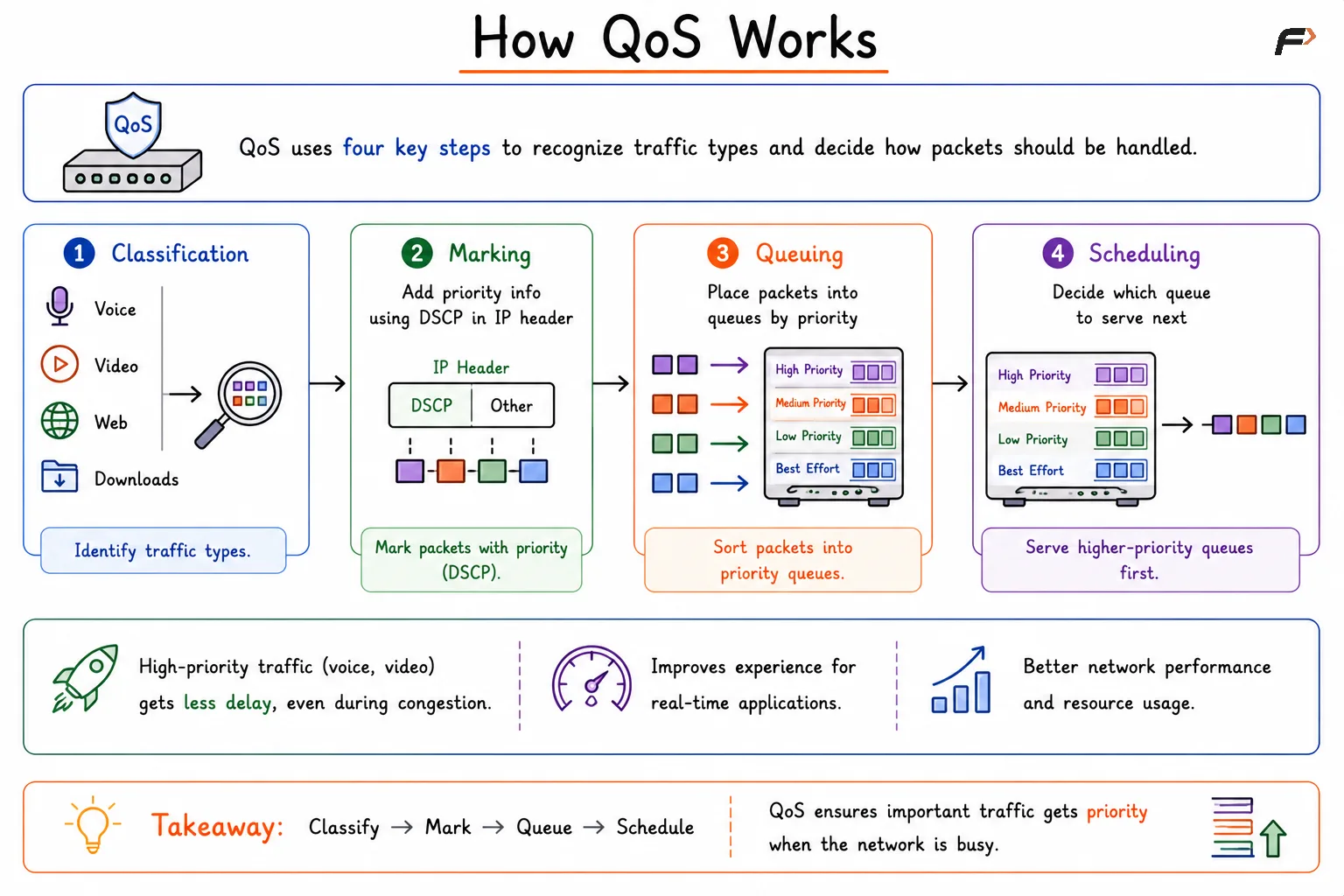
QoS usually works through four major steps: classification, marking, queuing, and scheduling. Together, these steps allow network devices to recognize traffic types and decide how packets should be handled.
Classification => Marking => Queuing => Scheduling
Classification: The network identifies traffic types such as voice, video, web traffic, or file downloads.
Marking: Priority information is added to packets, commonly using DSCP values in the IP header.
Queuing: Packets are placed into different queues based on their priority.
Scheduling: The device decides which queue should be served first when sending packets.
High-priority queues are usually served before lower-priority queues. This allows real-time traffic to move with less delay when the network is under load.
How QoS Works
QoS Does Not Increase Bandwidth
QoS is sometimes misunderstood as a way to make the network faster. In reality, QoS does not increase the total bandwidth of a link.
If a link supports 100 Mbps, QoS cannot turn it into 200 Mbps. What QoS can do is decide how that 100 Mbps should be shared when multiple traffic types compete for it.
This makes QoS a traffic management mechanism, not a bandwidth creation mechanism. It improves user experience by reducing delay, jitter, and packet loss for important traffic.
Traffic Shaping
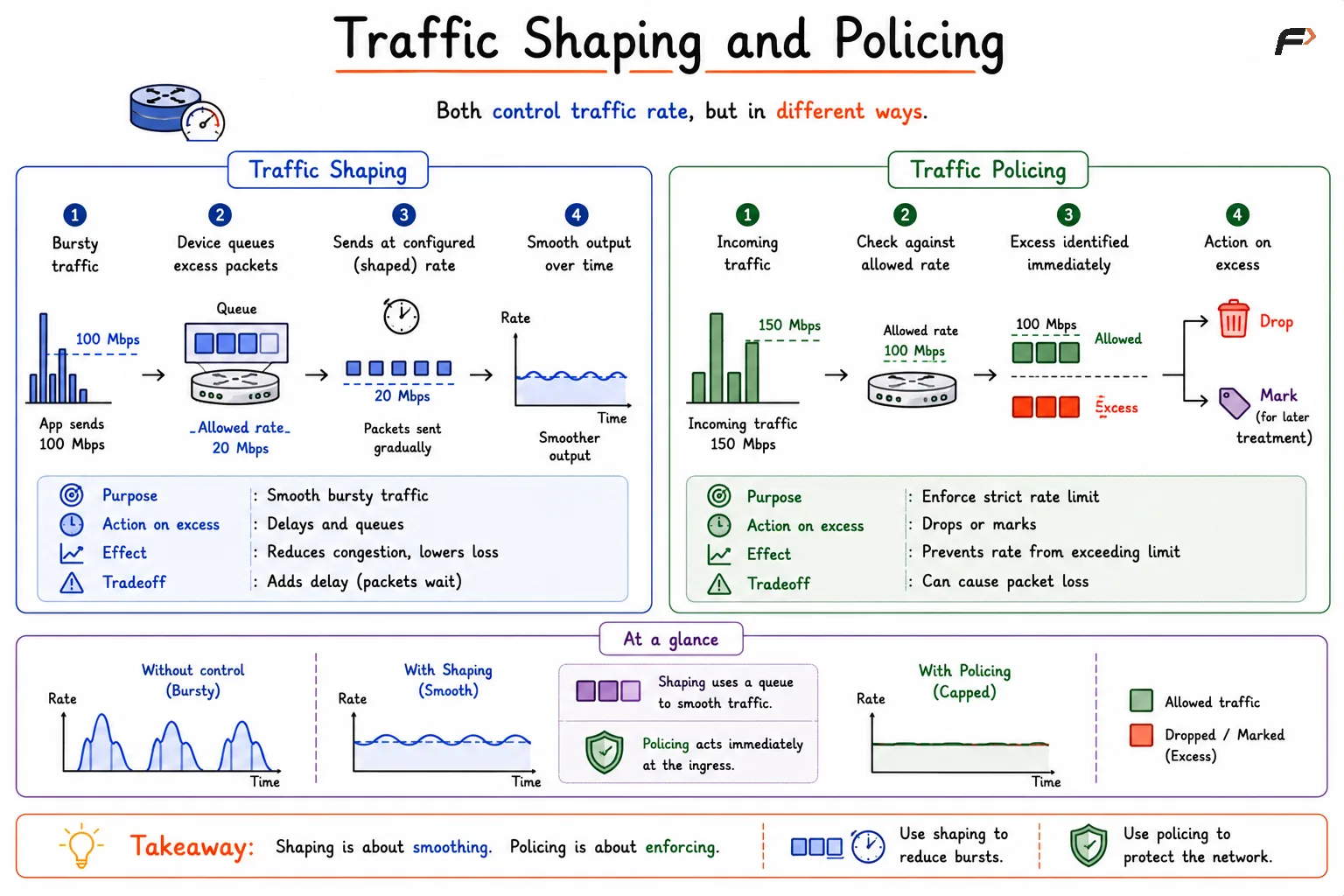
Traffic shaping controls how traffic leaves a network device. It is used to smooth sudden bursts and make traffic flow at a configured rate instead of sending everything at once.
Suppose an application suddenly tries to send traffic at 100 Mbps, but the allowed rate is 20 Mbps. Traffic shaping does not immediately drop the extra packets. Instead, it stores them temporarily in a queue and sends them gradually.
So instead of sending a large burst at once, the output becomes smoother over time.
Main purpose: Smooth bursty traffic.
Action on excess packets: Delays and queues them.
Effect: Reduces sudden congestion and lowers the chance of packet loss.
Tradeoff: Adds delay because packets may wait in a queue.
Traffic shaping is useful when the goal is to control traffic gently. It is commonly used when bursty traffic should be regulated without immediately discarding packets.
Traffic Shaping and Policing
Traffic Policing
Traffic policing enforces a strict traffic rate. It checks whether traffic is within the allowed limit and takes immediate action when traffic exceeds that limit.
Suppose the allowed rate is 100 Mbps and incoming traffic reaches 150 Mbps. The traffic within 100 Mbps is allowed. The extra 50 Mbps is treated as excess traffic.
Traffic policing may either drop excess packets or mark them for different treatment later.
Main purpose: Enforce a strict rate limit.
Action on excess packets: Drops or marks them.
Effect: Prevents traffic from exceeding the configured rate.
Tradeoff: Can cause packet loss if traffic frequently crosses the limit.
Traffic policing is stricter than shaping because it does not wait and smooth the traffic. If the traffic crosses the limit, action is taken immediately.
Traffic Shaping vs Traffic Policing
Traffic shaping and traffic policing both control traffic rates, but they behave very differently when traffic exceeds the allowed limit.
Aspect | Traffic Shaping | Traffic Policing |
|---|---|---|
Main idea | Smooths traffic flow | Enforces strict rate limits |
Excess traffic | Delayed and queued | Dropped or marked |
Packet delay | Can increase due to queuing | Usually does not delay excess traffic |
Packet loss | Less likely immediately | More likely if excess traffic is dropped |
Best suited for | Smoothing bursts and reducing congestion | Strict bandwidth enforcement |
Behavior | Flexible | Strict |
A simple way to remember the difference is: shaping delays excess traffic, while policing drops or marks excess traffic.
Summary
QoS helps manage limited network bandwidth by giving better treatment to important traffic such as voice, video, and gaming packets. It works through classification, marking, queuing, and scheduling, allowing network devices to prioritize traffic during congestion.
Traffic shaping smooths bursts by delaying excess packets and sending them gradually at the configured rate. Traffic policing enforces a strict rate limit by dropping or marking traffic that exceeds the allowed rate. Both are important QoS techniques, but shaping is gentler while policing is stricter.
Be the first to add a comment.