Introduction
The transport layer makes communication more precise than simple machine-to-machine delivery. An IP address can bring a packet to the correct device, but that device may be running many applications at the same time. The system still needs a way to decide which application should receive the incoming data.
That is where ports and sockets come in. Ports identify the destination process, and sockets create the actual communication endpoint used to send and receive data.
What Is a Port?
A port is a logical number used by the operating system to identify a specific application, service, or process. It is a software concept, not a physical connector.
If many applications share the same IP address on one machine, the destination port number tells the operating system where the incoming data should go.
A simple idea to remember is:
IP address: Identifies the machine.
Port number: Identifies the application or service on that machine.
So when a packet arrives, delivery is not complete just because the machine is correct. The operating system also checks the port number and forwards the data to the right process.
Why Ports Are Needed
A laptop may run a browser, email app, music app, chat app, and video calling app at the same time. All of them use the same network interface and the same IP address.
Without ports, the system would not know whether the incoming data belongs to the browser, the mail service, or some other application. Ports solve this process-level identification problem.
A short flow looks like this:
Sender application => source port => network => destination IP => destination port => correct receiving application
Ports and Sockets
Port Number Range and Types
Port numbers are 16-bit values, so their range is from 0 to 65535.
They are usually grouped into three categories:
Port Range | Category | Purpose |
|---|---|---|
0 to 1023 | Well-known ports | Standard services and common protocols |
1024 to 49151 | Registered ports | User applications and registered services |
49152 to 65535 | Dynamic or ephemeral ports | Temporary client-side connections |
This classification helps organize services and makes common network communication easier to manage.
Common Port Numbers
Some port numbers are commonly associated with well-known services.
Port | Service | Typical Use |
|---|---|---|
20, 21 | FTP | File transfer |
22 | SSH | Secure remote login |
25 | SMTP | Sending email |
53 | DNS | Name resolution |
67, 68 | DHCP | Automatic IP assignment |
80 | HTTP | Web traffic |
110 | POP3 | Email retrieval |
143 | IMAP | Email access |
443 | HTTPS | Secure web traffic |
These are default conventions, not absolute rules. A web server can run on port 80, but it can also run on 8080, 8000, or some other available port depending on configuration.
What Is a Socket?
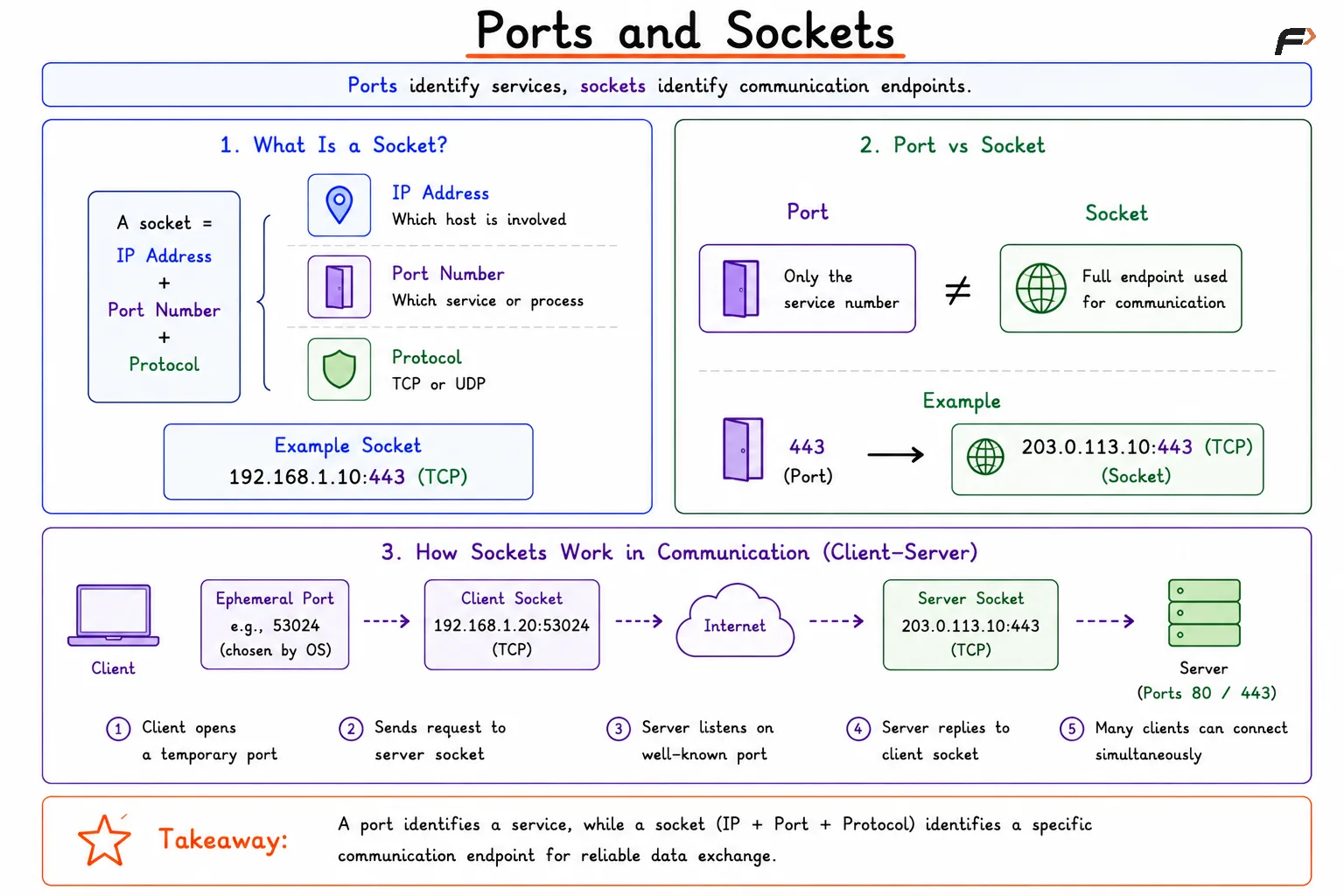
A socket is a communication endpoint created by the operating system for network communication. It is more than just a port number.
In practical networking, a socket is usually identified by:
IP address: Which host is involved
Port number: Which service or process is involved
Protocol: Whether the communication uses TCP or UDP
So a socket gives the system enough information to identify a specific communication endpoint.
For example, 192.168.1.10:443 with TCP represents a specific socket on a machine. That endpoint can be used by a web service listening for secure connections.
Port vs Socket
Ports and sockets are closely related, but they are not the same thing.
Aspect | Port | Socket |
|---|---|---|
Meaning | Logical number for a service or process | Communication endpoint |
Main role | Identifies the application/service | Represents the actual network communication point |
Includes | Port number only | IP address + port number + protocol |
Example | Port 80 |
|
A good way to see the difference is this: a port is one part of the address, while a socket is the full endpoint used in communication.
How Sockets Work in Communication
In client-server communication, the server usually waits on a known port, and the client uses a temporary port to start the connection.
A typical case looks like this:
A web server listens on TCP port
80or443.A client browser opens a temporary ephemeral port.
The client sends a request to the server socket.
The server replies to the client’s IP and temporary port.
This allows many clients to connect to the same server at the same time without confusion.
For example:
Server socket:
203.0.113.10:443Client socket:
192.168.1.20:53024
Even if thousands of users connect to the same server port, each session remains separate because the full communication uses source and destination addresses and ports together.
TCP, UDP, and Sockets
Sockets can be used with different transport protocols, most commonly TCP and UDP.
TCP sockets: Used when reliable, connection-oriented communication is needed
UDP sockets: Used when fast, connectionless communication is preferred
The port number exists in both TCP and UDP communication, but the way the communication behaves is different because the underlying transport protocol is different.
Summary
Ports and sockets are essential transport layer concepts in computer networks. A port is a logical number that identifies the correct application or service, while a socket is the full communication endpoint built from the IP address, port number, and protocol.
Together, they make process-to-process communication possible. Ports help the operating system decide which application should receive the data, and sockets provide the structure needed to create real client-server communication across the network.
Be the first to add a comment.