Introduction
Not all networks are equally large, they are classified based on their geographical coverage, ownership, purpose, and communication architecture. Understanding the different types of networks helps to design, manage, and troubleshoot systems ranging from small home setups to global communication infrastructures like the Internet. Each type of network is optimized for specific use cases, offering unique advantages and limitations.
Personal Area Network (PAN)
A Personal Area Network (PAN) is a very small network designed for personal use, typically within a range of a few meters. PANs connect personal devices such as smartphones, laptops, smartwatches, and wireless earphones using technologies like Bluetooth, USB, or infrared.
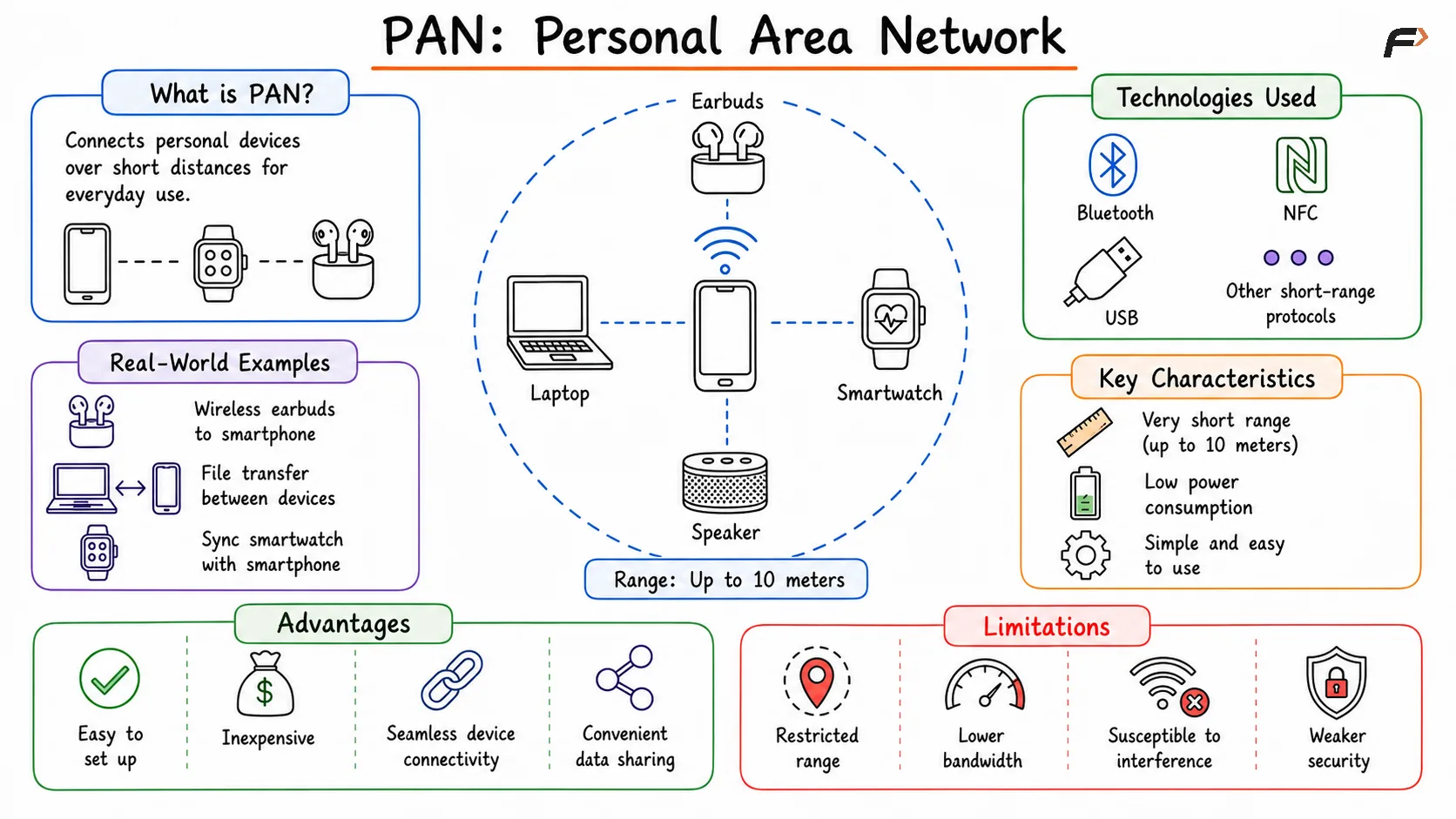
Graphic explaining a Personal Area Network (PAN), where personal devices such as a smartphone, laptop, smartwatch, wireless earbuds, and tablet are connected over a short range using technologies like Bluetooth or USB, enabling seamless communication and data sharing between nearby devices.
Characteristics of PAN
A Personal Area Network (PAN) is commonly used for connecting personal devices over short distances. Real-world examples include connecting wireless earbuds to a smartphone using Bluetooth, transferring files between a laptop and a mobile phone, and synchronizing a smartwatch with a smartphone. These networks are designed primarily for individual users and everyday device communication.
PANs are characterized by their very limited range, typically up to 10 meters, and their low power consumption. They are built using technologies such as Bluetooth, NFC, USB, and other short-range communication protocols. Their simplicity and small coverage area make them ideal for personal and portable devices.
One of the major advantages of PANs is that they are easy to set up, inexpensive, and require little to no dedicated infrastructure. They provide seamless connectivity between personal devices and support convenient data sharing. However, PANs also have limitations, including restricted range, lower bandwidth, susceptibility to interference from nearby devices, and generally weaker security compared to larger network types.
Types of PAN
Wired PAN: A wired Personal Area Network uses physical connections such as USB cables to connect devices. It provides fast, secure, and reliable communication over short distances and is commonly used for direct device-to-device data transfer.
Wireless PAN: A wireless Personal Area Network uses technologies such as Bluetooth, Infrared, or Zigbee to connect nearby devices without cables. It offers greater mobility and convenience, making it well-suited for smartphones, wearables, and other personal devices.
Local Area Network (LAN)
A Local Area Network (LAN) is a network that connects devices within a limited geographical area such as a home, office, school, or one floor of a building. LANs are typically owned, controlled, and managed by a single organization or individual. They provide high-speed connectivity and are commonly implemented using Ethernet (wired) or Wi-Fi (wireless) technologies.
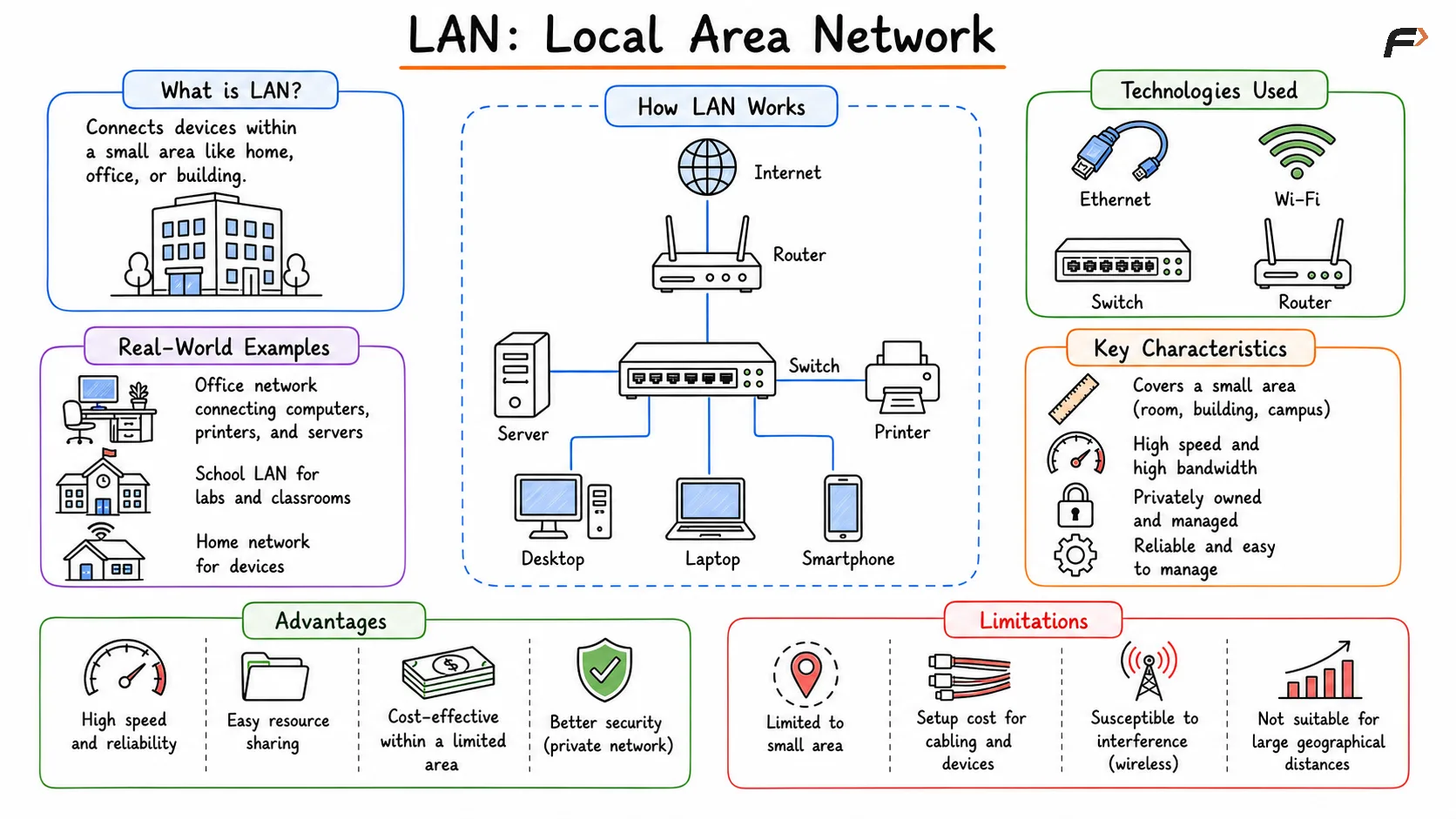
Visual depicting a Local Area Network (LAN), where multiple computers, printers, and other devices are connected through a switch or router within a limited area such as a home, office, school, or building, enabling high-speed communication and resource sharing.
Characteristics of LAN
A Local Area Network (LAN) is commonly used in homes, offices, schools, and campuses to connect devices within a limited geographic area. Real-world examples include a home Wi-Fi network connecting smartphones, laptops, and smart TVs, an office network enabling access to shared printers and internal servers, and a university network linking laboratories, classrooms, and administrative departments.
LANs typically cover a relatively small area such as a room, building, or campus and are known for providing high-speed communication, often ranging from 100 Mbps to several gigabits per second. They are usually privately owned and managed, offering low latency, high reliability, and efficient connectivity through technologies such as Ethernet cables and Wi-Fi access points.
One of the major advantages of a LAN is its ability to provide fast communication and efficient resource sharing, including printers, storage systems, and file servers. Private ownership also allows for better security and control. However, LANs are limited in geographic coverage and require initial setup, maintenance, and administrative management to ensure smooth operation.
Types of LAN
Client-Server LAN: Multiple client devices connect to a central server that manages resources, authentication, applications, and network access. It is commonly used in businesses and organizations that require centralized control.
Peer-to-Peer LAN: All devices have equal roles and can directly share files and resources with one another without a dedicated server. It is simple and suitable for small networks.
Ethernet: The most widely used LAN technology for wired networking. It provides high-speed, reliable communication and defines standards for cables, network devices, and data transmission.
Token Ring: A LAN technology that uses a token-passing mechanism, where only the device holding the token can transmit data. While rarely used today, it played an important role in the evolution of networking.
Metropolitan Area Network (MAN)
A Metropolitan Area Network (MAN) spans a city or a large urban area and interconnects multiple LANs. MANs are typically operated by Internet Service Providers (ISPs), government organizations, or large enterprises.
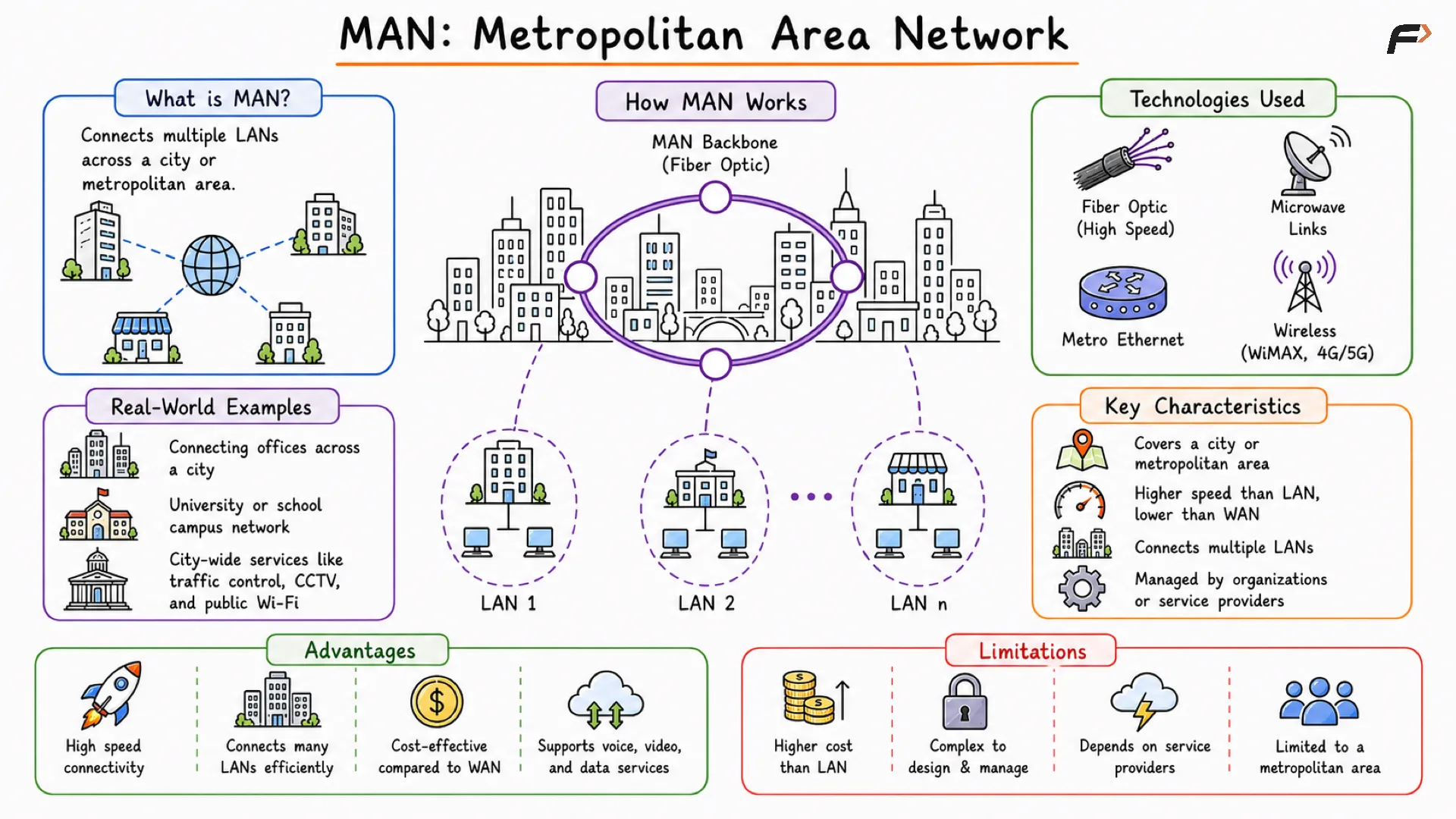
Diagram representing a Metropolitan Area Network (MAN), where multiple LANs across different buildings or locations within a city are connected together to enable communication and resource sharing over a larger urban area.
Characteristics of MAN
A Metropolitan Area Network (MAN) connects multiple LANs across a city or metropolitan region. Common examples include city-wide fiber networks operated by Internet Service Providers (ISPs), government communication networks, and cable television distribution systems that serve large urban areas.
MANs are designed to provide high-speed connectivity over larger distances than LANs and typically rely on fiber-optic infrastructure for fast and reliable communication. They are usually managed by service providers, telecom companies, or municipal authorities and act as a bridge between local networks spread across a city.
The main advantage of a MAN is its ability to support large-scale services such as broadband internet, cable television, and inter-office connectivity across metropolitan areas. However, building and maintaining a MAN requires significant infrastructure investment, involves more complex management, and can face security and congestion challenges as network usage grows.
Types of MAN
Wired MAN (Fiber Optic MAN): Uses fiber-optic cables to connect networks across a city, providing high bandwidth, low latency, and reliable communication.
Wireless MAN: Uses technologies such as WiMAX, microwave links, or radio communication to connect networks without physical cables, making deployment more flexible.
Public MAN: Operated by governments or telecom providers to deliver city-wide services such as internet access, public Wi-Fi, and communication infrastructure.
Private MAN: Built and managed by organizations to connect multiple offices, branches, or campuses within a city while providing greater control and security.
Metropolitan Ethernet: A popular MAN technology that extends Ethernet over metropolitan fiber networks, offering high-speed, scalable, and cost-effective connectivity for businesses and enterprises.
Wide Area Network (WAN)
A Wide Area Network (WAN) covers a large geographical area such as multiple cities, states, countries or continents. WANs interconnect multiple LANs and MANs using public or private communication links. The most prominent example of a WAN is the Internet.
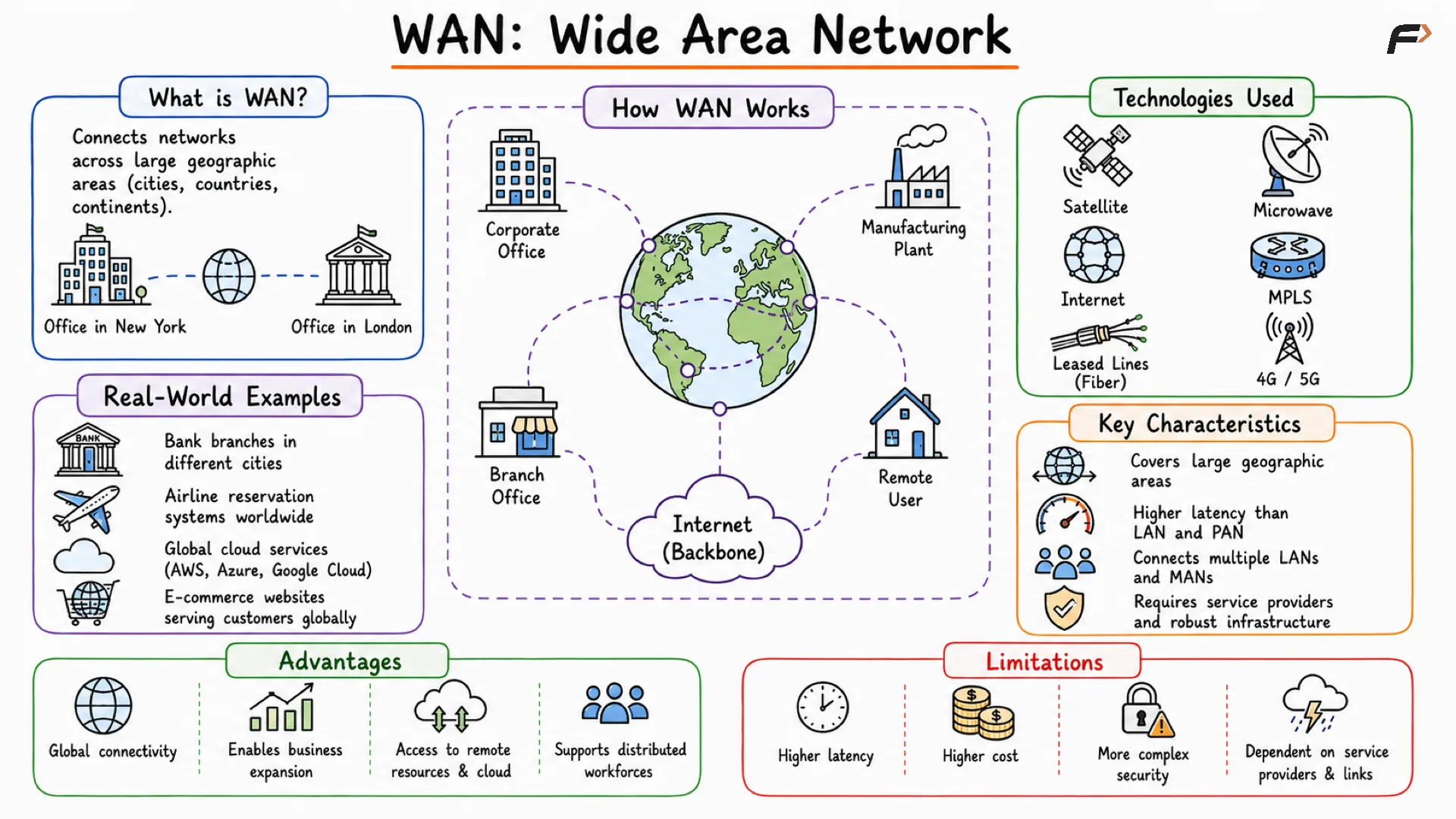
Overview of a Wide Area Network (WAN), showing multiple LANs across different cities or countries connected through the internet or dedicated communication links, enabling long-distance communication and data exchange between geographically dispersed locations.
Characteristics of WAN
A Wide Area Network (WAN) connects networks across large geographic regions such as countries or continents. Common examples include the Internet, which serves as a global network of networks, AWS regions interconnected across different countries, and banking networks that enable secure financial transactions worldwide.
WANs connect multiple LANs and MANs using technologies such as leased lines, satellite communication, and undersea fiber-optic cables. Because data often travels long distances through multiple intermediate networks, WANs generally experience higher latency compared to local networks.
The primary advantage of a WAN is its ability to enable global communication, cloud computing, and collaboration between geographically distributed users and organizations. However, WANs require expensive infrastructure, involve complex management and security considerations, and may experience higher latency, packet loss, and reliability challenges compared to smaller network types.
Types of WAN
Leased Line WAN: Provides a dedicated private connection between locations, offering consistent bandwidth, high reliability, and strong security for business communication.
MPLS (Multiprotocol Label Switching): Uses labels instead of traditional IP routing to forward traffic more efficiently, improving performance, reliability, and Quality of Service (QoS).
VPN (Virtual Private Network): Creates an encrypted tunnel over the public Internet, allowing remote users and branch offices to securely access private networks.
Packet-Switched WAN: Breaks data into packets that travel independently across a shared network and are reassembled at the destination. This approach is efficient, flexible, and widely used by the Internet.
Circuit-Switched WAN: Establishes a dedicated communication path before data transmission begins, providing predictable performance but often using network resources less efficiently.
Campus Area Network (CAN)
A Campus Area Network (CAN) connects multiple LANs within a limited geographic area such as a university campus, corporate campus, or military base. It is larger than a LAN but smaller than a MAN and is usually owned by a single organization.
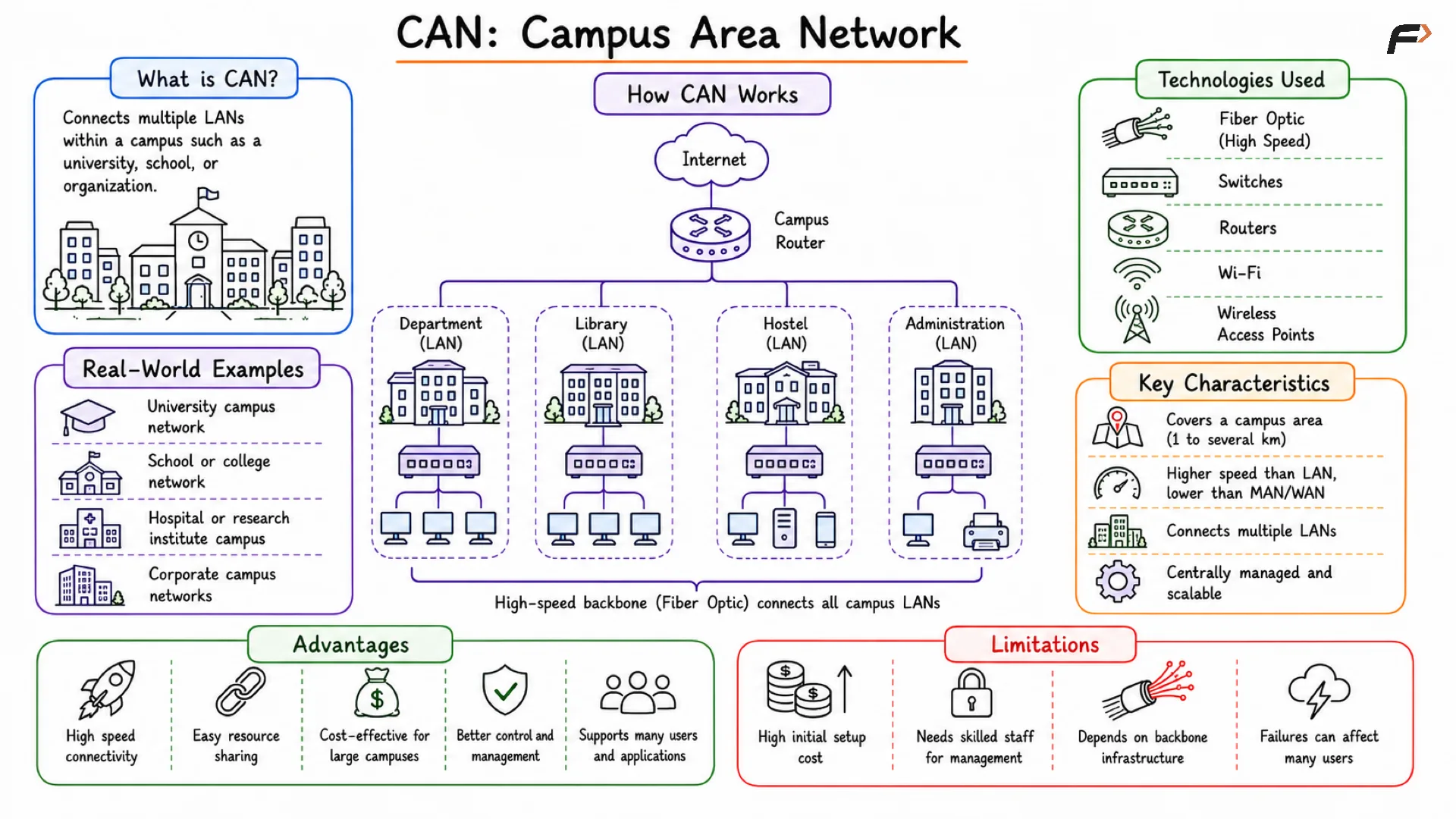
Representation of a Campus Area Network (CAN), where multiple buildings within a university, school, corporate campus, or research facility are interconnected through a high-speed network, allowing users across the campus to share resources and communicate efficiently.
Characteristics of CAN
A Campus Area Network (CAN) is designed to connect multiple buildings within a limited geographic area such as a university, corporate campus, or research facility. Common examples include university networks linking academic buildings, libraries, and hostels, corporate campuses connecting multiple office buildings, and research institutions with interconnected laboratories and facilities.
CANs typically use a high-speed backbone network, often built using fiber-optic cables, to provide fast and reliable communication between different locations on the campus. Unlike public networks, they are usually privately owned and managed by the organization, allowing greater control over performance, security, and network policies.
The main advantages of a CAN include efficient resource sharing across departments, high-speed connectivity, and centralized management of network resources and security. However, deploying and maintaining a campus network can be expensive due to infrastructure requirements, and it typically requires dedicated IT teams for administration and ongoing maintenance.
Summary Table
Feature | PAN | LAN | CAN | MAN | WAN |
|---|---|---|---|---|---|
Full Form | Personal Area Network | Local Area Network | Campus Area Network | Metropolitan Area Network | Wide Area Network |
Coverage Area | Very small (≈10 meters) | Small (home, office, lab) | Campus (multiple buildings) | City-wide | Global |
Purpose | Personal device communication | Local communication & resource sharing | Connect LANs within campus | Connect LANs across city | Connect networks globally |
Speed | Low | Very High | High | High | Moderate |
Latency | Very Low | Low | Low | Moderate | High |
Ownership | Individual | Private | Private | ISP / Government | Telecom Providers |
Technologies Used | Bluetooth, NFC, Zigbee | Ethernet, Wi-Fi | Fiber backbone, LAN tech | Fiber optics, cable systems | Leased lines, MPLS, Satellite |
Cost | Very Low | Low | Moderate | High | Very High |
Example | Phone + Earbuds | Home/Office Network | University Network | City Internet Network | Internet |
Be the first to add a comment.