Introduction
Network performance is not defined by one number. A connection can have high bandwidth and still feel slow if latency is high, jitter is unstable, or packets are being lost.
To understand real network speed, we need to look at multiple metrics together. Bandwidth, throughput, latency, RTT, jitter, packet loss, and server response time each describe a different part of the user experience.
Bandwidth
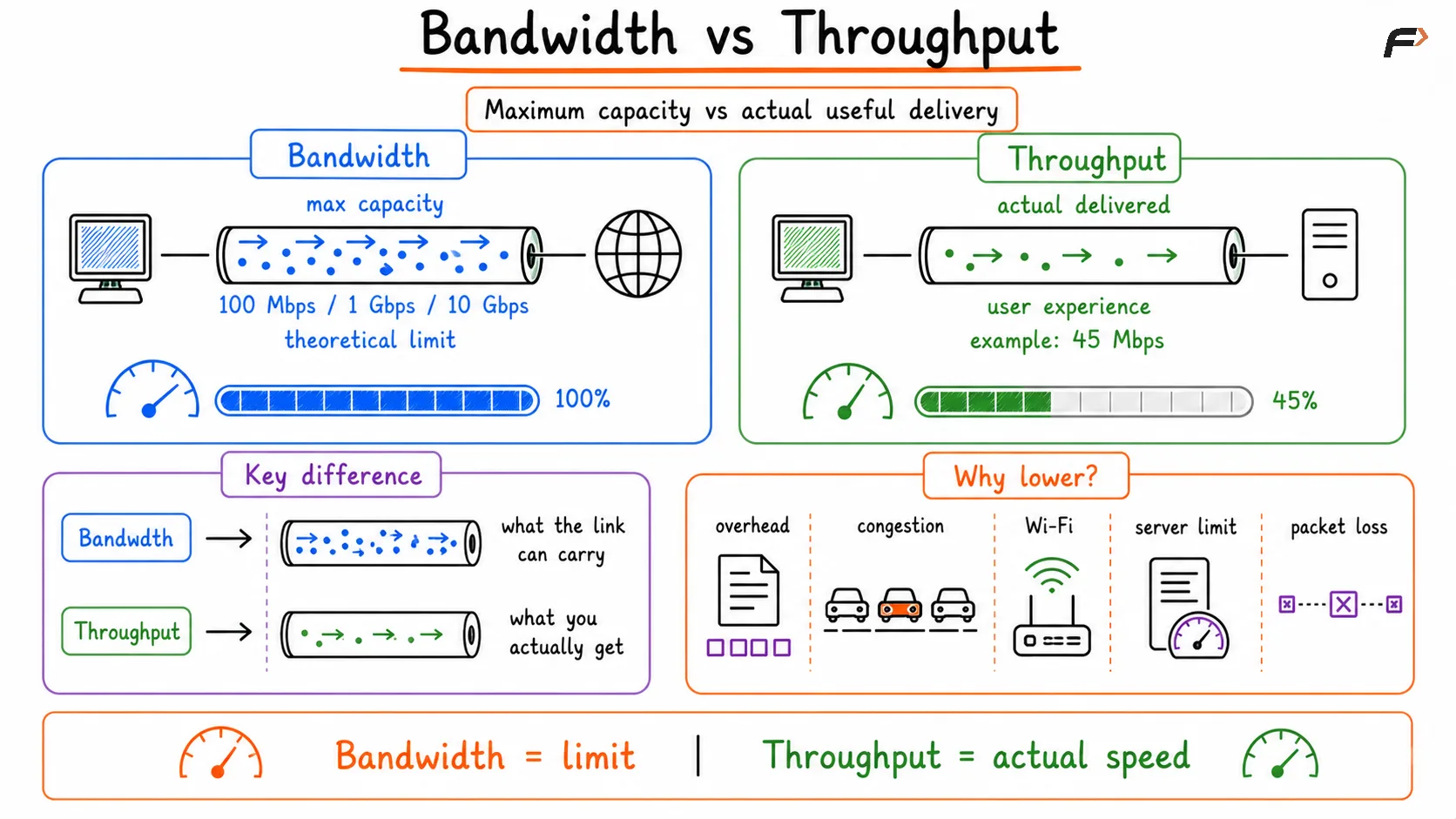
Bandwidth is the maximum theoretical capacity of a network link. It tells us how much data a link can carry per second under ideal conditions.
For example:
100 Mbps internet plan: The link can theoretically carry up to 100 megabits per second.
1 Gbps Ethernet link: The wired connection can theoretically carry up to 1 gigabit per second.
10 Gbps uplink: Common in data centers and high-capacity networks.
Bandwidth is measured in bits per second, such as Kbps, Mbps, Gbps, or Tbps. It defines the upper limit, but it does not guarantee that applications will always achieve that speed.
A useful way to remember it is: bandwidth is the ceiling, not the actual result.
Throughput
Throughput is the actual amount of useful data successfully delivered over the network per second. This is closer to what users experience during downloads, uploads, video streaming, and file transfers.
Throughput is usually lower than bandwidth because real networks have overhead, congestion, retransmissions, Wi-Fi interference, server limits, and protocol behavior.
Metric | Meaning | Simple Idea |
|---|---|---|
Bandwidth | Maximum possible capacity | What the link can theoretically carry |
Throughput | Actual useful delivery | What the user actually receives |
For example, a user may have a 100 Mbps connection but observe only 45 Mbps during a download. That does not always mean the internet plan is wrong. The limitation may come from Wi-Fi, the server, congestion, VPN overhead, or packet loss.
Bandwidth vs Throughput
Latency
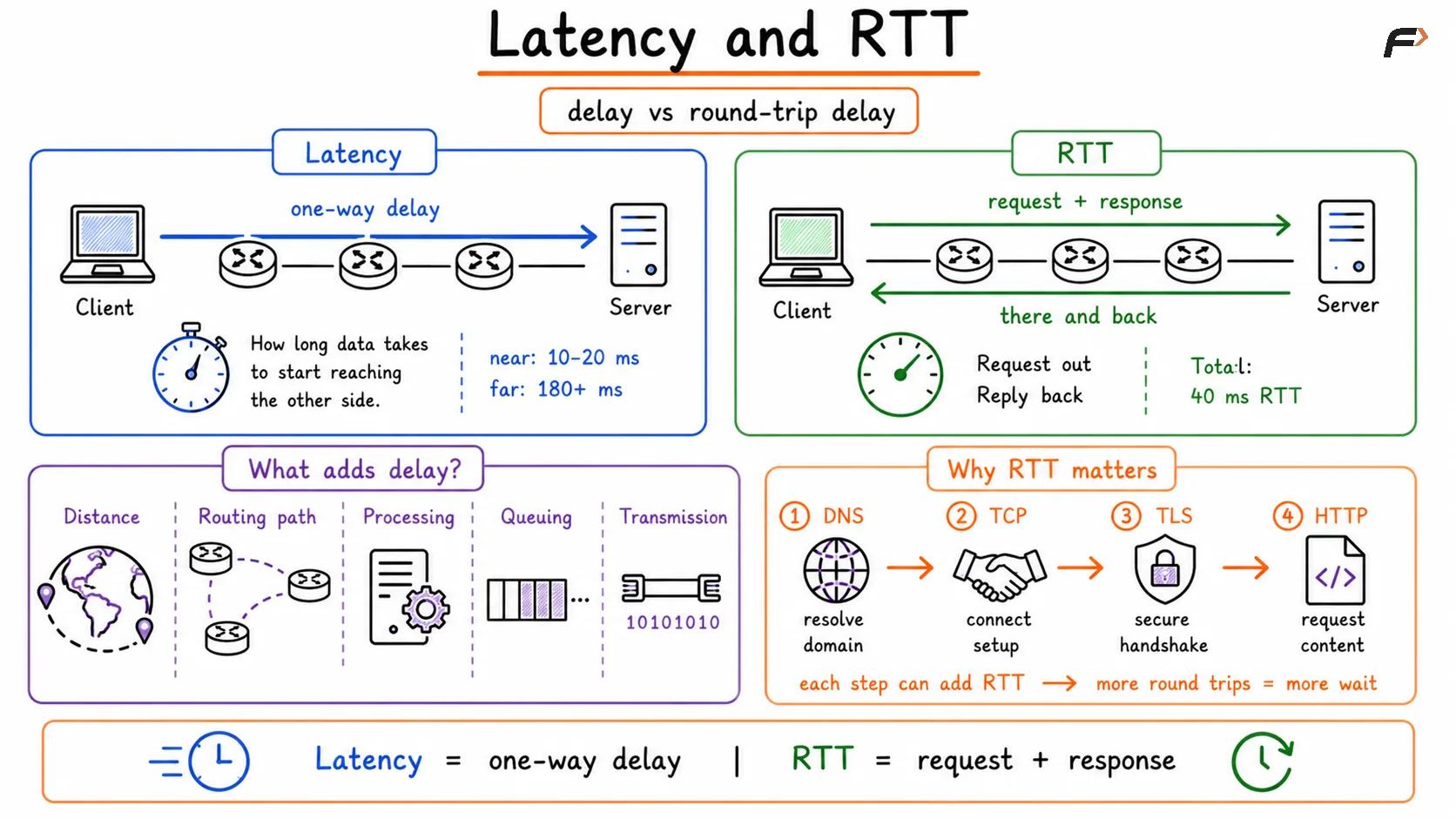
Latency is the delay involved in sending data from one point to another. It is usually measured in milliseconds.
Latency answers the question: how long does it take for data to start reaching the other side?
Low latency makes applications feel responsive. High latency causes delay, even when bandwidth is high.
Latency is affected by:
Distance: Farther servers usually create more delay.
Routing path: Packets may pass through several routers and networks.
Processing delay: Routers, firewalls, and servers need time to process packets.
Queuing delay: Packets may wait in buffers during congestion.
Transmission delay: Time is needed to place data onto the link.
For example, a nearby server may respond in 10-20 ms, while a server on another continent may take 180-250 ms or more depending on routing and network conditions.
RTT
RTT stands for Round Trip Time. It measures the time taken for a request to go from the client to the server and for the response to come back.
A simple RTT flow looks like:
Client sends request => Server receives request => Server response returns to client
RTT matters because many protocols need one or more round trips before real application data can flow.
For example, opening a website may involve:
DNS lookup: Resolves the domain name.
TCP handshake: Establishes a reliable connection.
TLS handshake: Secures HTTPS communication.
HTTP request: Sends the actual webpage request.
If RTT is high, each of these steps adds more delay. This is why distant servers can feel slower even when throughput is good.
Latency and RTT
Jitter
Jitter is the variation in latency over time. A network may have acceptable average latency but still perform poorly if packet delays keep changing.
For example:
Packet Delays | Jitter Condition |
|---|---|
30 ms, 31 ms, 29 ms, 32 ms | Low jitter |
30 ms, 90 ms, 28 ms, 75 ms | High jitter |
Low jitter means packets arrive consistently. High jitter means packets arrive unevenly, which affects real-time applications.
Jitter is especially important for:
Video calls: High jitter can cause freezing or uneven audio.
Voice calls: Audio may sound robotic or broken.
Online gaming: Player actions may feel inconsistent.
Remote desktop: Mouse and keyboard actions may feel unstable.
File downloads are usually less sensitive to jitter because they care more about total throughput than perfectly timed delivery.
Packet Loss
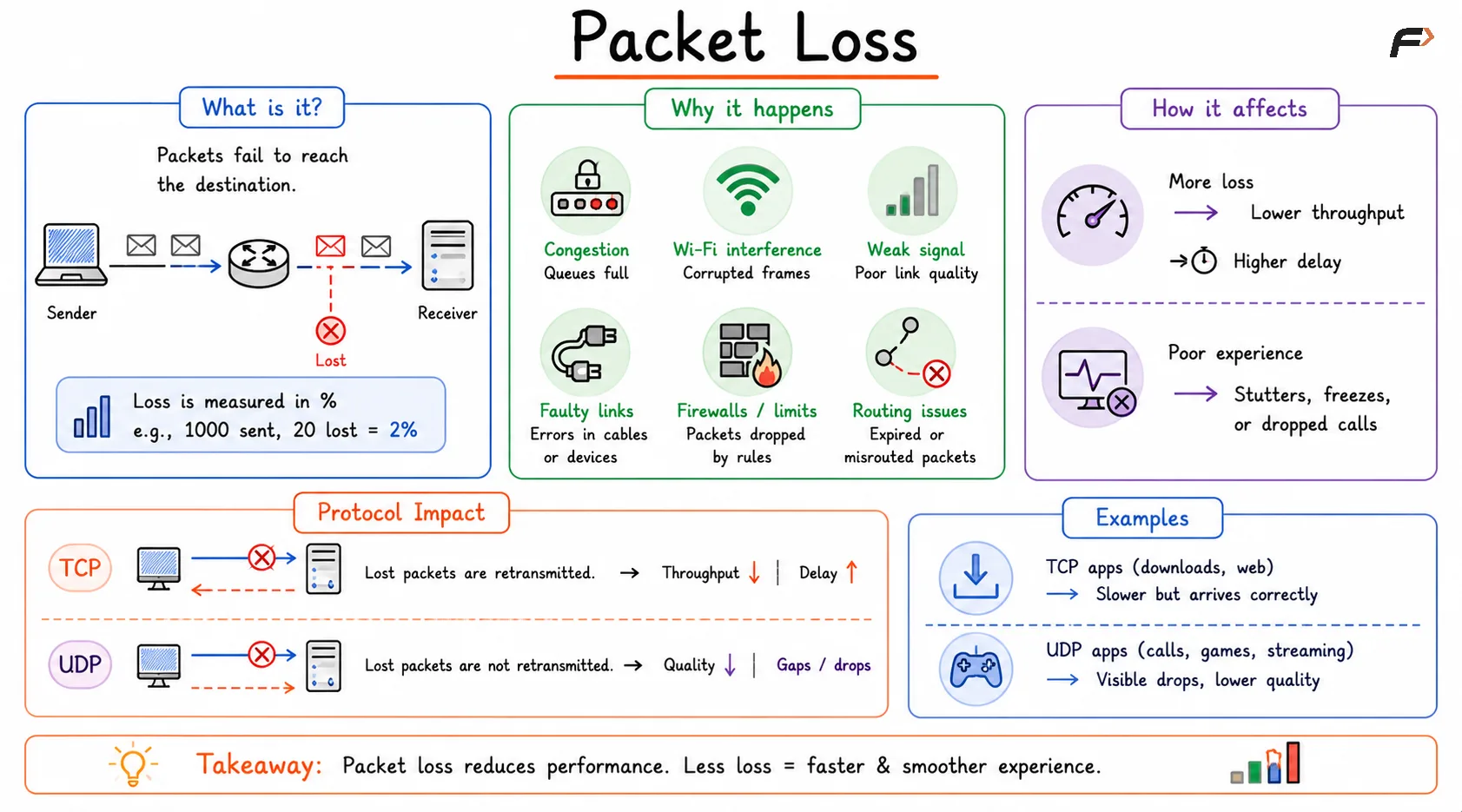
Packet loss occurs when packets fail to reach their destination. It is usually measured as a percentage.
For example, if 1000 packets are sent and 20 do not arrive, packet loss is 2%.
Packet loss may happen because of:
Network congestion: Router or switch queues become full.
Wi-Fi interference: Wireless frames become corrupted.
Weak signal: Poor link quality causes delivery failures.
Faulty links: Cables, interfaces, or devices may have errors.
Firewall or rate limits: Some packets may be intentionally dropped.
Routing issues: Packets may expire or be misrouted.
Packet loss affects TCP and UDP differently.
Protocol | Effect of Packet Loss |
|---|---|
TCP | Lost packets are retransmitted, reducing throughput and increasing delay |
UDP | Lost packets may not be retransmitted, affecting voice, video, or gaming quality |
In TCP-based applications like file downloads or normal web browsing, packet loss causes retransmissions. The data may still arrive correctly, but speed drops. In UDP-based applications like calls or games, lost packets may simply be skipped, causing visible or audible quality problems.
Packet loss
Server Response Time
Network delay is only one part of performance. The server also needs time to process the request and generate a response.
Server response time may include:
Application processing: Business logic running on the server.
Database queries: Fetching or updating data.
API calls: Communicating with other services.
Authentication checks: Verifying users or tokens.
Load handling: Serving many users at the same time.
A website can feel slow even when the network is healthy if the backend server, database, CDN, or load balancer is slow.
How Metrics Affect Applications
Different applications care about different performance metrics. There is no single “best” metric for every use case.
Application | Most Important Metrics |
|---|---|
Web browsing | Latency, RTT, server response time, throughput |
Video calls | Low latency, low jitter, low packet loss |
Online gaming | Very low latency, low jitter, low packet loss |
Streaming | Stable throughput and low packet loss |
File downloads | High throughput |
Cloud apps | Latency, RTT, server response time |
VoIP calls | Low jitter, low packet loss, stable latency |
A high-bandwidth connection may be excellent for downloading large files but still feel bad for gaming if latency and jitter are high.
Summary
Network performance depends on multiple metrics working together. Bandwidth defines maximum capacity, throughput shows actual useful delivery, latency and RTT measure responsiveness, jitter measures delay consistency, packet loss measures delivery reliability, and server response time measures backend processing delay.
High bandwidth alone does not guarantee a fast experience. A good network must provide enough throughput, low latency, stable jitter, minimal packet loss, and responsive servers. The real user experience is determined by the full path between client, network, CDN, load balancer, server, and application.
Be the first to add a comment.