Introduction
Load balancing means distributing incoming traffic across multiple servers instead of sending everything to one machine. It exists because no single server can handle unlimited requests.
Every server has limited CPU, memory, network bandwidth, disk I/O, and connection capacity. Once traffic grows beyond that capacity, the server becomes slow, starts dropping requests, or may go down completely. Load balancing solves this by allowing many servers to share the work.
Why Load Balancing Is Needed
If all users connect to a single backend server, that server becomes the only place where every request must be processed. This creates a serious bottleneck.
A single server has limits such as:
Processing power: The CPU can handle only a certain amount of work at once.
Memory: Too many active requests can exhaust available RAM.
Network bandwidth: Incoming and outgoing traffic cannot exceed link capacity.
Connection limit: A server can maintain only a limited number of active connections.
Disk I/O: File reads, writes, and logs can become slow under heavy load.
Upgrading the same machine is called vertical scaling. Adding more machines is called horizontal scaling. Load balancing becomes necessary once multiple servers are introduced, because traffic must now be distributed among them.
What Is a Load Balancer?
A load balancer is a system that sits between clients and backend servers. Clients send requests to the load balancer, and the load balancer decides which backend server should handle each request.
A simple request flow looks like this: Client => Load Balancer => Backend Server
Instead of exposing every backend server directly, the application exposes the load balancer as the front entry point. This improves scalability because new servers can be added behind the load balancer without changing how users access the application.
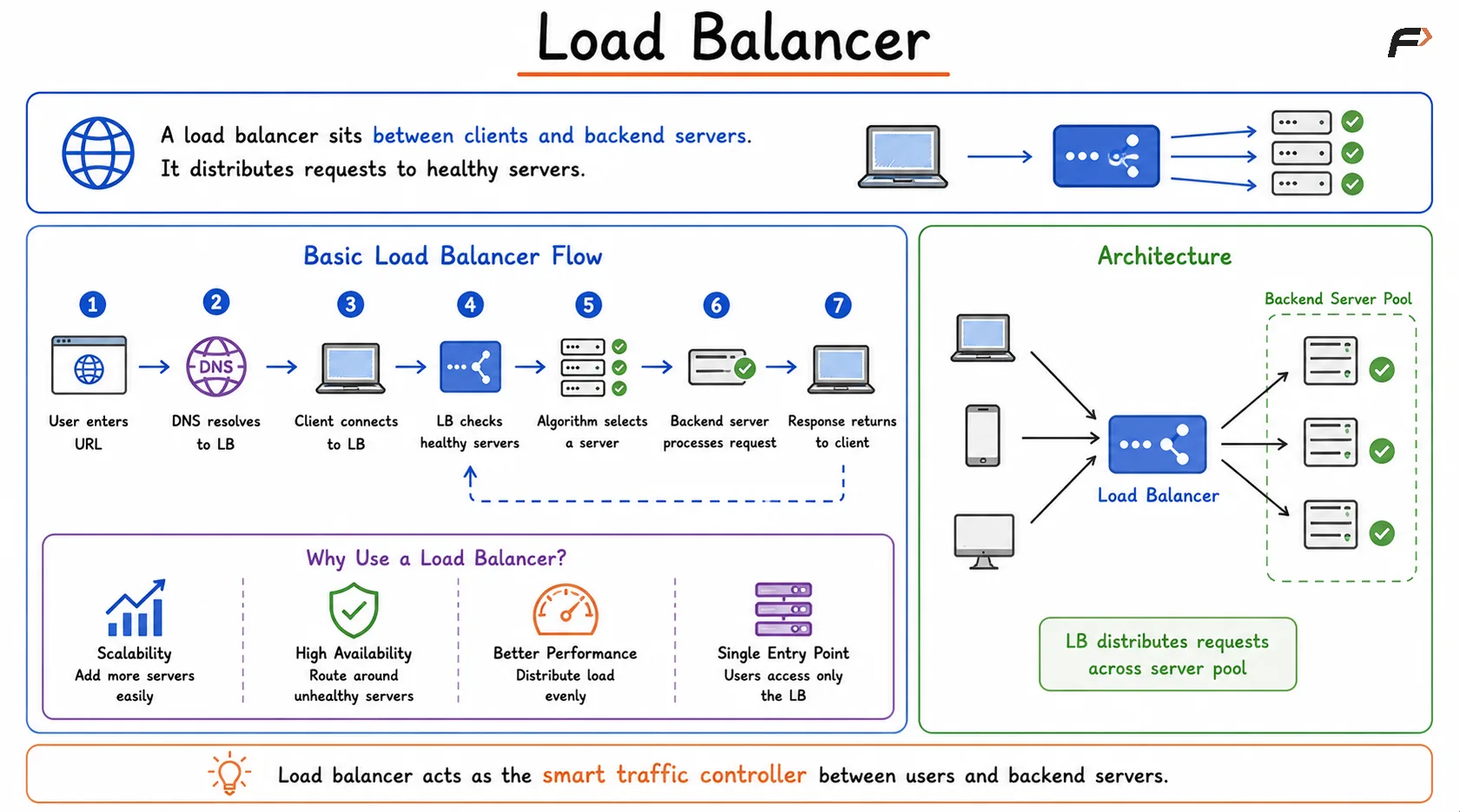
Load Balancer
Basic Load Balancer Flow
When a user opens a website, the request usually does not directly reach an application server. It first reaches the load balancer.
The flow can be understood in steps:
The user enters a website URL in the browser.
DNS resolves the domain to the load balancer’s address.
The client connects to the load balancer.
The load balancer checks which backend servers are healthy.
A load balancing algorithm selects one server.
The selected backend processes the request.
The response returns through the load balancer to the client.
This allows backend servers to work as a pool instead of isolated machines.
Health Checks
Health checks allow the load balancer to know which backend servers are working properly. A load balancer should not send user traffic to a server that is down, stuck, overloaded, or unable to respond correctly.
A common health check uses an endpoint such as: /health
The load balancer periodically sends a request to this endpoint. If the server responds successfully, it remains in the healthy pool. If the server does not respond, times out, refuses the connection, or returns an error, it may be marked unhealthy.
For example, if there are three servers and Server B becomes unhealthy, the load balancer removes Server B from active traffic routing. New requests are sent only to Server A and Server C until Server B becomes healthy again.
Health checks improve:
Availability: Users continue getting responses even when some servers fail.
Reliability: Broken servers are avoided automatically.
Fault tolerance: Traffic shifts away from failed machines.
User experience: Requests are less likely to hit dead or failing servers.
Load Balancing Algorithms
A load balancing algorithm decides which healthy server receives the next request. Different algorithms are used depending on traffic pattern and server capacity.
Algorithm | Basic Idea |
|---|---|
Round Robin | Sends requests to servers one by one in rotation |
Weighted Round Robin | Sends more traffic to stronger servers using weights |
Least Connections | Sends traffic to the server with fewer active connections |
IP Hash | Routes based on client IP, often used for session affinity |
Round Robin is simple and works well when servers are similar. Least Connections can be better when requests have different processing times, because it considers current active load.
Sticky Sessions
Sticky sessions, also called session affinity, mean the same client is repeatedly routed to the same backend server.
For example:
User 1 => Server A
User 1 next request => Server A again
Sticky sessions are useful when session data is stored in the memory of one backend server. If a logged-in user’s session exists only on Server A, sending the next request to Server B may cause the user to appear logged out.
However, modern applications usually avoid depending on sticky sessions. Instead, they prefer shared or stateless session handling.
Common alternatives include:
Redis session storage: Session data is stored in a shared cache.
Database-backed sessions: All servers can read session data from a common database.
Stateless tokens: Tokens such as JWT allow any server to verify the request.
Distributed session stores: Session state is available across backend servers.
This allows any healthy server to handle any request, which improves horizontal scaling and fault tolerance.
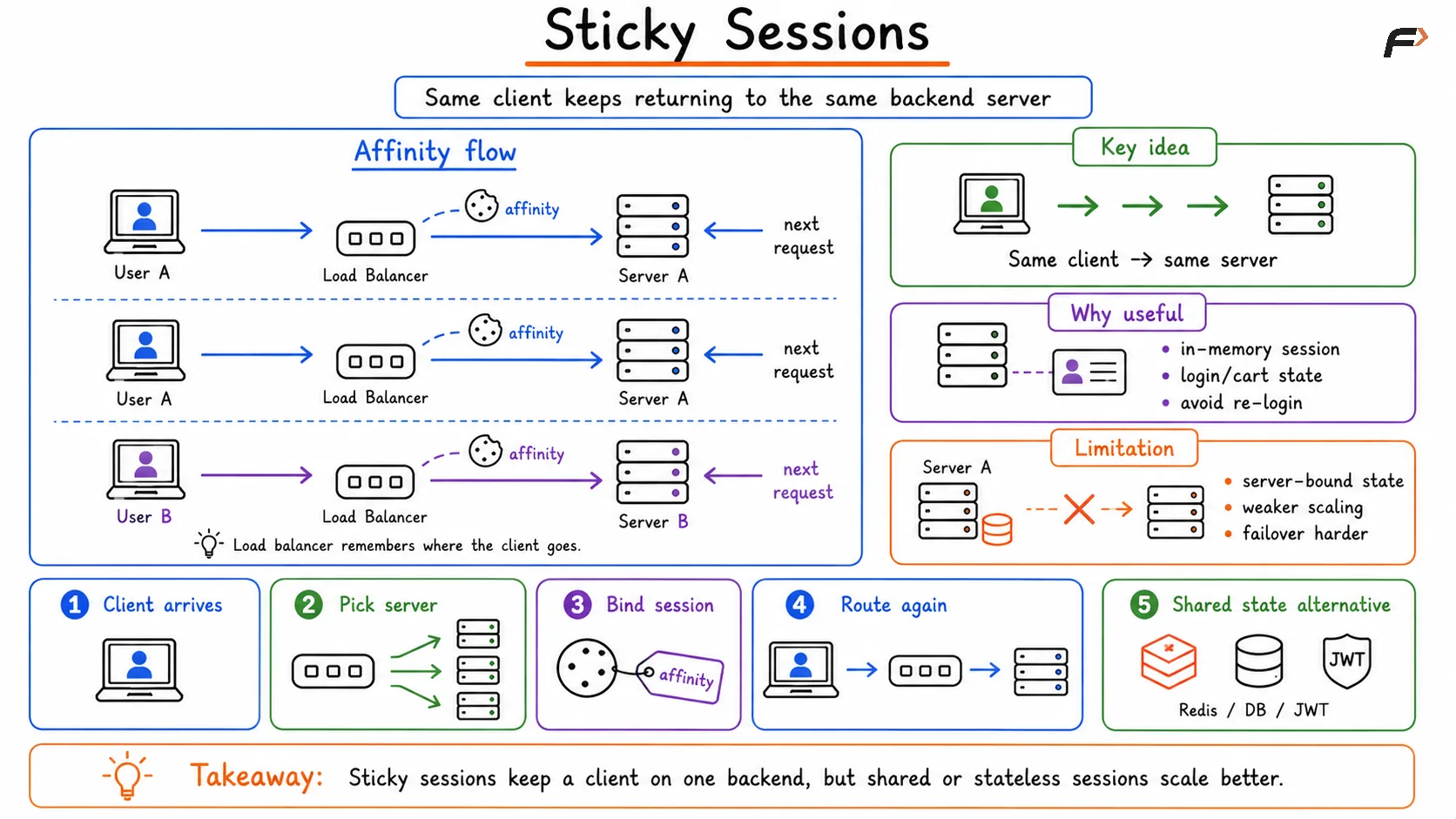
Sticky Sessions - Load Balancer
Load Balancer as Production Front Door
A load balancer is not only a traffic distributor. In many production systems, it acts as the front door through which most user requests enter.
Common responsibilities include:
Request routing: Sends traffic to the correct backend service or server.
Health checks: Avoids unhealthy servers.
Failover: Redirects traffic when a server or region fails.
TLS termination: Handles HTTPS encryption before forwarding traffic internally.
Rate limiting: Blocks excessive request traffic before it reaches backend servers.
Logging and monitoring: Collects request count, latency, errors, and traffic patterns.
Deployment control: Helps shift traffic during blue-green or canary deployments.
These responsibilities make the load balancer a critical part of scalable and reliable system design.
Summary
Load balancing distributes incoming traffic across multiple backend servers so that no single machine becomes overloaded. It enables horizontal scaling, improves availability, reduces bottlenecks, and helps systems continue working even when some servers fail.
A load balancer receives client requests, checks healthy servers, applies a load balancing algorithm, and forwards traffic to the selected backend. Modern load balancers also support health checks, failover, TLS termination, sticky sessions, rate limiting, logging, monitoring, and production traffic control.
Be the first to add a comment.