Introduction
Latency is not caused by just one device or one link. Whenever a request travels from a client to a server and the response comes back, several small delays get added together.
This is why a website may feel slow even when the internet connection looks fast. The delay may come from DNS, TCP connection setup, TLS security setup, routers, queues, server processing, CDN behavior, or even retransmissions caused by packet loss.
Main Sources of Latency
Latency is the combined effect of many delays across the full communication path. Some delays happen because of physics, some happen inside network devices, and some happen because the application or server takes time to respond.
Common sources of latency include:
Propagation delay: Time taken by the signal to physically travel from source to destination.
Transmission delay: Time required to push all packet bits onto the communication link.
Processing delay: Time spent by routers, switches, firewalls, NAT devices, load balancers, or servers while handling packets.
Queuing delay: Time spent waiting in a queue when a device receives more traffic than it can handle immediately.
DNS lookup delay: Time required to resolve a domain name into an IP address.
TCP handshake delay: Time required to establish a TCP connection before data transfer begins.
TLS handshake delay: Time required to create a secure HTTPS connection.
Server processing delay: Time taken by the backend server, application, or database to generate a response.
Retransmission delay: Extra delay caused when lost TCP packets must be sent again.
A simple way to represent total latency is:
Total Latency = Propagation + Transmission + Processing + Queuing + Setup + Server + Retransmission Delays
Propagation Delay vs Transmission Delay
Propagation delay and transmission delay are both network delays, but they come from different causes. One depends mainly on distance, while the other depends on packet size and link speed.
Aspect | Propagation Delay | Transmission Delay |
|---|---|---|
Meaning | Time taken by the signal to travel across the medium | Time required to push all bits into the link |
Depends on | Distance, route, transmission medium | Packet size and bandwidth |
Main issue | Farther servers increase delay | Larger packets or slower links increase delay |
Propagation delay cannot be removed completely because signals need time to travel. However, it can be reduced by using closer servers, CDNs, and shorter network paths.
Transmission delay improves when packet sizes are controlled properly and links have higher bandwidth. Still, bandwidth alone does not remove all other sources of latency.
Processing and Queuing Delays
Packets usually pass through multiple devices before reaching the final server. Each device may inspect headers, check tables, apply rules, translate addresses, or decide where the packet should go next.
Processing delay can occur at:
Router: Checks routing information and forwards the packet toward the next hop.
Switch: Uses MAC address information to forward traffic inside a local network.
Firewall: Applies security rules to allow or block traffic.
NAT device: Translates private and public IP address information.
Load balancer: Selects which backend server should handle the request.
Server: Runs application logic, database queries, or file access before responding.
Queuing delay happens when packets arrive faster than a device can process or forward them. During heavy traffic bursts, packets wait in buffers. If the queue becomes full, packets may be dropped.
In TCP-based communication, dropped packets usually cause retransmissions. That adds even more delay because the sender must detect the loss and send the missing data again.
Website Request Delay Flow
Opening a website involves more than sending one request and receiving one response. Several steps may happen before the browser receives the first byte.
A typical website request includes:
The browser checks cache and starts resolving the domain name.
DNS lookup finds the IP address of the server.
TCP handshake establishes a connection.
TLS handshake creates a secure HTTPS channel.
The browser sends the HTTP request.
CDN or edge server may serve the response if cached.
If not cached, the request may travel to the origin server.
A load balancer may route the request to one backend server.
The server processes the request and starts sending the response.
The first byte reaches the browser.
Because so many components are involved, a slow website cannot be diagnosed by looking at only one number. The delay may come from the network, the server, the database, the CDN, or connection setup.
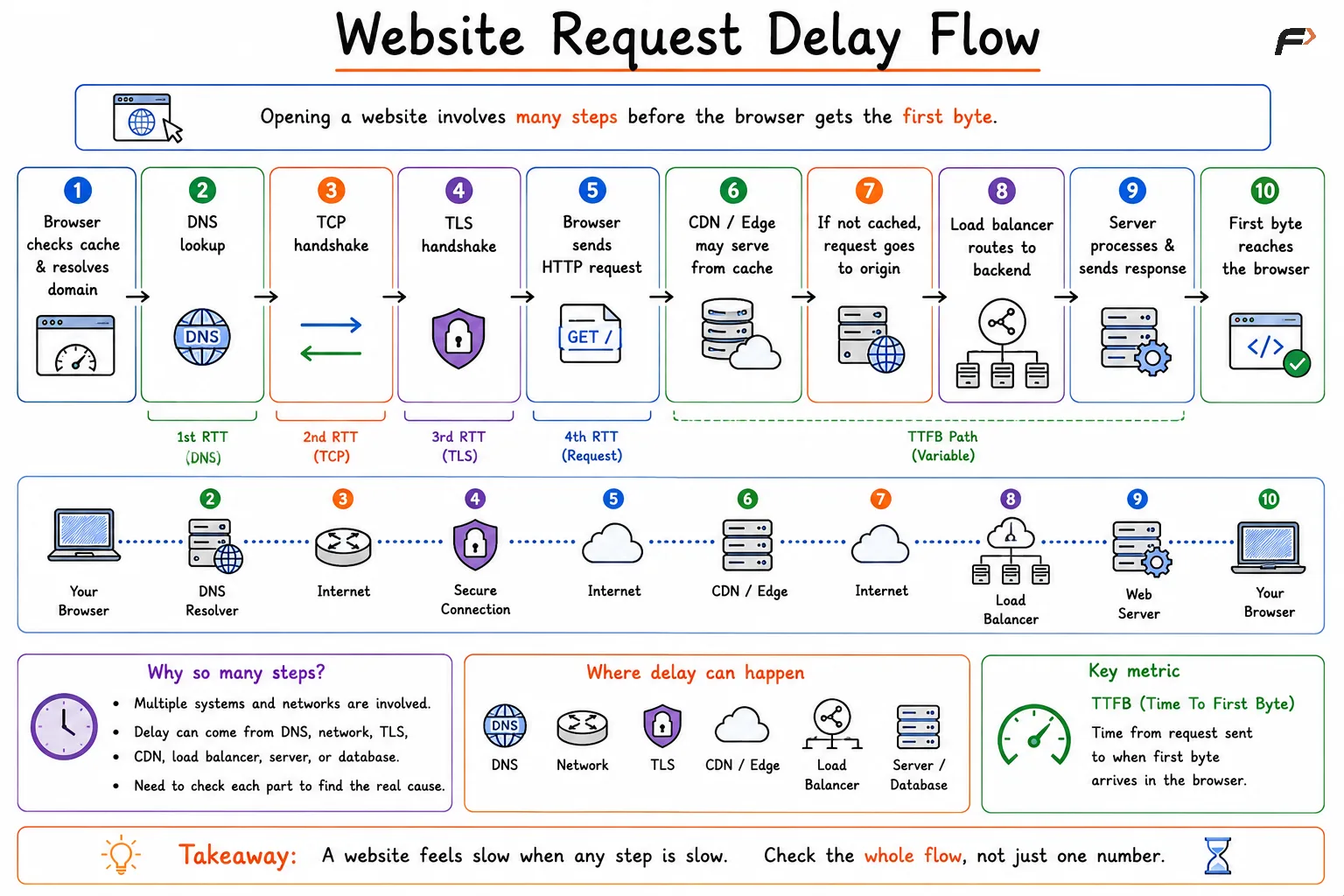
Website Request Delay Flow
What Is Time To First Byte?
Time To First Byte, or TTFB, measures the time from the start of a request until the first byte of the response reaches the client.
TTFB does not measure the complete download time. If a file is large, it may take much longer to fully download, but TTFB stops as soon as the first byte arrives.
For example, if a browser requests a webpage and the first byte arrives after 600 ms, then the TTFB is 600 ms. The rest of the HTML, CSS, JavaScript, images, or videos may still take additional time to download.
TTFB is useful because it shows how quickly the server and network begin delivering a response. A high TTFB usually means the browser had to wait too long before it could even start receiving useful response data.
Latency vs RTT vs TTFB
Latency, RTT, and TTFB are related, but they are not the same metric.
Metric | Meaning |
|---|---|
Latency | General delay in communication between source and destination |
RTT | Round Trip Time, meaning time for a signal to go to the destination and come back |
TTFB | Time from request start until the first byte of response reaches the client |
Reasons for High TTFB
A high Time To First Byte usually means something before the response is slow. The problem may be close to the user, inside the network path, at the CDN, or on the backend server.
Common reasons for high TTFB include:
Slow DNS lookup: Domain resolution takes too long before connection setup begins.
High network latency: The client and server are physically far apart or connected through a long route.
Slow TCP or TLS handshake: Connection setup takes extra time, especially on high-RTT paths.
CDN cache miss: The CDN cannot serve the response directly and must contact the origin server.
Heavy backend processing: The server needs extra computation before generating the response.
Packet loss and retransmission: Lost packets delay connection setup or response delivery.
A low TTFB does not guarantee a fully fast page, because rendering, JavaScript execution, images, and other resources still matter. But a high TTFB creates a slow start for everything that follows.
Summary
Latency is the total delay created by multiple stages of communication. Propagation delay, transmission delay, processing delay, queuing delay, DNS lookup, TCP handshake, TLS handshake, server processing, and retransmissions can all increase response time.
Time To First Byte measures how long it takes for the first byte of a response to reach the client. It does not include the complete download time, but it is an important signal for network performance, server response time, CDN behavior, and website speed.
Be the first to add a comment.