Introduction
IPv4, or Internet Protocol Version 4, is one of the most important technologies in computer networking. It is the protocol that gives devices logical addresses and allows packets to move from one network to another until they reach the destination.
Inside a local network, devices can communicate using MAC addresses and Layer 2 technologies such as Ethernet or Wi-Fi. But once communication has to travel beyond the local network, a larger addressing and forwarding system is needed. That is where IPv4 comes in.
What IPv4 Is
IPv4 is the version of the Internet Protocol that became widely adopted for network communication across multiple interconnected networks. It works at the Network Layer, or Layer 3, of the OSI model.
Its main job is to help devices identify remote destinations and move packets across routers and different networks. That is why IPv4 is closely linked with IP addressing, routing, and packet delivery.
What an IP Address Means
An IP address is a logical address assigned to a device on a network so data can be sent to the correct destination. The word logical is important here because an IP address is linked to the device's location in a network, not to the hardware itself.
That is why a device may keep the same MAC address but use a different IP address after moving to another network.
Aspect | MAC Address | IP Address |
|---|---|---|
Type | Hardware-based address | Logical network address |
Layer | Data Link Layer | Network Layer |
Scope | Local link or local network | Across multiple networks |
Change when device moves networks | Usually no | Often yes |
This difference is one of the foundations of Layer 3 communication.
Why IPv4 Is Important
IPv4 became the first version of IP to see large-scale real-world adoption. Even though IPv6 adoption continues to grow, IPv4 is still widely used in enterprise networks, home networks, service provider networks, and many internet-facing systems.
IPv4 provides several essential functions:
Logical addressing: Gives devices an address that works across networks.
Packet delivery: Allows data to travel from source to destination.
Routing support: Helps routers choose the next hop.
Inter-network communication: Connects separate networks into a larger internetwork.
IPv4 Address Format
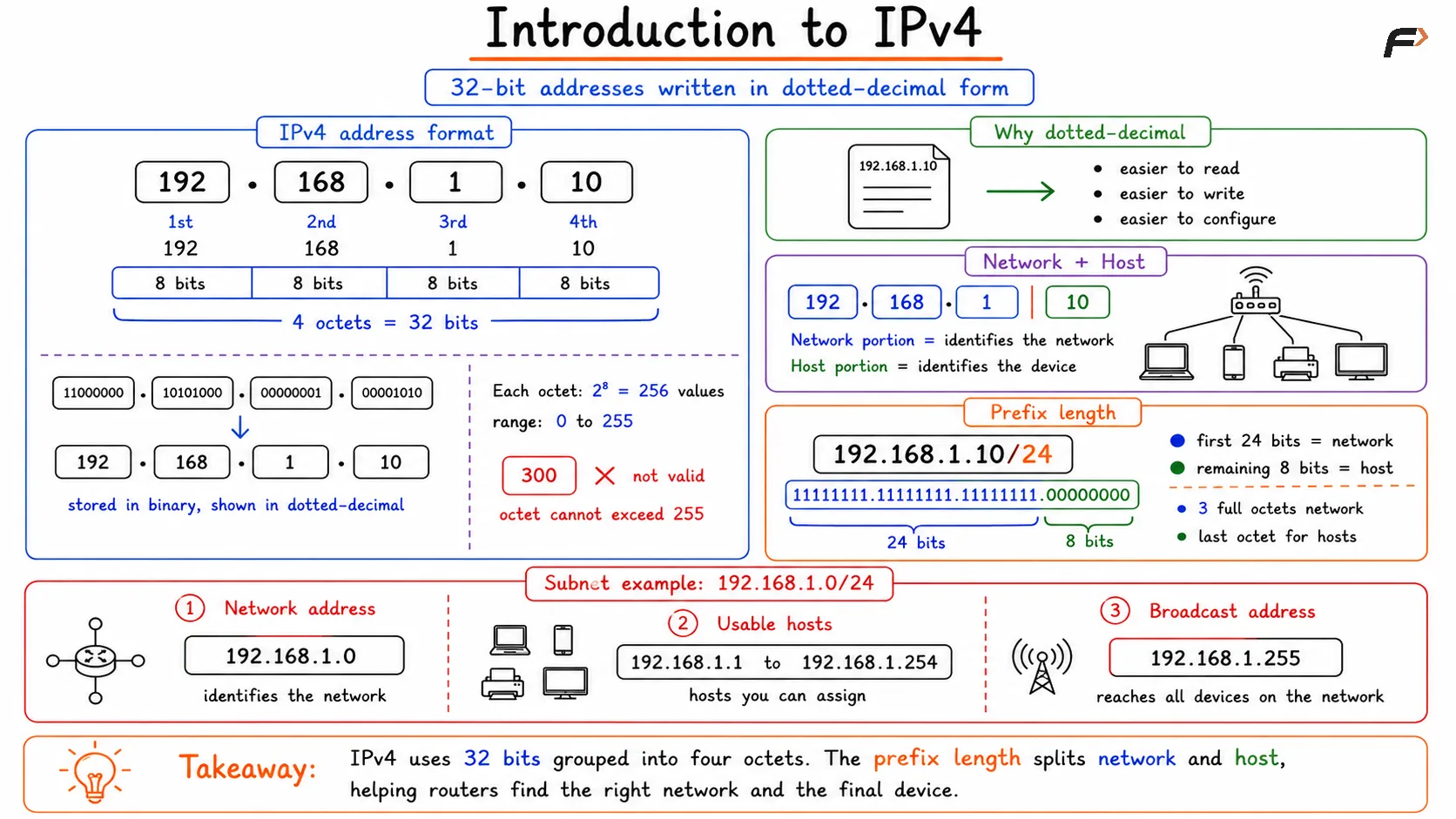
An IPv4 address contains 32 bits. These 32 bits are divided into four octets, and each octet contains 8 bits.
Because binary is difficult for humans to read quickly, IPv4 addresses are usually written in dotted-decimal notation.
Example: 192.168.1.10
This address has four octets:
First octet: 192
Second octet: 168
Third octet: 1
Fourth octet: 10
Internally, the address is stored in binary, but dotted-decimal notation makes it easier to read, write, and configure.
Each octet has 8 bits. With 8 bits, the total number of possible combinations is 2^8 = 256 .
That gives a value range from 0 to 255. This is why an IPv4 octet cannot contain values such as 300 or 500.
Introduction to IPv4
Network Portion and Host Portion
An IPv4 address is divided logically into two parts:
Network portion: Identifies the network
Host portion: Identifies a specific device inside that network
This division is important because it allows routers to identify which network a packet should go to, while the host part identifies the final device within that network.
For example, in a home network, the network portion identifies the home LAN, while the host portion identifies a phone, laptop, printer, or smart TV inside that LAN.
Prefix Length
The boundary between the network portion and the host portion is defined by the prefix length.
Example: 192.168.1.10/24
Here, /24 means:
First 24 bits: Network portion
Remaining 8 bits: Host portion
Since 24 bits equals three full octets, the network portion in this case is 192.168.1, and the last octet is used for host addresses.
Network Address, Broadcast Address, and Usable Hosts
Consider this subnet: 192.168.1.0/24
In that subnet:
Network address:
192.168.1.0Broadcast address:
192.168.1.255Usable host range:
192.168.1.1to192.168.1.254
The network address identifies the subnet itself, so it cannot be assigned to a device. The broadcast address is reserved for sending traffic to all devices in that subnet.
That is why a /24 subnet gives 254 usable host addresses, not 256.
How Prefix Length Affects Host Capacity
The number of host bits decides how many addresses are available in a subnet. More host bits mean more devices can be addressed.
Examples:
/24: 8 host bits
/16: 16 host bits
/26: 6 host bits
A smaller prefix leaves more room for hosts, while a larger prefix creates smaller subnet blocks.
IPv4 Packet Structure
IPv4 does not only define addressing. It also defines how data is carried at Layer 3 inside an IP packet.
An IPv4 packet has two major parts:
Header: Contains delivery-related information
Payload: Contains data from higher layers
The IPv4 header may contain fields such as:
Source IP address
Destination IP address
TTL
Protocol information
Fragmentation information
The payload may contain:
TCP segment
UDP datagram
Application data
IPv4 and Hop-by-Hop Delivery
As data moves through the network, the destination IP address generally remains the same from source to final destination. But the Layer 2 addressing changes at each hop.
That means:
IP addresses: Stay focused on the original sender and final receiver
MAC addresses: Change from one local link to the next
This happens because each router removes the old frame and builds a new one for the next link, while the IP packet continues toward the same destination.
Summary
IPv4 is the widely used version of the Internet Protocol that provides logical addressing, packet delivery, and routing across multiple networks. It uses 32-bit addresses written in dotted-decimal notation and divides those addresses into network and host portions using prefix length.
IPv4 also defines packet structure, supports subnetting, and enables hop-by-hop forwarding through routers. Understanding IPv4 is essential because it connects several core networking ideas together, including IP addressing, network boundaries, usable hosts, encapsulation, and packet movement across the internet.
Be the first to add a comment.