Introduction
Wireless networking allows devices to communicate without using physical cables. Instead of sending data through copper wires or fiber-optic links, wireless devices transmit information through radio waves.
This is the reason laptops, phones, tablets, smart TVs, printers, cameras, and IoT devices can connect to a network while moving around. Wireless networking provides convenience and mobility, which is why Wi-Fi is used in homes, offices, colleges, airports, cafes, hospitals, warehouses, and public places.
Why Wireless Networking Is Needed
Wired networks are fast and reliable, but every device needs a physical connection. This becomes inconvenient when users move frequently or when many devices need temporary network access.
Wireless networking solves this by allowing devices to connect through the air instead of requiring a dedicated cable for every device.
Mobility: Users can move while staying connected.
Easy setup: Devices can join the network without new cabling.
Flexible layout: Homes and offices do not need to depend completely on network ports.
Public access: Cafes, airports, hotels, and campuses can provide shared internet access.
IoT support: Smart devices, sensors, cameras, and appliances can connect without separate wires.
The need for wireless networking comes from a simple reality: modern devices are portable, and users expect network access wherever they go.
How Wireless Networking Works
Wireless networking uses electromagnetic radio waves to carry data between devices. A wireless device uses an antenna to send and receive these radio signals.
A simplified communication flow looks like:
The transmitting device converts digital data into a radio signal.
The radio signal travels through the air.
The receiving device captures the radio signal.
The receiving device converts the radio signal back into digital data.
In a typical Wi-Fi network, a phone or laptop communicates wirelessly with an access point or Wi-Fi router. The access point then connects that wireless device to the larger network, usually through a wired connection.
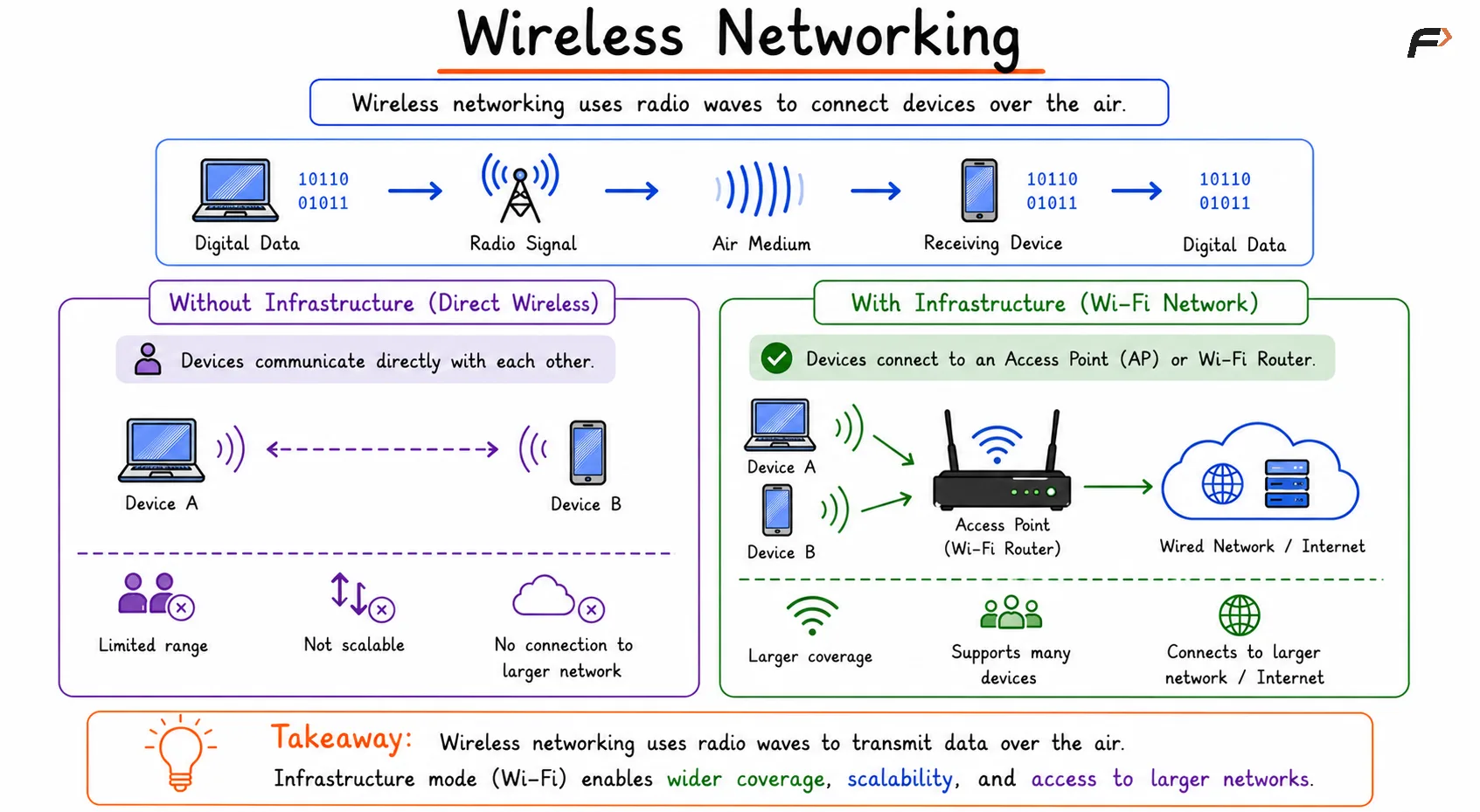
Wireless Networking
Access Point and Wi-Fi Router
A wireless access point, or AP, is the device that provides Wi-Fi connectivity to wireless clients. Laptops, phones, tablets, and IoT devices connect to the AP using radio waves.
In homes, the device people call a “Wi-Fi router” usually combines several networking functions into one box.
Access point: Provides wireless connectivity.
Router: Connects the home network to the internet.
Switch: Connects wired Ethernet devices.
DHCP server: Assigns IP addresses automatically.
NAT device: Allows private devices to share one public internet connection.
Firewall: Filters unwanted traffic from outside.
In larger networks such as offices and campuses, access points are often separate devices connected to switches, routers, controllers, and security systems.
Wired vs Wireless Networking
Aspect | Wired Networking | Wireless Networking |
|---|---|---|
Medium | Physical cables | Radio waves |
Mobility | Limited | High |
Setup | Requires cabling | Easier device connection |
Performance | More predictable | Can vary with environment |
Interference | Usually lower | Higher due to shared radio medium |
Security Concern | Physical access is harder | Signals travel through the air |
Common Example | Ethernet LAN | Wi-Fi WLAN |
Wired networks are usually more stable and predictable. Wireless networks are more flexible, but they must handle interference, shared channels, and signal quality changes.
Shared Medium in Wireless Networks
Wireless communication uses the surrounding air as the transmission medium. Many devices may use the same radio channel, so they must coordinate when to transmit.
This shared-medium nature is one of the biggest differences between Wi-Fi and wired Ethernet.
Devices sharing the wireless medium may include:
Laptops and phones: Common Wi-Fi clients in homes and offices.
IoT devices: Sensors, cameras, smart lights, and appliances.
Nearby Wi-Fi networks: Other routers and access points using nearby channels.
Because the medium is shared, wireless networks can experience contention, retransmissions, and performance drops when many devices compete at the same time.
Common Wireless Technologies
Wireless networking is not limited to Wi-Fi. Different wireless technologies are designed for different ranges, speeds, power usage, and use cases.
Technology | Common Use |
|---|---|
Wi-Fi | Local wireless networking and internet access |
Bluetooth | Short-range device-to-device communication |
Cellular networks | Mobile communication over wide areas |
NFC | Very short-range communication such as contactless payments |
Wi-Fi is the most common wireless technology for local area networking, while cellular networks are used for mobile internet across larger geographic areas.
Limitations of Wireless Networking
Wireless networking is flexible, but it is not perfect. Since radio signals travel through the air, the environment affects performance.
Common limitations include:
Interference: Nearby devices and networks may affect signal quality.
Signal attenuation: Signal strength decreases with distance and obstacles.
Shared bandwidth: Multiple devices compete for the same wireless channel.
Variable latency: Delay can change depending on signal strength and congestion.
Security risks: Wireless signals can be received beyond physical boundaries, so encryption and authentication are important.
These limitations do not make wireless networking weak. They simply mean wireless networks must be designed and secured carefully.
Summary
Wireless networking allows devices to communicate using radio waves instead of physical cables. It provides mobility, flexibility, easy setup, public connectivity, and support for modern devices such as laptops, phones, smart TVs, and IoT systems.
Wi-Fi networks usually rely on access points or wireless routers to connect wireless devices to a larger wired network. Compared to Ethernet, wireless networking is more flexible but also more affected by interference, signal strength, shared channels, and security requirements.
Be the first to add a comment.