Introduction
Network performance describes how well data moves between two systems. A browser requesting a website, a backend service calling a database, or a video call sending audio and video packets all depend on network speed, stability, and reliability.
A network may look simple from the user side, but each request travels through many components before the response comes back. Any one of those components can affect performance.
A Typical Request Path
When a user opens a website, the request does not directly jump from the browser to the server. It moves through several network and application components.
A simplified path looks like:
User device => Wi-Fi router => ISP => backbone network => CDN or load balancer => server
The response then travels back through the network and finally reaches the browser. If any part of this path is slow, congested, or overloaded, the user may experience delay.
Important components in this path include:
Router: Connects the local network to the internet.
ISP: Provides access to the wider internet.
Backbone network: Carries traffic across large network paths.
CDN: Serves cached content from locations closer to users.
Load balancer: Distributes traffic across multiple servers.
Server: Processes the request and generates the response.
Why Websites Feel Slow
A website can feel slow even when the internet plan looks fast. This happens because loading a webpage involves many steps, not just raw download speed.
Before a webpage appears, the browser may perform DNS lookup, TCP connection setup, TLS handshake, HTTP request handling, server processing, database queries, content delivery, response transfer, and browser rendering.
Slow performance may come from:
DNS delay: The domain name takes time to resolve.
High latency: Requests and responses take longer to travel.
Packet loss: Missing packets cause retransmissions.
Server delay: The backend takes time to process the request.
CDN cache miss: Content may need to be fetched from the origin server.
Congestion: Too much traffic causes queues and delays.
Bad routing: Packets may take an inefficient path.
This is why network performance must be understood as an end-to-end experience.
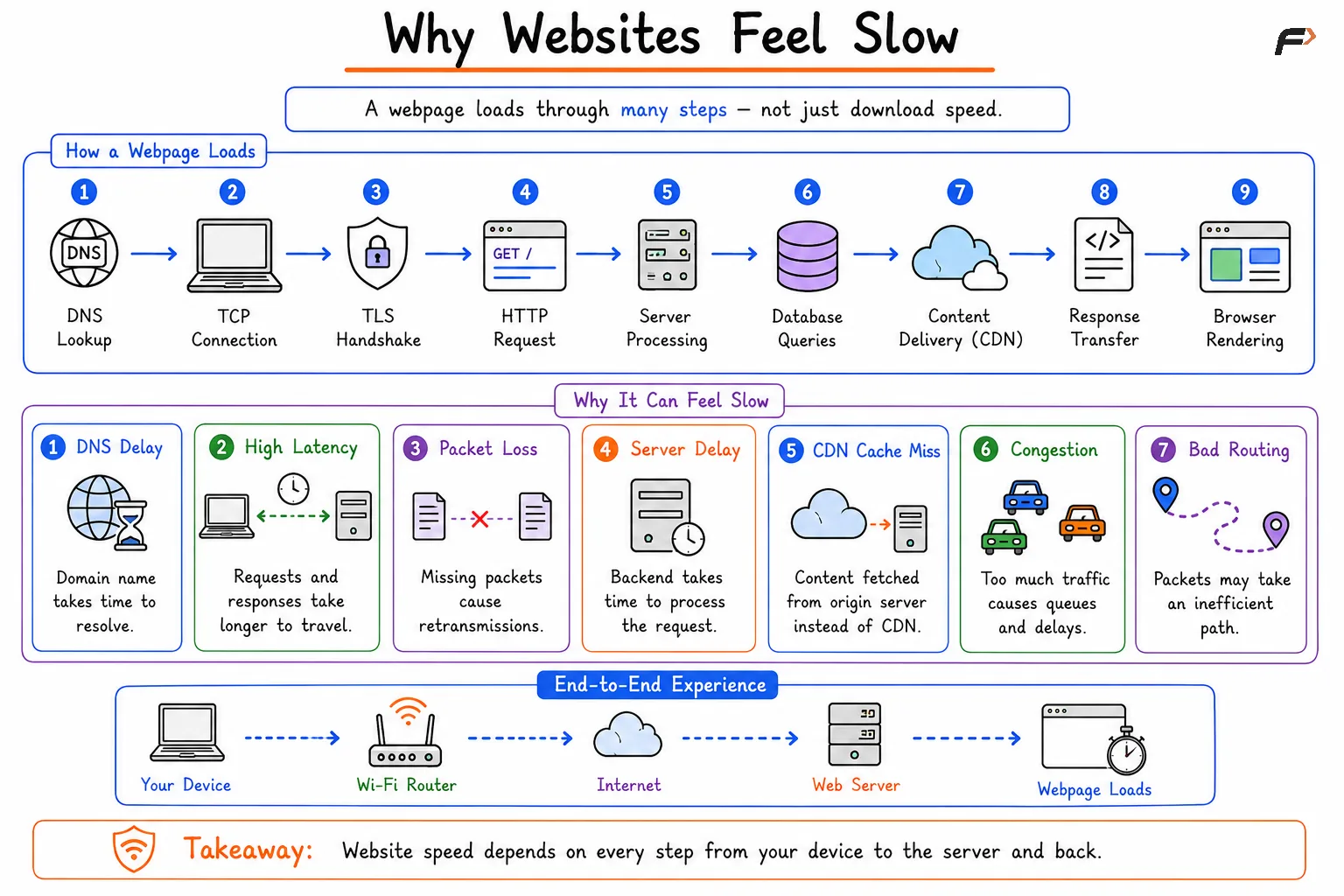
Why Websites Feel Slow
Bandwidth vs Throughput
Bandwidth and throughput are related, but they are not the same.
Metric | Meaning | Simple Idea |
|---|---|---|
Bandwidth | Maximum capacity of a link | What the network can theoretically carry |
Throughput | Actual useful data delivered per second | What the user actually gets |
For example, a broadband plan may offer 100 Mbps bandwidth. But the actual download may be lower because of Wi-Fi interference, congestion, server limits, protocol overhead, or packet loss.
Bandwidth is the maximum possible capacity. Throughput is the real achieved transfer rate.
Latency and RTT
Latency is the time taken for data to travel from one point to another. It is usually measured in milliseconds.
Round Trip Time, or RTT, measures the time for a request to go from client to server and for the response to come back. Tools like ping usually show RTT rather than one-way latency.
Metric | Meaning | Important For |
|---|---|---|
Latency | One-way delay between two points | Responsiveness |
RTT | Request and response travel time | Ping, gaming, browsing, APIs |
Low latency is important for online gaming, video calls, remote desktops, live collaboration, and interactive applications. Even with high bandwidth, high latency can make a system feel slow.
Packet Loss and Jitter
Packet loss occurs when packets fail to reach their destination. This may happen due to congestion, faulty links, interference, overloaded devices, or routing problems.
Jitter means variation in latency. If packets arrive with inconsistent delays, real-time applications may suffer even if average latency looks acceptable.
Metric | Meaning | Common Impact |
|---|---|---|
Packet Loss | Some packets never arrive | Retransmissions, choppy calls, slow throughput |
Jitter | Delay keeps changing | Unstable voice, video, and gaming experience |
Video calls, voice calls, and online games are especially sensitive to jitter and packet loss because they need smooth, timely delivery.
Server Response Time
Network delay is not the only reason an application feels slow. The server also needs time to process the request.
A server may need to:
Run application logic: Process the request.
Query a database: Fetch or update data.
Call another service: Communicate with APIs or microservices.
Generate response data: Create HTML, JSON, images, or files.
Handle load: Serve many users at the same time.
If the server is overloaded or the database is slow, users may experience delay even when the network itself is healthy.
Different Applications Need Different Metrics
No single metric defines performance for every application. Different applications care about different parts of network behavior.
Application | Most Important Metrics |
|---|---|
Online gaming | Low latency, low jitter, low packet loss |
Video calls | Low latency, low jitter, stable throughput |
Streaming | Sufficient bandwidth and throughput |
File downloads | High throughput |
Web browsing | Low latency and good server response time |
Cloud applications | Latency, packet loss, server response time |
A fast file download connection may still feel bad for gaming if latency is high. A low-latency connection may still struggle with 4K streaming if throughput is too low.
Bottlenecks in Network Performance
A bottleneck is the slowest or weakest part of the communication path. The final user experience is limited by this weakest component.
Common bottlenecks include:
Low bandwidth link: The connection does not have enough capacity.
Wi-Fi congestion: Multiple devices share airtime and reduce throughput.
ISP congestion: The provider network is overloaded.
Slow routing path: Packets take a longer or inefficient route.
CDN issue: Cached content is unavailable or distant.
Load balancer issue: Traffic is not distributed efficiently.
Server overload: The application cannot process requests quickly.
Database delay: Backend queries take too long.
Improving performance means finding the actual bottleneck instead of assuming every problem is caused by internet speed.
Summary
Network performance describes the speed, stability, and reliability of communication between systems. A request may pass through routers, ISPs, backbone networks, CDNs, load balancers, servers, databases, and browsers before the user sees a result.
Important network performance metrics include bandwidth, throughput, latency, RTT, packet loss, jitter, and server response time. Different applications depend on different metrics, so performance must be judged based on the use case. Real-world speed is determined by the complete path, and the slowest component often becomes the bottleneck.
Be the first to add a comment.