Introduction
The network layer is the part of networking that makes communication possible beyond a single local network. Inside a LAN, devices can exchange frames using MAC addresses and Layer 2 technologies such as Ethernet or Wi-Fi. But real communication usually goes much farther than one local segment.
When a user opens a website, sends a message, or accesses a cloud service, the data often passes through many different networks before reaching the destination. The layer that handles that larger journey is the Network Layer, also known as Layer 3 of the OSI model.
Why the Network Layer Is Needed
The Data Link Layer works well for local delivery, but its scope is limited. MAC addresses are designed for communication within a local network, not for sending data across cities, countries, or the wider internet.
A packet traveling to a remote destination may pass through a path like this:
Home Network => ISP Network => Regional Network => Backbone Network => Destination Network
That path cannot be handled by local MAC-based delivery alone. A system is needed to identify remote destinations and move data across many interconnected networks. That system is provided by the network layer.
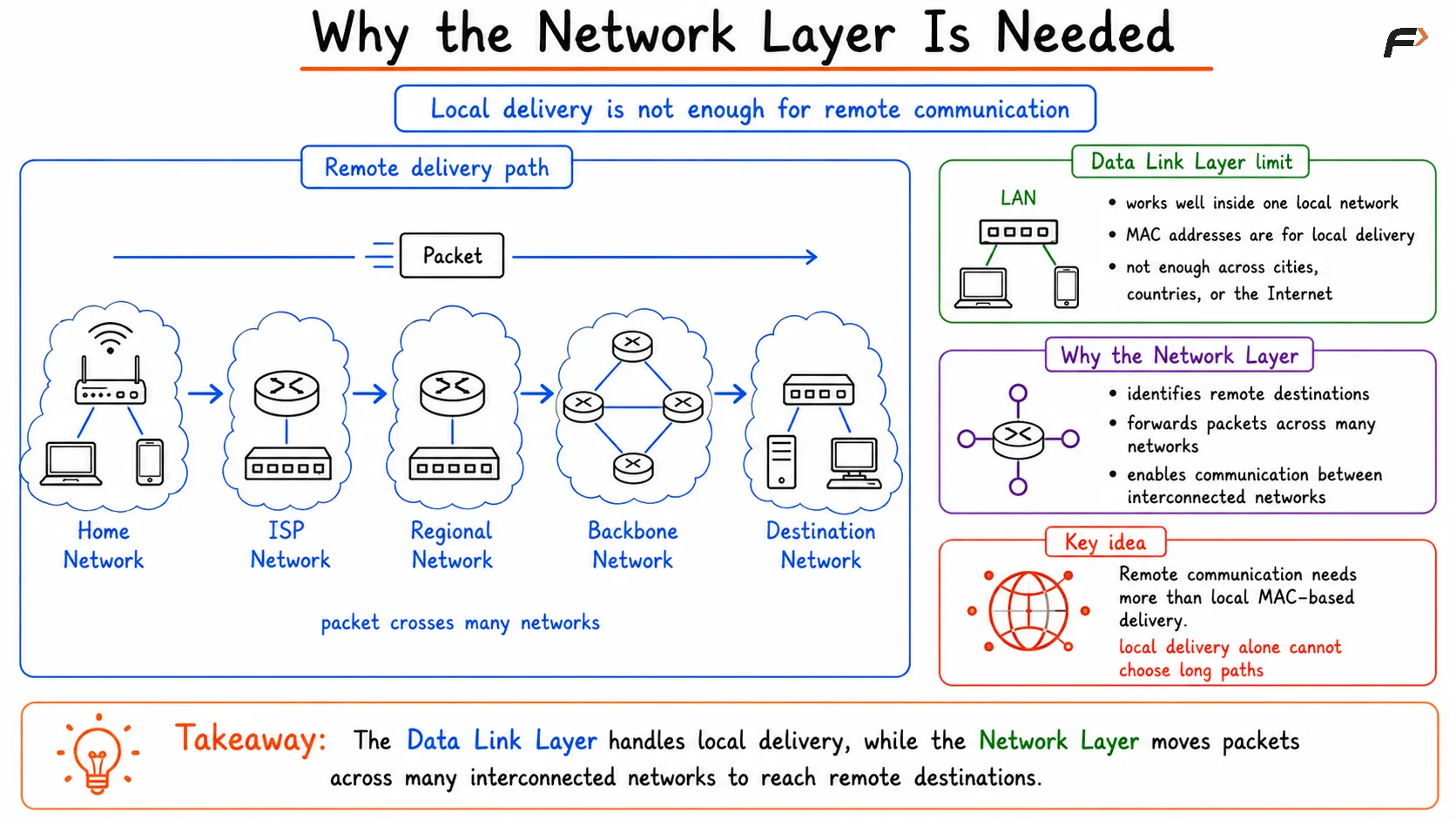
Need of Network Layer
Why MAC Addresses Are Not Enough
MAC addresses are useful for local delivery, but they do not provide a scalable global addressing system. They help one device reach another device on the current link or within the current local network.
For communication across many networks, a different kind of addressing is required. That is where IP addresses come in.
Aspect | MAC Address | IP Address |
|---|---|---|
Scope | Local network | Multiple networks and global communication |
Main role | Local frame delivery | End-to-end logical addressing |
Used at | Data Link Layer | Network Layer |
Suitable for internet-wide routing | No | Yes |
This is one of the main reasons the network layer exists. It introduces a logical addressing system that works across separate networks.
Main Functions of the Network Layer
The network layer has three major responsibilities. These functions work together to ensure that packets can move from one network to another until they reach the destination.
Logical addressing: Uses IP addresses to identify the source and destination across an internetwork.
Packet forwarding: Moves packets from one router to the next hop.
Routing: Decides the path a packet should take through multiple networks.
These functions are closely related, but they are not identical.
Logical Addressing
The network layer introduces IP addresses so devices can be identified beyond the local network. Unlike MAC addresses, which are mainly local, IP addresses are used to represent devices and networks in a larger internetwork.
Every packet typically carries:
Source IP address: Identifies where the packet came from.
Destination IP address: Identifies where the packet is supposed to go.
This logical addressing allows routers to make decisions based on destination networks, not just on local hardware addresses.
Hop-by-Hop Forwarding
Once a packet has a destination IP address, it must travel through the network one step at a time. This process is called hop-by-hop forwarding.
At each step, a router receives the packet, looks at the destination IP address, and decides where it should go next. The router does not need to know the full journey in one action. It only needs to know the correct next hop.
At every hop, the packet moves closer to the destination network.
Routing Across Networks
Forwarding answers the question, "Where should this packet go next?" Routing answers the larger question, "What path should be used through the network?"
There can be multiple possible routes between the source network and the destination network. Routing allows routers to select an appropriate path based on available routes and routing information.
This is why routing is a broader decision-making process, while forwarding is the actual packet movement based on those decisions.
Routing vs Forwarding
Routing and forwarding are closely connected, but they perform different roles. A clear comparison makes the difference easier to remember.
Aspect | Routing | Forwarding |
|---|---|---|
Purpose | Determines the path through the network | Moves packets along that path |
Nature | Decision-making process | Packet movement process |
Uses | Routing tables, routing logic, path selection | Destination lookup and outgoing interface selection |
Plane | Control plane | Data plane |
Main question | Which path should be used? | Where should this packet go next? |
Routing builds and maintains the network's path knowledge. Forwarding uses that knowledge to send packets from one interface to another.
How Routers Work at Layer 3
Routers are the main devices associated with the network layer. Their job is to move packets between different networks.
When a packet arrives at a router, the router typically performs these actions:
Examines the destination IP address: Identifies the target network.
Checks the routing table: Looks for the correct route or next hop.
Selects the outgoing interface: Decides where the packet should leave.
Updates packet handling information: Processes values such as TTL.
Forwards the packet: Sends it toward the next network.
This process repeats at each router until the packet reaches the destination network.
Routing Table and Next Hop
A router does not guess where to send traffic. It uses a routing table, which stores information about destination networks and how to reach them.
A routing table essentially tells the router:
Destination network: Which network the packet is trying to reach.
Next hop: Which router or path should be used next.
Outgoing interface: Which interface should carry the packet onward.
This table is what allows routers to forward packets intelligently instead of blindly sending traffic in every direction.
Time To Live (TTL)
An important field handled by the network layer is TTL, or Time To Live. TTL helps prevent packets from circulating forever in the case of a routing loop.
Each time a packet passes through a router:
TTL is reduced by one: The router decrements the value.
TTL reaching zero: The packet is discarded.
Protection against loops: The network avoids endless packet circulation.
TTL is a small field, but it plays an important role in network stability and fault containment.
Why the Network Layer Is Central to the Internet
The internet is not one single network. It is a collection of many interconnected networks. The network layer is what allows communication to cross those boundaries in an organized and scalable way.
Without the network layer:
local networks could work internally
devices could use MAC addresses inside a LAN
remote communication across many networks would not scale properly
With the network layer, packets can move from one network to another until they finally reach the intended destination.
Summary
Network layer is Layer 3 of the OSI model and is responsible for logical addressing, routing, and packet forwarding across multiple interconnected networks. It introduces IP addresses so devices can be identified beyond the local network and uses routers, routing tables, next-hop decisions, and TTL handling to move packets toward their destination.
This layer is essential because modern communication rarely stays inside one LAN. The network layer is what allows data to travel across home networks, ISP networks, backbone networks, and destination networks until the packet finally arrives where it is meant to go.
Be the first to add a comment.