Introduction
HTTP or Hypertext Transfer Protocol, is the application layer protocol that powers web communication. Whenever a browser opens a website, a frontend calls an API, or a mobile app fetches data from a server, HTTP is usually involved.
At its core, HTTP defines how a client asks for something and how a server replies. Over time, HTTP has evolved from a very simple document-fetching protocol into a modern web communication system that supports APIs, media delivery, caching, persistent connections, multiplexing, and now HTTP/3 over QUIC.
What HTTP Does
HTTP is built around client-server communication. A client such as a browser, app, or API consumer sends a request, and the server sends a response.
This makes HTTP a request-response protocol. The client starts the interaction, and the server answers with data, metadata, an error, or confirmation.
Some common HTTP uses are:
Web browsing: Loading HTML pages, images, stylesheets, and scripts
REST APIs: Sending and receiving JSON data
Authentication flows: Login, token exchange, and session handling
File transfer: Downloading documents, software, and media
Frontend-backend communication: Fetching data for dashboards, apps, and portals

TUF Plus Ad
HTTP Request-Response Model
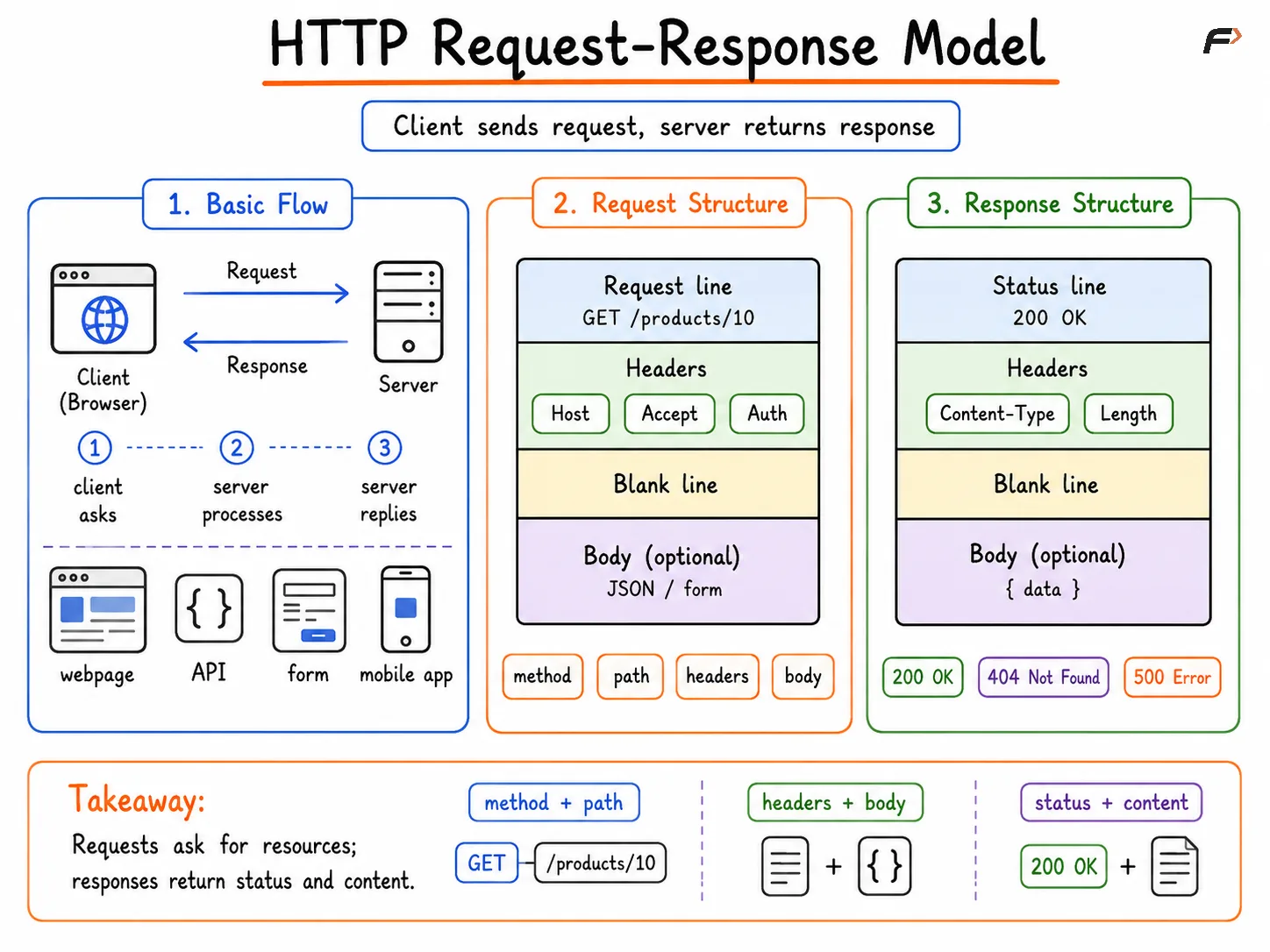
The HTTP communication model is simple in principle:
Client sends request => Server processes request => Server sends response
The request tells the server what resource is needed and what operation should happen. The response tells the client whether the request worked and, if needed, returns the requested content.
For example:
A browser requests a webpage
An API client requests user data
A frontend sends form data to the backend
A mobile app asks for updated content
Even though the basic model is simple, the structure around requests and responses is what makes HTTP powerful.
HTTP Request-Response Model
Structure of an HTTP Request
An HTTP request usually contains these main parts:
Request line: Includes method, path, and HTTP version
Headers: Provide metadata about the request
Blank line: Separates headers from body
Optional body: Carries data for methods such as
POST,PUT, orPATCH
A conceptual request looks like this:
GET /products/10 HTTP/1.1
Host: example.com
Accept: application/json
Authorization: Bearer token123
The request line tells the server what the client wants. Headers add context. If the client is sending actual data, that goes in the request body.
Important request components include:
Method: What action to perform
Path or URL: Which resource is targeted
Headers: Format, authentication, caching, and other metadata
Body: Payload data such as JSON, form content, or uploaded information
TUF Plus Ad
Structure of an HTTP Response
An HTTP response also has a defined structure:
Status line: Includes HTTP version and status code
Headers: Describe the response
Blank line: Separates headers from body
Optional body: Contains the returned content
A conceptual response looks like this:
HTTP/1.1 200 OK
Content-Type: application/json
Content-Length: 48

{ "id": 10, "name": "Keyboard" }
The status line is especially important because it tells the client whether the request succeeded, failed, or needs some additional action.
Be the first to add a comment.