Introduction
Data is not usually sent across a network as one huge block. A file, message, image, audio stream, or web response is divided into smaller units called packets.
Each packet carries a small part of the original data along with extra information that helps the network deliver it correctly. Once the packets reach the destination, they are arranged again to rebuild the original message.
Why Data Is Divided Into Packets
Sending one large block of data is inefficient and risky. Suppose a 100 MB file is being transferred and the connection fails halfway. If the file was sent as one giant unit, the entire transfer may need to start again.
Packets solve this problem by breaking the data into manageable pieces. If one packet is lost, only that packet needs to be sent again instead of repeating the whole transfer.
Packet-based transmission provides several benefits:
Better sharing: Many users can send packets over the same network without one user blocking everyone else.
Easier forwarding: Routers can process smaller units more efficiently.
Better error recovery: Lost packets can be retransmitted individually.
Improved fault tolerance: Packets may use alternate paths if one route fails.
Efficient large transfers: Big files can be handled as smaller chunks.
What a Packet Contains
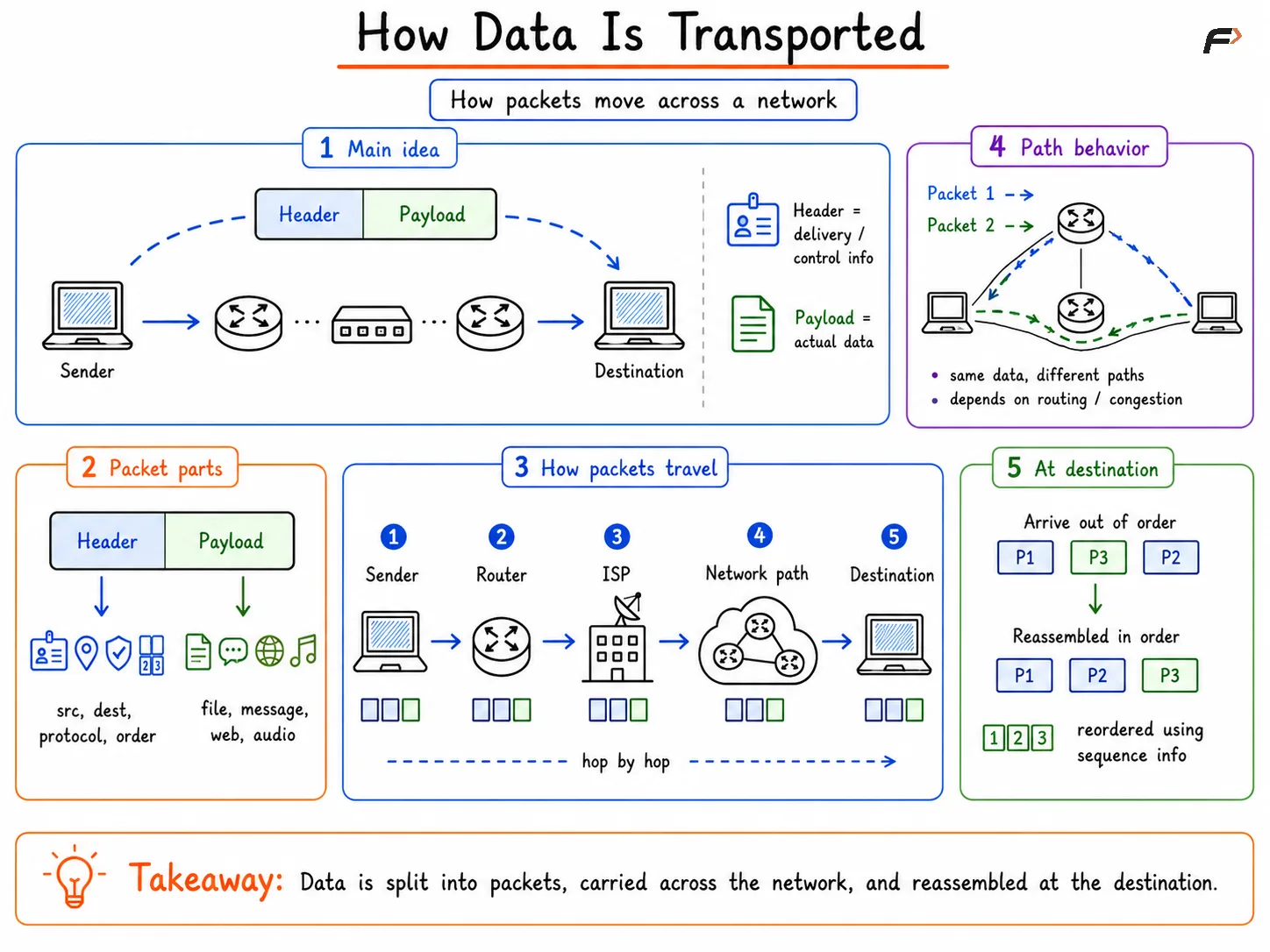
A packet contains two main parts: header and payload.
Part | Meaning |
|---|---|
Header | Control information used for delivery and processing |
Payload | Actual user data being carried inside the packet |
The payload is the useful content, such as part of a file, message, webpage, or audio stream. The header contains information such as source address, destination address, protocol details, and ordering information.
Different layers may add different headers as data moves through the network stack. This is why network communication involves terms like segments, packets, frames, and bits.
How Packets Travel Through a Network
How Packets Travel Through a Network
After data is divided into packets, those packets travel through network devices such as switches, routers, access points, and ISP networks.
A simple flow looks like this:
Sender => Router => ISP => Network path => DestinationPackets do not always need to follow the exact same path. In packet-switched networks, each packet can be forwarded independently depending on routing decisions, congestion, link availability, and network conditions.
For example:
Packet 1 may travel through one route.
Packet 2 may travel through another route.
Packet 3 may arrive slightly later than Packet 4.
Even if packets arrive out of order, the destination can arrange them correctly using sequence information.
Sequence Numbers and Reassembly
Since packets may arrive out of order, the receiver needs a way to reconstruct the original data correctly. Sequence numbers help identify the correct position of each packet or segment.
For example, if an audio file is divided into many parts, each part must be placed in the right order. Otherwise, the reconstructed audio would be incorrect.
The receiver uses sequence information to:
Identify missing packets.
Arrange packets in the correct order.
Rebuild the original message.
Deliver the complete data to the application.
Reliable protocols such as TCP use sequencing, acknowledgements, and retransmission to make this process dependable.
Packet Loss and Retransmission
Packet loss occurs when one or more packets fail to reach the destination. This may happen because of congestion, damaged links, faulty hardware, transmission errors, or overloaded network devices.
Suppose packets 1, 2, 4, and 5 arrive, but packet 3 is missing. In reliable communication, the sender can retransmit only packet 3 instead of sending the full message again.
This makes packet-based communication efficient. The network does not waste bandwidth resending data that has already arrived successfully.
Important Network Performance Terms
Several performance terms help explain how efficiently data is transported across a network.
Term | Meaning |
|---|---|
Bandwidth | Maximum theoretical capacity of a link |
Throughput | Actual data transfer rate achieved in practice |
Latency | Time taken for data to travel from sender to receiver |
Packet Loss | Packets failing to reach the destination |
Goodput | Useful application data delivered after excluding overhead |
Bandwidth tells the maximum possible capacity, but throughput shows what is actually achieved. Goodput is even more user-focused because it excludes headers, retransmissions, and control information.
For example, a 100 Mbps connection may not always deliver 100 Mbps of useful application data because real networks include congestion, overhead, retransmissions, device limits, and latency.
Summary
Data is transported across networks by dividing large messages into smaller packets. Each packet carries payload data and header information that helps with addressing, routing, ordering, and delivery.
Packets may travel independently through routers, switches, ISP networks, and other paths before being reassembled at the destination. Concepts like sequence numbers, retransmission, bandwidth, throughput, latency, packet loss, goodput, and packet switching explain why modern networks can transfer data efficiently and reliably.
Be the first to add a comment.