Introduction
A CDN, or Content Delivery Network, helps websites deliver images, videos, scripts, and other files faster by storing copies of content on servers located closer to users.
Without a CDN, every user may have to fetch content from the website's main server, also called the origin server. If the user is far away from that server, the content may load slowly.
A CDN reduces this delay by serving content from nearby edge servers.
What Is a CDN?
A CDN is a distributed network of servers placed in different geographic locations.
These servers are called edge servers because they sit closer to end users compared to the origin server.
In simple terms:
Origin Server -> CDN Edge Servers -> Users
The main goal of a CDN is to reduce latency, improve loading speed, reduce origin server load, and handle large traffic efficiently.
Step 1: User Requests the Image or Video
Suppose a webpage contains an image URL like: https://cdn.example.com/images/banner.png
or a video URL like: https://cdn.example.com/videos/intro.mp4
When the browser needs that file, it sends a request for the CDN domain.
The browser does not directly know which CDN server should answer. It first needs DNS resolution.
Step 2: DNS Sends the User to a CDN Edge Server
DNS helps map the CDN domain to an IP address.
CDNs often use smart DNS or routing systems to direct the user to a suitable edge server.
The selected edge server may depend on:
User location
Network latency
Server load
CDN availability
ISP routing path
The goal is not always just the geographically closest server. The CDN tries to choose an edge server that can respond quickly and reliably.
Step 3: CDN Checks Its Cache
After the request reaches the CDN edge server, the edge checks whether it already has the requested image or video.
There are two common cases:
Case | Meaning |
|---|---|
Cache hit | Content is already stored at the edge |
Cache miss | Content is not available at the edge |
If it is a cache hit, the edge server can return the content immediately.
If it is a cache miss, the edge server must fetch the content from the origin server.
Step 4: Cache Hit
In a cache hit, the CDN edge server already has a valid copy of the file.
For example:
User -> CDN Edge -> Cached image/video returned
This is the fastest path because the request does not need to travel back to the origin server.
Cache hits reduce latency and lower the load on the website's main server.
Step 5: Cache Miss
In a cache miss, the CDN edge does not have the requested file.
The edge server contacts the origin server and asks for the file.
The flow becomes:
User -> CDN Edge -> Origin Server
Origin Server -> CDN Edge -> User
After receiving the file from the origin, the CDN edge usually stores a copy in its cache. Future users near that edge can receive the file directly from the CDN.
Step 6: Cache-Control Decides How Long Content Stays Cached
CDNs use HTTP caching rules to decide how long content should remain valid.
The origin server may send headers such as:
Cache-Control: public, max-age=86400
This means the content can be cached publicly for a specific amount of time.
Common cache-related headers include:
Cache-ControlETagLast-ModifiedExpires
These headers help the CDN decide whether to serve the cached copy or recheck with the origin server.
How a CDN Serves an Image
Images are usually served as complete files.
For an image, the CDN flow is simple:
Browser requests the image URL.
DNS routes the request to a CDN edge.
CDN checks cache.
If cached, the image is returned immediately.
If not cached, CDN fetches the image from origin.
CDN stores the image and returns it to the browser.
CDNs may also optimize images by resizing, compressing, or converting them into formats such as WebP or AVIF when configured to do so.
How a CDN Serves a Video
Videos are often much larger than images, so they are usually delivered differently.
Instead of sending one huge video file at once, modern streaming often splits the video into smaller chunks.
A video player may first download a manifest file, such as:
HLS playlist
DASH manifest
The manifest tells the player where the video chunks are and which quality levels are available.
Then the player downloads small video segments one by one.
A simplified flow is:
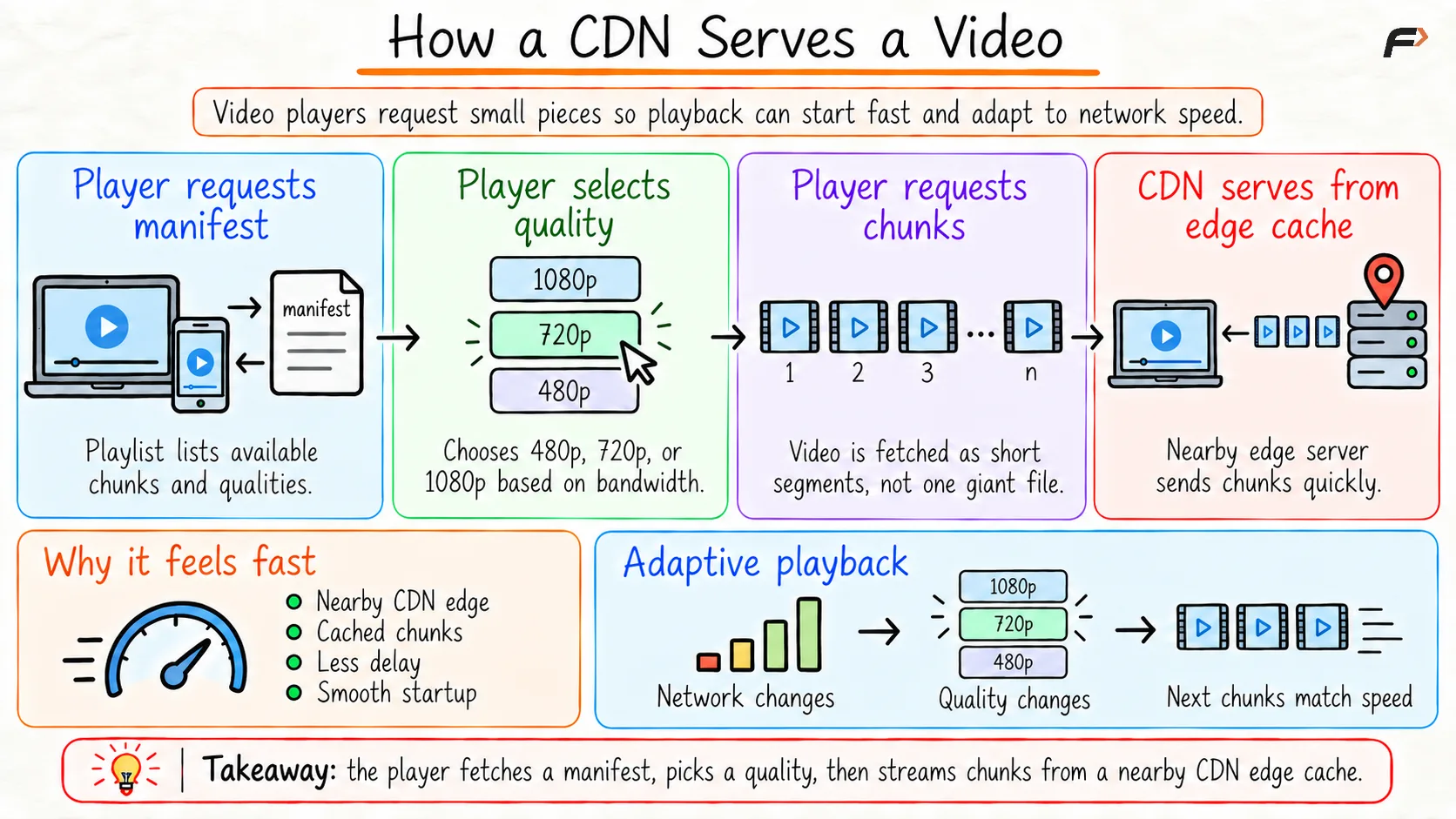
How a CDN Serves a Video
Why CDN Delivery Is Faster
CDN delivery is faster because:
Content is served from nearby edge servers.
Cached content avoids repeated origin fetches.
CDN networks are optimized for high traffic.
Users are routed to healthy and efficient edge locations.
Static files can be delivered without heavy backend processing.
This improves page load speed and video playback quality.
Conclusion
A CDN serves images and videos by placing content closer to users through edge servers. When a user requests a file, DNS routes the request to a suitable CDN edge. If the file is cached, the CDN returns it quickly. If not, the CDN fetches it from the origin server, returns it to the user, and stores it for future requests.
Images are usually served as complete files, while videos are often delivered as smaller chunks using streaming techniques such as HLS or DASH. This allows faster loading, smoother playback, adaptive quality, and lower load on the origin server.
Be the first to add a comment.