Introduction
The OSI model explains how network communication is divided into layers. When data is sent, it moves down the OSI model on the sender side. When data is received, it moves up the OSI model on the receiver side.
This upward movement is called decapsulation. Each layer reads the information meant for it, removes its own header or trailer, and passes the remaining data to the layer above.
In simple terms, data travels up the OSI model so that raw network signals can finally become meaningful application data.
Step 1: Physical Layer Receives Bits
The journey begins at the Physical layer.
At this layer, data exists as signals. These signals may be electrical pulses, light signals, or radio waves depending on the medium.
The Physical layer receives these signals and converts them into bits, such as 0s and 1s. It does not understand IP addresses, ports, websites, or files. Its job is only to receive raw bit patterns from the transmission medium.
After the bits are recovered, they are passed upward to the Data Link layer.
Step 2: Data Link Layer Processes Frames
The Data Link layer groups bits into frames.
This layer checks whether the frame is meant for the receiving device on the local network. It uses physical addressing, such as MAC addresses, to identify source and destination devices within the same local link.
The Data Link layer also checks for basic transmission errors using information such as the Frame Check Sequence.
If the frame is valid and meant for this device, the Data Link layer removes the frame header and trailer. The remaining payload is passed to the Network layer.
At this stage, the data unit changes from a frame to a packet.
Step 3: Network Layer Processes Packets
The Network layer handles logical addressing and routing.
In TCP/IP networks, this layer usually works with IP packets. It checks the destination IP address and confirms that the packet is meant for this device.
Routers mainly operate at this layer when forwarding packets between networks. On the final receiving device, the Network layer removes the IP header and passes the payload to the Transport layer.
At this stage, the receiver knows which transport protocol should handle the data, such as TCP or UDP.
Step 4: Transport Layer Processes Segments or Datagrams
The Transport layer provides process-to-process communication.
If TCP is used, the data unit is commonly called a segment. If UDP is used, it is commonly called a datagram.
This layer checks port numbers to decide which application process should receive the data. For example, web traffic may use port 443, while DNS commonly uses port 53.
With TCP, this layer also handles reliability, ordering, acknowledgments, retransmission, and flow control. With UDP, the layer is simpler and does not provide the same reliability features.
After processing the transport header, the payload is passed upward to the next layer.
Step 5: Session Layer Manages the Communication Session
The Session layer is responsible for managing communication sessions between applications.
It can help establish, maintain, and terminate logical conversations. In many real-world protocol stacks, session-layer functions are often handled inside application protocols or libraries rather than as a separate visible layer.
As data moves upward, the session-related control information is processed, and the remaining data continues to the Presentation layer.
Step 6: Presentation Layer Handles Data Format
The Presentation layer focuses on how data is represented.
It may handle tasks such as:
Data format conversion
Encryption and decryption
Compression and decompression
Character encoding
For example, if encrypted application data is received, this layer conceptually represents the place where data becomes readable again after decryption. In practical internet communication, encryption is often handled by protocols such as TLS.
After the data is converted into a usable format, it is passed to the Application layer.
Step 7: Application Layer Delivers Data to the Application
The Application layer is the top layer of the OSI model.
This is where the received data becomes meaningful to the application. A browser may receive an HTML page, an email client may receive a message, or an API client may receive a JSON response.
The Application layer does not mean the user-facing app itself. It means the network services and protocols that the app uses, such as HTTP, DNS, SMTP, FTP, or other application-layer protocols.
At this point, the data has completed its journey up the OSI model.
Example: Opening a Website
Consider a user opening an HTTPS website.
At the receiver side, the data moves upward like this:
Physical Layer: Receives signals and converts them into bits
Data Link Layer: Reads the Ethernet frame and checks the MAC address
Network Layer: Reads the IP packet and checks the destination IP
Transport Layer: Reads the TCP segment and uses the destination port
Session Layer: Maintains the logical communication session
Presentation Layer: Handles secure formatting or decryption concepts
Application Layer: Delivers HTTP data to the browser
Each layer only handles the information relevant to its own responsibility.
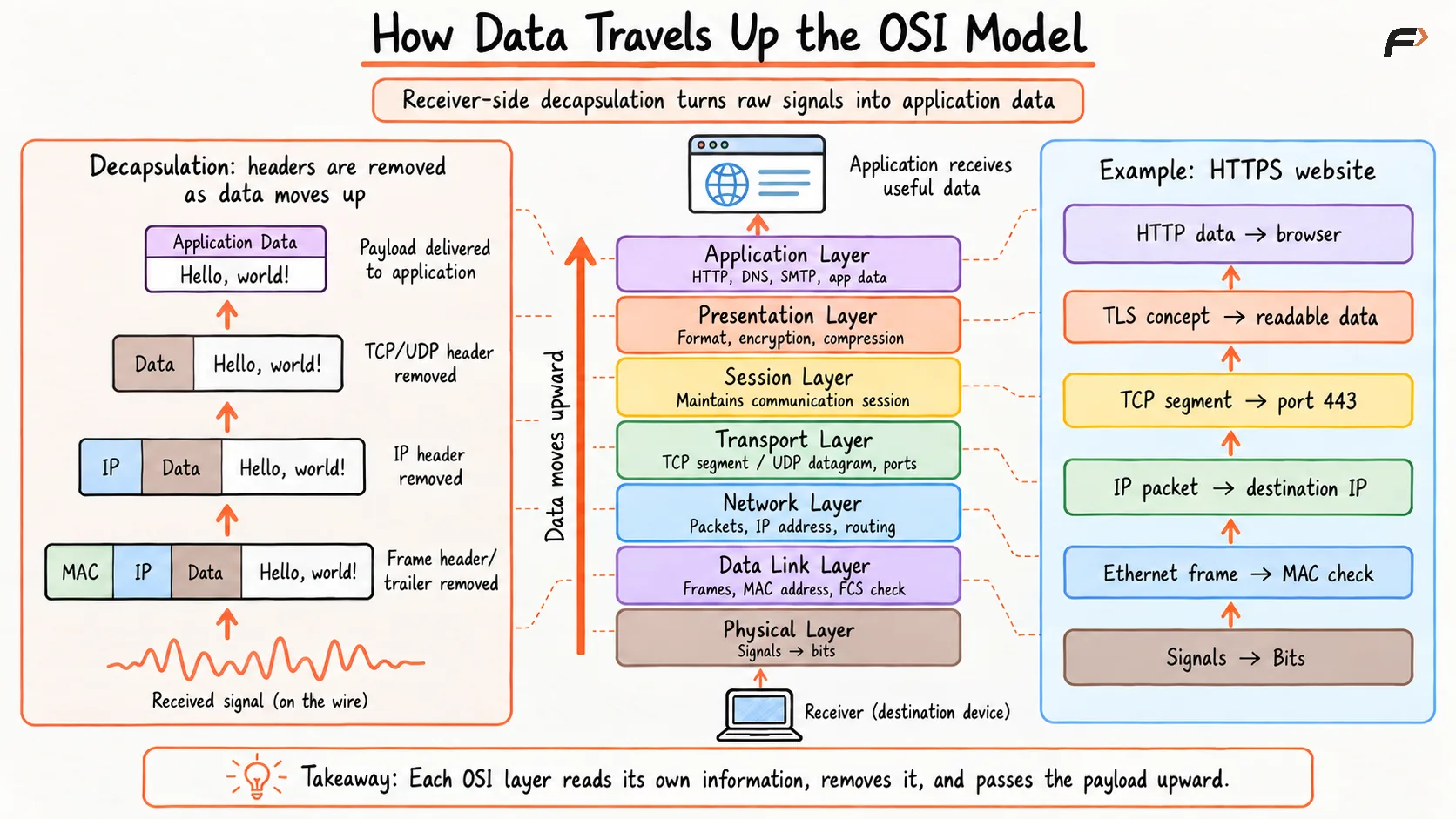
How Data Travels Up the OSI Model
Conclusion
When data travels up the OSI model, it moves from raw signals to meaningful application data. The receiving device starts at the Physical layer, reconstructs bits, processes frames, reads packets, handles transport information, and finally delivers usable data to the application layer.
This upward process is called decapsulation. Each layer removes the information added by the matching layer on the sender side. That is how a signal traveling through a network becomes a webpage, message, file, API response, or any other useful data.
Be the first to add a comment.