Introduction
Ethernet switching is one of the most important concepts in Local Area Networks. In modern LANs, switches are responsible for moving Ethernet frames between devices efficiently, so communication stays fast and unnecessary traffic stays limited.
A switch mainly works at the Data Link Layer, or Layer 2, of the OSI model. Since Ethernet communication at this layer depends on MAC addresses, the switch makes its forwarding decisions by looking at the source and destination MAC address in each frame.
Switch vs Hub
A switch and a hub may look similar because both connect multiple devices, but their behavior is very different. A hub repeats traffic everywhere, while a switch makes forwarding decisions based on what it has learned.
Feature | Hub | Switch |
|---|---|---|
Traffic handling | Sends frames to all ports | Sends frames only where needed |
Learning | No learning mechanism | Learns MAC-to-port mappings |
Flooding behavior | Always repeats traffic | Floods only when necessary |
Efficiency | Less efficient | More efficient |
Network performance | Creates more unnecessary traffic | Reduces unnecessary traffic |
This is why switches replaced hubs in most Ethernet networks. A switch improves performance by keeping traffic more targeted.
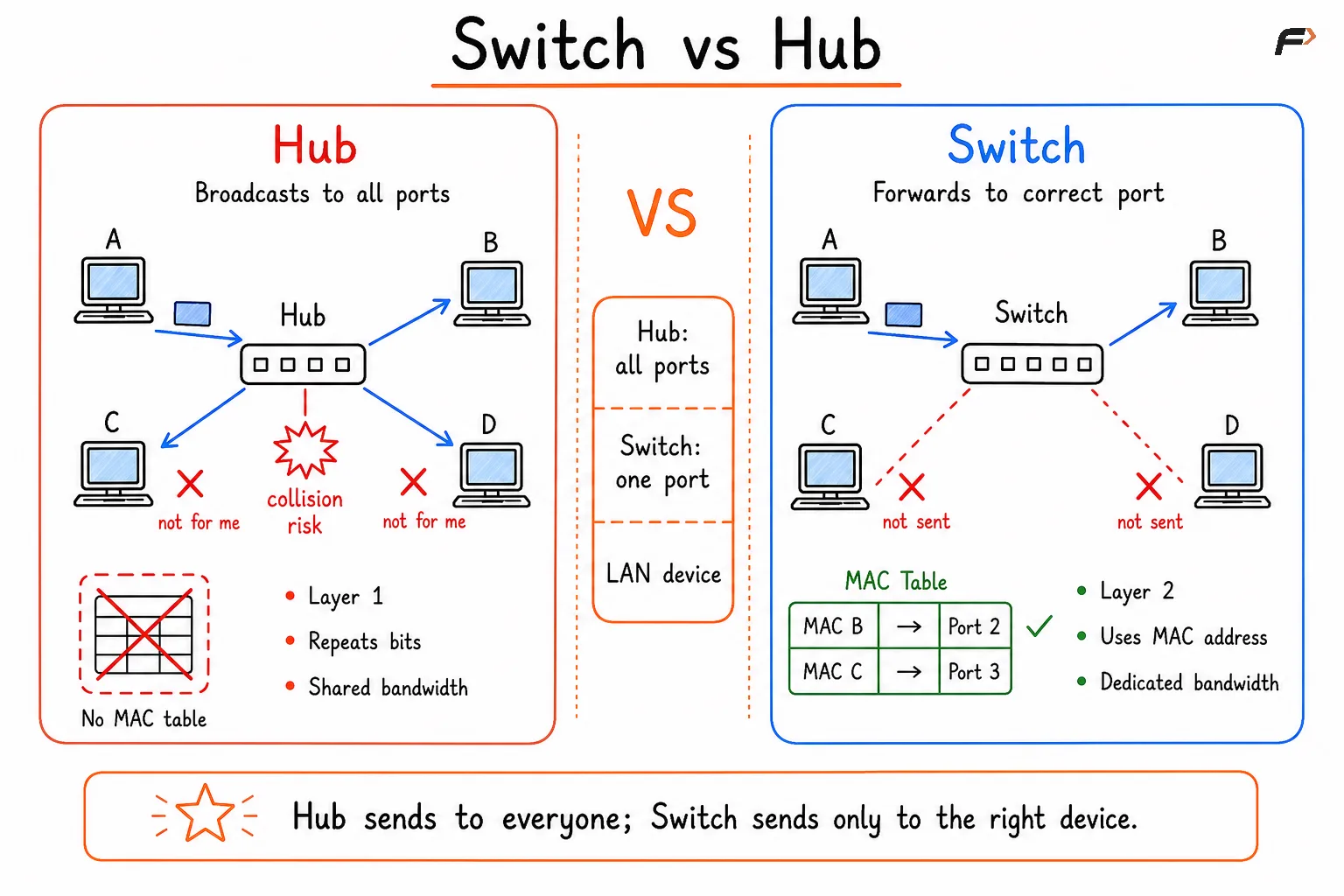
Comparison diagram showing a hub broadcasting data to all connected devices without using a MAC table, while a switch forwards data only to the intended device using MAC addresses for efficient communication.
Core Functions of Ethernet Switching
The behavior of a switch can be understood through three basic actions: learning, forwarding, and flooding when required.
Learn: The switch reads the source MAC address of incoming frames and records where that device is reachable.
Forward: If the destination MAC address is already known, the frame is sent only to the correct port.
Flood when required: If the destination MAC address is unknown, the switch sends the frame to relevant ports so the destination can respond and be learned.
These three functions together make Ethernet switching efficient and practical for daily network communication.
How MAC Learning Works
When a switch starts operating, its MAC address table is empty. It does not yet know which device is connected to which port. That knowledge is built gradually by watching traffic.
Suppose Device A sends a frame to Device B. The switch immediately learns that Device A is reachable through the incoming port. But if Device B is not yet present in the table, the switch cannot forward the frame directly.
In that situation, the flow looks like this:
Source learning: The switch records Device A's MAC address with the incoming port.
Unknown destination: Device B is not yet in the MAC table.
Flooding: The frame is sent to relevant ports except the incoming port.
Reply and learning: When Device B replies, the switch learns B's MAC address and port.
Once both MAC addresses are learned, later communication becomes much more direct.
MAC Address Table and Aging
A switch stores learned information in the MAC address table, also called the forwarding table. This table is what allows the switch to forward frames intelligently instead of treating every destination as unknown.
A forwarding entry usually includes:
MAC address: The hardware address of the device.
Port: The port through which the device is reachable.
VLAN: The VLAN in which the MAC address was learned.
Age timer: The timer used to remove old entries.
Aging is important because devices do not stay fixed forever. A laptop may disconnect, move to another port, or leave the network. If entries never expired, the switch could keep forwarding traffic to the wrong location. Aging removes unused entries so the switch can relearn accurate information when traffic appears again.
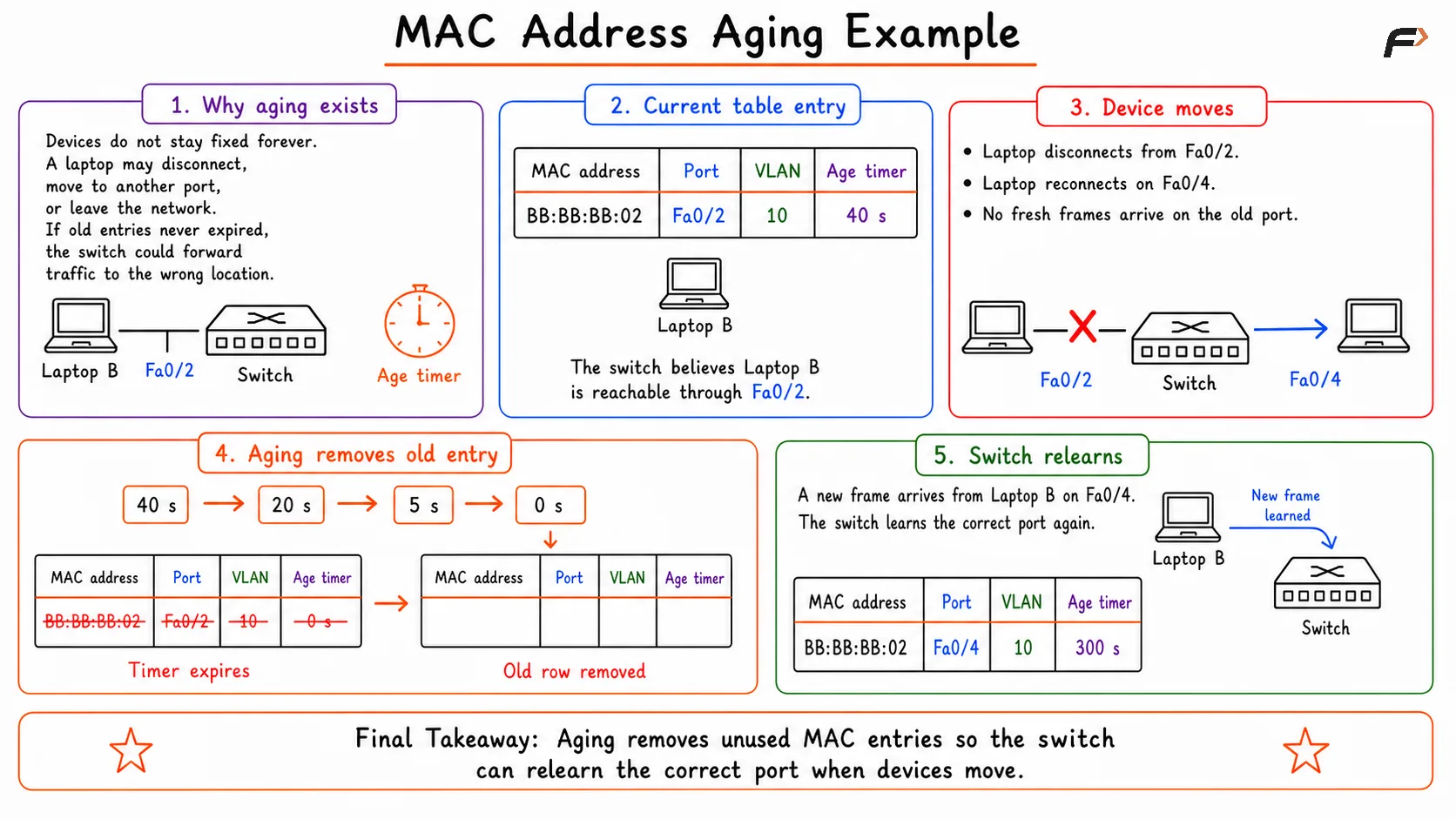
Diagram illustrating a switch's MAC address table, showing how MAC addresses are learned from incoming frames, mapped to switch ports, and automatically removed after an aging timer expires if no new traffic is received.
Forwarding and Flooding Behavior
The switch behaves differently depending on whether the destination MAC address is known.
Traffic Type | Switch Behavior | Result |
|---|---|---|
Known unicast | Forwards the frame only to the mapped destination port | Most efficient traffic flow |
Unknown unicast | Floods the frame to relevant ports except the incoming port | Destination can receive and reply |
Broadcast | Floods the frame within the same VLAN except the incoming port | All devices in that VLAN receive it |
Known unicast traffic is the normal efficient case in a stable network. Unknown unicast flooding is common during first-time communication. Broadcast traffic is required for some protocols, such as ARP, where a device needs to ask which host owns a particular IP address.
VLAN-Aware Ethernet Switching
Modern switches do more than store MAC addresses and ports. In many networks, they also track VLAN membership, which means forwarding decisions are made within the correct logical network.
This matters because the same physical switch may support multiple virtual networks at once. A switch must know not just where a device is connected, but also in which VLAN that device belongs.
For example:
Ports 1-6: Engineering VLAN
Ports 7-12: Sales VLAN
If a device in the Engineering VLAN sends a broadcast frame, the switch forwards that broadcast only to ports in the Engineering VLAN. Devices in the Sales VLAN do not receive it.
This VLAN-aware behavior helps with:
Traffic isolation: Frames stay inside the correct VLAN.
Better control: Broadcast traffic is limited to the right segment.
Improved security: Different groups remain logically separated.
Efficient design: One physical switch can support multiple logical networks.
Common Problems in Ethernet Switching
Ethernet switching is efficient, but some network problems can still affect its behavior and performance.
Unknown destination flooding: Too many unknown MAC addresses can cause repeated flooding and extra traffic.
Broadcast storms: Excessive broadcast traffic can consume bandwidth and disrupt normal communication.
Switching loops: Frames may circulate continuously, creating duplicate traffic and unstable behavior.
MAC flapping: The same MAC address keeps appearing on different ports, often due to a loop or misconfiguration.
Wrong VLAN assignment: A device placed in the wrong VLAN may lose connectivity or end up in the wrong logical network.
Protocols such as Spanning Tree Protocol (STP) are used to reduce the risk of loops and the larger problems that loops can create.
Summary
Ethernet switching is the Layer 2 process of forwarding Ethernet frames using MAC addresses and a forwarding table. A switch learns device locations from source MAC addresses, forwards frames directly when the destination is known, and floods traffic only when necessary.
In modern LANs, Ethernet switching is closely tied to VLAN-aware forwarding, broadcast control, MAC table aging, and logical segmentation. Understanding Ethernet switching is essential because it connects several important networking ideas, including MAC learning, forwarding behavior, broadcast domains, VLANs, and switching-related problems.
Be the first to add a comment.