Introduction
Email looks simple from the user side. You write a message, click send, and it appears in someone else’s inbox. But behind that simple experience, different email protocols work together to move, store, and retrieve messages across the network.
At the application layer, email communication mainly depends on three core protocols: SMTP, POP3, and IMAP. Each one has a different role, and understanding that role is the key to understanding how email systems work.
What Are Email Protocols?
Email protocols are standardized rules that allow email clients and mail servers to communicate correctly. They define how a message is submitted, how it travels between servers, and how a user later accesses that message from a mailbox.
In practical terms, email communication has two major parts:
Sending mail: Moving an outgoing email from the sender side toward the destination server
Receiving mail: Accessing or downloading incoming email from the recipient’s mailbox
That is why one single protocol is not enough. Different stages of email communication need different protocols.
The Three Main Email Protocols
The most important email protocols are:
SMTP: Used for sending email
POP3: Used for retrieving email, usually by downloading it
IMAP: Used for retrieving and managing email while keeping it on the server
These three protocols form the foundation of most traditional email systems used by desktop clients, mobile mail apps, and many server-based email services.
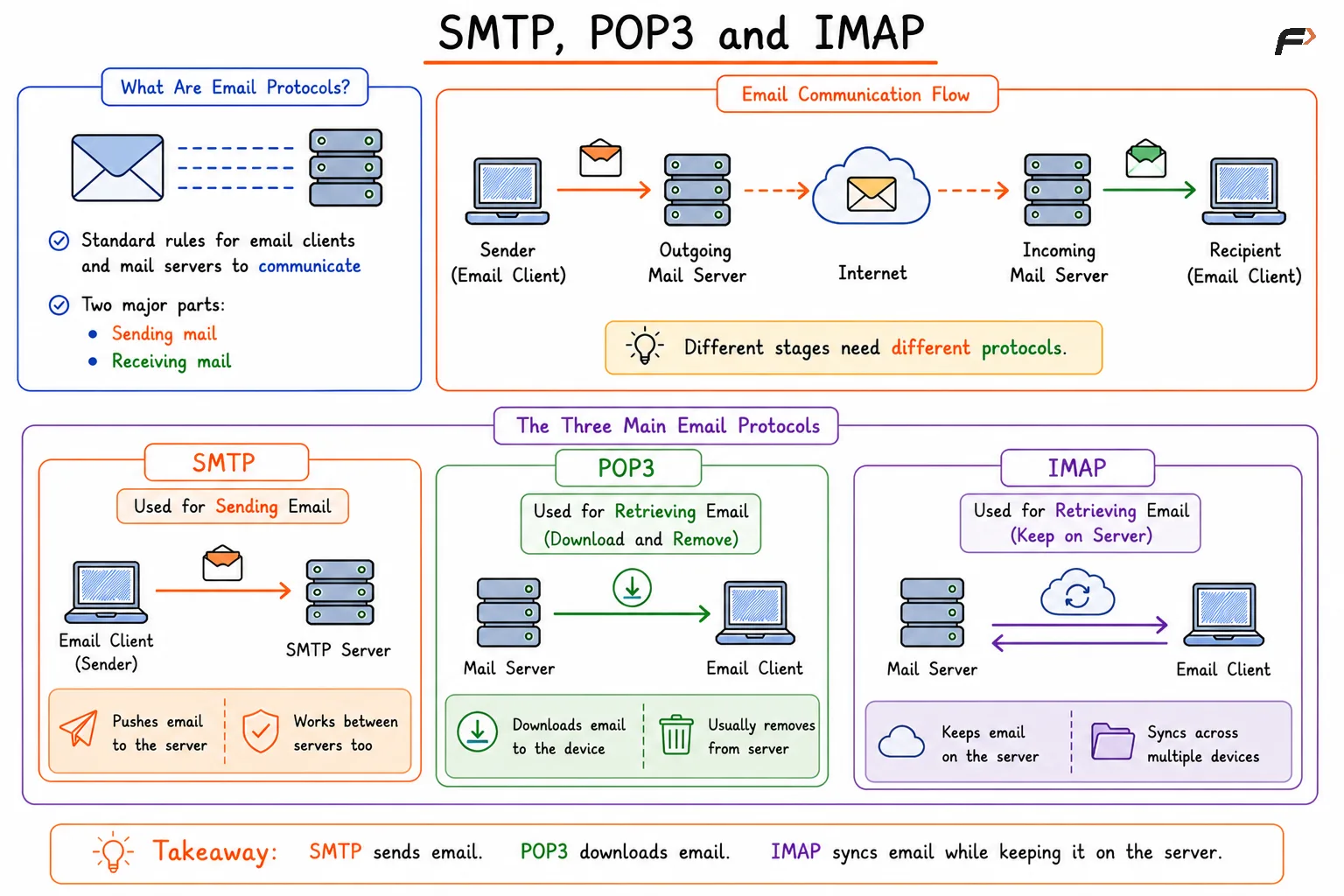
SMTP, POP3 and IMAP
SMTP for Sending Email
SMTP stands for Simple Mail Transfer Protocol. It is the standard protocol used for outgoing email.
When a user sends an email, the email client hands the message to an SMTP server. That server then forwards the message toward the destination mail server. SMTP is therefore responsible for mail submission and mail transfer, not for reading stored inbox messages.
A simple flow looks like this:
Email client => SMTP server => destination mail server
Some important points about SMTP are:
Main role: Sending and relaying email
Used by: Email clients and mail servers
Not used for: Reading inbox messages
Common ports:
25,587, and in many secure setups465
SMTP is focused on message transmission. Once the message reaches the destination mailbox, another protocol is needed for access.
POP3 for Downloading Email
POP3 stands for Post Office Protocol version 3. It is used by an email client to retrieve email from a mail server.
The traditional POP3 model is simple: the client connects to the server, downloads messages, and often removes them from the server after download. This makes POP3 useful when a user wants local access to messages on one device.
Some key points about POP3 are:
Main role: Retrieving incoming email
Working style: Download-oriented
Server storage behavior: Messages are often removed after retrieval, depending on settings
Common ports:
110and secure995
POP3 works well for basic email access, especially when mailbox synchronization across multiple devices is not the main goal.
IMAP for Mailbox Synchronization
IMAP stands for Internet Message Access Protocol. Like POP3, it is used to retrieve email, but it works very differently.
Instead of treating the server as a temporary holding place, IMAP treats the mail server as the main source of truth. Messages usually remain on the server, and the client synchronizes with that server. This makes IMAP much better for users who check email from multiple devices such as a phone, laptop, and tablet.
Important points about IMAP include:
Main role: Retrieving and managing email from the server
Working style: Server-based synchronization
Server storage behavior: Messages usually remain on the server
Common ports:
143and secure993
IMAP is widely used in modern email systems because it supports folders, multi-device access, and better mailbox consistency.
POP3 vs IMAP
POP3 and IMAP are both incoming mail protocols, but they are designed for different usage patterns.
Feature | POP3 | IMAP |
|---|---|---|
Main purpose | Download email to client | Access and synchronize email on server |
Storage model | Often local after download | Usually remains on server |
Multi-device support | Limited | Strong |
Folder synchronization | Minimal | Supported |
Best use case | Single-device access | Multi-device email access |
A simple way to remember this is:
POP3: Download and keep locally
IMAP: Sync and manage on the server
How These Protocols Work Together
A complete email journey usually involves more than one protocol. Sending and receiving are separate operations, so the same user may rely on both SMTP and IMAP, or SMTP and POP3.
A typical workflow looks like this:
The sender composes an email in an email client.
The client uses SMTP to submit the message to a mail server.
The message is transferred to the recipient’s mail server.
The recipient accesses the mailbox using POP3 or IMAP.
The email client displays the message to the user.
This separation of roles is why email systems remain structured and scalable even across different providers and devices.
Summary
Email protocols are the standard rules that make email communication possible between email clients and mail servers. SMTP is used for sending and relaying outgoing email, while POP3 and IMAP are used for retrieving incoming email.
POP3 is mainly download-based, while IMAP is synchronization-based and better suited for modern multi-device access. Together, these protocols form the core of how email systems send, store, access, and manage messages across networks.
Be the first to add a comment.