Introduction
DNS, or the Domain Name System, is one of the most important services on the internet. It helps users access websites and online services using human-friendly names like google.com instead of remembering numeric IP addresses such as 142.250.x.x.
Without DNS, browsing the web, sending email, calling APIs, and connecting to cloud services would be much harder. DNS acts like the naming system of the internet, mapping domain names to the technical information machines need for communication.
What Is DNS?
DNS is a distributed and hierarchical naming system that translates domain names into IP addresses. When a user enters a website name in a browser, DNS helps find the correct server address for that website.
In simple terms:
Humans prefer names:
example.comNetworks use IP addresses:
93.184.216.34DNS connects the two
DNS is an application layer service and usually uses port 53 with both UDP and TCP, depending on the type of query and response.
Why DNS Is Needed
The internet is built on IP-based communication, but users do not naturally work with raw IP addresses. Services can also move between servers, change infrastructure, or use multiple IPs at once, so using names is more flexible than hardcoding addresses.
DNS is needed because it provides:
Human-readable naming: Easier access to websites and services
Flexible mapping: One domain can point to changing IP addresses
Scalability: The naming system can support billions of lookups
Service delegation: Different parts of the namespace can be managed by different authorities
This is why DNS is not just a convenience feature. It is core internet infrastructure.
DNS Hierarchy
DNS follows a hierarchical structure rather than a single central database. This makes it scalable and distributed.
The main levels are:
Root level: The top of the DNS hierarchy
Top-Level Domain (TLD) level: Domains such as
.com,.org,.net,.inSecond-level domain: Names such as
google.comorexample.orgSubdomain level: Names such as
mail.example.comorapi.example.com
A typical hierarchy looks like this:
Root => .com => example.com => www.example.com
This structure allows control to be delegated step by step, which is one of the reasons DNS scales so well globally.
Main DNS Components
Several server roles are involved in DNS resolution.
Root name servers: Know where to find TLD servers
TLD name servers: Know where to find authoritative servers for domains under that TLD
Authoritative name servers: Store the actual DNS records for a domain
Recursive resolvers: Perform lookup work on behalf of clients
Stub resolvers: Basic client-side resolvers inside user devices or operating systems
A user device usually does not contact the entire hierarchy directly. It normally asks a recursive resolver, which does the lookup work.
How DNS Resolution Works
When a user types a domain name into a browser, the DNS resolution process begins. If the answer is not already available locally or in cache, the resolver starts moving through the DNS hierarchy.
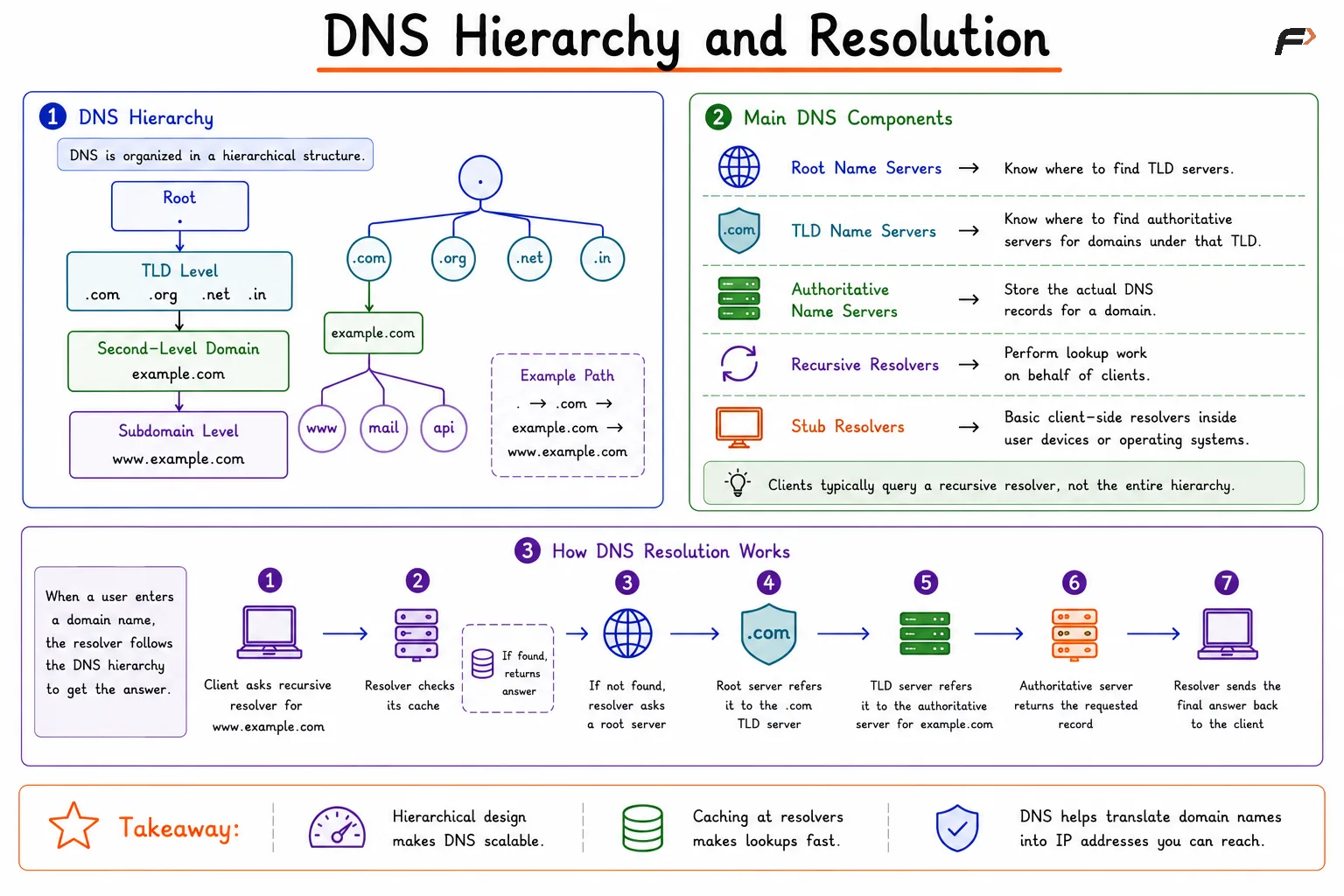
DNS Hierarchy and Resolution
A typical lookup flow is:
The client asks a recursive resolver for
www.example.comThe recursive resolver checks its cache
If not found, it asks a root server
The root server refers it to the
.comTLD serverThe TLD server refers it to the authoritative server for
example.comThe authoritative server returns the requested record
The recursive resolver sends the final answer back to the client
This process is usually very fast because caching reduces repeated full lookups.
Recursive vs Iterative Query
Recursive and iterative queries are two important DNS concepts.
Aspect | Recursive Query | Iterative Query |
|---|---|---|
Who does the full lookup? | The recursive resolver | The requester follows referrals step by step |
Client experience | Client asks once and gets a final answer | Client may need to contact multiple servers |
Common use | End device to recursive resolver | Resolver to root, TLD, and authoritative servers |
Response style | Final answer or failure | Best available referral or answer |
In practice:
Recursive query: “Find the final answer for me.”
Iterative query: “Tell me the next server to ask.”
Both are important to understanding DNS resolution.
DNS Caching
DNS would be much slower if every query had to go all the way from the root to the authoritative server every time. That is why caching is so important.
A recursive resolver stores answers temporarily based on the TTL, or Time To Live, value of the DNS record. As long as the cached entry is still valid, the resolver can answer quickly without repeating the full lookup.
Benefits of caching include:
Faster response times
Reduced load on root and authoritative servers
Better efficiency for repeated queries
Lower network overhead
Caching is one of the key reasons DNS can support huge global traffic volumes.
Caching Issues in DNS
Caching improves performance, but it also creates some issues.
Stale records: Old cached data may remain until TTL expires
Propagation delay: DNS changes may not appear immediately everywhere
Cache poisoning risk: If false data enters cache, users may be redirected incorrectly
Inconsistent answers: Different resolvers may temporarily return different results depending on cache state
This is why DNS changes, such as pointing a domain to a new server, do not always become visible instantly across the internet.
Be the first to add a comment.