Introduction
A CDN, or Content Delivery Network, is a distributed network of servers used to deliver website and application content faster. Instead of every user request travelling to the main origin server, a CDN serves content from edge servers located closer to users.
This improves latency, page load speed, availability, and scalability. CDN caching is one important part of how a CDN works, but the full CDN lifecycle also includes routing, edge selection, origin communication, and content delivery.
What Is a CDN?
A CDN sits between users and the origin server. The origin server is the main server where the original website content, files, images, videos, APIs, or static assets are hosted.
The CDN has many edge servers placed across different geographic locations. When a user requests content, the CDN tries to serve the request from a nearby edge server instead of sending the request all the way to the origin.
A simple CDN flow looks like this: User => CDN Edge Server => Origin Server
The origin is contacted only when the CDN does not already have a valid copy of the requested content.
Why CDN Is Needed
Without a CDN, every user request reaches the origin server directly. If users are located far away, the request travels a longer network path, increasing latency and response time.
A CDN helps solve these problems:
Lower latency: Content is served from a nearby edge location.
Faster page load: Static files such as images, CSS, JavaScript, and videos load faster.
Reduced origin load: Repeated requests are handled by CDN edge servers.
Better scalability: The system can handle more users without overloading the origin.
Improved availability: Cached content may still be served even when the origin is under pressure.
Bandwidth savings: Less repeated traffic needs to travel back to the origin server.
CDNs are especially useful for websites with global users, media-heavy pages, high traffic, or frequently requested static content.
CDN Request Lifecycle
When a user opens a website using a CDN, the request follows a lifecycle before the response is delivered.
The user requests a file, page, image, video, or asset.
DNS routes the request toward a suitable CDN edge location.
The CDN edge server checks whether it already has the requested content.
If the content is available and fresh, the CDN serves it directly.
If the content is missing or expired, the CDN contacts the origin server.
The origin returns the content to the CDN.
The CDN forwards the response to the user and may store a copy for future requests.
This lifecycle allows the CDN to reduce repeated origin requests and serve popular content quickly from edge servers.
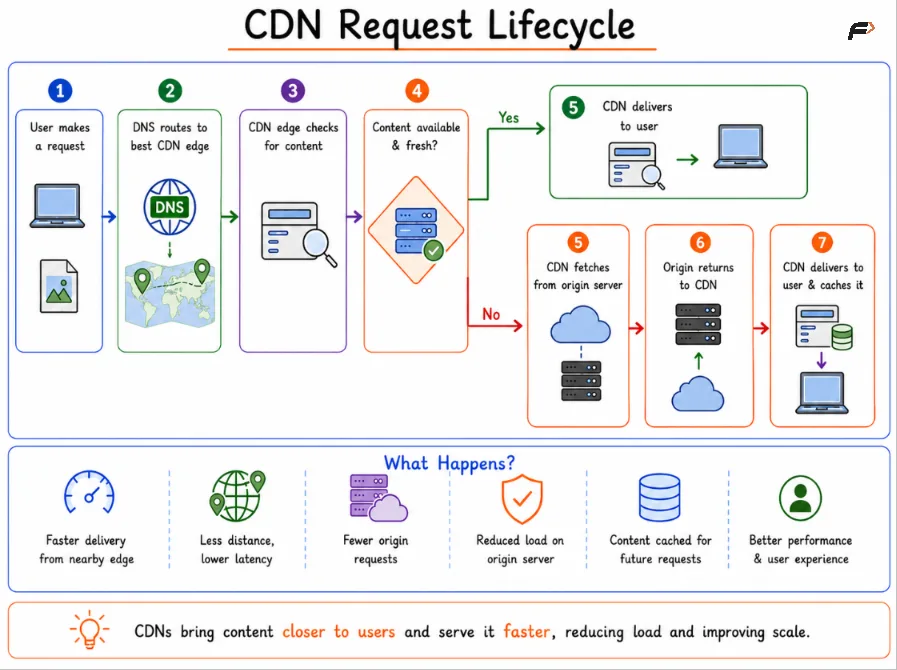
CDN Request Lifecycle
What Is CDN Caching?
CDN caching means storing copies of content on CDN edge servers. Once content is cached, future users can receive it directly from the CDN instead of waiting for the origin server.
Common cacheable content includes:
Images: Product images, banners, icons, and thumbnails.
CSS files: Stylesheets used by web pages.
JavaScript files: Frontend scripts and bundles.
Videos and media: Large files that benefit from edge delivery.
Documents and downloads: PDFs, software files, and static resources.
Static HTML: Pages that do not change per user.
Dynamic or user-specific content needs careful caching because it may differ for each user.
Cache Hit, Cache Miss, and TTL
A cache hit happens when the CDN already has a valid cached copy of the requested content. The response is fast because the origin server is not contacted.
A cache miss happens when the CDN does not have the content. In that case, the CDN fetches the content from the origin server, returns it to the user, and may cache it for future requests.
Term | Meaning |
|---|---|
Cache Hit | CDN has a valid cached copy and serves it directly |
Cache Miss | CDN does not have the object and fetches it from origin |
TTL | Time To Live, meaning how long cached content remains fresh |
Revalidation | CDN checks whether expired cached content is still valid |
Purge | Cached content is manually removed before expiry |
Eviction | CDN removes less-used content to make space |
TTL is usually controlled through cache headers such as Cache-Control: max-age and Expires. Headers like ETag and Last-Modified are used for revalidation, allowing the CDN to check whether stale cached content has changed..
Cache Expiry, Revalidation, and Purging
Cached content cannot always stay fresh forever. If a file changes on the origin server, the CDN must eventually update its cached copy.
There are three common ways this happens:
Expiry: The cached object becomes stale after its TTL ends.
Revalidation: The CDN asks the origin whether the cached version is still valid.
Purging: The cached file is manually removed before the TTL ends.
For static assets, another common approach is file versioning. Instead of replacing style.css, the website may publish style-v2.css. Since the URL changes, the CDN treats it as a new file and fetches the latest version.
Summary
A CDN improves performance by placing edge servers between users and the origin server. Requests are routed to nearby CDN locations so content can be delivered with lower latency and less origin load.
CDN caching stores copies of content at edge servers. A cache hit serves content quickly from the CDN, while a cache miss fetches it from the origin. The CDN caching lifecycle includes TTL, expiry, revalidation, purging, and eviction. Together, CDN delivery and CDN caching improve speed, scalability, availability, and website performance.
Be the first to add a comment.