Introduction
High bandwidth does not always mean high speed. A network may advertise 300 Mbps, 1 Gbps, or even more, but the actual data transfer rate can still be much lower because real communication depends on the complete path between sender and receiver.
Two important ideas help explain this clearly: bottlenecks and Bandwidth Delay Product. Bottlenecks explain why the slowest part of a network limits performance, while Bandwidth Delay Product explains how much data must remain in flight to fully use a network link.
Bandwidth, Throughput, and Goodput
Bandwidth is the maximum capacity of a network link. It tells us how much data the link can carry under ideal conditions. For example, a 300 Mbps connection means the link can theoretically carry up to 300 megabits per second.
Throughput is the actual rate at which data is transferred successfully in practice. It is usually lower than bandwidth because of congestion, latency, packet loss, protocol overhead, weak Wi-Fi signals, server limits, and other real-world factors.
Goodput goes one step further. It measures only the useful application data received by the user, excluding headers, retransmissions, acknowledgements, and control information.
Term | Meaning |
|---|---|
Bandwidth | Maximum theoretical capacity of the link |
Throughput | Actual data transfer rate achieved in practice |
Goodput | Useful application data delivered after removing overhead |
Why Throughput Is Lower Than Bandwidth
Throughput becomes lower than bandwidth because data does not travel through a single perfect link. It passes through many devices, networks, queues, and servers before reaching the destination.
Common reasons for lower throughput include:
Network congestion: Too much traffic causes packets to wait in queues.
Packet loss: Lost packets may need retransmission, reducing useful transfer speed.
High latency: Long delay affects how quickly acknowledgements return.
Protocol overhead: Headers, acknowledgements, and control packets consume capacity.
Slow server: A server may not be able to send data as fast as the client connection allows.
Slow receiver: The receiving device may limit how much data it can accept.
Wi-Fi issues: Weak signals, interference, and shared wireless medium reduce real speed.
TCP control mechanisms: Flow control and congestion control may slow down transmission to keep the network stable.
This is why upgrading an internet plan does not always make every website, download, or application faster.
What Is a Network Bottleneck?
A bottleneck is the slowest or most limited part of the communication path. Since every packet must pass through the complete path, the weakest segment controls the maximum end-to-end throughput.
Consider this path:
Client Wi-Fi: 866 Mbps
Router to ISP: 300 Mbps
ISP path: 150 Mbps
Server sending capacity: 80 Mbps
Even though the client Wi-Fi and ISP connection support higher speeds, the server can send only 80 Mbps. So the actual transfer cannot exceed 80 Mbps in this case.
A simple way to think about it is a wide road connected to a narrow bridge. Traffic may move quickly on the wide road, but once it reaches the narrow bridge, everything slows down. The bridge becomes the bottleneck.
Bandwidth Delay Product
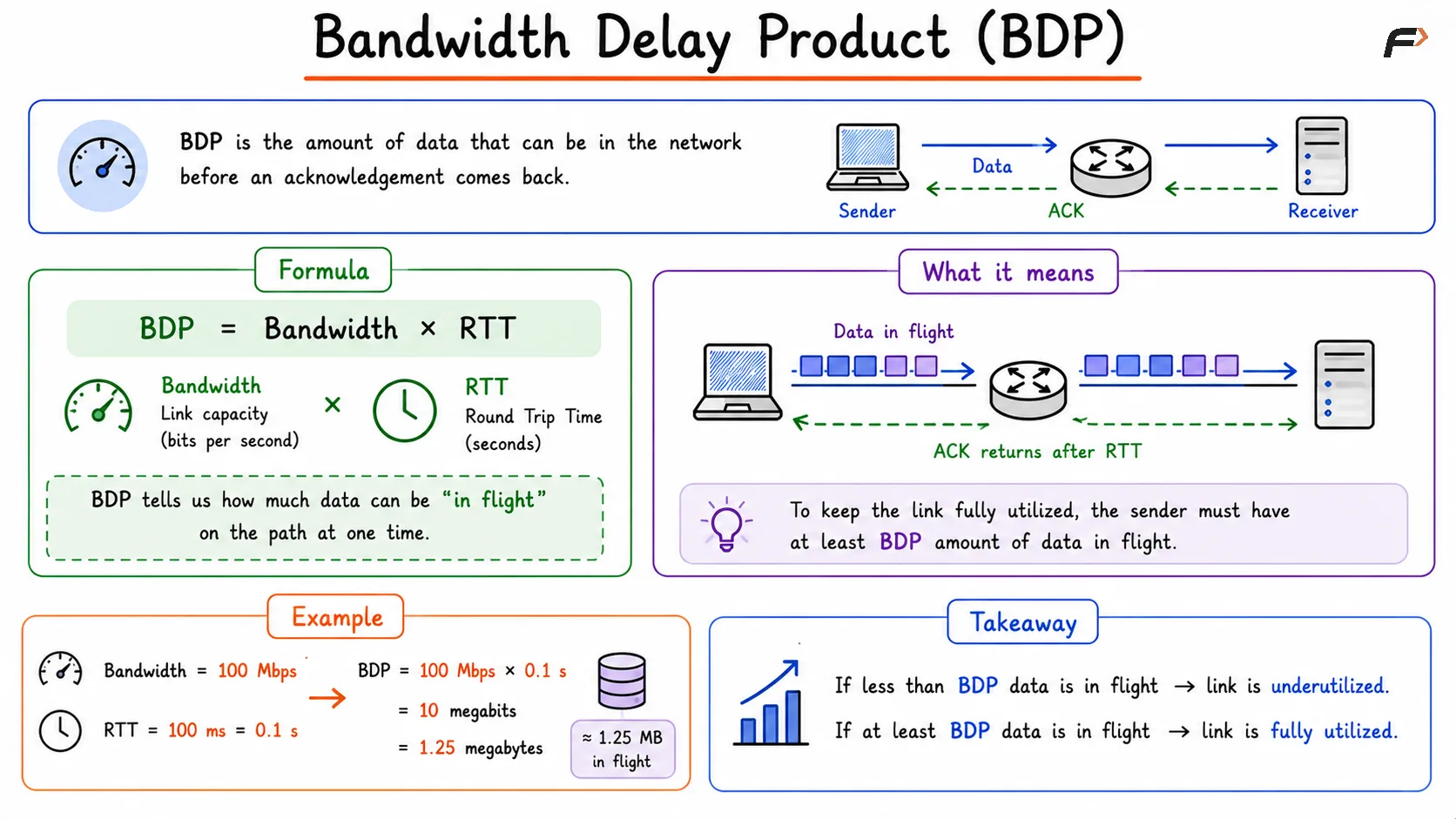
Bandwidth Delay Product, or BDP, represents the amount of data that can be present in the network before an acknowledgement comes back.
The formula is:
Bandwidth Delay Product = Bandwidth x Round Trip TimeHere, Round Trip Time means the time taken for data to reach the receiver and for the acknowledgement to return to the sender.
For example:
Bandwidth = 100 Mbps
RTT = 100 ms = 0.1 seconds

BDP = 100 Mbps x 0.1
BDP = 10 megabits
BDP = 1.25 megabytes
This means around 1.25 MB of data can be in flight on that path at one time. If the sender does not keep enough data in flight, the network link will not be fully utilized.
Bandwidth Delay Product
Data in Flight and TCP Window Size
Data in flight means the data that has been sent but not yet acknowledged. While the first packet is travelling and its acknowledgement is returning, the sender can continue sending more packets.
For good performance, especially over high-bandwidth and high-latency links, enough data must remain in flight. If the sender waits too often for acknowledgements, the link remains partially empty and throughput drops.
This is closely related to TCP window size. The TCP window controls how much unacknowledged data can be sent before waiting for acknowledgements.
Small window: The sender may stop too early and underuse the available bandwidth.
Large enough window: The sender can keep the network pipeline full.
Too much uncontrolled data: Congestion may increase, causing packet loss and delays.
BDP helps estimate how large the window needs to be to use the available network capacity properly.
Why More Bandwidth May Not Fix Slow Transfers
Increasing bandwidth helps only when bandwidth is the actual bottleneck. If the limitation is somewhere else, the improvement may be small or invisible.
For example, upgrading from 100 Mbps to 300 Mbps may not help if:
The server can send data only at 80 Mbps.
The application is waiting on a slow database query.
The network path has high RTT.
The Wi-Fi signal is weak.
TCP window size is too small for the bandwidth-delay path.
Packets are being lost and retransmitted.
A firewall, router, or load balancer is overloaded.
Performance improvement should begin by identifying the real bottleneck. More bandwidth increases the size of the pipe, but the pipe still needs enough data flow, low enough delay, and no slower component blocking the path.
Summary
Bandwidth is the maximum capacity of a network link, while throughput is the actual transfer rate achieved in real conditions. Goodput is the useful application data delivered after removing protocol overhead and retransmissions.
A bottleneck is the slowest component in the communication path, and it limits the overall data transfer speed. Bandwidth Delay Product shows how much data can stay in flight based on bandwidth and RTT. To use a network efficiently, the sender must keep enough data in the pipeline instead of waiting too often for acknowledgements.
Be the first to add a comment.