Introduction
Before creating tables or writing queries, you need a database in which to organize your data. A college application, for example, might use one database to hold information about students, courses, and enrollments.
Working with databases involves creating that container, selecting it for use, checking its contents, and managing it as requirements change. These operations establish the context in which later SQL statements run.
What Is a Database in SQL?
A database is an organized collection of data and related objects managed by a database management system. In a relational database, tables store records, while objects such as views and indexes support access to that data.
For example, a database named college_db might contain:
students: Stores student details.
courses: Stores available course information.
enrollments: Records which students have joined which courses.
A database and a table serve different purposes. The database organizes related objects, while a table holds records about a particular subject.
Database management syntax varies between systems. The main examples in this editorial use MySQL, followed by a short comparison with PostgreSQL.
Creating a Database with CREATE DATABASE
The CREATE DATABASE command creates a database with the specified name. Your account must have the necessary creation privilege.
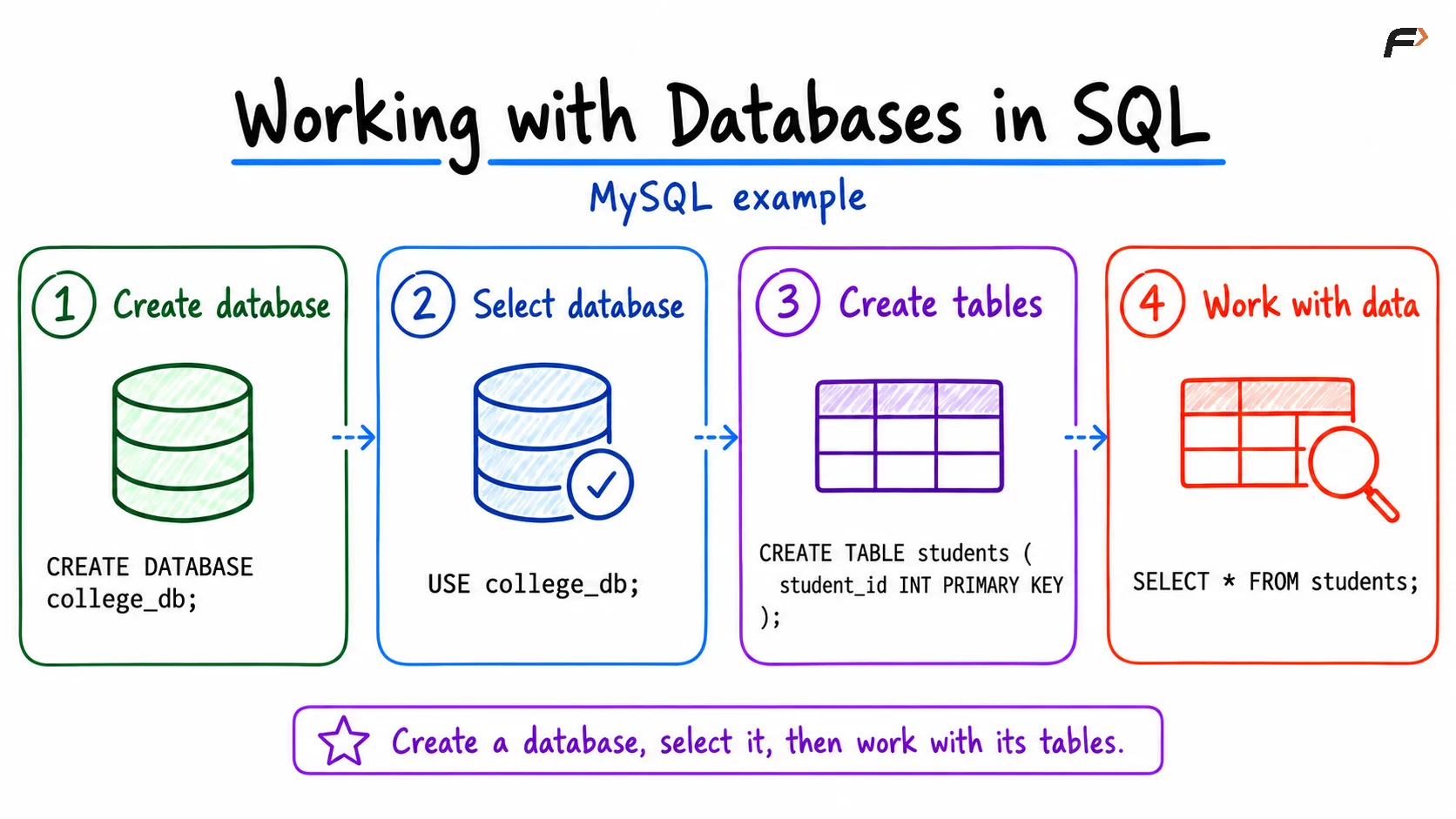
CREATE DATABASE college_db;This creates college_db, but it does not create application tables or automatically select the database for subsequent statements.
In MySQL, attempting to create a database that already exists produces an error unless you include IF NOT EXISTS:
CREATE DATABASE IF NOT EXISTS college_db;This form avoids an error caused by the database already existing. It does not replace the existing database or verify that its settings match your intended configuration.
Choose names that are clear and easy to use:
Use meaningful names: Prefer
college_dbover an unclear name such asdb1.Keep naming consistent: Lowercase names with underscores are convenient.
Avoid spaces and reserved words: These can introduce unnecessary quoting requirements.
Keep letter case consistent: Database-name case behavior can depend on the system and platform
Listing Available Databases
In MySQL, SHOW DATABASES lists databases visible to the current account.
SHOW DATABASES;An illustrative result might include:
Database |
|---|
college_db |
information_schema |
mysql |
performance_schema |
sys |
The actual list depends on the server and your privileges. System databases support MySQL's operation and metadata; use your application database for course examples.
To check for a specific name, use an exact comparison:
SHOW DATABASESWHERE `Database` = 'college_db';The backticks quote MySQL's output column name. If the database exists and is visible to your account, its name appears in the result.
Selecting a Database with USE
Creating a database and selecting it are separate operations. In MySQL, USE makes a database the default for subsequent statements in the current session.
USE college_db;After this selection, an unqualified table name such as students is resolved within college_db.
Check the current default database with:
SELECT DATABASE();The result is college_db if selection succeeded. If no default database has been selected, the function returns NULL.
Database selection belongs to the connection. A new connection may need its own USE statement unless the database was specified in the connection settings.
You can also qualify a table name explicitly:
SELECT *FROM college_db.students;This identifies the database and table directly, assuming the table exists and your account has permission to read it.
working with dates in sql
Creating and Inspecting Tables
Once the database is selected, create a table inside it:
USE college_db;CREATE TABLE students ( student_id INTEGER PRIMARY KEY, student_name VARCHAR(100) NOT NULL, department VARCHAR(20));Here, CREATE DATABASE established the database, while CREATE TABLE defines a particular table and its columns.
MySQL provides commands for inspecting the selected database:
SHOW TABLES;This lists its visible tables and views. To inspect the columns of the new table, use:
DESCRIBE students;The output includes column names, data types, nullability, key information, and defaults. This helps confirm that a table has the structure expected before inserting data.
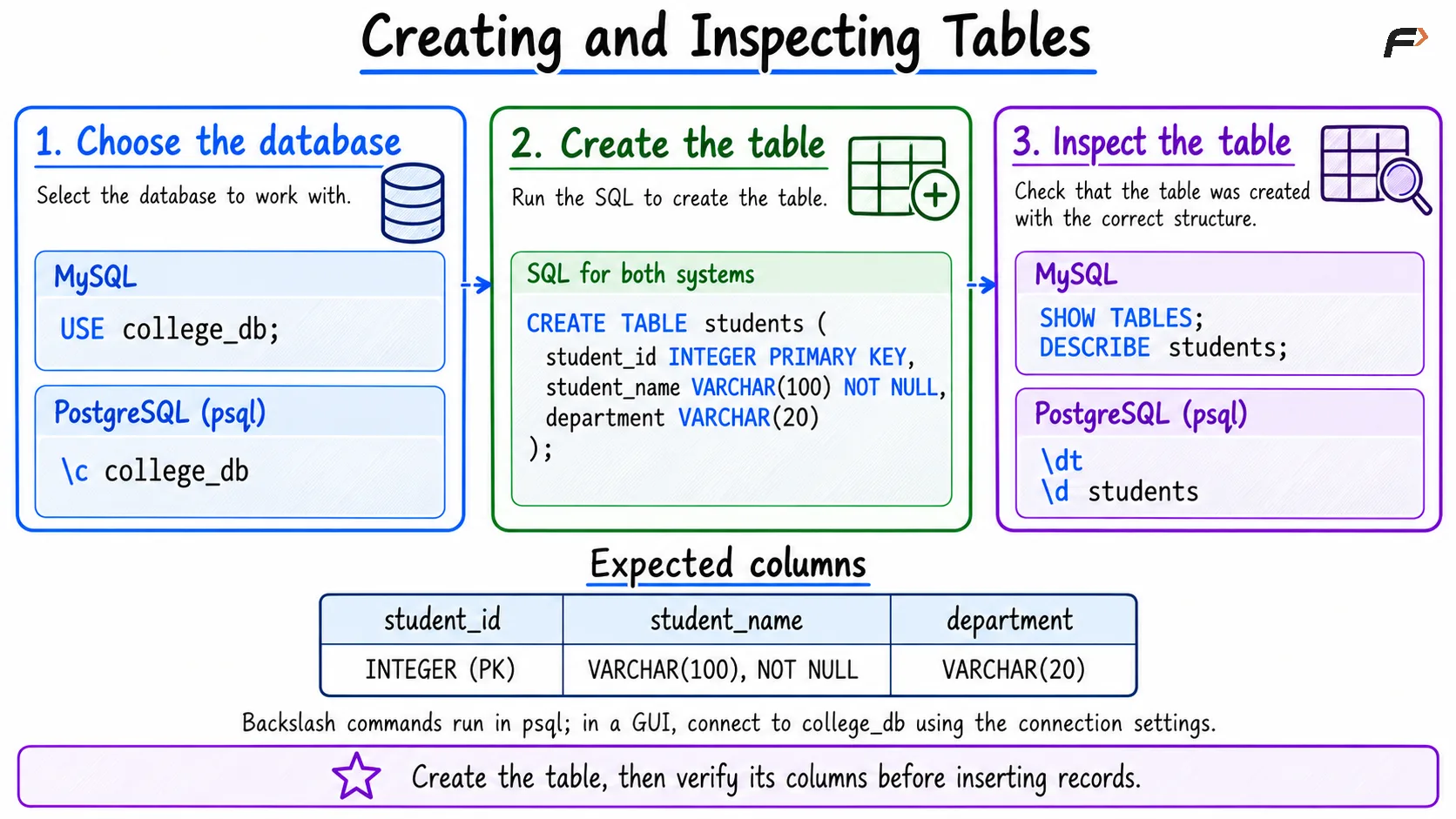
Creating and inspecting a students table using MySQL and PostgreSQL commands.
For a compact working example, add and retrieve one record:
INSERT INTO students (student_id, student_name, department)VALUES (1, 'Asha', 'CSE');SELECT student_id, student_name, departmentFROM students;The query returns:
student_id | student_name | department |
|---|---|---|
1 | Asha | CSE |
The basic workflow is:
Connect to the database server using an authorized account.
Create the application database if needed.
Select it and verify the current database.
Create tables and work with their records.
Inspect database objects when you need to check their structure.
Changing Database Settings with ALTER DATABASE
ALTER DATABASE changes supported database settings. Its available options depend on the database system.
For example, in MySQL:
ALTER DATABASE college_dbCHARACTER SET utf8mb4;This changes the database's default character set. A character set determines which characters can be represented, while a collation defines rules for comparing and sorting text.
The default can be inherited by newly created tables when they do not specify their own character set. This statement does not convert existing table columns automatically.
You can inspect the database definition with:
SHOW CREATE DATABASE college_db;Database settings and table structures are managed separately. Use ALTER DATABASE for supported database options and ALTER TABLE for changes to a table's definition.
Removing a Database with DROP DATABASE
DROP DATABASE removes a database and its stored application objects, including its tables and their data. Its scope is much broader than deleting records from one table.
For an unused practice database:
DROP DATABASE practice_db;In MySQL, IF EXISTS avoids an error when the named database is absent:
DROP DATABASE IF EXISTS practice_db;IF EXISTS checks existence; it does not protect an existing database from deletion. Verify the name and retain any required backup before executing the command.
In MySQL, DROP DATABASE causes an implicit commit and cannot be undone using an ordinary ROLLBACK.
Command | Scope | What remains |
|---|---|---|
| Removes all rows from | Table definition and database |
| Removes the | Database and its other objects |
| Removes the database and its application objects | Other databases on the server |
MySQL and PostgreSQL Differences
Database creation has similar basic syntax in MySQL and PostgreSQL, but listing databases and changing the connection context work differently.
Task | MySQL | PostgreSQL |
|---|---|---|
Create a database |
|
|
List databases |
|
|
Select or connect to a database |
|
|
Check current database |
|
|
List tables |
|
|
Inspect a table |
|
|
The PostgreSQL commands beginning with a backslash are psql client commands, not SQL statements. They are entered without SQL semicolons and may not work in a graphical tool's SQL editor.
PostgreSQL does not support MySQL's USE statement. To work in another database, establish a connection to it through your client or application.
The meaning of schema also differs. In MySQL, SCHEMA is a synonym for DATABASE. In PostgreSQL, a database contains schemas, which provide namespaces for tables and other objects.
PostgreSQL also prohibits CREATE DATABASE and DROP DATABASE inside a transaction block. To drop a PostgreSQL database, connect to a different database first; other active connections can also prevent deletion.
Common Errors When Working with Databases
Many beginner errors come from using the wrong database context or mixing commands from different systems.
No database selected: In MySQL, select a database with
USEor qualify the table name before operations that need a database context.Database already exists: Choose another name or use MySQL's
IF NOT EXISTSwhen reusing the existing database is intended.Unknown database: Check the spelling and confirm that you are connected to the correct server.
Access denied: The account may lack the privileges needed to create, access, modify, or remove the database.
Table not found: Check the selected database, table name, and whether the table has been created.
Unsupported syntax: Confirm that the command belongs to your database system and client.
Checking the server connection and current database early often resolves confusion before any data changes are made.
Summary
Working with databases in SQL establishes the environment for storing and querying application data. In MySQL, CREATE DATABASE, SHOW DATABASES, USE, ALTER DATABASE, and DROP DATABASE support the main database management tasks.
Keep database operations distinct from table and row operations, and verify the current context before making changes. Clear names, appropriate privileges, and awareness of dialect differences make later SQL work easier to manage.
Be the first to add a comment.