Introduction
A college might store student details in an admissions file, fee payments in an accounts file, and borrowing records in a library file. Each application works with its own files, but keeping shared information consistent becomes difficult as the applications grow.
A database management system (DBMS) provides common services for storing, querying, protecting, and updating related data. Understanding how it differs from traditional file processing helps explain when simple files are sufficient and when database management becomes useful.
Understanding File Systems and DBMSs
What Is a File System?
A file system organises and manages files and directories on a storage device. It supports operations such as creating, reading, writing, and deleting files.
Examples include NTFS, ext4, and APFS. CSV and JSON are file formats, not file systems.
In a file-based application, programs interpret the contents of files. For example, a library application might read a CSV file, locate a student’s record, validate changes, and write the updated contents.
The file system manages access to the file. The application generally manages the meaning of records inside it.
What Is a DBMS?
A DBMS is software used to define, access, update, and administer a database. The database is the related data being managed; the DBMS is the software managing it.
MySQL and PostgreSQL are relational DBMSs. Other DBMSs use models such as documents, graphs, or key-value pairs, so DBMS does not always mean relational tables or SQL.
Database systems provide services such as query processing, storage management, access control, and integrity enforcement. The available features depend on the product and configuration.
Who Manages the Data?
The main difference is how responsibility is divided between the application and the storage software.
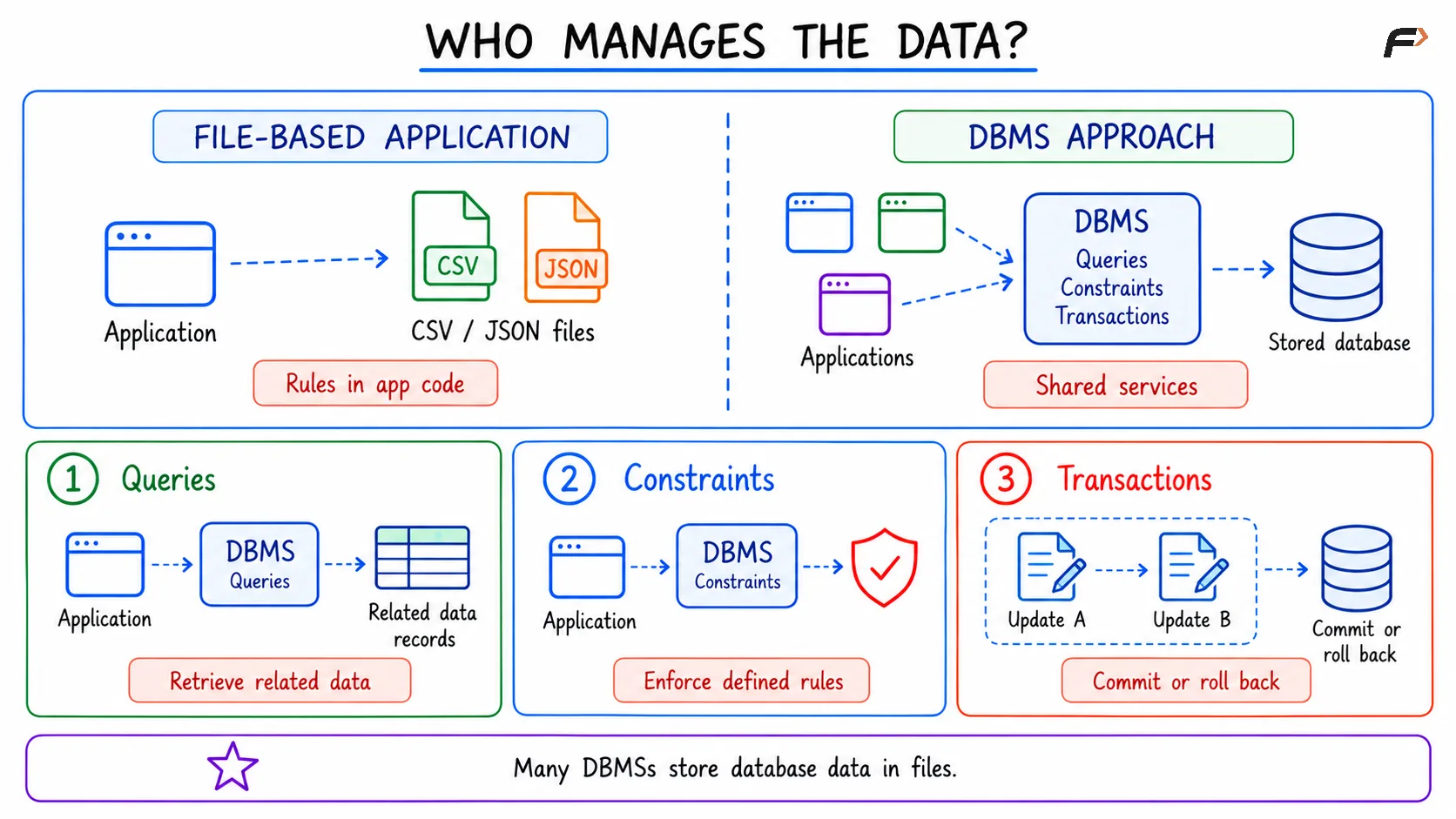
Who Manages The Data
Many DBMSs store their database contents in files. Using a DBMS adds a layer that understands records, queries, constraints, and transactions.
Problems with Traditional File Processing
File-based storage can work well for a small task. Problems become more noticeable when several applications maintain overlapping information.
When Copies Disagree
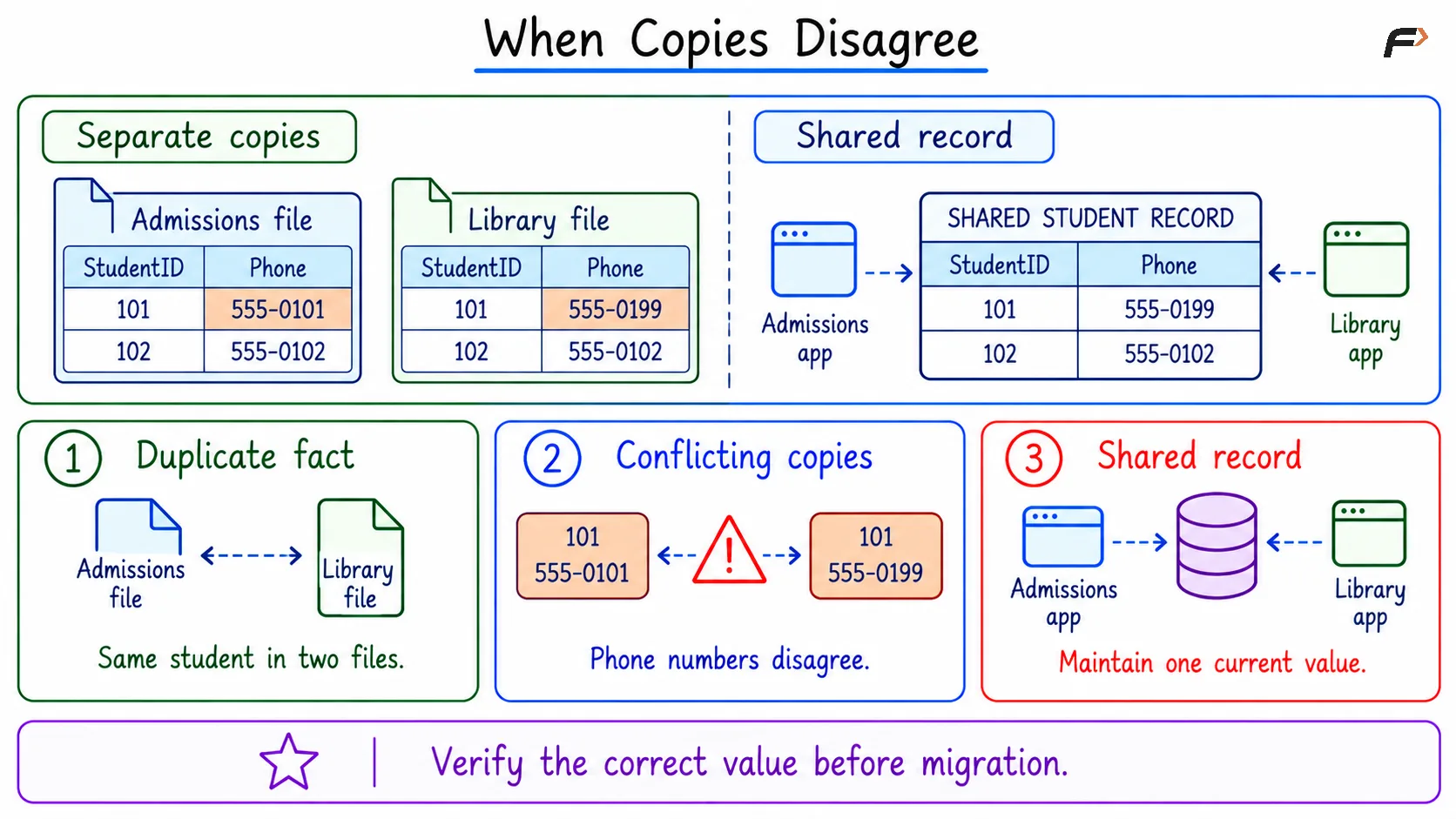
Suppose admissions and the library both store a student’s current phone number. The student updates the library record, but the admissions copy remains unchanged.
When Copies Disagree
The shared-record design assumes that 555-0199 has been verified as the correct number. Moving data into a DBMS does not automatically determine which conflicting value is correct.
Traditional file processing commonly creates these difficulties:
Redundancy and inconsistency: Several files may store the same fact. Updating only some copies produces conflicting answers, such as different current phone numbers for the same student.
Data isolation: Related information may be scattered across files with different layouts. Answering “Which students have unpaid fees and overdue books?” requires reading and combining those files correctly.
Program-data dependence: Programs may assume a particular column order, separator, or record layout. Changing that format can require changes in every program that reads it.
Repeated validation logic: Separate programs may each implement rules such as unique student identifiers or valid payment amounts. If their checks differ, one application may accept data another rejects.
Coordination and failure handling: Multiple writers can overwrite one another’s changes unless they coordinate. If an operation updates several files and stops halfway, the application needs a way to detect and repair the incomplete work.
These are limitations of a simple file-processing design. Developers can build additional mechanisms around files, but those mechanisms require implementation and maintenance.
How a DBMS Helps Manage Shared Data
A DBMS supplies reusable mechanisms that applications would otherwise need to implement themselves.
Shared Structure and Integrity Rules
In a relational college database, student details, fee payments, and borrowing records can be stored separately and connected through identifiers.
For example:
Relation | Purpose |
|---|---|
STUDENT | Stores each student’s identifying details |
FEE_PAYMENT | Records payments associated with students |
LOAN | Records books borrowed by students |
A primary key can prevent duplicate student identifiers. A foreign key can require a payment or loan to reference an existing student.
These constraints protect the rules explicitly defined in the database. They do not detect every real-world error, such as a correctly formatted but incorrect phone number.
Flexible Queries and Data Independence
A relational DBMS lets applications request combinations of data through SQL. A new report can often be expressed as a query rather than a new collection of file-reading routines.
It also separates logical access from many physical storage decisions. Adding an index, for example, usually does not require rewriting the query that retrieves students.
This is physical data independence. It does not mean every change is invisible to applications: renaming a column or changing its meaning can still affect queries.
Transactions and Recovery
Consider recording a fee payment and reducing the student’s outstanding balance. These changes should succeed together.
A transaction groups related operations into one unit. If the transaction cannot complete, its changes can be rolled back instead of leaving only part of the operation recorded.
Transactional systems also provide mechanisms for protecting committed changes and recovering after failures. The guarantees depend on the database engine and its durability settings.
Concurrent Access and Security
Concurrency control: A DBMS coordinates overlapping operations using mechanisms such as locks or multiple record versions. Applications must still choose suitable transaction boundaries and handle conflicts correctly.
Access control: Database privileges can limit what different accounts may read or modify. For example, library staff may access borrowing records while finance staff manage payments.
Backup and restoration: Database-aware tools help create recoverable backups. Administrators still need backup schedules, protected copies, and restoration checks.
File System vs DBMS: Main Differences
The file-processing column below describes applications working directly with ordinary files.
Aspect | Traditional file processing | DBMS approach |
|---|---|---|
Main abstraction | Files, directories, and their contents | Records and structures defined by a data model |
Record interpretation | Application parses the file format | DBMS interprets managed structures |
Relationships | Application connects related records | Relational systems support keys, joins, and referential constraints |
Queries | Usually implemented through application code or external tools | Query interfaces support retrieval and manipulation |
Integrity rules | Implemented by applications or supporting tools | Supported rules can be enforced centrally |
Concurrent updates | Application coordinates access using available file mechanisms | Transaction and concurrency services coordinate access |
Multi-step changes | Application implements coordination and recovery | Transactional engines support atomic operations |
Security | File and directory permissions; application checks | Database privileges alongside operating-system protections |
Recovery | File backups and application recovery procedures | Database-aware backups and recovery mechanisms |
Overhead | Often low for simple tasks | Includes database processing and administration |
Performance | Can suit simple sequential access | Can suit indexed searches, joins, and concurrent updates |
Avoid absolute claims such as “file systems have no security,” “DBMSs eliminate all duplication,” or “a DBMS is always faster.”
File systems provide important protections and coordination mechanisms. A DBMS adds data-management services, while its effectiveness still depends on design and operation.
Choosing Between Files and a DBMS
When Files Are a Good Fit
Simple configuration: A small settings file can be easy to read, edit, and distribute. A database may add little value when one application manages a few values.
Exchange and export: CSV and JSON are useful for moving data between systems or producing a report that another tool will consume.
Independent documents and media: Images, videos, and documents can be stored as files. An application may use a database to track their metadata and locations.
Controlled processing: A single-writer batch task can work effectively with files when its format, validation, and failure handling are well defined.
When a DBMS Is a Better Fit
Shared, changing records: Several applications need to work with the same maintained information.
Related data and varied questions: Users need searches, summaries, and combinations of records that change over time.
Coordinated updates: Operations such as payments, bookings, and stock changes require reliable transaction boundaries.
Enforceable rules: Identifiers, references, and access permissions need consistent enforcement across applications.
A DBMS also introduces costs: configuration, schema design, monitoring, backups, and query tuning. Those costs vary substantially between an embedded database and a distributed database service.
Data size alone should not decide the choice. A small booking system may need transactions, while a large immutable export may be perfectly suitable as a file.
Summary
File systems organise files and provide storage operations, while file-based applications interpret and coordinate the records inside them. A DBMS adds services for querying, integrity, transactions, access control, and recovery. Files remain useful for simple storage and exchange. A DBMS becomes valuable when applications need reliable shared records, related data, and coordinated updates.
Be the first to add a comment.