Introduction
A table can store names, prices, dates, and many other kinds of information. Each column needs a suitable data type so the database can interpret its values and apply the appropriate operations.
SQL data types establish these rules when a table is created. Choosing them carefully helps preserve accuracy, organize records, and avoid problems such as losing leading zeros or storing money as approximate values.
What Are SQL Data Types?
A data type defines the kind of value a column can hold, along with characteristics such as its range, precision, or maximum length.
For example, a student’s name belongs in a character column, while a course fee belongs in an exact numeric column. Although both values can be written as text, their meaning and the operations performed on them differ.
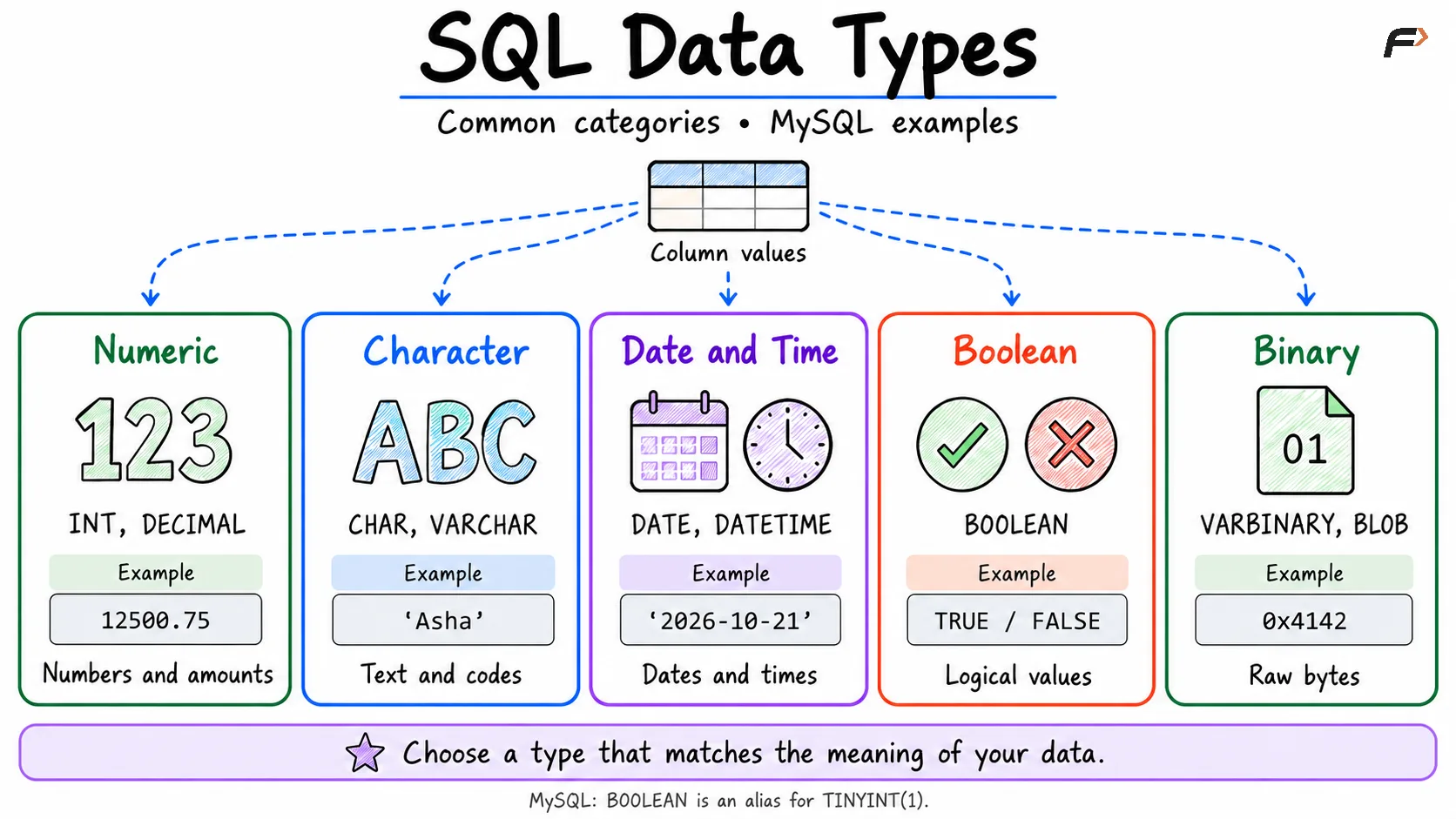
Common SQL data types fall into these groups:
Numeric: Whole numbers, exact decimals, and approximate numbers.
Character: Names, codes, descriptions, and other text.
Date and time: Calendar dates, times, and combined date-time values.
Boolean: True-or-false information.
Binary: Raw bytes, such as file contents.
The examples below use MySQL. Many names are shared across database systems, but supported types and their behavior can differ.
sql data types
Numeric Data Types
Numeric types store values used in counting, measurement, and calculations. The main distinction is between exact values and approximate values.
Type | Stores | Example use |
|---|---|---|
| Whole numbers within a smaller range | Small counts |
| Whole numbers | Quantity, student ID |
| Whole numbers within a larger range | Large identifiers or counters |
| Exact decimal values within declared precision | Prices, fees |
| Approximate floating-point values | Scientific measurements |
Choose an integer type with enough range for expected values. For example, a quantity of 25 does not require a fractional component.
For decimal values, precision is the total number of digits, and scale is the number of digits after the decimal point. In DECIMAL(8, 2), eight digits are available in total, including two fractional digits. A value such as 12500.75 fits.
FLOAT and DOUBLE represent a wide range of approximate values, but many decimal fractions cannot be represented exactly. Use DECIMAL for monetary amounts where exact decimal representation matters.
Character Data Types
Character types store text, including values that contain digits but are not used for arithmetic.
Type | Main characteristic | Example use |
|---|---|---|
| Fixed-length character type | Fixed-format codes |
| Variable-length text up to a declared limit | Names, email addresses |
| Longer text, subject to the type’s limits | Descriptions, notes |
For example, VARCHAR(100) allows a name containing up to 100 characters in MySQL, subject to database limits. It does not require every name to contain 100 characters, and the number is not a fixed byte allocation.
CHAR is useful for values with a consistent length, such as two-character country codes. In MySQL, shorter CHAR values are space-padded when stored; trailing-space handling differs from VARCHAR.
Store phone numbers, postal codes, and identifiers such as '00127' as character data when their formatting matters. An integer represents the numeric value and does not preserve leading zeros.
Date and Time Data Types
Date and time types let the database interpret values as temporal information rather than ordinary text.
MySQL type | Represents | Example value |
|---|---|---|
| Calendar date |
|
| Time or elapsed time |
|
| Date and time |
|
| Date and time with session-time-zone conversion |
|
Use DATE for information such as a date of birth when no time component is needed. In MySQL, TIME can also represent durations, including values beyond a 24-hour clock.
MySQL converts TIMESTAMP values between the session time zone and UTC during storage and retrieval. DATETIME does not apply that same automatic conversion. Their supported ranges also differ, so they should not be treated as interchangeable.
Boolean, Binary, and Other Types
Boolean values represent conditions such as whether a student is active. In MySQL, BOOLEAN and BOOL are aliases for TINYINT(1): zero is treated as false and nonzero values as true.
Declaring a MySQL column as BOOLEAN alone does not restrict it to just 0 and 1. A constraint can enforce that rule when required.
Other useful types include:
BINARYandVARBINARY: Store fixed-length or variable-length byte strings.BLOB: Stores binary content, such as file bytes.JSON: Stores JSON documents in database systems that support it.
NULL is not a data type. It represents missing or unknown information in a column that permits null values, whether that column stores numbers, text, or dates.
Example: Creating a Table with Data Types
The following MySQL example combines several common types in one table:
CREATE TABLE students ( student_id INT PRIMARY KEY, student_name VARCHAR(100) NOT NULL, country_code CHAR(2), date_of_birth DATE, course_fee DECIMAL(8, 2), is_active BOOLEAN NOT NULL DEFAULT TRUE, CHECK (is_active IN (0, 1)));Each choice reflects the column’s purpose: an integer identifies the student, character types hold names and codes, DATE stores a calendar date, and DECIMAL represents an exact fee.
Insert a representative record:
INSERT INTO students ( student_id, student_name, country_code, date_of_birth, course_fee, is_active)VALUES ( 1, 'Asha', 'IN', '2005-08-14', 12500.75, TRUE);The data types define how values are represented. Constraints such as PRIMARY KEY, NOT NULL, and CHECK add separate rules about which values are acceptable.
Choosing the Right Data Type
Start with the meaning of the information, then consider its expected size and required accuracy.
Match the value: Use numeric types for calculations and character types for names or formatted codes.
Allow enough range: Choose an integer type that supports expected growth.
Preserve precision: Use
DECIMALfor exact monetary amounts.Choose sensible lengths: Allow realistic text lengths without assigning every field an unnecessarily large limit.
Use temporal types: Store dates as dates so date comparisons and calculations work naturally.
Check database behavior: Type names, conversions, and invalid-value handling vary between systems.
A data type does not express every business rule. An integer column can still need a CHECK constraint to reject negative quantities, for example.
Summary
SQL data types determine how column values are represented and which operations suit them. Numeric, character, temporal, boolean, and binary types cover the main requirements of everyday table design.
Choose types according to meaning, range, length, and precision. Combine them with appropriate constraints, and check database-specific behavior when similar type names have different rules.
Be the first to add a comment.