Introduction
Relational databases organize data into tables, but storing information is only part of the work. Applications also need to retrieve selected records, add new entries, update existing values, and control who can access them.
SQL provides a common language for these tasks. Understanding its basic syntax and command categories makes it easier to work with database structures, write useful queries, and manage changes correctly.
What Is SQL?
SQL stands for Structured Query Language. It is used to define database objects, retrieve and modify data, manage permissions, and control transactions in relational database management systems.
SQL is largely declarative: a query describes the result required, while the database system determines an execution plan. For example, a query can request students with marks above 80 without specifying how to scan storage or use an index.
A database is the organized collection of data. A DBMS is the software that manages it, and SQL is a language used to communicate with relational DBMSs such as PostgreSQL, MySQL, Oracle Database, and SQL Server.
These systems share many SQL concepts, but some syntax and behavior differ. The examples below use PostgreSQL-compatible SQL, with broadly portable syntax wherever practical.
Tables, Data Types, and SQL Syntax
A table represents a collection of related records. Each row stores one record, and each column represents an attribute, such as a student's name or marks.
Consider this students table:
student_id | student_name | department | marks |
|---|---|---|---|
1 | Asha | CSE | 85 |
2 | Ravi | ECE | 72 |
3 | Meera | CSE | 91 |
4 | Kabir | ME | NULL |
Each column has a data type that determines which values it can hold. Common examples include INTEGER for whole numbers, VARCHAR(n) for text up to a specified length, DECIMAL(p, s) for exact numeric values, and DATE for calendar dates.
A basic SQL statement looks like this:
SELECT student_name, marksFROM studentsWHERE marks >= 80;Here, SELECT, FROM, and WHERE are keywords. students is a table name, while student_name and marks are column names.
Useful syntax conventions include:
Statement ending: Use a semicolon to terminate a statement.
Text values: Enclose string literals in single quotes, such as
'CSE'.Formatting: Use line breaks and indentation to make queries readable.
Comments: Use
--for a single-line comment or/* ... */for a block comment.Letter case: Keywords can usually be written in either case. Identifier case rules depend on the database and whether names are quoted.
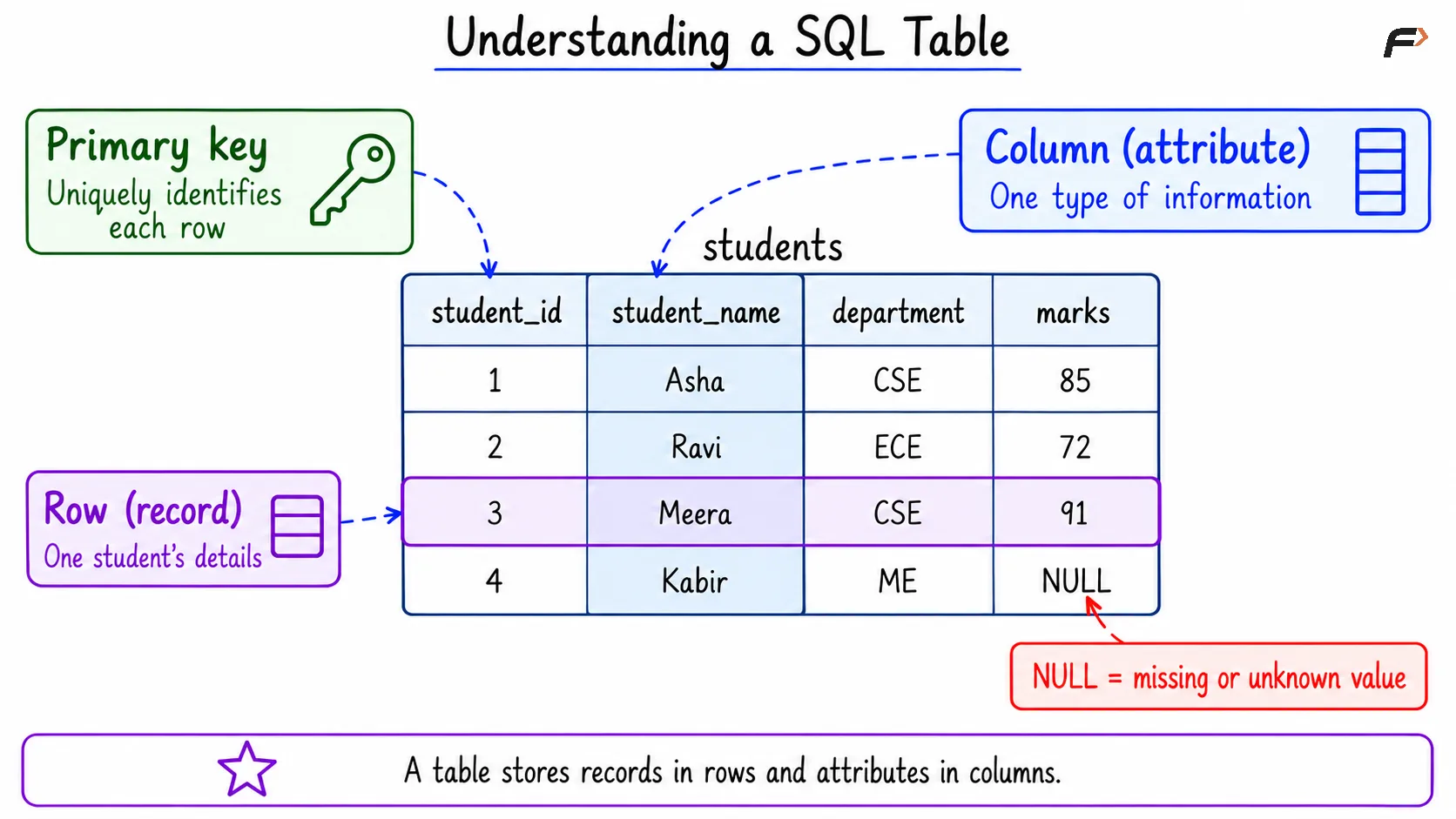
Understanding a SQL table
Types of SQL Commands
SQL commands are commonly taught in five groups according to their purpose.
Category | Full form | Purpose | Common commands |
|---|---|---|---|
DDL | Data Definition Language | Define or change database structures |
|
DML | Data Manipulation Language | Add, modify, or remove records |
|
DQL | Data Query Language | Retrieve data |
|
DCL | Data Control Language | Manage access privileges |
|
TCL | Transaction Control Language | Control transaction boundaries and changes |
|
This grouping is a learning convention rather than a classification used identically everywhere. In particular, SELECT is sometimes included under DML instead of being placed in a separate DQL category.
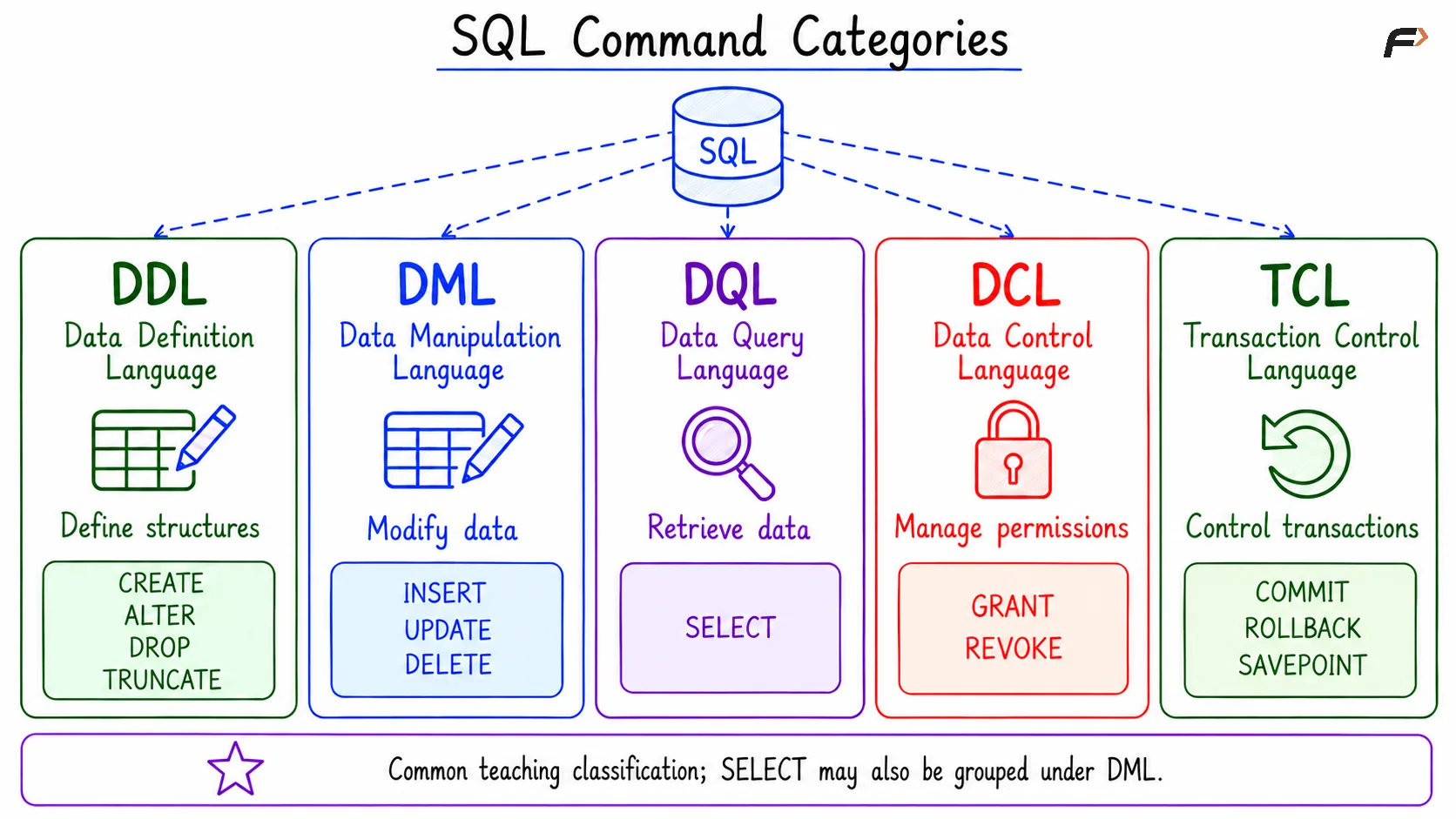
SQL command categories
DDL: CREATE, ALTER, DROP, and TRUNCATE
DDL commands define and modify database objects. A table definition specifies column names, data types, and constraints that restrict the data accepted.
The following statement creates the example table:
CREATE TABLE students ( student_id INTEGER PRIMARY KEY, student_name VARCHAR(100) NOT NULL, department VARCHAR(20), marks INTEGER CHECK (marks BETWEEN 0 AND 100));The constraints serve different purposes:
PRIMARY KEY: Uniquely identifies each row and prevents null key values.
NOT NULL: Requires a value in the specified column.
CHECK: Requires a condition to hold. In this example, non-null marks must fall between 0 and 100.
Other common constraints include UNIQUE, which restricts duplicate values, and FOREIGN KEY, which requires non-null referencing values to match an appropriate key in another or the same table. A DEFAULT supplies a value when a column is omitted from an insert.
Use ALTER TABLE to change an existing structure:
ALTER TABLE studentsADD COLUMN email VARCHAR(150);The following commands illustrate two different removal operations. They are separate examples, not steps to execute before the later queries:
TRUNCATE TABLE students;DROP TABLE students;TRUNCATE empties the table while retaining its definition. DROP TABLE removes the table object, including its data. Dependencies and foreign keys may restrict either operation.
DML: INSERT, UPDATE, and DELETE
DML commands change the records stored in a table. After creating students, populate it with representative rows:
INSERT INTO students (student_id, student_name, department, marks)VALUES (1, 'Asha', 'CSE', 85), (2, 'Ravi', 'ECE', 72), (3, 'Meera', 'CSE', 91), (4, 'Kabir', 'ME', NULL);Listing column names explicitly makes the mapping between columns and values clear. Columns omitted from an insert receive their defaults, or null values where permitted.
Use UPDATE to modify existing records:
UPDATE studentsSET marks = 78WHERE student_id = 2;This changes Ravi's marks to 78. Use DELETE to remove matching records:
DELETE FROM studentsWHERE student_id = 4;For these statements, the WHERE clause determines which rows are affected. Omitting it makes every row eligible for the update or deletion. A useful practice is to check the intended condition with a SELECT query before modifying data.
The query examples in the following sections assume the original four sample rows.
DQL: SELECT, Filtering, and Sorting
SELECT retrieves data without changing the stored rows. Specify the required columns and the table containing them:
SELECT student_name, marksFROM students;Use SELECT * to request all columns, although naming columns explicitly often makes application queries clearer. DISTINCT removes duplicate rows from the selected result:
SELECT DISTINCT departmentFROM students;To filter and sort records, combine WHERE and ORDER BY:
SELECT student_name, marksFROM studentsWHERE department = 'CSE' AND marks >= 80ORDER BY marks DESC;The result is:
student_name | marks |
|---|---|
Meera | 91 |
Asha | 85 |
DESC sorts in descending order; ASC sorts in ascending order and is the default. Without ORDER BY, SQL does not guarantee the order of returned rows.
Common filtering operators include:
Comparisons:
=,<>,<,>,<=, and>=.Logical conditions:
AND,OR, andNOT; use parentheses when combining conditions that could be ambiguous.Range matching:
BETWEEN 70 AND 90includes both endpoints.Set membership:
IN ('CSE', 'ECE')matches any listed value.Pattern matching:
LIKE 'M%'matches text beginning withM;%represents any sequence of characters, while_represents one character.
NULL represents missing or unknown information. Test it with IS NULL or IS NOT NULL, rather than = NULL:
SELECT student_nameFROM studentsWHERE marks IS NULL;This returns Kabir. Ordinary comparisons with NULL produce an unknown result, and WHERE retains only rows for which its condition is true.
Aggregate Functions, GROUP BY, and HAVING
Aggregate functions calculate a result from multiple rows. Common examples include COUNT, SUM, AVG, MIN, and MAX.
SELECT COUNT(*) AS total_students, COUNT(marks) AS students_with_marks, AVG(marks) AS average_marksFROM students;For the original sample data, COUNT(*) returns 4 and COUNT(marks) returns 3. COUNT(column) counts non-null values; aggregates such as AVG and SUM also ignore null inputs.
Use GROUP BY to calculate results separately for each group:
SELECT department, COUNT(*) AS student_countFROM studentsGROUP BY departmentHAVING COUNT(*) >= 2;This returns CSE with a count of 2.
Clause | Role | Example condition |
|---|---|---|
| Filters individual rows before grouping |
|
| Filters groups after aggregation |
|
A common written clause order is SELECT, FROM, WHERE, GROUP BY, HAVING, and ORDER BY. Conceptually, rows are selected and filtered before grouping and result calculation, although the database may optimize the physical execution.
DCL: GRANT and REVOKE
DCL commands manage access privileges. A privilege is permission to perform a particular operation on a database object.
Assuming a PostgreSQL role named course_reader already exists, an authorized user can grant it permission to query the table:
GRANT SELECT ON TABLE students TO course_reader;The corresponding grant can be removed with:
REVOKE SELECT ON TABLE students FROM course_reader;Removing one grant does not necessarily remove every route to access. A role may still receive privileges through another role or through PUBLIC. Access can also require permissions on the containing database or schema.
TCL: COMMIT, ROLLBACK, and SAVEPOINT
A transaction groups operations into a unit of work. Transaction control lets related changes succeed together or be discarded when the intended operation cannot be completed.
In PostgreSQL, an explicit transaction can begin with BEGIN:
BEGIN;UPDATE studentsSET marks = 88WHERE student_id = 1;SAVEPOINT before_second_change;UPDATE studentsSET marks = 79WHERE student_id = 2;ROLLBACK TO SAVEPOINT before_second_change;COMMIT;The first update is committed, while the second update is discarded. SAVEPOINT marks a position within the transaction; rolling back to it retains earlier changes without committing them.
COMMIT completes the transaction and makes its changes permanent. A full ROLLBACK instead discards the transaction's uncommitted changes. Once a transaction has committed, a later ROLLBACK cannot undo it.
In PostgreSQL, statements outside an explicit transaction block normally execute in individual implicit transactions. Client libraries can manage transaction boundaries automatically, so connection settings also matter.
DELETE vs TRUNCATE vs DROP
These commands all remove something, but they operate at different levels.
Feature |
|
|
|
|---|---|---|---|
Main purpose | Remove matching rows | Empty a table | Remove the table object |
Supports | Yes | No | No |
Retains table definition | Yes | Yes | No |
Typical use | Remove selected records | Clear an entire table | Remove an unnecessary table |
Rollback behavior should not be inferred from a command's teaching category. In PostgreSQL, TRUNCATE can be rolled back within an uncommitted transaction; other database systems may behave differently.
Identity handling also varies. PostgreSQL's TRUNCATE preserves associated sequence values by default, while RESTART IDENTITY requests that owned sequences restart.
Summary
SQL supports the main operations needed to work with relational databases: defining structures, retrieving records, modifying data, managing permissions, and controlling transactions. DDL, DML, DQL, DCL, and TCL provide a useful way to organize these responsibilities.
A strong foundation begins with clear table definitions, precise conditions, correct null handling, and deliberate transaction boundaries. These basics prepare learners for joins, subqueries, views, and more advanced database queries.
Be the first to add a comment.