Introduction
A database stores information in an organized form and provides controlled methods for reading and changing it. When an application sends a request, the database does more than open a file. It validates the request, chooses an execution strategy, moves required data between storage and memory, coordinates concurrent activity, and returns a result.
This overview explains how databases work without going deeply into the internal algorithms reserved for later lessons.
A Database at a Glance
A database system sits between applications and stored data. Its main responsibilities include organizing data, processing queries, reading and writing records, enforcing defined rules, coordinating concurrent operations, controlling access, preserving committed changes, and recovering from some failures.
A simplified interaction follows this flow:
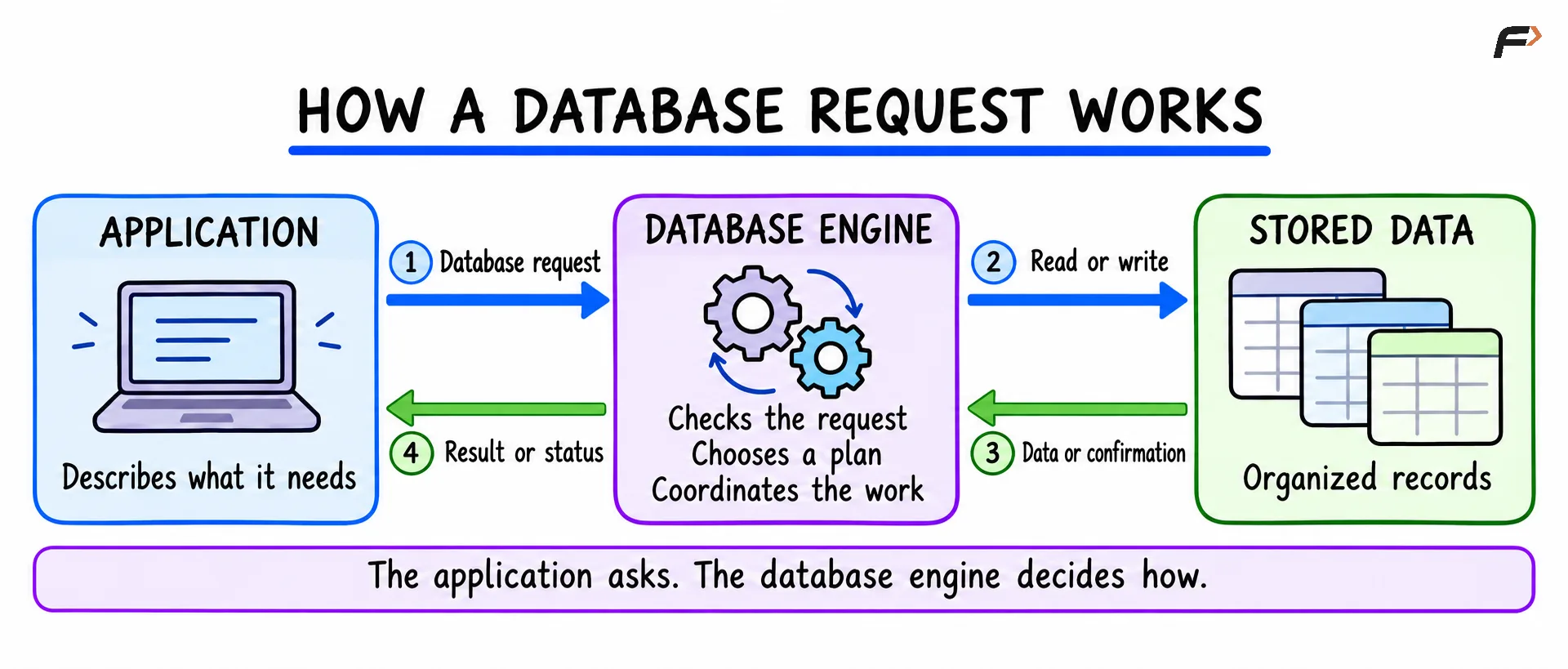
How a Database Request Works
Logical Data and Physical Storage
Applications usually work with logical structures such as tables, rows, and columns.
The database translates those logical structures into physical storage structures.
Logical view | Physical implementation |
|---|---|
Database | Collection of database files and metadata |
Table | Stored records organized across data pages |
Row | Record encoded inside one or more pages |
Column | Value stored according to its data type |
Index | Separate search structure referencing stored data |
A table may appear as one continuous grid, but its rows are usually divided across fixed-size storage units commonly called pages or blocks.
Pages allow the database to read and write manageable groups of data instead of treating an entire table as one object. The exact page format and size depend on the database system.
Metadata Describes the Stored Data
A database also stores information about its own structure. This metadata can include table names, column names, data types, constraints, index definitions, user permissions, and database statistics.
The collection of structural metadata is often called the system catalog or data dictionary.
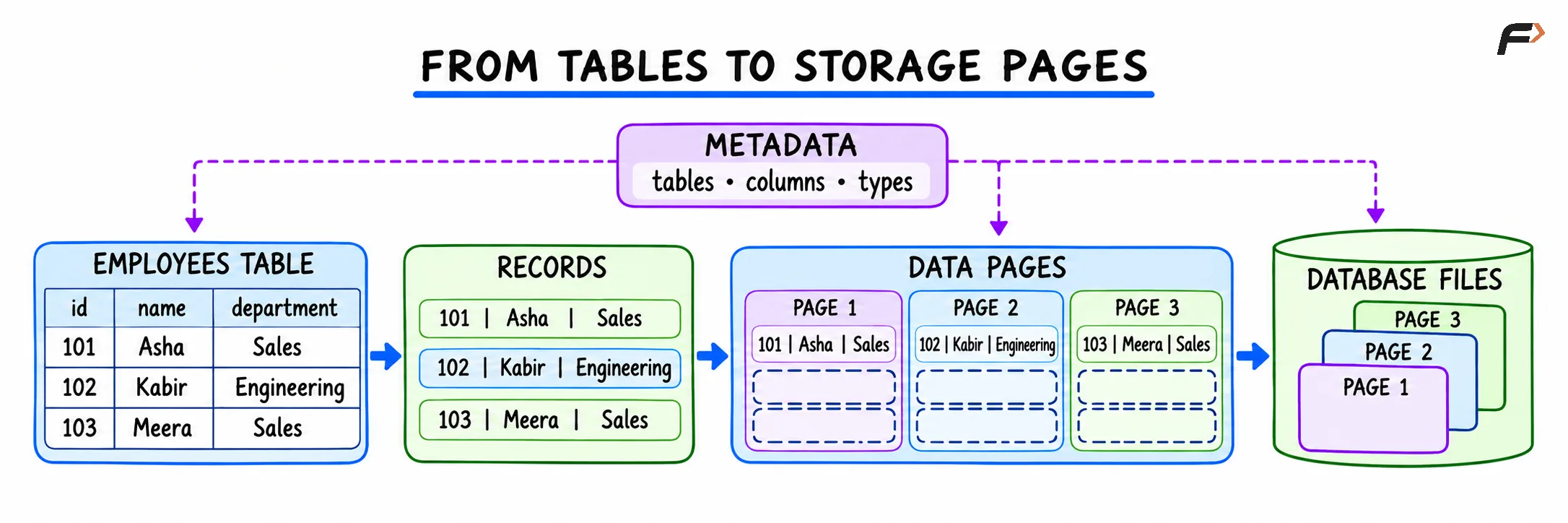
From Tables to Storage Pages
How a Database Processes a Read Query
Consider a request for employees in the Sales department.
SELECT name, salaryFROM employeesWHERE department = 'Sales';The syntax across both databases is identical because this example uses standard SQL features.
A relational database commonly processes the request through the following stages.
1. Connection and Access Check
The application connects to the database using a database client, command-line tool, or software driver.
The database identifies the session and checks whether it has permission to access the requested objects.
2. Parsing and Validation
The parser examines the SQL statement. It checks SQL syntax, table names, column names, data types, available functions, and access permissions.
Invalid statements are normally rejected before execution begins.
3. Planning and Optimization
A valid SQL statement describes the required result but not the complete physical procedure.
The query planner considers possible execution strategies. Depending on the query and available structures, these strategies may include scanning a table, reading an index, combining multiple indexes, sorting rows, grouping values, or joining tables in different orders.
The optimizer estimates the cost of suitable plans and selects one. Cost is an estimate based on factors such as expected row counts, page reads, CPU work, and available statistics.
4. Execution
The execution engine performs the selected plan.
For the Sales query, it may:
Locate relevant employee records
Test the
department = 'Sales'conditionKeep matching rows
Extract the
nameandsalaryvaluesBuild the result set
5. Result Delivery
The database sends the result back to the client:
name | salary |
|---|---|
Asha | 55000 |
Meera | 61000 |
Large results may be transferred in batches rather than assembled and sent as one enormous object.
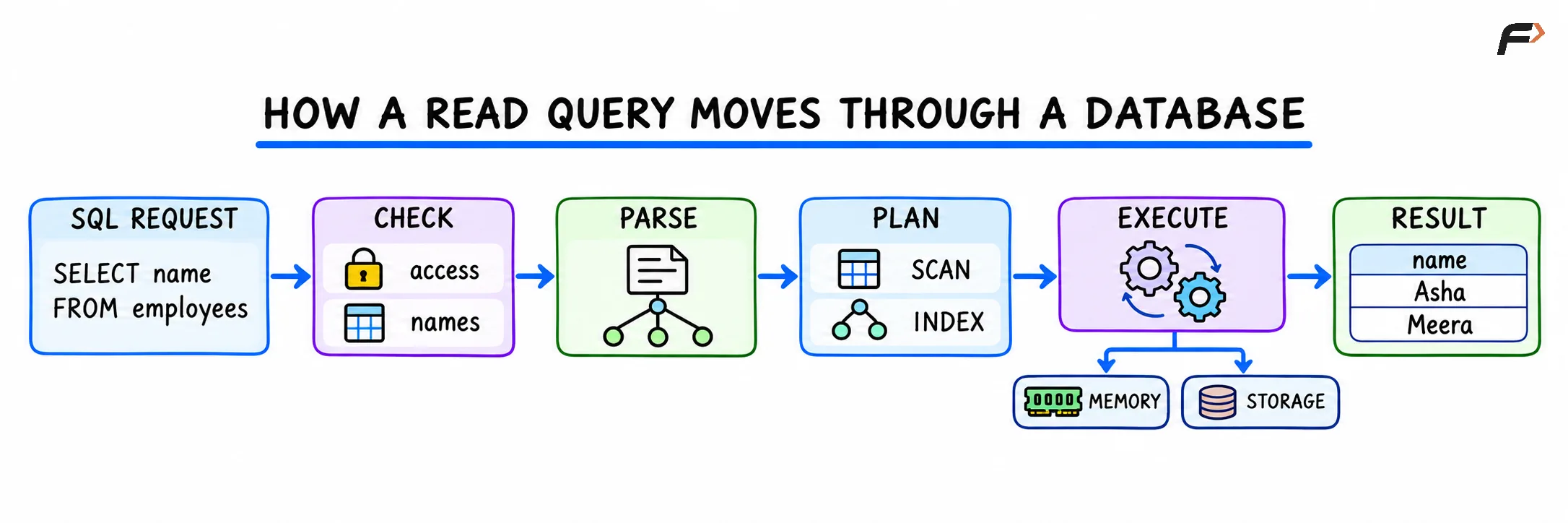
How a Read Query Moves Through a Database
How Memory and Storage Work Together
Permanent database data is commonly kept on durable storage such as an SSD or hard disk. Reading storage for every operation would be expensive, so databases also use memory.
Durable Storage
Durable storage holds table data, index data, database metadata, recovery logs, along with configuration and supporting files.
Data usually remains available after the database process or machine restarts, assuming the storage remains healthy and recovery succeeds.
Database Memory
The database keeps frequently used pages and working data in memory.
This memory may contain recently accessed data pages, index pages, query-processing workspaces, sort or join data, cached metadata, and log buffers.
When a required page is already in memory, the database can often avoid a physical storage read. This is commonly called a cache hit or buffer hit.
When the page is absent, the database loads it from storage into memory before processing it.
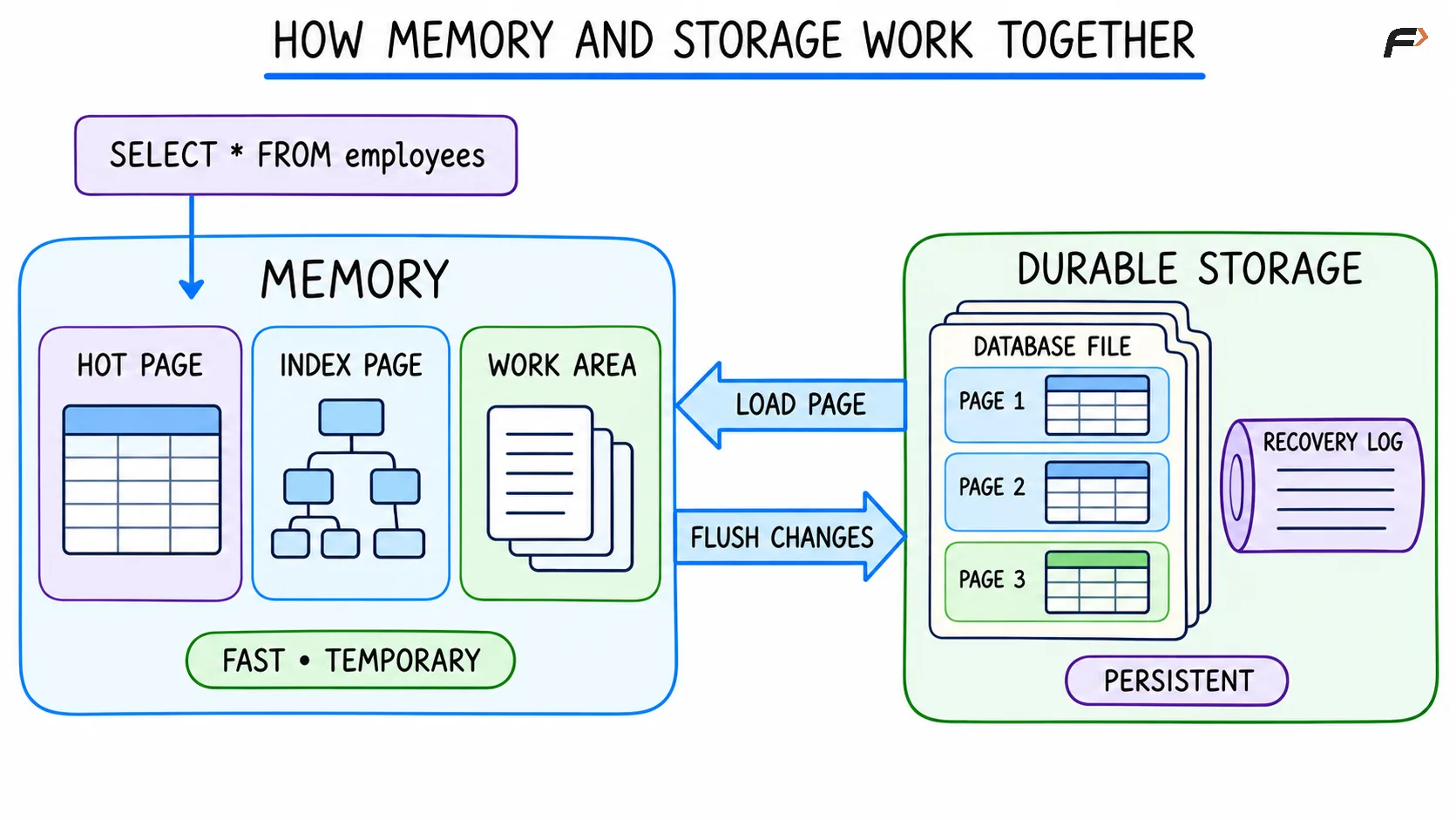
How Memory and Storage Work Together
How Indexes Help Locate Data
Without a useful index, the database may need to examine a large portion of a table to find matching rows.
An index stores selected values in a structure designed for efficient lookup. It also contains enough information to locate the corresponding table records.
For the Sales query, an index on department could help the database locate Sales records without scanning every employee.
An index does not automatically improve every query. The planner may avoid an index when:
The table is small
Most rows match the condition
The index does not support the operation
Reading the table directly is estimated to cost less
Indexes also require storage and maintenance when data changes. Their internal structures and design trade-offs belong to later indexing lessons.
How a Database Processes a Data Change
Read queries return information without intentionally changing stored rows. Statements such as INSERT, UPDATE, and DELETE modify data.
Consider a salary update.
UPDATE employeesSET salary = 58000WHERE employee_id = 101;A simplified write operation commonly follows these stages.
1. Validate the Statement
The database checks the syntax, referenced objects, permissions, and data types.
2. Locate the Target Rows
The execution plan identifies rows matching employee_id = 101. The database may use an index or scan stored pages.
3. Coordinate the Change
The database coordinates the modification with other active operations. The exact technique may involve locks, row versions, timestamps, or a combination of mechanisms.
4. Check Data Rules
Relevant rules may be checked, including data-type requirements, uniqueness rules, referential rules, value restrictions, and other defined constraints.
5. Record Recovery Information
Many database systems record enough information to recover committed changes if a failure occurs.
PostgreSQL uses write-ahead logging, while MySQL’s InnoDB storage engine uses redo logging as part of its recovery design. In both cases, change information can be made durable before every modified data page is written to its final location.
6. Complete the Transaction
A successful commit confirms the transaction according to the database’s durability settings.
Modified data pages may remain in memory temporarily and be written to their data files later. The recovery log helps restore changes that were committed but not yet copied to their final data-page locations.
The exact order, logging format, and flushing behavior differ between database systems.
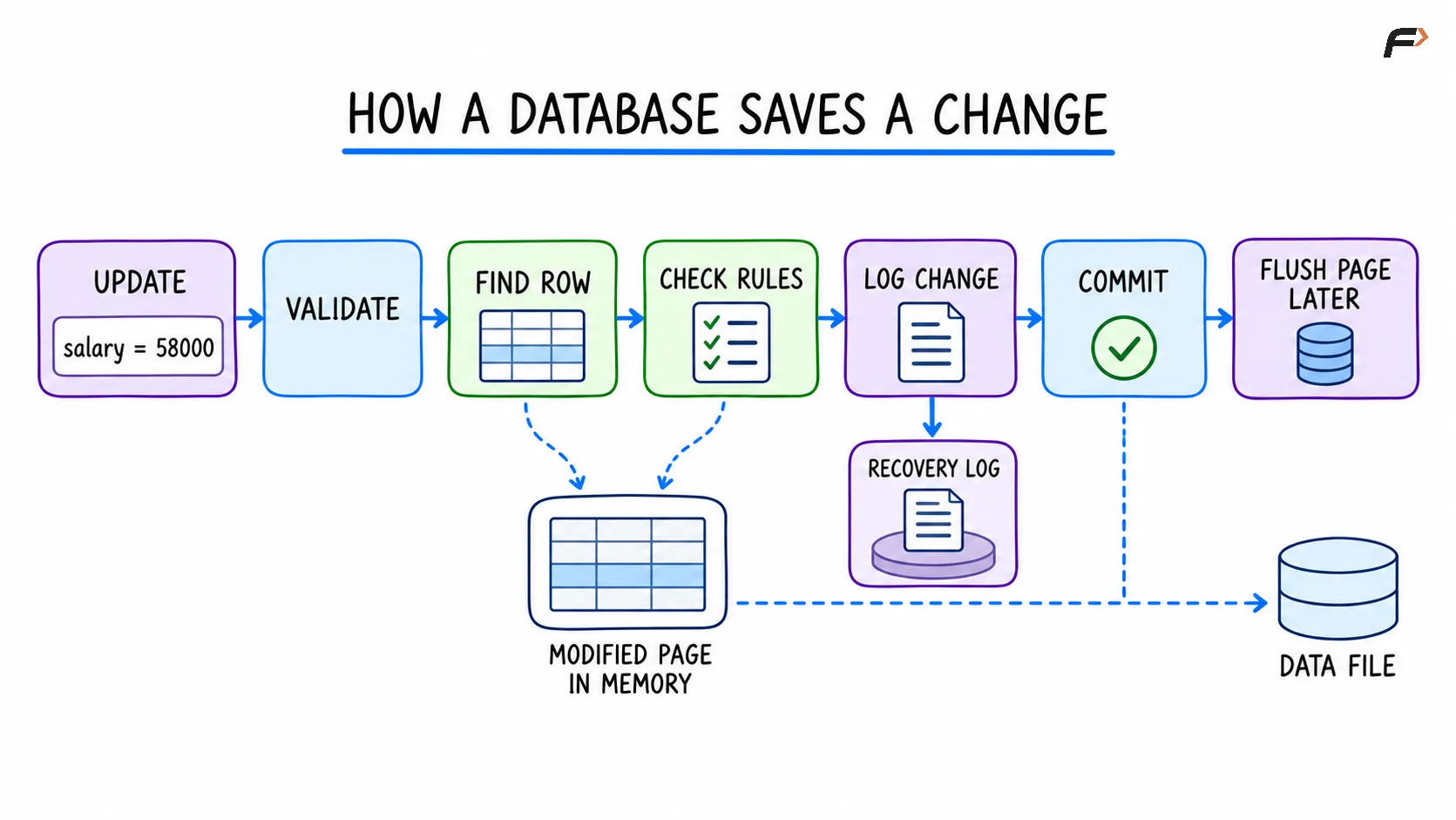
How a Database Saves a Change
How Databases Handle Concurrent Activity
A database may receive requests from many applications at the same time.
Concurrent operations can conflict. One session may read a row while another session changes it. Two sessions may also attempt to update the same record.
Database systems use concurrency-control techniques to manage these situations. Common mechanisms include locks, row versions, transaction snapshots, isolation rules, and conflict detection.
The objective is to allow useful parallel work without exposing unacceptable intermediate states or silently losing changes.
Concurrency behavior depends on the database system, storage engine, transaction isolation level, and operation. Detailed locking, multiversion concurrency control, isolation, and deadlocks belong to later transaction lessons.
How Databases Protect Data
A database contributes to reliability through several layers.
Mechanism | Purpose |
|---|---|
Authentication | Identifies a connecting account |
Authorization | Controls permitted operations |
Constraints | Rejects data that violates defined rules |
Transactions | Treats related operations as a controlled unit |
Recovery logs | Support restoration after certain failures |
Checkpoints | Coordinate log progress with stored data pages |
Backups | Provide recoverable copies of data |
Replication | Maintains additional copies in other database instances |
No single mechanism guarantees complete safety.
Recovery logs do not replace backups. Replication can copy accidental deletions or incorrect updates. Constraints enforce only the rules that have been defined.
Reliable database operation combines appropriate design, access control, monitoring, backup, recovery testing, and infrastructure management.
The Application and Database Have Different Roles
Applications and databases work together, but they solve different problems.
Application responsibility | Database responsibility |
|---|---|
User interface | Persistent data storage |
Business workflow | Query execution |
Request handling | Concurrent data access |
Input collection | Defined data constraints |
External service communication | Transaction coordination |
Presentation formatting | Recovery support |
Some responsibilities can be shared or placed in different layers. The exact boundary depends on system design.
A database is not the complete application. It is the data-management system that applications use.
Common Confusions About How Databases Work
A database does not normally read an entire table into memory for every query
The engine works with pages and intermediate results. It may scan many pages, but pages can be processed incrementally.
A table is not stored as a visible spreadsheet
Rows and columns form the logical view. Physically, the database encodes records inside files, pages, and supporting structures.
An index is not a second complete table in every case
An index stores selected keys and row-location information in a specialized structure. Its exact contents depend on the database system and index type.
The fastest-looking plan is not always selected
The optimizer works from estimates. Incomplete or outdated statistics can produce an inefficient plan.
Committing a transaction does not always mean every changed data page was immediately rewritten
Many systems can confirm durability after required recovery information has been flushed, while modified data pages are written later.
Memory does not make durable storage unnecessary
Memory improves performance, but most general-purpose databases still use durable storage and recovery mechanisms to preserve committed data.
A database does not guarantee correct business data automatically
The database enforces declared rules. Missing or incorrect rules can still allow undesirable data.
Summary
Databases manage the bridge between logical data representations and physical storage structures. Read queries rely on parsing, execution planning, and memory caching to retrieve data efficiently, while write operations coordinate concurrency, rule validation, and logging to guarantee durability. Understanding the boundary between database constraints and application logic helps produce clean system designs, optimal indexing strategies, and reliable data architectures.
Be the first to add a comment.