Introduction
An event may keep separate lists of people who attended its online and onsite sessions. Some people appear in both lists. When combining them, should those people appear once, or should every attendance entry remain?
SQL provides UNION and UNION ALL for combining query results. UNION removes duplicate rows, while UNION ALL preserves every occurrence. The right choice depends on what the combined result needs to represent.
Understanding the Difference with an Example
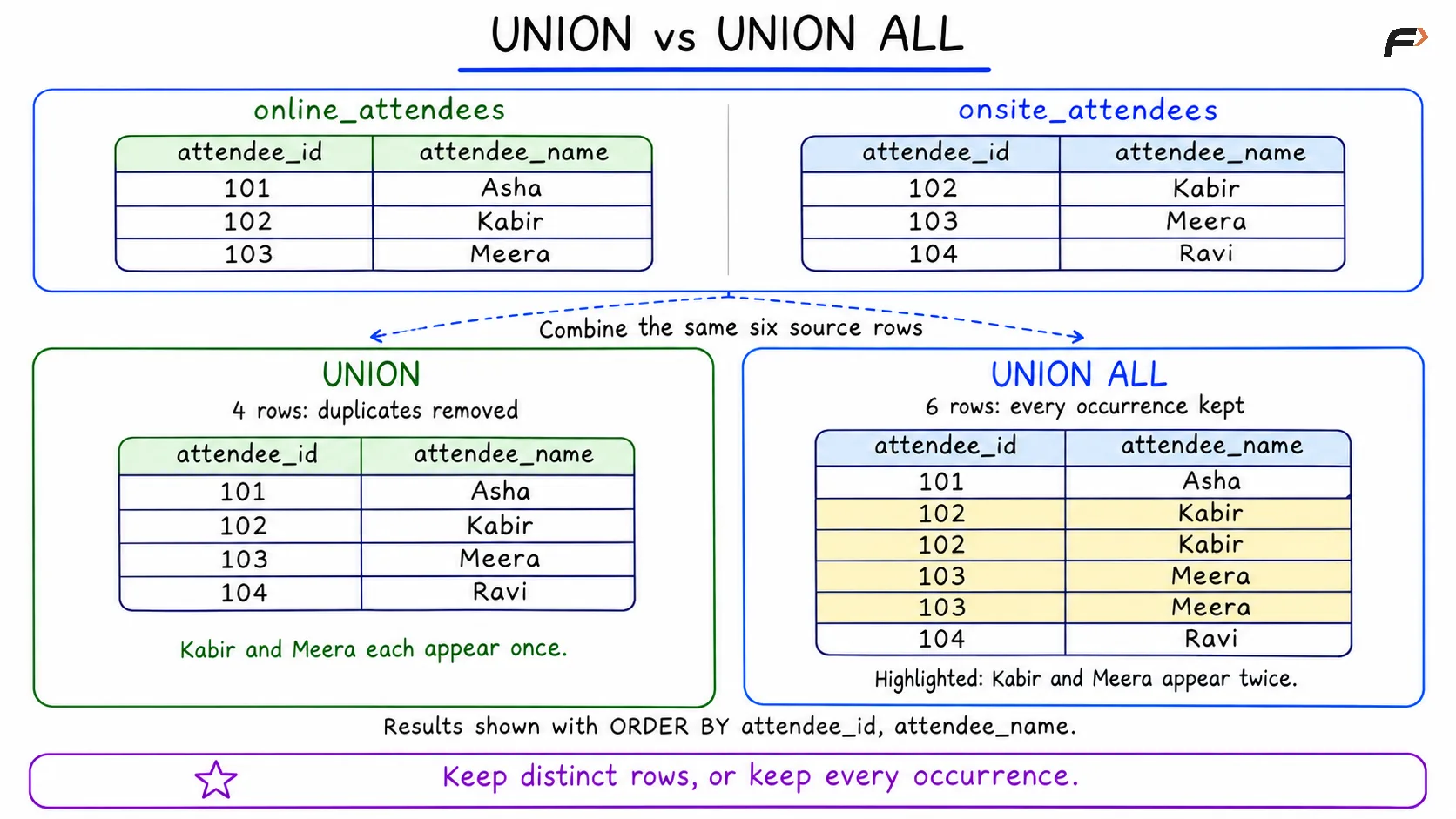
Consider the two attendance tables in the image:
online_attendees contains Asha, Kabir, and Meera.
onsite_attendees contains Kabir, Meera, and Ravi.
The same attendee ID identifies the same person in both tables. Since Kabir and Meera appear in both lists, the inputs contain six attendance entries for four distinct people.
Union vs Union All
What UNION does
Look at the result on the left. UNION keeps one copy of each distinct row:
Kabir and Meera appear once each: Their attendee ID and name pairs are repeated across the two inputs, so the extra copies are removed.
Asha and Ravi remain: Each appears in only one input, so neither row has a duplicate to remove.
The result contains four rows, making it suitable for a combined participant list.
What UNION ALL does
Look at the result on the right. UNION ALL keeps all three online entries and all three onsite entries.
Kabir and Meera each appear twice because their entries from both lists are preserved. The highlighted rows show these repeated occurrences.
The result contains six rows. These still describe four distinct people, but they preserve all six attendance entries.
SQL Queries for the Example
The queries below use the exact table names, columns, and data shown in the image. MySQL and PostgreSQL use the same syntax here.
Using UNION
To return distinct attendee ID and name pairs, place UNION between the two SELECT statements.
SELECT attendee_id, attendee_nameFROM online_attendeesUNIONSELECT attendee_id, attendee_nameFROM onsite_attendeesORDER BY attendee_id, attendee_name;Output
attendee_id | attendee_name |
|---|---|
101 | Asha |
102 | Kabir |
103 | Meera |
104 | Ravi |
Both selected values match in the repeated Kabir rows and in the repeated Meera rows. UNION therefore keeps one copy of each pair.
Using UNION ALL
To preserve every entry, use UNION ALL between the SELECT statements.
SELECT attendee_id, attendee_nameFROM online_attendeesUNION ALLSELECT attendee_id, attendee_nameFROM onsite_attendeesORDER BY attendee_id, attendee_name;Output
attendee_id | attendee_name |
|---|---|
101 | Asha |
102 | Kabir |
102 | Kabir |
103 | Meera |
103 | Meera |
104 | Ravi |
Every input row contributes a result row, giving 3 + 3 = 6 rows. The final ORDER BY produces the same ordering shown in the image.
Neither query changes the original tables.
Key Differences and When to Use Each
Comparison | UNION | UNION ALL |
|---|---|---|
Repeated rows | Keeps one copy of each distinct row | Keeps every occurrence |
Duplicate elimination | Required | Skipped |
Result in this example | Four distinct attendee rows | Six attendance entries |
Suitable use | A distinct list of selected rows | A complete collection of entries |
Processing work | May require extra work to remove duplicates | Usually requires less work |
For the event’s combined participant list, UNION produces the required four rows.
For a report that must preserve each online and onsite attendance entry, UNION ALL keeps the information needed. Removing repeated entries could otherwise change counts or totals calculated from the combined result.
UNION ALL usually performs less work because it skips duplicate elimination. Actual execution time depends on the data and execution plan. Choose the operator that gives the correct result before considering performance.
Summary
UNION and UNION ALL combine compatible query results, but they handle repeated rows differently. In the attendance example, UNION returns four distinct attendee rows, while UNION ALL preserves all six entries. Use UNION when distinct rows are required and UNION ALL when every occurrence matters. Always match the selected columns and specify ordering when needed.
Be the first to add a comment.