Introduction
Tables organize related information into rows and columns. A college database, for example, can use a students table to store student identifiers, names, and departments in a consistent structure.
SQL provides commands to create that structure and change it when requirements evolve. Managing tables includes inspecting their definitions, adding or modifying columns, renaming objects, and removing tables that are no longer needed.
Creating a Table with CREATE TABLE
The CREATE TABLE command defines a new table, including its columns, data types, and constraints. Each column represents an attribute, while each row stores one record.
The following examples use MySQL and assume that college_db already exists:
USE college_db;CREATE TABLE students ( student_id INT PRIMARY KEY, student_name VARCHAR(100) NOT NULL, department VARCHAR(20), age INT CHECK (age >= 16));This creates an empty table with four columns. Creating a table does not insert any student records.
The definition includes three important rules:
PRIMARY KEY: Makes
student_ida unique, non-null identifier for each row.NOT NULL: Requires a value for
student_name.CHECK: Requires a supplied age to be at least 16. A null age remains permitted because the column is not declared
NOT NULL.
Other common options include UNIQUE to restrict duplicates, DEFAULT to supply an omitted value, and FOREIGN KEY to enforce references between related tables.
In MySQL, CREATE TABLE IF NOT EXISTS avoids an error when a table with the same name already exists. It does not check that the existing structure matches the requested definition.
Inspecting a Table’s Structure
Before changing a table, inspect its current definition. MySQL provides DESCRIBE to show column names, data types, nullability, key information, and defaults.
DESCRIBE students;SHOW CREATE TABLE displays the complete SQL statement required to create the students table, including its columns, data types, constraints, and table options.
SHOW CREATE TABLE students;Unlike DESCRIBE, which provides a column-by-column overview, this command shows the table’s full definition. It displays the statement without executing it or creating another table.
These commands inspect the table’s structure. To retrieve its stored records, use SELECT:
SELECT *FROM students;Immediately after creation, this query returns no rows because the table is still empty.
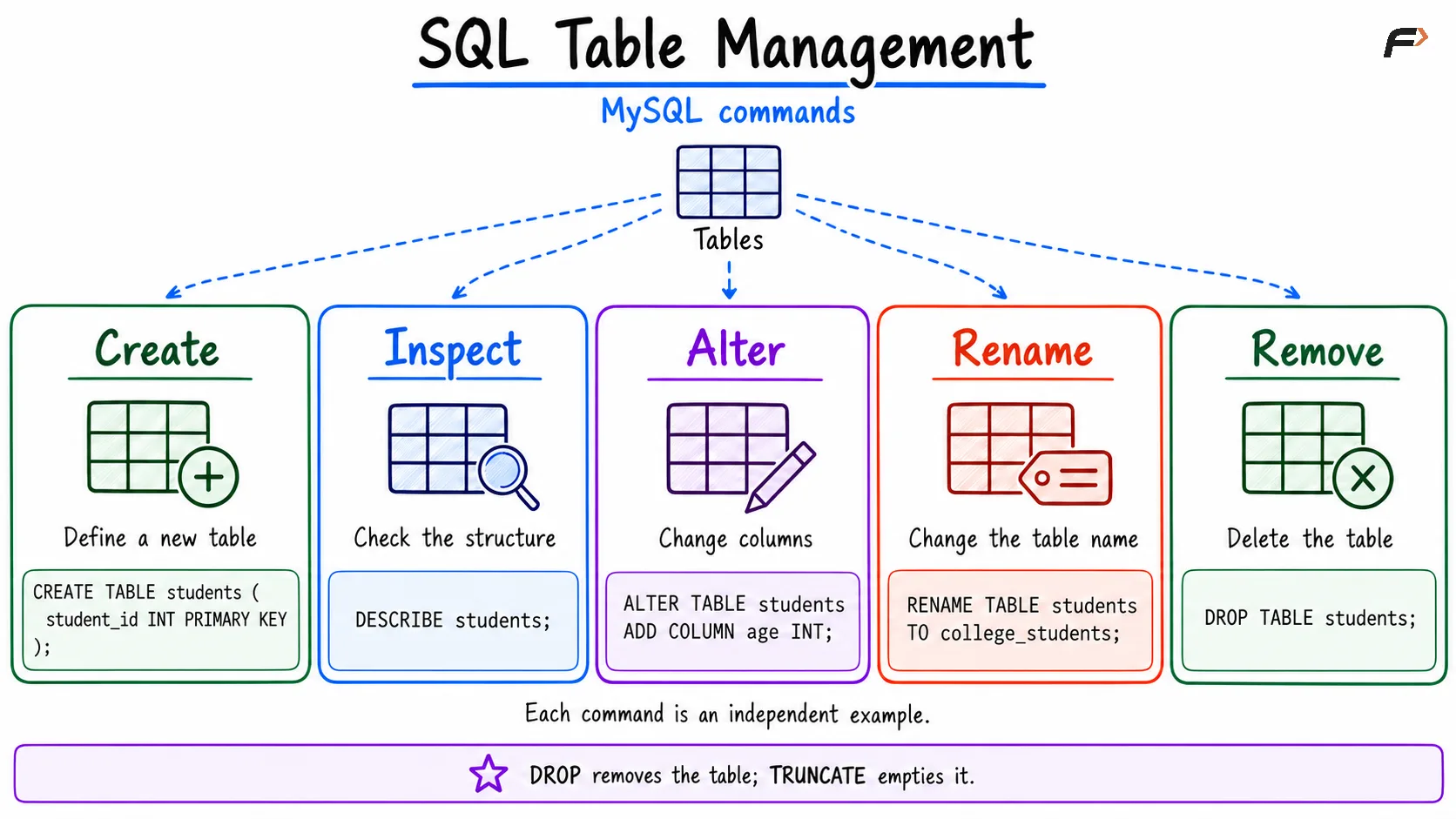
sql table management
Changing Columns with ALTER TABLE
ALTER TABLE changes an existing table’s definition. It can add columns, modify their definitions, rename them, or remove them.
Add a column: Suppose student email addresses must now be stored.
ALTER TABLE studentsADD COLUMN email VARCHAR(150);The new column permits null values and has no explicit default, so existing rows receive NULL for email.
Modify a column: Increase the maximum length of student names:
ALTER TABLE studentsMODIFY COLUMN student_name VARCHAR(150) NOT NULL;In MySQL, include attributes such as NOT NULL that must remain in the modified column definition. Omitting them can change the column’s rules.
Rename a column: Give department a more specific name:
ALTER TABLE studentsRENAME COLUMN department TO department_name;This changes the column name while retaining its values. Queries that use the old name must be updated.
Drop a column: Remove the email column if it is no longer required:
ALTER TABLE studentsDROP COLUMN email;Dropping a column removes its stored values as well as its definition. Changing a data type can also affect existing values, so check compatibility before narrowing a column’s length or range.
These examples use MySQL syntax. Other database systems may use different forms for modifying columns.
Renaming a Table
Renaming changes a table’s name while retaining its structure and records. In MySQL, use RENAME TABLE:
RENAME TABLE students TO college_students;Subsequent queries should use the new name:
SELECT *FROM college_students;Application queries, views, and other dependent code may need updates after a rename. Renaming a table does not automatically rewrite every reference to it.
Emptying or Removing a Table
Sometimes the table is still useful, but its records are no longer needed. In other cases, the entire table should be removed.
To empty the renamed table in MySQL:
TRUNCATE TABLE college_students;To remove the table itself instead:
DROP TABLE college_students;These are alternative operations, depending on what you want to retain.
Command | Purpose | Retains table structure? | Supports a row filter? |
|---|---|---|---|
| Removes matching records | Yes | Yes, using |
| Empties the table | Yes | No |
| Removes the table and its data | No | No |
For example, DELETE FROM college_students WHERE age < 18; targets selected rows. TRUNCATE TABLE cannot apply that condition.
Foreign keys and other dependencies can restrict table removal or truncation.
A transaction groups database operations into one unit of work. COMMIT makes its changes permanent, while ROLLBACK cancels changes that have not yet been committed, provided those operations support rollback.
In MySQL, ordinary table-definition commands such as ALTER TABLE, TRUNCATE TABLE, and DROP TABLE cause an implicit commit: the database commits the current transaction automatically, without an explicit COMMIT command. Their structural changes cannot be reversed by running ROLLBACK afterward.
For example, after successfully dropping a table in MySQL, ROLLBACK will not bring it back. Check the table name and preserve required data before executing destructive commands.
PostgreSQL handles these table operations differently: ordinary ALTER TABLE, TRUNCATE TABLE, and DROP TABLE operations can be rolled back when performed inside an explicit transaction before it is committed.
Practical Table-Management Guidelines
A clear table definition reduces confusion as the database grows. Choose names, types, and constraints according to the information being stored.
Use meaningful names: Prefer
student_nameover an unclear abbreviation.Choose suitable data types: Use numeric types for calculations and character types for names or formatted codes.
Define a reliable key: Give each record a stable identifier.
Inspect before altering: Check existing columns and constraints before changing them.
Review dependencies: Column and table changes can affect application queries and related objects.
Preserve required data: Keep a suitable backup before destructive structural changes.
Table structure and table data are separate concerns. Use ALTER TABLE to change a definition and UPDATE to change values stored in existing rows.
Summary
SQL table management begins with CREATE TABLE and continues with inspection, structural changes, renaming, and removal. Data types define how values are represented, while constraints establish rules for acceptable records.
Choose each operation according to its scope. Altering a column changes the structure, deleting records changes the contents, and dropping a table removes both its definition and data.
Be the first to add a comment.