Introduction
Wireless networks need strong security because Wi-Fi signals travel through the air. Anyone within range may be able to capture wireless frames, so Wi-Fi needs mechanisms for authentication, encryption, and protection against unauthorized access.
WPA stands for Wi-Fi Protected Access. It is a family of wireless security protocols designed to protect Wi-Fi communication and improve upon older insecure methods such as WEP.
Why WPA Is Needed
In a wired network, an attacker usually needs physical access to a cable or port. In a wireless network, radio signals can travel beyond walls, rooms, and buildings. This makes Wi-Fi easier to observe from outside the immediate physical area.
WPA helps protect wireless networks by providing:
Authentication: Checks whether a device is allowed to join the network.
Encryption: Protects wireless data so outsiders cannot read it.
Key generation: Creates temporary session keys instead of using the password directly.
Integrity protection: Helps detect tampering with protected frames.
Access control: Reduces unauthorized use of private Wi-Fi networks.
The Wi-Fi password is not directly used to encrypt every frame. Instead, WPA security uses the password or authentication result to derive stronger keys for the session.
WPA, WPA2, and WPA3
Wireless security evolved over time because older methods became weak against practical attacks. WPA improved on WEP, WPA2 became the long-running standard, and WPA3 introduced stronger protection for modern Wi-Fi networks.
Version | Main Idea | Current Role |
|---|---|---|
WEP | Early wireless security method | Insecure and outdated |
WPA | Transitional improvement over WEP | Legacy |
WPA2 | Stronger Wi-Fi security using modern encryption | Still widely used |
WPA3 | Newer Wi-Fi security with SAE and stronger protections | Recommended where supported |
WPA2 is still common in many networks, but WPA3 is the stronger choice when both router and client devices support it.
WPA Personal and WPA Enterprise
WPA can be used in personal and enterprise modes. The difference is mainly how users are authenticated.
Mode | How It Works | Common Use |
|---|---|---|
WPA Personal | Uses a shared Wi-Fi password | Homes and small offices |
WPA Enterprise | Uses an authentication server such as RADIUS | Companies, campuses, and large networks |
WPA Personal is simpler because everyone usually connects using a Wi-Fi password. WPA Enterprise is more scalable because users can have separate credentials, certificates, or policies.
WPS is sometimes used to simplify device connection, but it can introduce security risks if weak methods such as PIN-based setup are enabled. For secure networks, WPA2 or WPA3 with a strong configuration is preferred.
Why a Handshake Is Needed
After a device discovers, authenticates, and associates with an access point, encrypted communication still cannot begin immediately. The client and access point must first establish encryption keys.
The handshake solves three important problems:
Proves shared secret ownership: Both sides prove they know the correct Wi-Fi secret without sending it directly.
Creates fresh session keys: New temporary keys are generated for the current connection.
Prepares encrypted communication: The client and access point become ready to protect wireless traffic.
The password, PMK, and final session keys are not sent openly over the air. Instead, both sides exchange controlled values and independently derive the required keys.
WPA2 Four-Way Handshake
WPA2-Personal commonly uses a four-way handshake after association. Before the handshake, both the client and access point can derive a Pairwise Master Key, or PMK, from the Wi-Fi password and SSID.
The PMK is not transmitted. It acts as a parent key used to derive temporary session keys.
A simplified WPA2 four-way handshake flow looks like:
The access point (AP) sends the ANonce to the client.
The client generates an SNonce and sends it along with a MIC to the AP.
The AP sends the Group Temporal Key (GTK) and a MIC to the client.
The client confirms the handshake, completing the secure connection.
During this exchange:
ANonce: A random value generated by the access point.
SNonce: A random value generated by the client.
PTK: Pairwise Transient Key created using the PMK, nonces, and MAC addresses.
MIC: Message Integrity Code used to prove key possession and detect tampering.
GTK: Group Temporal Key used for broadcast and multicast traffic.
The PTK protects unicast traffic between one client and one access point. The GTK protects broadcast and multicast traffic shared among clients.
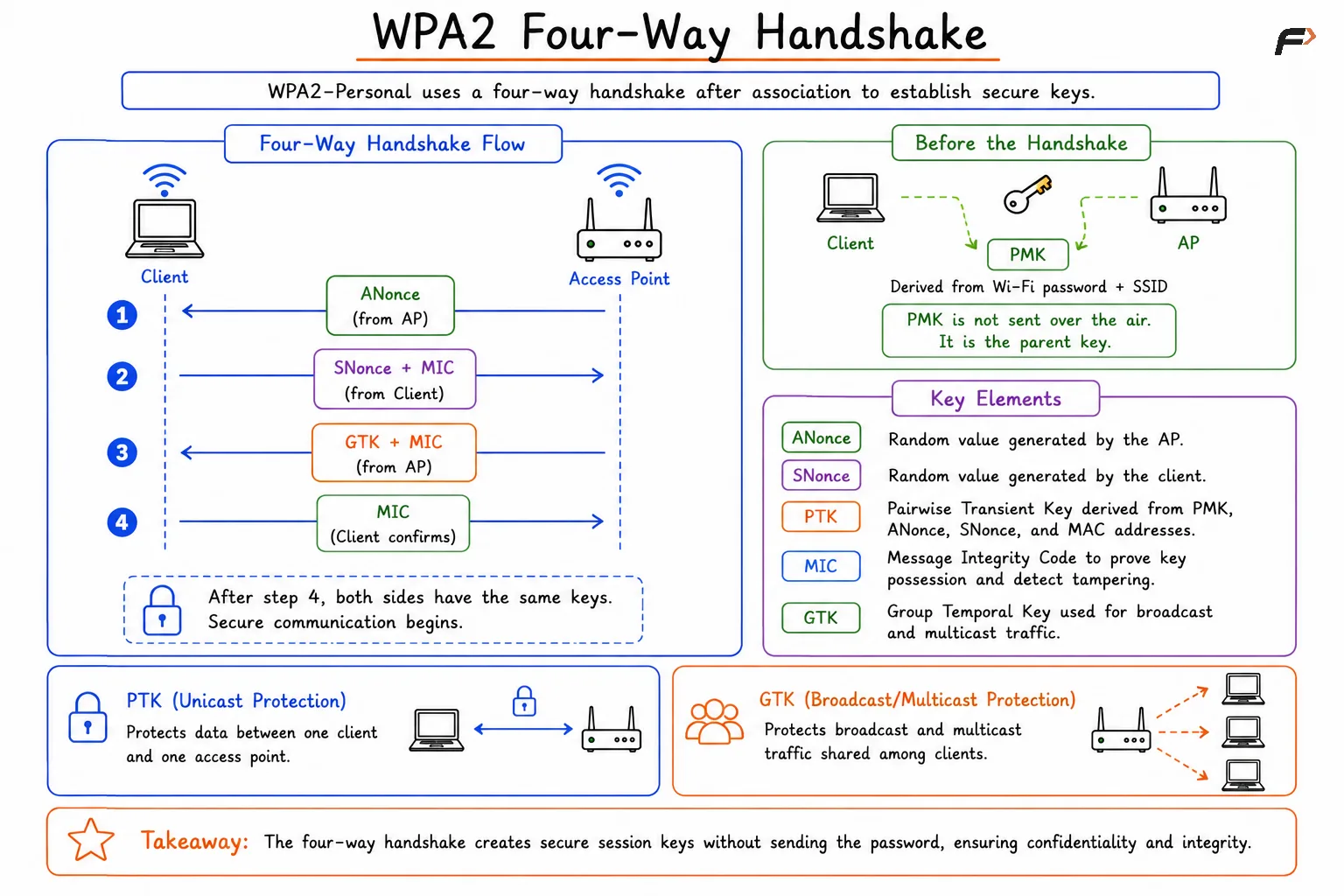
WPA2 Four-Way Handshake
What the Four-Way Handshake Achieves
The WPA2 four-way handshake is not just a formality. It is the step that turns a joined Wi-Fi connection into a secure Wi-Fi connection.
It achieves:
Mutual verification: The client and access point confirm that both sides have the right secret.
Fresh key generation: New session keys are created for each connection.
No password transmission: The Wi-Fi password is never sent directly over the air.
Broadcast key delivery: The access point securely provides the GTK to the client.
Encrypted data transfer: Protected wireless communication can begin after the handshake completes.
After the handshake, normal protocols such as DHCP, ARP, DNS, TCP, HTTP, and HTTPS can run over the encrypted wireless link.
WPA3 and SAE Handshake
WPA3-Personal improves Wi-Fi security by replacing the older pre-shared key approach with SAE, which stands for Simultaneous Authentication of Equals. SAE is designed to make password-based Wi-Fi authentication stronger.
WPA3 still uses secure key establishment and later derives keys for encrypted communication, but SAE improves the beginning of the process.
WPA3 SAE provides:
Better password protection: Captured handshake material is not useful for simple offline password guessing in the same way as WPA2-Personal.
Forward secrecy: Past sessions remain protected even if the password is later discovered.
Mutual authentication: The client and access point both participate in proving possession of the password-derived secret.
Stronger modern security: WPA3 also requires Protected Management Frames in supported WPA3 networks.
This makes WPA3 safer for home and personal Wi-Fi networks, especially when users choose passwords that are not extremely complex.
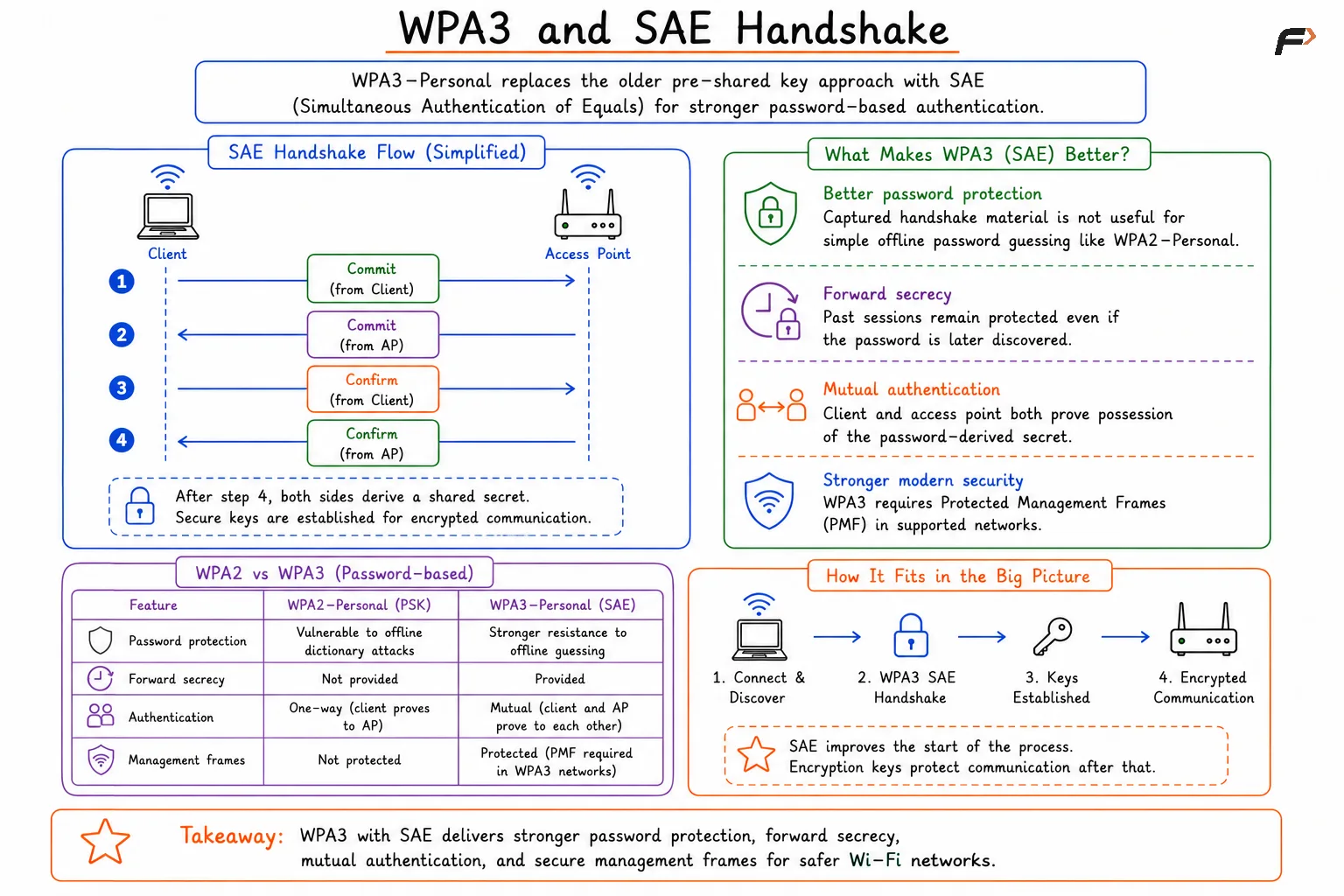
WPA3 and SAE Handshake
WPA2 vs WPA3 Handshake
Aspect | WPA2-Personal | WPA3-Personal |
|---|---|---|
Password Method | Pre-shared key based | SAE-based authentication |
Main Handshake Risk | Captured material can support offline guessing if password is weak | Stronger resistance to offline dictionary attacks |
Forward Secrecy | Not provided in the same way | Supported through SAE |
Management Frame Protection | Optional in many WPA2 deployments | Required for WPA3 |
User Experience | Enter Wi-Fi password | Enter Wi-Fi password |
From the user’s perspective, both may simply look like entering a Wi-Fi password. Internally, WPA3 uses a stronger authentication method before encrypted communication begins.
Summary
WPA is the family of Wi-Fi security protocols used to protect wireless networks. WPA improved on WEP, WPA2 became the widely used standard, and WPA3 added stronger protections through SAE, forward secrecy, and required management frame protection.
The WPA2 four-way handshake allows the client and access point to prove possession of the shared secret, derive fresh session keys, distribute broadcast keys, and begin encrypted wireless communication without sending the Wi-Fi password directly. WPA3 improves the authentication phase with SAE, making modern Wi-Fi networks more resistant to password guessing and better suited for secure wireless communication.
Be the first to add a comment.